


Dreame Z20 Station two-minute review
The Dreame Z20 Station has completely changed my home cleaning habits, thanks to a combination of terrific suction power, useful cleaning modes and a self-empty docking station that makes vacuuming an absolute breeze.
As the name implies, the Dreame Z20 Station reviewed here includes a self-emptying charging dock and is only available in the US and Australia.
A model without the docking station, known simply as the Dreame Z20 is available in the US and UK, but not in Australia. The number of attachments included with either model also varies depending on where you live.
Called the Illumination Omni-Brush, this floorhead features a built-in LED light beam to help reveal dust that’s otherwise invisible to the eye. It’s a similar feature to Dyson’s Detect technology which, it must be said, is a bit more effective than Dreame’s implementation, but only in the sense that Dyson’s version is brighter and covers a slightly broader area of the floor. Dreame’s CelesTect technology, as it’s known, does still show up dust on hard floors and after the initial shock of realizing just how much was on mine, I found it to be an invaluable feature.
Unlike the top-of-the-line Dreame Z50, whose floorhead can automatically detect floor types and adjust its inlet to maintain good suction and reduce damage to carpets, the Omni-Brush requires the user to manually flick a front-mounted switch as you move from hard floor to carpet and vice versa for the optimal clean.
Speaking of cleaning, I found the Auto mode to be the best of the three suction settings on offer — the other two being Eco and Turbo — as it’s the only mode that dynamic suction comes into play and the Z20 would function perfectly well if you never changed settings. Whether that was to clean up dirty floorboards or remove hair from my carpet, it handled it in one pass quite effectively.
The LCD display on the top of the handheld unit shows a graph of dirt sizes that the vacuum detects during cleaning, much like on a Dyson, but it’s a lot more animated than its competitor. I initially found this feature a bit superfluous and an excuse to use up the display real estate, but it ultimately enabled me to carry out a more thorough cleaning of my home, as it shows when all dust and debris under the floorhead has been vacuumed.
Using the Dreame Z20 day to day is a simple process, with the power and mode select buttons falling nicely under the thumb. There’s decent manoeuvrability in the Illumination Omni-Brush cleaning head too, but the vacuum is top heavy, which makes it tiring to use for longer cleaning sessions. The wand is also a bit too short for my liking, which caused some lower back pain from having to bend slightly during every clean, and it’s sadly not extendable like in the Z50.
The Z20 comes with a few additional attachments, although the exact number and type varies by country, with the US getting a broader set compared to Australia. Changing attachments is easy thanks to large press-in buttons.
The main feature that differentiates the Z20 Station from the standalone Z20 available in the UK is the former coming with an auto-empty docking station. This is a freestanding charging base for the vacuum that automatically empties the dust cup into a 3L bag every time you place it on the stand. The dust bag is accessed via a magnetically attached side plate. Dreame says the bag is big enough for up to 100 days of dust and debris, although that will depend on the amount of dirt that’s collected each cleaning run and how often you clean, but a spare is supplied in the box to help save on initial costs of buying extras.
Other than its weight and height, there’s really not a lot to complain about here — with excellent suction and performance, plus the ease of having a self-emptying feature, the Dreame Z20 Station represents good value for money, especially if you can pick it up during a sale.

Dreame Z20 Station: Price & availability
- Announced at CES 2025, available since early-2025 in US, mid-2025 in Australia
- Station model not currently available in UK
- List price: $799.99 / AU$799 (standalone vacuum costs $299.99 / £299)
The Dreame Z20 Station was announced at CES 2025, so it’s not exactly ‘new’, but it then had a staggered rollout worldwide, arriving in the US first, followed by an Australian launch in July of that year.
With a list price of $799.99 / AU$799.99 — and with it seemingly never far from a big discount — the Dreame Z20 Station is well priced, especially when compared against direct competitors. There is arguably greater value in the US, as the Dreame Z20 Station is supplied with a few extra attachments compared to the Australian variant. These include a rotating soft dusting brush and a flexible adapter that allows the vacuum cleaner to get underneath chairs and tables for example, without you having to bend down.
The Station model on review here, which includes the auto-empty dock, isn’t currently available in the UK. A standalone Z20 cordless model (so without the dock), is available in the US and UK at a lower price point of $299.99 / £299 — and again, never far from a discount — but isn’t available in Australia at the time of writing. The vacuum itself is the same no matter which version you get.
Perhaps the closest competitor to the Z20 Station would be the Samsung Bespoke AI Jet Lite, which offers 280W of suction power compared to the Dreame’s 250AW, along with an auto-empty docking station. However, this Samsung model costs $899.99 in the US, and nearly double that of the Dreame in Australia at AU$1,499. The Dyson Gen5detect also offers 280AW of suction power, but can’t self-empty, and will set you back $1,049.99 / £799 / AU$1,599.
While Shark has a few auto-empty options in its vacuum range at a similar price point to the Z20 Station that don’t incur the ongoing cost of purchasing replacement dust bags, the Dreame manages to outdo them in terms of pure power.
- Value score: 4.5/5
Dreame Z20 Station: Specs
Swipe to scroll horizontally
Weight (handheld unit): | 2.2kg |
Weight (with wand and floorhead): | 3.3kg |
Dock weight: | 5kg |
Bin capacity: | 0.6L |
Dust bag capacity: | 3L |
Suction power: | 250AW |
Maximum runtime: | 90 minutes |
Turbo mode runtime: | up to 10 minutes |
Charge time: | up to 4 hours |
Dreame Z20 Station review: Design
- Sleek, premium look for vacuum and dock
- Can feel heavy after long periods
- Separate stand for attachments
The Dreame Z20 Station is made up of two components: a cordless vacuum cleaner and a docking station that’s used to both automatically empty the vacuum’s dust canister and to recharge its battery. The standalone Z20 cordless vacuum looks (and performs) identical to the Station model reviewed here.
It’s part of a wider Z-series of cordless vacuums in Dreame’s lineup — with up to five sold depending on where you live — and is positioned as the mid-range option. The highest-spec variant available in most territories is the Z30, while the even more powerful Z50 Station is currently only available in Australia.
Other than the white Dreame Z10, the other Z-series models are mostly all-grey affairs, but with subtle differences to tell them apart. In the case of the Z20, Dreame has given the predominantly gray color of the vacuum and the docking station some copper/brass accents that are a lot more prominent than on the Z50. In my opinion, this is the best-looking Z-series Dreame vacuum as the copper/brass color gives off an added sense of luxury.

The Dreame Z20 ships with one main floorhead called the Illumination Omni-Brush. As the name implies, this floorhead features a built-in illuminating LED light to help reveal dust and debris on floors that are invisible to the naked eye. It’s a similar feature to Dyson’s ‘Detect’ floorhead and shines out over 140º. I haven’t used a Dyson myself, but my colleague and vacuum expert Sharm has. She confirms that the green beam used by Dyson is brighter and has a broader beam, but adds the Dreame’s interpretation of the technology is still incredibly beneficial.
A small comb is integrated into the floorhead to prevent hair from tangling, and there’s a small switch on the front that adjusts a movable lip on the brushroll housing — you’ll need to flip it when moving from hard floors (lowered for close suction) to soft floors or carpets (raised to maintain optimal clearance between the roller and fibers, preventing carpet damage).
The tube connecting the handheld unit to the main floorhead isn’t telescopic, which may put taller people off. Indeed, I felt some pain in my lower back as I had to bend ever so slightly to ensure the cleaning head remained in contact with the floor, and I’m roughly 177cm tall.
With the main vacuum unit, the tube and floorhead combined, the total weight is 3.3kg, making it one of the heavir cleaners we’ve tested at TechRadar. As a result it did cause my arm to become tired, even during shorter cleaning stints of around 10 minutes.

There are two buttons on the main vacuum body — one for power and one to switch between cleaning modes. Both are placed where your thumb naturally falls, resulting in easy control. Above the buttons is a color display that shows which cleaning mode you’ve selected, both via a temporary image that shows up when you select a mode, and then a color theme to indicate the mode you’re in. The default automatic mode is yellow, Eco is green while Turbo is red.
When particularly dirty areas are detected, a graphical representation is shown on the LCD display. Particles are divided into four categories depending on their size, with a rising bar for each indicating the number of particles detected. While Dyson also offers a similar feature, I much prefer Dreame's design.
At first I thought it was a bit gimmicky, but the more I used the Dreame Z20, the more I found the graph to be beneficial when cleaning. Before I would usually pass the vacuum over my floors quickly, but thanks to the graphical display, I spent more time moving around my home to ensure the graph levels returned to 0 before moving to the next spot of floor.

Like many of the best cordless vacuum cleaners, the Dreame Z20 can be converted into a handheld cleaner by removing the main wand and attaching any of the other tools. Exactly which tools you have at your disposal will vary depending on where you live and which version of the Z20 you get.
As already mentioned, the Z20 Station ships with a single main floorhead, along with a motorized mini brush and a combination crevice tool. The US version adds a flexible adapter and an extra extension piece for the main rod.
The standard Z20, available in the US and UK, includes two main floorheads — a multi-surface brush and a soft roller brush for hard floors, both are illuminated — along with a motorized mini brush, rotating soft brush and some extension pieces.
No matter which variant you choose, the extra attachments all store on a separate docking station that sits on the floor. It’s not particularly big and each attachment has a dedicated spot, but it is an extra thing you’ll need to make space for.

The onboard dust canister is rather a standard 0.6L, and given the fact it’s automatically emptied every time the Z20 is returned to the docking station — which itself utilizes a three liter dust bag — it’s unlikely you’ll ever actually fill it!
Speaking of the auto-empty docking station, it looks just as sleek as the Z20 vacuum cleaner, decked out in a matching grey color finish. You’re able to adjust the orientation how you see fit and depending on where the nearest power point is, as there are four available outputs for the cable in the base. A magnetically attached side panel conceals the 3L dust bag inside, and requires just a small amount of pressure to remove.
Battery life is rated at up to 90 minutes of runtime in the Eco power mode, which should be plenty even if you have a large home. Switching modes does have an effect on battery life and recharging to full can take a few hours (more on that later). The battery on the Z20 is swappable, but is naturally an extra added expense.
- Design score: 4/5

Dreame Z20 Station review: Performance
- Good suction on carpet and hard floors
- LED light beam reveals dust that’s invisible to the eye
- Auto mode is a great set-and-forget option
The Dreame Z20 Station offers an impressive 250AW of suction power. However, compared to the likes of the Dyson V16 Piston Animal with its 315AW and Dreame’s own Z50 Station which offers a staggering 330AW of suction, the Dreame Z20 could look underpowered but don't let that put you off.
I think Dreame has done a great job optimally harnessing that power with a floorhead design that cleans with both front and back movements. As you'll read below, I found that I could clean the majority of messes in one pass on any kind of flooring.
The Dreame Z20 has three power modes, and to test them all, I sprinkled flour, rice and hair (separately) on both carpet and hard floor.
Hard floor performance
Hard floors are objectively easier to keep clean compared to carpet and most cordless vacuums will be able to keep them dust-free even with low suction power.
To test how well the Dreame Z20 Station could handle different sizes of dirt and debris, I concocted a mixture of cacao powder, long-grain rice and coffee beans. I sprinkled this mixture on wooden floorboards and it took one forward movement in Auto mode to clean up the mess. There was a small amount of the mixture left in front of the floorhead that had been pushed forward, but this was easy to clean up with a second going over. And, as expected, the vacuum did boost its suction power automatically when it detected this mixture on the floor.
I was just as impressed with the performance in Eco mode, as even with the lower suction, my mixture was removed off the floor without any issues. I did need to switch to the Turbo setting however, as a few of the coffee beans did become stuck within it.
Image
1
of
2
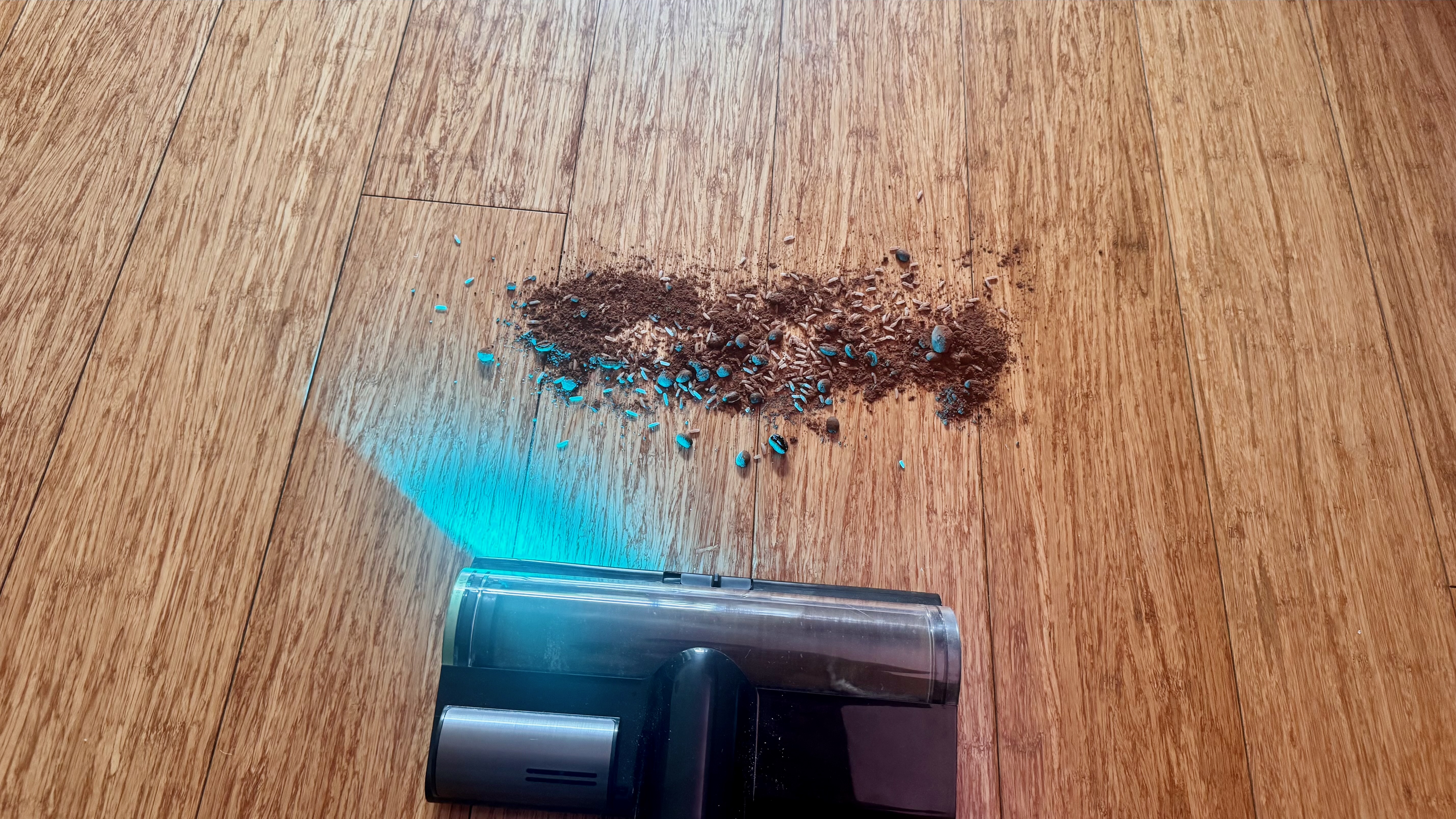
I don’t have a pet, but for the purposes of this review, I was prepared to take some clippers to my own hair. With a decent chunk of hair available to sprinkle on my floor, the Dreame Z20 Station once again proved it had no trouble cleaning it up on both Auto and Eco modes.
The laser on the Illumination Omni-Brush tool does a good job of highlighting dust and debris on hard floors that is invisible to the naked eye, either illuminating a bright aquamarine or creating visible shadows. It’s not as bright as the light on Dyson’s Fluffy floorhead, nor is the beam as broad.
Indeed, when using the Z20 during the day when my home was filled with natural light, it was a little tricky to see the effects of the CelesTect technology. When ambient light levels are lower, it naturally performs far better. And, unlike the Dyson Fluffy Optic tool, the Dreame beam can’t be switched off, making it superfluous when cleaning carpets.
Still, l ultimately found it to be invaluable when cleaning my home. In fact, my partner messaged me from home one day when using the vacuum, claiming he was experiencing “trauma” from the amount of dust that was now visible on the floor.
Carpet performance
Image
1
of
2
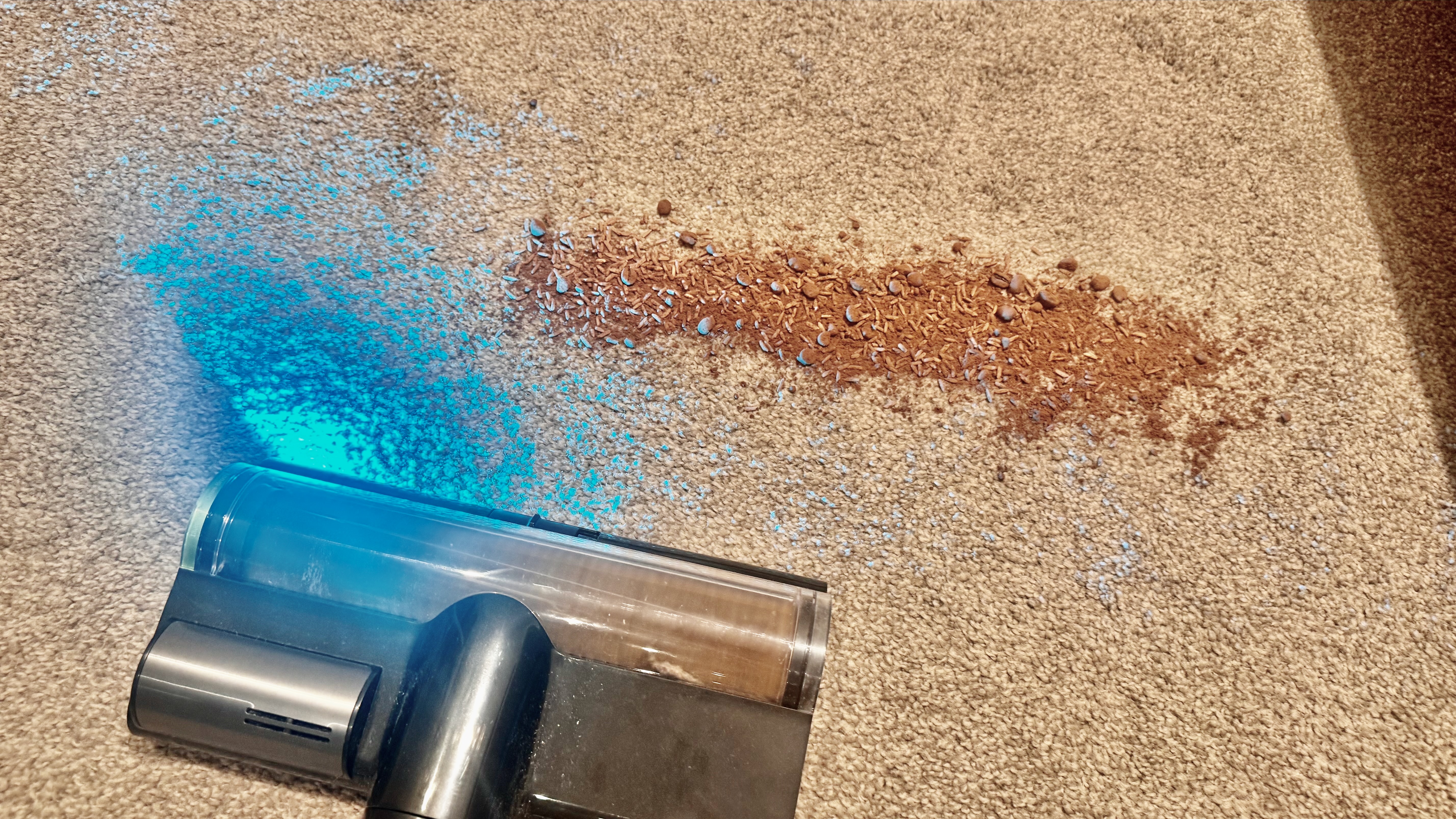
I used the same mixture of cacao powder, long-grain rice and coffee beans on a relatively low-pile carpet and found that performance wasn’t quite as effective as it was on hard floors.
By this I mean that in both Auto and Eco modes, I needed to pass over the mess with two front and back movements to ensure everything was cleaned up. Given the fact it took these two passes in Auto mode, which automatically kicked into Turbo mode when it first detected the spill, I expected Eco mode to either require more passes, or just not succeed at all. However, as you’ll see from the images above, both modes only required a double pass (forward and backwards twice), which I found impressive.
It was a similar story with hair. The Z20 Station did effectively remove my trodden hair trimmings from the carpet, but needed a couple of passes in order to do so, which is still pretty darn good compared to other cordless vacuums we’ve tested here at TechRadar.
Handheld and accessories
As I’ve already mentioned in this review, the Z20 Station comes with a varying number of tools depending on where you live, and a separate cradle to store them. US customers receive a few more tools compared to Australia — these being a Rotating Soft Dusting Brush, a Flexible Adapter and an Extension Hose — and since I’m based in Sydney, Australia, I was unable to test them.
However, my colleague Sharm has recently reviewed the Dreame Z50 Station (an Australia-only model at the time of writing) which comes with these attachments, and found the rotating soft dusting brush did an admirable job of keeping shelves dust-free.
Image
1
of
2
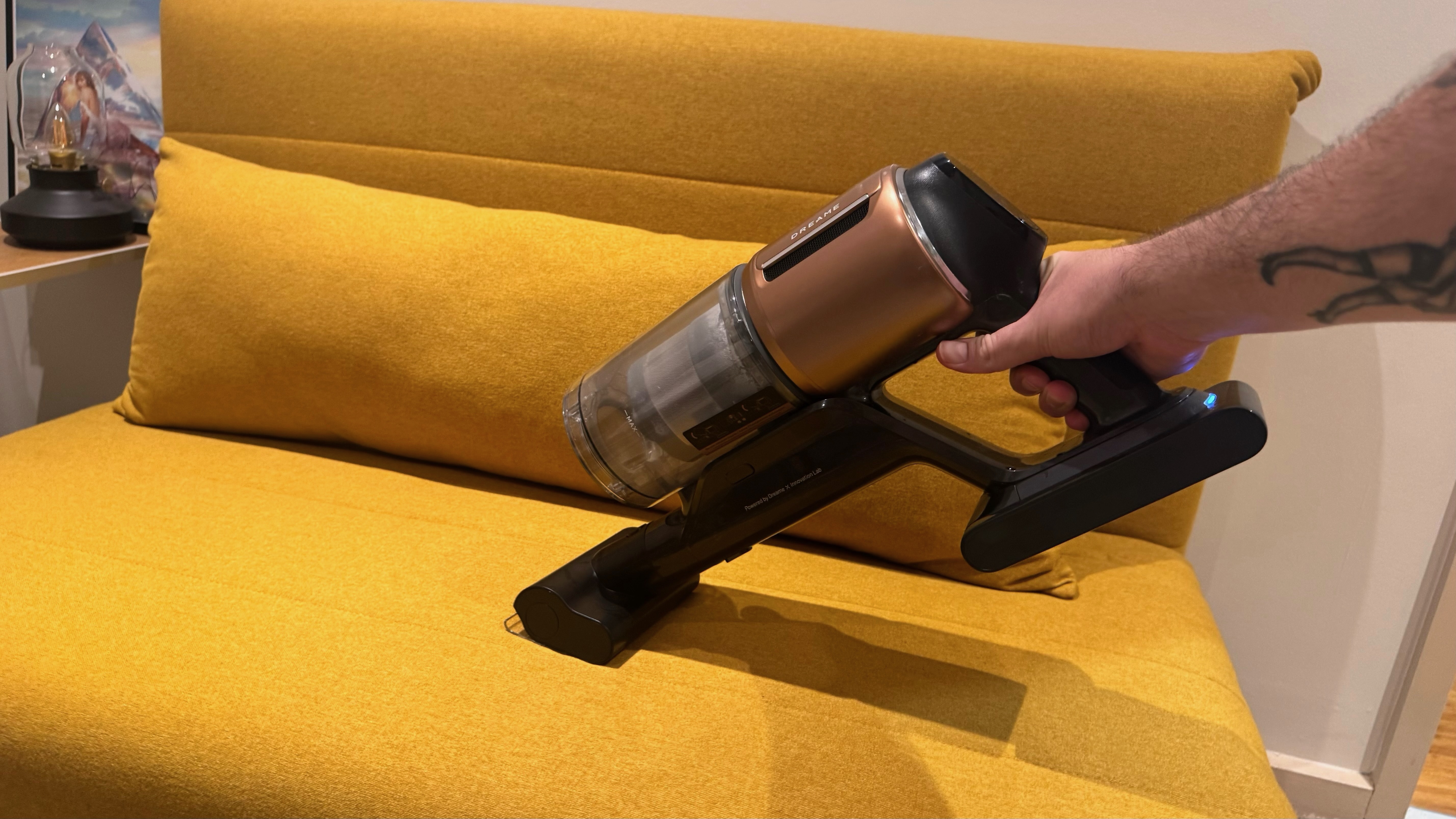
The set of attachments that come with the Z20 Station in both countries include a motorized mini brush, a combination tool and a soft brush tool.
Converting the vacuum to handheld mode and back again is a simple process as the buttons to disengage pieces are large and work as intended. Simply remove the extension rod, clip on your desired attachment and you’re away. However, given the main unit is quite large and the battery makes it relatively heavy, I found myself using two hands to hold onto it when vacuuming upholstery, for example.
Cleaning performance when in handheld mode is just as good as its regular mode and I was pleasantly surprised to find the dynamic suction adjustment carries over too. However the graphical display doesn’t function, i.e. when the vacuum applies some boost to the suction power, the bars don’t indicate what type and how much of a particular particle type has been detected.
Dock performance
Emptying the Z20’s dust canister is easy thanks to the free-standing charging dock. Just place the unit on the dock to trigger the auto-empty function. Whether you have the vacuum in handheld mode or the full unit, the function will trigger, although the additional weight of the wand and floorhead makes for a more seamless experience by providing the right amount of pressure inside the dock to force the self-empty to take place. You can also manually get this feature to come on by pressing a button on the dock.
While auto-empty works well, I should note that some dust and debris could occasionally remain stuck towards the handle end of the canister. I found that I needed to knock these around with my palm to dislodge them and trigger the auto-empty functionality again.
One final performance metric worth mentioning are the noise levels. I used the decibelX app on my iPhone to measure sound levels in each mode. Eco returned a result of around 63dB, similar to a washing machine, and Turbo mode saw it increase to 79dB, similar to heavy traffic. That’s quite standard for a vacuum of this caliber.
- Performance score: 4.5/5
Dreame Z20 Station review: Battery
- Up to 90 minutes on Eco mode; 10 minutes in Boost
- Battery takes up to 5 hours to fully recharge
- Swappable battery reduces interruptions and life cycle

When using the lowest-powered Eco setting, Dreame claims the battery will last up to 90 minutes. That’s impressive and puts the Z20 up there with some of the longest-lasting runtimes and on par with our current-favorite cordless vacuum cleaner, the Dreame R20 — clearly Dreame knows how to eke the most out of its vacuum power units.
On test, with the crevice tool attached, I managed 1 hour 38 minutes, which is in line with Dreame’s claims. However, with the Omni-Brush cleaning head attached, which is motorized, the battery life in Eco mode dropped considerably to 42 minutes.
Using a vacuum cleaner’s Boost mode comes with the expectation that battery life will take a considerable hit and that is indeed the case for the Z20, as I managed just 10 minutes before it completely died.
I got around 60 minutes of runtime when in Auto mode, but given the fact that suction power is dynamically adjusted in this mode, runtime will depend a lot on the area being cleaned and how dirty it might be. A countdown displaying the remaining battery percentage is shown on the digital display, which changes to just “Lo” when it drops below 10%.
If you want to be able to clean for longer, or to ensure you maximize the runtime of your Dreame Z20, then you’ll need an additional battery pack. An official power unit is available from the Dreame store in the US for $69.90, but at the time of writing I am unable to find one on either the UK or Australian stores. Third-party power packs are available from the likes of Amazon, but these should be used with caution as they can void your machine’s warranty or damage the unit if overheated.
- Battery score: 4/5
Should I buy the Dreame Z20 Station?
Scorecard
Swipe to scroll horizontally
Attribute | Notes | Score |
|---|---|---|
Value | Great build quality and features, and the fact it regularly receives heavy discounts makes the Dreame Z20 Station a good-value option. | 4.5 / 5 |
Design | Sleek and easy to use, but feels heavy during prolonged use. Plus the CelesTect light is better than the usual white headlights on other floorheads to reveal hidden dust. | 4 / 5 |
Performance | Excellent suction even in Eco mode. Auto mode works as intended to make cleaning a fuss-free process. | 4.5 / 5 |
Battery | It’s possible to get well over an hour from a single charge, although most users will get less than that, which is still a great result. | 4/5 |
Buy it if...
Don't buy it if...
Alternatives
How I tested the Dreame Z50 Station
I used the Dreame Z20 Station in my own two-bedroom apartment as the test space, which includes a variety of flooring — carpet in the bedrooms, tiles in the bathrooms and hardwood floors in the kitchen and living areas.
While I used it mainly for regular cleans, I also decided to cut my own hair (to mixed result) so that I could tread it into the carpet to determine how well the vacuum would perform.
I also created a mixture of pantry items to test cleaning of different dirt sizes — this included cacao powder, rice and coffee beans — which I sprinkled over both carpet and hard floor.
I also used all three attachments to see how well they work with the handheld unit, including using the motorized miniature brush on my bed head and sofas, while the crevice and brush tools were used to clean drawers and skirting boards.
To measure battery life, I used a stopwatch to time when the machine powered down on its own during different suction settings and with different attachments. I also ensured that I only tested the battery on mixed flooring when it was particularly dirty and with the main floorhead, to see how long it would run with dynamic suction.
Read more about how we test vacuums at TechRadar
[First reviewed April 2026]