


Thermal Master P4: 30-second review
The Thermal Master P4 is the latest addition to the brand's P-series of smartphone thermal cameras, and technically, it eclipses the previous P3 design. Rather than offering a single thermal sensor, it pairs the now-familiar 256x192 VOx microbolometer with a visible light camera, creating a dual-lens design. Thermal Master calls the world's first of its kind in this class, ignoring all the phones with thermal cameras that already have this capability.
We’ve seen this work extremely well on phones that support the same approach. And the only issue is often that, because each sensor sees a slightly different angle, the two images sometimes don’t align well. This is especially true when working close up.
To address this on the P4, Thermal Master introduced the IR Eraser function that allows rapid toggling between thermal and optical views, which is useful for aligning what you are seeing thermally with the physical layout of the object in front of you.
What the P4 doesn’t deliver is a new thermal sensor. Therefore, it has the same resolution as the P3, with native 256x192 capture enhanced to 512x384 through the X3IR software algorithm. Sensitivity is rated at under 35 mK, and there are 15 professional measurement modes, including point, line, rectangle, and circle tracking. The temperature range runs from minus 20 degrees Celsius to 600 degrees Celsius, with an accuracy of plus or minus 2 degrees Celsius.
There is, however, a significant caveat. The P4 is Android only. There is no iOS version, and Thermal Master makes no suggestion that one is planned. For iPhone users, the P3 or P1 cameras remain the only choices from this brand. It can be used with a PC, though it requires a way to hold the camera, since Thermal Master doesn’t include a tripod or stand.
Overall, for those who work on heating/cooling installations, engines, or power distribution systems, the P4 could be a remarkably useful tool. But its lack of a macro capability makes it unsuitable for electronics repair.

Thermal Master P4: price and availability
- How much does it cost? $400/£360/€400
- When is it out? It is available now
- Where can you get it? Direct from the Thermal Master website, with shipping from regional warehouses in the US, UK, EU, and China. And via online retailers.
The P4 carries a standard price of $499 USD, though at the time of writing, Thermal Master was running a sale that reduced the cost to $399 USD.
Direct from Thermal Master, UK buyers pay £359, which seems a little excessive at current exchange rates compared to the dollar price. European buyers pay €399, which, given that the Euro is stronger than the Dollar, is disappointing.
It is worth noting that Thermal Master states that all listed prices include applicable import duties and taxes for supported regions, thereby removing the risk of unexpected fees at delivery.
Those expecting to find it cheaper on Amazon.com will be disappointed, since it’s the same cost as from Thermal Master. And, the same is true on Amazon.co.uk.
By comparison, the Thermal Master P3 retails at $279 USD (sale from $349 USD), making the P4 a notable step up in price. The FLIR One Pro sits at around $429 USD, so the P4 is in competitive territory. For European buyers, the TOPDON TC001 at roughly $209 USD offers a lower-cost alternative, though it lacks the dual-lens feature set.
Given that this is the same thermal sensor, adding a low specification conventional sensor and charging an additional $120 over the P3 makes the P4 something of a gouge.

- Value score: 3.5/5
Swipe to scroll horizontally
Feature | Specification |
Model | Thermal Master P4 |
Infrared Sensor | VOx microbolometer 256x192 @12 μm |
Super IR Resolution | 512x384 via X3IR algorithm |
NETD Sensitivity | < 35 mK |
Temperature Range | -20°C to 600°C (-4°F to 1112°F) |
Accuracy | ±2°C |
Frame Rate | 25 Hz |
Focus Type | Fixed focus (15 cm to infinity) |
Field of View | 56.0° (H) x 42.2° (V) |
Digital Zoom | 15x |
Imaging Modes | Infrared, Visible, IR-Fuse, MIX |
Measurement Modes | 15 modes (points, lines, rectangles, circles) |
Colour Palettes | 12 options |
Compatibility | Android 6.0 and above only (no iOS) |
Power Consumption | 0.58W from phone |
Dimensions | 53mm x 29mm x 11mm |
Weight | 26.5 g |
Package Contents | P4 camera, portable case, 50cm extension cable, user manual |
Warranty | 2 years |
Thermal Master P4: Design
- Ultra compact
- Extension cable included, but no tripod
- Dual-lens layout with infrared and visible light sensors
- No iOS support
Before we get into the weeds of what makes the P4 a truly desirable thermal camera, I need to call out how lovely the engineering of this tiny 26,5g camera is.
It’s an all-metal construction that apes a compact camera layout, with a USB port protruding from its top. Therefore, it's clearly designed to be inserted into a phone's USB port and operated entirely via software. That’s good, because buttons on the camera would have introduced forces that would translate through to the USB port unfavourably.
Thermal Master includes a 50cm USB-C extension cable, which makes good sense since getting the camera away from the phone body improves the view, and some rugged designs block attachment with rubber plugs. However, as was an issue previously with the P1 and P3, how are you meant to direct the camera, hold the phone, and operate the software unless you have three hands?

I’m not sure, but amazingly, after an outlay of $400, there is still no tripod or stand in the box. Holding the extension cable with the camera dangling at one end while operating the app with the other hand remains an awkward arrangement at best, and I’m rapidly losing patience with the idea that Thermal Master will ever notice this issue.
What is good about this design is that the thermal and visible light sensor centres are only about 10cm apart, reducing the parallax effect between the images. But the camera doesn’t come with a lens cap to prevent debris from getting on either sensor.
The last point is critical and, thankfully, isn’t an issue for this reviewer: the lack of support for Apple iOS. There are no adapters to plug the P4 into an iPhone, unless it has a USB-C port, and the software to use it is not on the Apple App Store.
It may be that this might be addressed by an Apple version in the fullness of time, but it's rumoured that Apple will do away with ports altogether (to avoid being told by the EU to add them) and charge wirelessly, which would scupper Thermal Master and a significant selection of hardware addon companies.
It’s worth noting that the camera can also be used with a PC if it has a USB-C port.
Overall, the construction quality is high, and with dual sensors, it has the credentials to be the best Thermal Master phone accessory. However, the inability of Thermal Master to deliver on both Android and Apple platforms, and the lack of a tripod, serve to undermine this proposition and the relatively high asking price.

Design score: 3.5/5
Thermal Master P4: User experience
- Android 6.0 or above required, no iOS version
- 4 imaging and 15 temperature modes
A key limitation of the P4 is the Android-only compatibility. Thermal Master offers no iOS version of the P4, and no Lightning or USB-C to Lightning adapter is included. iPhone users must look elsewhere in their range.
The Temp Master app is the same software used across the P-series. On the positive side, this means 15 measurement modes, 12 colour palettes, temperature alarm functions, and time-lapse recording are all present.
But the central selling point of the P4 is the dual-lens arrangement, and that brings the MIX mode that combines data from both the thermal and optical sensors. This works brilliantly in most respects, and better than I’ve ever seen it work on phones with thermal sensors.
However, the positioning of the two image sources isn’t always ideal, and that’s not due to the sensors being slightly offset. It’s because the phone is handheld, and the thermal image's refresh rate is much lower than that of a conventional light sensor. Therefore, the conventional light data is always ahead of the thermal, something that wouldn’t be an issue if the phone (or camera) were on a tripod or other support.
This is especially evident when you use the IR Eraser function, a mode that lets you rub on the image with a finger to reveal the live image source beneath. This is a useful mode, but due to the lag of the thermal component, the window is often slightly out of fit with the thermal.
The IR-Fuse mode blends both streams into a single image where the conventional image source takes priority. And, if you want, there is a purely thermal mode. But using that would entirely undermine buying the P4, since you could get the same experience on the P3 for less.

For general HVAC and building inspection work, the dual-lens feature genuinely adds something. Identifying a damp patch or a failing insulation section is clearer when you can overlay the thermal reading onto a visible light reference. But for PCB work, the P3 with its macro lens and manual focus is still likely the better choice.
I’m inclined to believe that not providing a macro mode was a tactical choice by Thermal Master, since the P3 probably still sells well. Having the P4 come along and cannibalise P3 sales wouldn’t be a smart move.
I suspect, at some point in the future, when the P3 and P4 are end-of-line, a new P5 will appear that offers both the dual sensor capability and a macro mode, but that’s a guess.
The free PC analysis software is a genuine bonus at this price. It supports 2D and 3D thermal editing, report generation, and works with both offline image files and live connections.
If you detect a slight frustration here, it's that this camera has the ability to create some of the best thermal imagery I’ve seen at this price point, but the lack of any way to lock the camera physically or a macro mode, stops it from being the best choice for all thermal requirements.
The P4 is easily better than any thermal camera I’ve seen on a phone, although it costs more than the price of one of those, and you still have to provide the phone.

- User experience score: 3.5/5
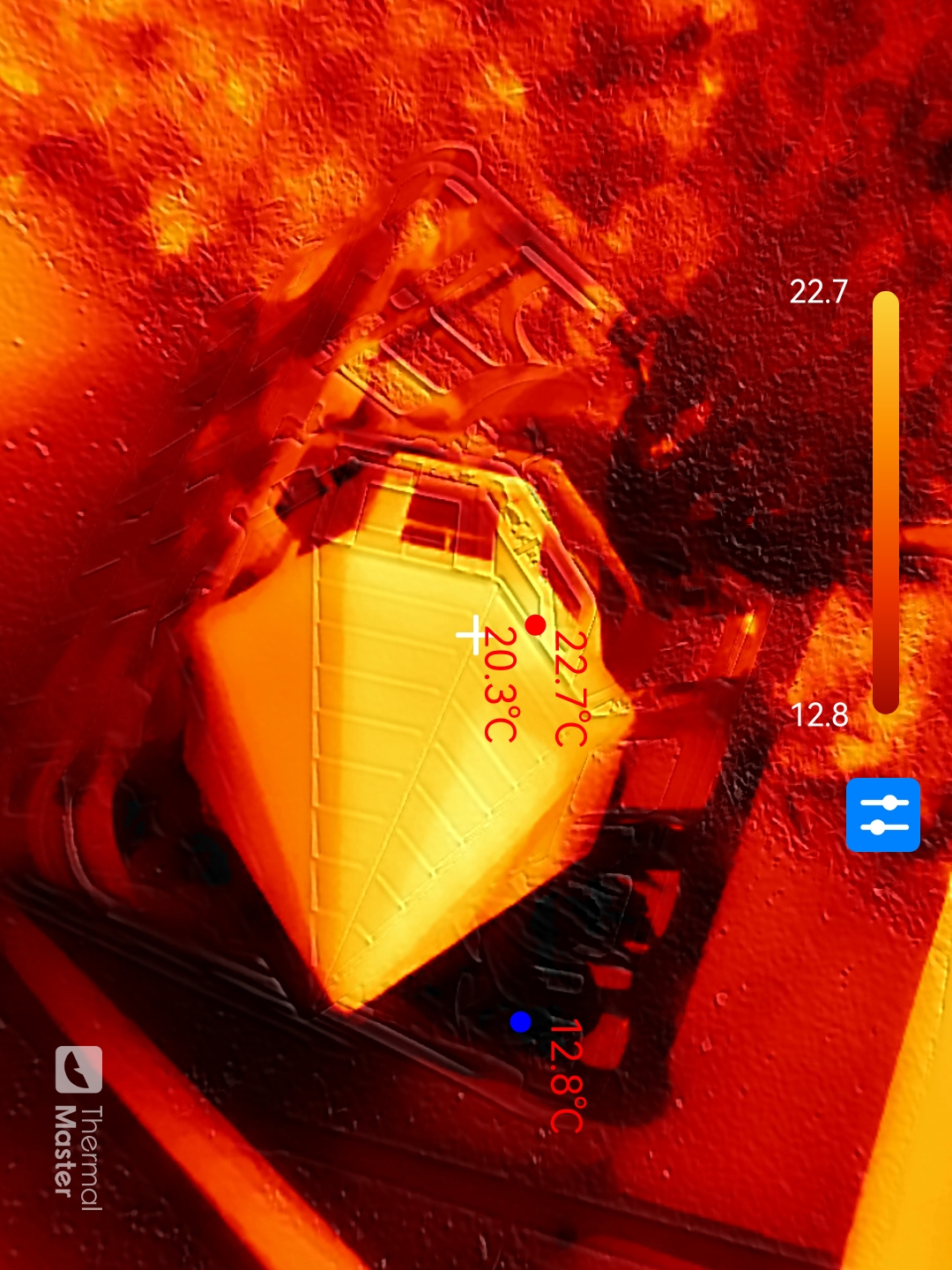
Thermal Master P4 Camera samples
Image
1
of
9
Thermal Master P4: Final verdict

If it weren’t for some obvious issues where the phone or camera should be kept stationary, I might argue that it's worth the extra cost over the P3 for the improved quality of the results. But the P3 had a macro mode that made it useful for those hunting circuit board component issues.
That reduces the potential areas where it can be useful, even if it still leaves plenty of jobs it can do, but at this price, customers will want it all. Something else it appears Thermal Master seems disinclined to offer is compatibility with Apple iOS devices. The P3 supported Apple iOS customers from the outset, so perhaps it's not coming for the P4?
These issues, and the high cost, take some of the shine off what could have been an entirely positive review. For those who don’t use Apple-branded equipment and aren’t bothered by the price or lack of a macro mode, this is a great choice and a notch up from previous devices.
Should I buy a Thermal Master P4?
Swipe to scroll horizontally
Attributes | Notes | Rating |
|---|---|---|
Value | Priced above the P3, but the dual-lens adds some justification | 3.5/5 |
Design | Compact and portable, but no stand. Android USB-C only | 3.5/5 |
User experience | Powerful four-mode imaging is let down by iOS exclusion | 4/5 |
Overall | A capable step up for Android users who need hybrid thermal and optical imaging | 4/5 |