

惯性聚合 高效追踪和阅读你感兴趣的博客、新闻、科技资讯
阅读原文 在惯性聚合中打开

推荐订阅源

J
Java Code Geeks
月光博客
月光博客
D
DataBreaches.Net
云风的 BLOG
云风的 BLOG
F
Fortinet All Blogs
T
The Blog of Author Tim Ferriss
Stack Overflow Blog
Stack Overflow Blog
Blog — PlanetScale
Blog — PlanetScale
aimingoo的专栏
aimingoo的专栏
U
Unit 42
OSCHINA 社区最新新闻
OSCHINA 社区最新新闻
MyScale Blog
MyScale Blog
T
Tailwind CSS Blog
N
Netflix TechBlog - Medium
B
Blog
博客园_首页
G
Google Developers Blog
Recent Announcements
博客园 - 【当耐特】
P
Proofpoint News Feed
博客园 - 司徒正美
Hugging Face - Blog
Hugging Face - Blog
MongoDB | Blog
MongoDB | Blog
Last Week in AI
Last Week in AI

Latest from TechRadar

Quordle hints and answers for Monday, April 13 (game #1540) NYT Strands hints and answers for Monday, April 13 (game #771) NYT Connections hints and answers for Monday, April 13 (game #1037) Morbid Metal developer explains why he ditched an origami art direction in favor of gritty sci-fi — 'It worked, but it didn't really feel like me' '71% of US households get routers from ISPs': Why new FCC rules could leave millions stuck with outdated,… 'The CPU is the system’s executive layer': Intel joins SambaNova as both face existential threat from… ‘More bang for your buck’: 7 easy ways to boost your MacBook Neo’s performance for free DJI Romo P vs Roborock Saros 10R — which robot vacuum comes out on top when it comes to dodging obstacles? I put… I spent 6 hours with Genshin Impact on the Galaxy S26 Ultra, and I can't believe how far mobile gaming has come What is the release date for The Testaments episode 4 on Hulu and Disney+? I reviewed the LG G6 for 3 weeks, and it's a fantastic OLED TV that's the new best option for brighter rooms Is your bird feeder camera doing more harm than good? 3 tips for using it safely as RSPB issues urgent disease warning Chelsea vs Man City Live Streams: How to watch Premier League 2025/26 from anywhere in the world, team news How to watch Alcaraz vs Sinner for FREE: TV Channels for Monte-Carlo Masters Final Sunderland vs Tottenham Live Streams: How to watch Premier League 2025/26 from anywhere in the world, team news Are these the best-designed workout headphones ever? I used them for a month to find out How to watch Snooker 900 John Virgo online (it's free) – stream O'Sullivan vs Higgins anywhere I've only just discovered the Walk With Frodo app on Garmin's Connect IQ store — and as as a huge LOTR nerd, it's going to make the next 1,800 miles fly by 'Just not sustainable': Why your monthly £25 broadband internet bill could soon hit £45 How to watch Paris-Roubaix 2026: Free Streams & TV Info as Tadej Pogacar chases third Monument How to watch Euphoria season 3 online – stream Zendaya & Sydney Sweeney drama from anywhere today '$15K bill destroyed a solo developer’s startup': How hackers are using leaked Google API keys to… There's a sneaky way to watch UFC 327 really cheap... NYT Connections hints and answers for Sunday, April 12 (game #1036) NYT Strands hints and answers for Sunday, April 12 (game #770) Quordle hints and answers for Sunday, April 12 (game #1539) Amazon's Ring cameras are the perfect solution to secure your home on a budget — shop today's best deals… I've tested every iPhone since the iPhone 12, and Ceramic Shield 2 is the first iPhone glass I fully trust UFC 327 live stream: how to watch Procházka vs Ulberg, start time, preview, full card We're officially getting the DJI Pocket 4 on April 16, but here's how Insta360 could beat it
I've been a Spotify subscriber for 17 years — here ...
David Nield · 2026-04-24 · via Latest from TechRadar
A laptop screen showing Spiceitfy for Spotify
(Image credit: Spicetify)

As someone who loves listening to music and has been writing about tech for a living for a very long time (more than two decades at this point), I of course signed up for Spotify as soon as I could — which in the UK was February, 2009.

A lot has changed since then, both inside and outside the digital music industry, as Spotify told us about in an exclusive interview for its 20th birthday today. But I've kept up a Spotify Premium subscription through it all — it's an app I load up most days and am still writing about.

What you might not know if you're a Spotify user is that there are a host of plug-ins and extensions available for the music streaming platform that add extra features and functionality — a bit like extensions for your web browser. They tap into the Spotify app to do something different, and to enhance the experience in all kinds of ways.

Article continues below


1. Last.fm
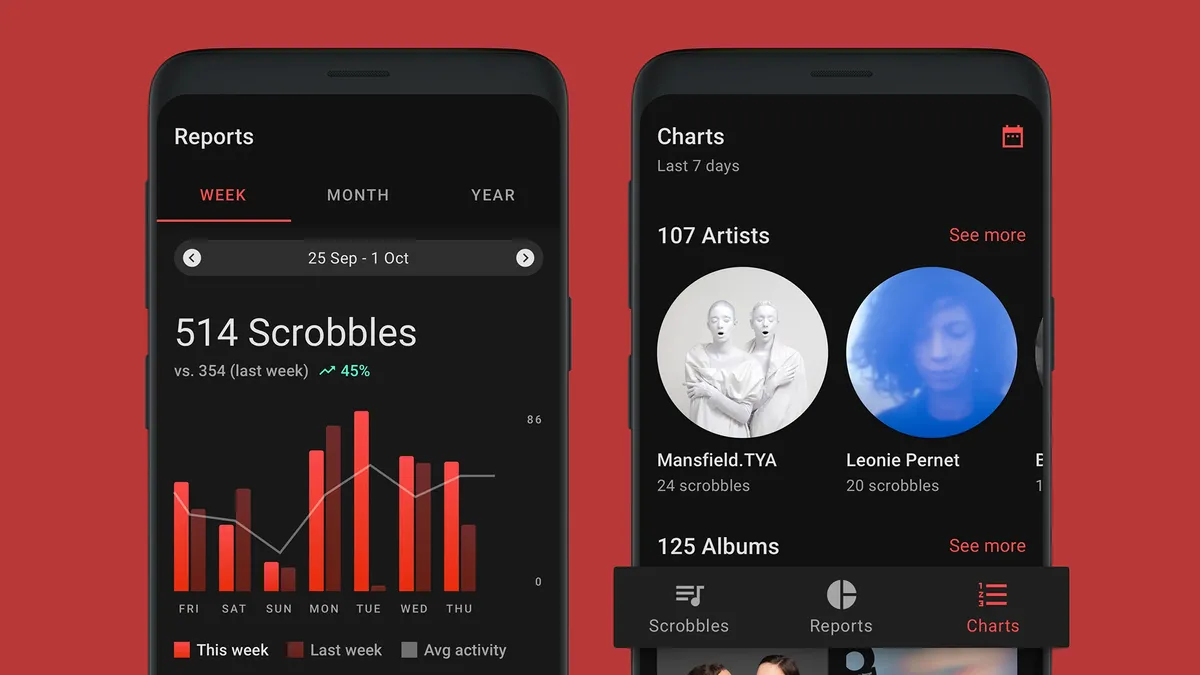
Last.fm on Android

(Image credit: Last.fm)

Spotify of course offers its own listening statistics, with Spotify Wrapped at the end of each year and more detailed breakdowns now available whenever you want, but Last.fm remains the undisputed champion of tracking your listening habits — something that's known as 'scrobbling' in Last.fm parlance.

Once you've connected your Last.fm and Spotify accounts, you can dig into a host of charts and reports around your music listening, whether it's your favorite genre of all time or the artist you loved the most this month (or this month five years ago). Plus, it can track your listening across all your other audio streaming apps too, and recommend new music.

2. Spicetify

Spicetify

Experimenting with Spicetify themes (Image credit: Future)

If you want to be able to customize the interface of the Spotify desktop player for Windows or macOS, then Spicetify is the extension for you. It gives you controls for adjusting fonts, colors, and more besides, and there are hundreds of premade themes you can pick from with just a couple of clicks — and tweak to suit your own tastes.

Sign up for breaking news, reviews, opinion, top tech deals, and more.

Besides the themes, Spicetify also offers numerous little edits that you can apply to the Spotify desktop player, whether it's adding extra visualizers or removing a button or interface element that you don't like or need. It's all backed up by a busy community of users who are constantly coming up with new customization ideas.

3. The Playlist Miner

A laptop screen showing The Playlist Miner for Spotify

(Image credit: Playlist Miner / Future)

Head over to The Playlist Miner if you want some extra inspiration for your Spotify playlists. After connecting to your Spotify account, it searches through the public playlists available on the platform to find a mix of songs tailored specifically for you, whether you're looking for tracks for working out or chilling out.

How you search for new songs really is up to you: maybe you could try building a playlist around "inspiration" or around "high energy". As long as there are enough public playlists matching the search criteria for The Playlist Miner to work with, it'll select the most popular picks across those playlists.

4. Oscurify

Obscurify

Just how obscure is your music taste? (Image credit: Future)

Music is more fun if you're sharing it and discussing it with other people — or at least comparing your taste with the wider world, which is something that Obscurify lets you do. Connect your Spotify account, and you get a fascinating breakdown of how eclectic your choice of tunes is compared to other Spotify users.

You get shown the most obscure artists and tracks that you listen to, and the plug-in can also dig down into stats on how happy or sad your music tastes are — as well as telling you how that's changing over time. There's also a recommendations section you can use to check out new artists you might not have already come across.

5. TuneEase

A laptop showing the TuneEase extension for Spotify

(Image credit: TuneEase)

Sometimes the best extensions are the simplest ones, and that's the case with TuneEase. It'll run as a pop-up inside Google Chrome or indeed any browser based on Chromium (including Microsoft Edge and Opera), and gives you control of the Spotify desktop or web player through a little browser control deck.

It doesn't sound like much, but if you do a lot of your computing inside a browser, TuneEase will save you a significant amount of time switching between windows and tabs when you want to pause your music or skip to the next track. You can toggle shuffle settings, adjust the volume, and favorite songs as well.


Follow TechRadar on Google News and add us as a preferred source to get our expert news, reviews, and opinion in your feeds. Make sure to click the Follow button!

And of course you can also follow TechRadar on TikTok for news, reviews, unboxings in video form, and get regular updates from us on WhatsApp too.

Dave is a freelance tech journalist who has been writing about gadgets, apps and the web for more than two decades. Based out of Stockport, England, on TechRadar you'll find him covering news, features and reviews, particularly for phones, tablets and wearables. Working to ensure our breaking news coverage is the best in the business over weekends, David also has bylines at Gizmodo, T3, PopSci and a few other places besides, as well as being many years editing the likes of PC Explorer and The Hardware Handbook.

You must confirm your public display name before commenting

Please logout and then login again, you will then be prompted to enter your display name.