
惯性聚合 高效追踪和阅读你感兴趣的博客、新闻、科技资讯
阅读原文 在惯性聚合中打开

推荐订阅源

Martin Fowler
Martin Fowler
Threat Intelligence Blog | Flashpoint
博客园 - 聂微东
IT之家
IT之家
GbyAI
GbyAI
奇客Solidot–传递最新科技情报
奇客Solidot–传递最新科技情报
Y
Y Combinator Blog
博客园 - 【当耐特】
The Cloudflare Blog
宝玉的分享
宝玉的分享
罗磊的独立博客
钛媒体:引领未来商业与生活新知
钛媒体:引领未来商业与生活新知
让小产品的独立变现更简单 - ezindie.com
V
Visual Studio Blog
小众软件
小众软件
博客园_首页
Last Week in AI
Last Week in AI
J
Java Code Geeks
V
V2EX
雷峰网
雷峰网
Apple Machine Learning Research
阮一峰的网络日志
阮一峰的网络日志
腾讯CDC
博客园 - 司徒正美
Engineering at Meta
Engineering at Meta
The GitHub Blog
The GitHub Blog
H
Hackread – Cybersecurity News, Data Breaches, AI and More
D
DataBreaches.Net
博客园 - 三生石上(FineUI控件)
MyScale Blog
MyScale Blog
云风的 BLOG
云风的 BLOG
The Register - Security
M
MIT News - Artificial intelligence
Microsoft Azure Blog
T
The Blog of Author Tim Ferriss
N
Netflix TechBlog - Medium
F
Full Disclosure
B
Blog
H
Help Net Security
C
Check Point Blog
WordPress大学
WordPress大学
人人都是产品经理
人人都是产品经理
Cyber Security Advisories - MS-ISAC
Jina AI
Jina AI
酷 壳 – CoolShell
酷 壳 – CoolShell
Blog — PlanetScale
Blog — PlanetScale
L
LangChain Blog
P
Proofpoint News Feed
D
Docker
Microsoft Security Blog

Latest from TechRadar

Quordle hints and answers for Monday, April 13 (game #1540) NYT Strands hints and answers for Monday, April 13 (game #771) NYT Connections hints and answers for Monday, April 13 (game #1037) Morbid Metal developer explains why he ditched an origami art direction in favor of gritty sci-fi — 'It worked, but it didn't really feel like me' '71% of US households get routers from ISPs': Why new FCC rules could leave millions stuck with outdated,… 'The CPU is the system’s executive layer': Intel joins SambaNova as both face existential threat from… ‘More bang for your buck’: 7 easy ways to boost your MacBook Neo’s performance for free DJI Romo P vs Roborock Saros 10R — which robot vacuum comes out on top when it comes to dodging obstacles? I put… I spent 6 hours with Genshin Impact on the Galaxy S26 Ultra, and I can't believe how far mobile gaming has come What is the release date for The Testaments episode 4 on Hulu and Disney+? I reviewed the LG G6 for 3 weeks, and it's a fantastic OLED TV that's the new best option for brighter rooms Is your bird feeder camera doing more harm than good? 3 tips for using it safely as RSPB issues urgent disease warning Chelsea vs Man City Live Streams: How to watch Premier League 2025/26 from anywhere in the world, team news How to watch Alcaraz vs Sinner for FREE: TV Channels for Monte-Carlo Masters Final Sunderland vs Tottenham Live Streams: How to watch Premier League 2025/26 from anywhere in the world, team news Are these the best-designed workout headphones ever? I used them for a month to find out How to watch Snooker 900 John Virgo online (it's free) – stream O'Sullivan vs Higgins anywhere I've only just discovered the Walk With Frodo app on Garmin's Connect IQ store — and as as a huge LOTR nerd, it's going to make the next 1,800 miles fly by 'Just not sustainable': Why your monthly £25 broadband internet bill could soon hit £45 How to watch Paris-Roubaix 2026: Free Streams & TV Info as Tadej Pogacar chases third Monument How to watch Euphoria season 3 online – stream Zendaya & Sydney Sweeney drama from anywhere today '$15K bill destroyed a solo developer’s startup': How hackers are using leaked Google API keys to… There's a sneaky way to watch UFC 327 really cheap... NYT Connections hints and answers for Sunday, April 12 (game #1036) NYT Strands hints and answers for Sunday, April 12 (game #770) Quordle hints and answers for Sunday, April 12 (game #1539) Amazon's Ring cameras are the perfect solution to secure your home on a budget — shop today's best deals… I've tested every iPhone since the iPhone 12, and Ceramic Shield 2 is the first iPhone glass I fully trust UFC 327 live stream: how to watch Procházka vs Ulberg, start time, preview, full card We're officially getting the DJI Pocket 4 on April 16, but here's how Insta360 could beat it 'Today is the day you've been waiting for': eGPUs can now officially turn a humble Mac Mini into an AI… Linux pulls support for ancient CPU — unsurprisingly, Linus Torvald says there is 'zero real reason' to… Keanu Reeves' new Apple TV movie Outcome has been slammed by critics — watch these 4 highly-rated films with the beloved actor instead 'AI is a once-in-a-lifetime opportunity': Amazon CEO Andy Jassy lays out his '6 truths' for the… How to watch Grand National 2026: Free Streams & TV Channels for Aintree National Hunt Race ‘I hadn’t verified a single thing’: Using ChatGPT for Iran war news changed how I trust information Want cafe-quality lattes at home without buying an expensive new coffee machine? Jura's new gadget upgrades your drinks with perfectly foamed milk every time 'A self-inflicted hit': Washington state just rolled back sales tax exemptions for AI data centers worth… Playing The Last of Us with friends made my favorite PlayStation game feel brand new again Mint Mobile's new Samsung Galaxy S26 series deal can save you up to $900 — enough to cover an entire device Not a squat, not a deadlift — the trap bar deadlift 'sits between' the two, builds muscle fast and is… Record Store Day 2026 starts soon! The date, the top vinyl drops, and everything else you need to know Women's Six Nations 2026 Free Streams: TV Channels, Preview, Table, Round 5 Fixtures, France vs England Time Beyond Paradise season 4 star would 'love' to do The Celebrity Traitors season 2 — and would be 'terrified' if one contestant came to Shipton Abbott 'There’s no one-size-fits-all office chair': Vari explains the design decisions behind its award-winning… I was a vacuum reviewer for two years — these are the 6 sub-£250 models I'd recommend in a heartbeat Save $200 and get the Samsung Galaxy S26 Ultra at its preorder price for a limited time at Amazon 'Small business owners have significant creative control from start to finish' — VistaPrint reveals the… TurboQuant isn't the RAM crisis savior you're hoping for, analysts say — as memory prices continue to… ICYMI: the 7 biggest tech stories of the week, from DJI's new robovac to Artemis II iPhone photos I matched the upgraded Meta AI against ChatGPT, and you can really tell which AI has social media roots Quordle hints and answers for Saturday, April 11 (game #1538) I created my dream coffee corner at IKEA for under $100 — and my mornings are about to get a lot cozier 'Experts' to rent for $1 per month: Hostinger debuts 7-person AI team to help SMBs save thousands on… The new MacBook Air has already dropped to a record-low price on Amazon I tested Turtle Beach's Mario-themed controller and headset for Nintendo Switch 2 — and they surprised me for… NYT Strands hints and answers for Saturday, April 11 (game #769) NYT Connections hints and answers for Saturday, April 11 (game #1035) After soaring 2,200%, DDR4 RAM prices finally fall — but don't get too excited It's "completely changed my home cleaning habits": The Dreame Z20 is a highly effective vacuum cleaner for even lsrger homes. Beyond no-log: Tor looks into seizure-proof servers that forget your data There's a sneaky way to watch IPL 2026 for FREE Microsoft hands Linux Foundation key Surface data to help fix laptop battery life Adobe Reader users beware — experts flag months-old security flaw using booby-trapped PDFs to scope out victims 'Shockingly good value': New rugged Android tablet has a built-in 1080p projector, night-vision camera, and… Stop the presses — Microsoft is actually cutting cloud PC prices for SMBs, promises to make it 'more cost-effective for small and medium businesses' Microsoft has begun stripping out AI from Windows 11 — but it's already being criticized for not going far… Euphoria season 3 episode 3 release date: when will it come out on HBO Max? 'If one piece of your supply chain is delayed, then your whole project can't deliver': Nearly half of US data centers planned for 2026 canceled or delayed — and things could soon get much worse ChatGPT’s hidden backup model just got smarter — as OpenAI adds a cheaper Pro option Forget Big Mistakes — new Netflix true crime series Trust Me: The False Prophet is the only TV show you need to… 'The problem is not AI’s capability...what won’t improve on its own is the human side': Major study claims white-collar workers are fighting back against AI in the workplace Introducing Perspectives — the new home for premium contributed content on TechRadar Pro ‘Computers are no longer a bicycle for the mind’: Frameworks founder says the Steve Jobs era is over and PCs are now a ‘self-driving car that takes you directly to the destination’ No, Elon Musk doesn't want to give you a $5,000 tax refund — it's a scam, here's what to look out… ‘It’s a potential national security threat’: Proton study finds over 3,500 US legislators’ official emails leaked and exposed on the dark web ‘I want to cancel’: YouTube Premium quietly hikes its US prices for the first time in three years, forcing… RTX 5090s and other high-powered graphics cards may carry risks of cable melting issues — but Asus thinks it has… Former Xbox exec thinks Naughty Dog's decision to cancel the 80% completed The Last of Us Online 'was the right call', but it shouldn't have greenlit it in the first place — 'The ambition was there, but the realistic upfront planning wasn't', she says West Ham vs Wolves Live Streams: How to watch Premier League 2025/26 from anywhere in the world Microsoft warns worrying security flaw exposed over 50 million Android users, says 'user credentials and financial… ‘Apple will grit its teeth and push through’ — new report suggests the iPhone Air 2 isn’t dead,… Google Chrome rolls out a new tool to try and stop infostealer malware in its tracks 'Two Hells collide' — Doom: The Dark Ages and Diablo Immortal unite in a limited-time crossover event,… Spotify is rolling out new video controls, and as someone who hates its in-app music videos, I know this will be a huge… 8 new movies and TV shows to watch on Netflix, Prime Video, HBO Max, and more this weekend (April 10) AdGuard VPN has a new app for iPhone — and you can try it out for 7 days for free Currys refuses to end its Easter sale — I've found the 21 best tech deals that are still available Amazon is slashing prices on Garmin watches — save up to $350 on best-rated models for running, biking and hiking Inspired to start running this summer? Here are 8 brilliant running shoes I'd recommend for beginners NASA used a 12-year-old GoPro to capture a sight called the ‘greatest gift’ by Artemis II pilot — and… iPhone owners urged to change this key privacy setting after FBI recovers suspect’s deleted Signal messages How to read Murder in Purple and Gold online from anywhere Garmin's cashing in on the screenless Whoop-style smart band trend with its upcoming CIRQA — here's the… YouTube insists that a 90-sec, unskippable ad format 'isn't something we are testing' — but furious… ‘Everything is magenta’: This wild hack got Mac OS X Cheetah working on a Nintendo Wii, and I can’t… A new free-to-play Borderlands game gets surprise drop on mobile, which Zynga says is part of a 'limited-time… The Xiaomi 17 outmuscles the iPhone 17 and Galaxy S26 in several key areas — read our full review In a sea of PlayStation Portal cases, the one I value the most has yet to be beaten How to submit an article for TechRadar Pro Perspectives
I gamed on Gigabyte’s high-end QD-OLED monitor and it made me wish the software was as good as the screen
Nick RossFreelance technology writer · 2026-05-21 · via Latest from TechRadar

Gigabyte’s MO27U2 has plenty going for it, with a fast, colorful UHD QD-OLED panel, useful gaming features and a sober design that works well for both work and play. However, it’s expensive and its mediocre HDR performance, awkward settings and barely functional companion app make it frustrating to live with. It’s good, but at this price it needs to be better.

Pros

  • +

    Fast 240Hz refresh rate

  • +

    UHD tandem QD-OLED panel

  • +

    Low-reflection glossy coating

  • +

    Built-in speakers

Cons

  • -

    Expensive

  • -

    Mediocre HDR performance

  • -

    Annoying setting adjustments

Why you can trust TechRadar We spend hours testing every product or service we review, so you can be sure you're buying the best. Find out more about how we test.

Gigabyte MO27U2: Two-Minute Review

We’ve seen many glitzy gaming monitors over the past few years, so it’s almost refreshing to see a premium model that eschews all the in-your-face RGB lighting and pointy bits for a more sober option that better suits a mixed work-and-play environment.

But is the Gigabyte MO27U2 actually worth buying?

It’s a tandem QD-OLED screen with a multi-layer OLED structure that boosts brightness and efficiency, while Gigabyte’s OLED Care features help reduce burn-in risk. Its latest-gen sub-pixel technology fends off the spidery text that blighted predecessors, and this, plus the high resolution, high-pixel-density, reflection-reducing, glossy coating, means it’s also very good for work: multiple windows can be comfortably used at once and large spreadsheets can be more easily viewed.

When it came to multimedia, the QD-OLED’s penchant for color vibrancy and contrast quickly came to the fore, but there were some issues.

Despite a huge number of image-tinkering options in the on-screen display (OSD) menu, finding a perfect balance of HDR contrast and image clarity proved trying. No matter what I did, highlights would blow out noticeably in bright areas while patchy image aberrations often blighted content. I haven’t seen image-processing issues like that for a while.

Switching color spaces and preset modes often felt like installing a too-small carpet: shifting in one direction might smooth out some color issues but introduce horrendous blocky artifacts to gradients. It’s not altogether terrible, but I expect better from a premium gaming monitor.

Gigabyte MO27U2 Gaming Monitor on a desk setup

(Image credit: Future)

The 240Hz refresh rate keeps rapidly moving objects practically blur-free, with G-Sync helping prevent image tearing.

Sign up for breaking news, reviews, opinion, top tech deals, and more.

Motion clarity is supposedly enhanced by Gigabyte’s ‘Ultra Clear’ technology, but the setting was grayed out no matter what settings I adjusted. Indeed, fighting with settings became a regular annoyance: while some changes provided instantaneous results, others would see the monitor essentially reset and potentially require a full Windows reconfiguration. A firmware upgrade made no difference.

The new Gigabyte Control Center app also felt like a broken mess. It struggled to identify the monitor, offered fewer options than the OSD and didn’t automatically sync with them. While you might not change settings regularly, you won’t want to tinker with this too much.

Gigabyte MO27U2 Gaming Monitor review view

(Image credit: Future)

Beyond the 4K QD-OLED screen, the MO27U2 hangs its hat on its gaming enhancements. The OLED variable refresh rate (VRR) anti-flicker feature will appeal to console gamers keen to reduce flicker when variable refresh rates are in play. The ‘Tactical Switch’ button quickly drops the display size down to a 24-inch mode and switches the aspect ratio to 4:3 or 5:4 to suit particularly persnickety competitive first-person shooter (FPS) players.

There’s an all-green-screen night-vision feature, an Eagle Eye sniper-zoom window plus the usual on-screen crosshairs and contrast-busting Black Equalizer features to stop enemies from jumping out of shadows. Some feel gimmicky, but they’ll appeal to niche audiences.

Another core feature is Gigabyte’s multifaceted anti-burn-in technology, backed by a three-year warranty, which potentially provides additional peace of mind.

Ultimately, though, the MO27U2 is priced as a premium gaming monitor but misses the mark in just too many areas. There are better options for similar money.

Gigabyte MO27U2 Gaming Monitor box

(Image credit: Future)

Gigabyte MO27U2: Price & availability

  • How much does it cost? $650 / £539 / AU$1,499
  • When is it available? It’s out now in most regions
  • Where can you get it? Available in the US, UK, Australia and elsewhere

Gigabyte’s MO27U2 is available at significantly different price points all over the world, yet it’s expensive everywhere.

It’s worth comparing it with other premium UHD, 240Hz QD-OLED monitors in your region as it’s likely you’ll find a better deal, especially in Australia where the price is significantly higher, for some reason.

  • Value: 3 / 5

Gigabyte MO27U2: Specs

Swipe to scroll horizontally

Gigabyte MO27U2 specifications

Screen size

27-inch

Aspect ratio

16:9

Resolution

3,840 x 2,160

Brightness

250 nits typical SDR; 1,000 nits peak HDR at 3% average picture level

Refresh rate

240Hz

Response time

0.03ms GTG

Viewing angle

178°(H)/178°(V)

Contrast ratio

1,500,000:1

Color coverage

99% DCI-P3

Inputs

1x DisplayPort 1.4, 2x HDMI 2.1, 1x USB-C (18W power delivery), 2x USB-A 3.2 Gen 1, 1x USB-B, 1x 3.5mm audio jack

Weight

7.1kg (15.7lb)

Gigabyte MO27U2: Design

  • Sober, work-friendly design
  • Good connectivity
  • Excellent gaming features

The Gigabyte MO27U2 has a thin yet robust glass screen that’s supported by a (refreshingly small) sturdy base. It’s simple to assemble owing to the stem clipping onto the back of the screen and screwing onto the base with a single thumbscrew.

The stem affords plenty of adjustment: there’s -5° to +21° of tilt, -15° to +15° of swivel, 90° of counterclockwise pivot and a generous 130mm (5.1in) of height adjustment. Its small footprint means competitive gamers can get right up close to it.

Gigabyte MO27U2 Gaming Monitor stand removed from the monitor

(Image credit: Future)

All of the important ports are covered. There are two HDMI 2.1 ports, one DisplayPort 1.4, one USB-C port (that supports DisplayPort, 18W power delivery and USB hub connectivity) plus one USB-B upstream port and two USB-A 3.2 Gen 1 downstream ports. There’s also a 3.5mm headphone jack and (usefully) two 5W speakers. Some may lament offering only 18W of power delivery in the modern market, but that’s nitpicking. DisplayPort 2.1 is also an omission that few in the real world will miss.

Image

1

of

2
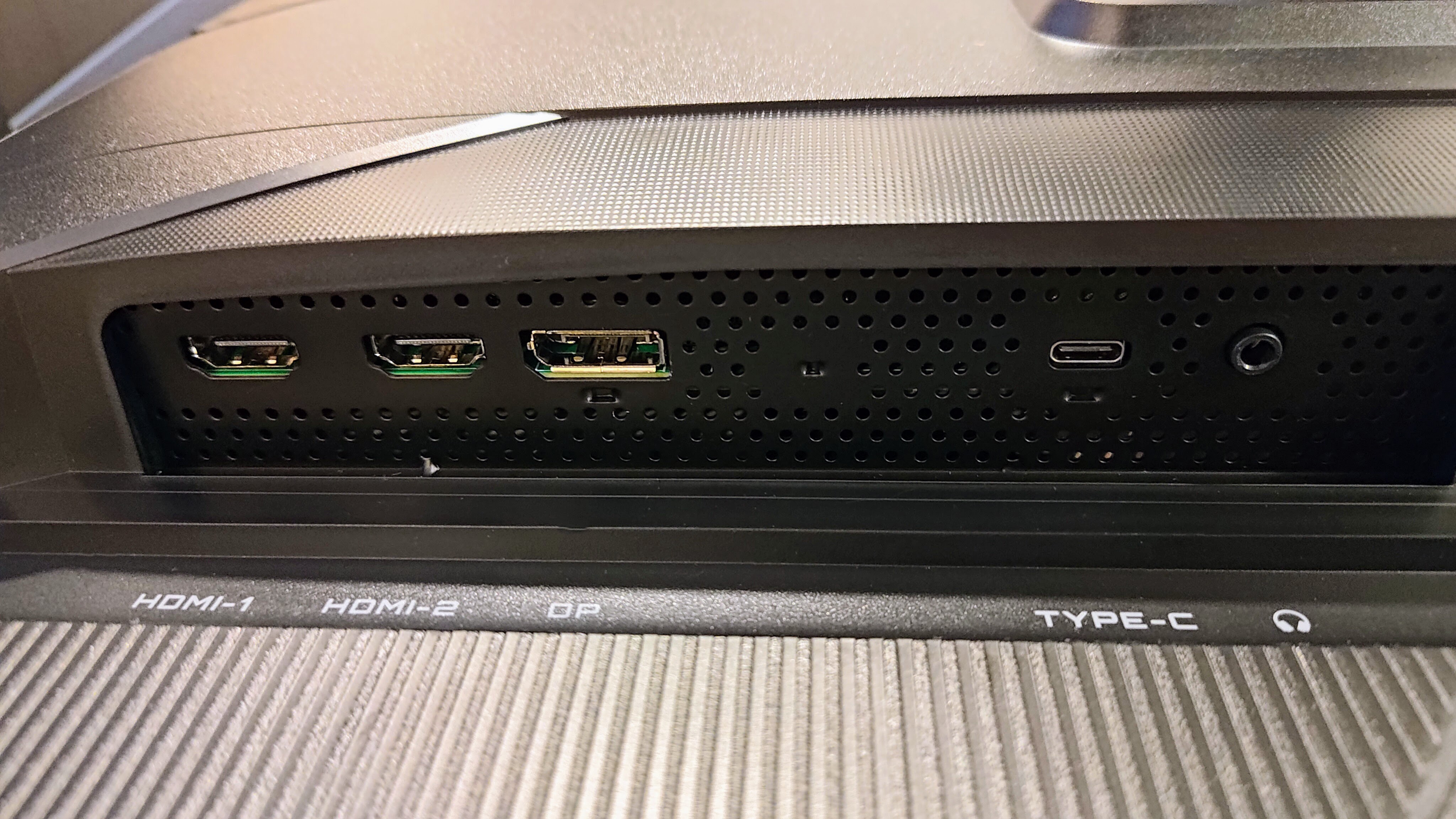
Gigabyte MO27U2 Gaming Monitor video inputs
(Image credit: Future)

You can access the settings by a joystick button (and two programmable buttons) at the bottom of the screen. It’s mostly responsive and intuitive, but some adjustments can reset the screen and even require setting up in Windows all over again.

I'm not sure what’s happened to the Gigabyte Control Center app, which is now barely functional. On the occasions that it did detect the display, it only provided access to a handful of settings and then wouldn’t always sync them with the screen.

Image

1

of

2
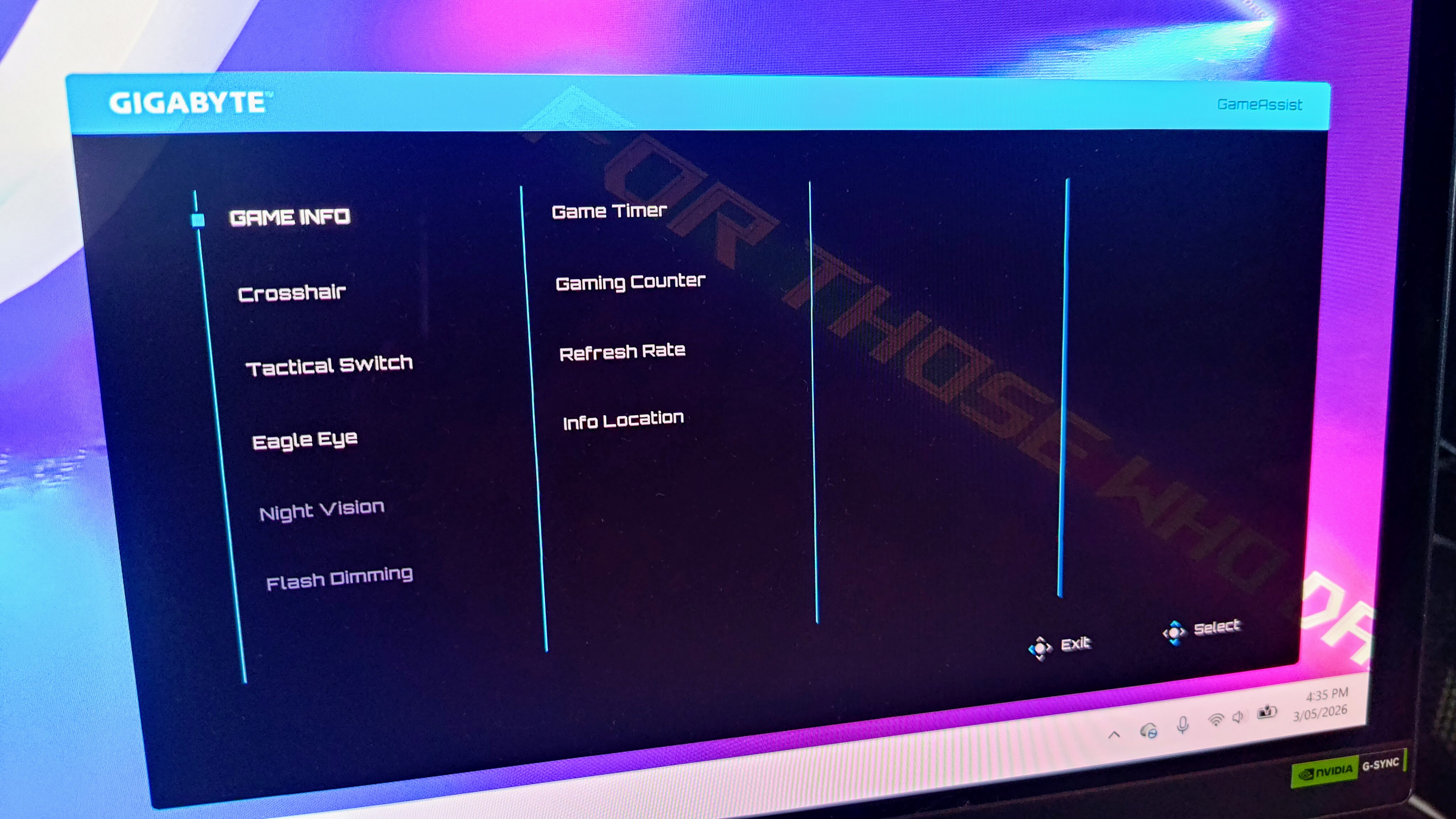
Gigabyte MO27U2 Gaming Monitor control software
(Image credit: Future)

A Game Assist menu provides access to ‘Game Info’ such as an on-screen timer, refresh rate display and multiple on-screen crosshairs. The Tactical Switch setting allows configuration of the shortcut button (next to the joystick button). You can also use it to automatically switch the display from a 16:9 ratio to 4:3 or 5:4. Resolution can be switched to a 24-inch mode with 4:3 and 5:4 options, something that makes a difference when playing competitive shooters.

Other features include an Eagle Eye sniper zoom box in the middle of the screen. I find this unusably annoying, but if you’re a camping sniper-type player, it might be beneficial to your ‘gameplay.’ There’s also ‘green-screen-style’ night vision (which I couldn’t get on with) plus (a welcome) flash dimming setting.

Other gaming features include AI Black Equalizer, which flattens contrast to reveal enemies hiding in shadows.

Gigabyte MO27U2 Gaming Monitor OSD control joystick close up

(Image credit: Future)

If you’ve got a console, then VRR mode can help prevent tearing in supported 120Hz games. Separately, Ultra Clear inserts black frames at 120Hz to reduce motion blur. It’s very effective and something that pro-gaming esports screens often make use of.

Other features are the usual monitor fare. There are plenty of image adjustment options and presets, so you can (at least attempt to) set up the monitor just so.

Finally, there’s a suite of OLED Care options including Pixel Clean, Static Control, Pixel Shift, Sub-Logo Dim, Corner Dim and much more. It also regularly performs an automatic maintenance cycle, but you can delay it if you’re in the middle of something important (unlike some rivals).

All in all, there are few features missing from the Gigabyte MO27U2, but it gets marked down for the terrible partner app and slow adjustment of some settings.

  • Design: 4 / 5

Gigabyte MO27U2: Performance

  • Impressive QD-OLED panel
  • Mediocre HDR handling
  • Fast 240Hz gaming performance

The tandem QD-OLED panel is generally very impressive. It gets bright (1,000-nit peak HDR brightness), with rich and vibrant colors, very good contrast and very nearly true blacks. The issue of spidery text (that we’ve seen with previous-generation panels) has been banished, and this, plus the UHD resolution and a physics-defying, low-reflection glossy screen means it’s excellent for work as well as multimedia consumption.

However, being a premium monitor means my expectations are higher. HDR performance is an issue: while details are visible in dark areas and bright lights pierce through them in localized areas of the screen, highlights get lost in bright areas too easily.

Gigabyte MO27U2 Gaming Monitor panel close up

This image shows how highlights get lost in bright areas too easily (Image credit: Future)

Transitions and gradients are mostly very smooth, but most adjustments will transform them into a stepped, blocky, artifact-riddled mess. This will be a minor point for many gamers, but there are better performers for similar money (not least from Gigabyte) available, so it’s marked down accordingly.

Still, the 240Hz refresh rate marries with a fast, 0.03ms pixel response time to banish blur to a degree where only the most demanding competitive FPS players might grumble. Nvidia G-Sync compatibility ensures image tearing isn’t an issue.

The twin 5W speakers might not offer the best fidelity, but they get loud and punchy and are very useful for watching casual videos from time to time, so I appreciate their inclusion.

  • Performance: 4 / 5

Should you buy the Gigabyte MO27U2?

Swipe to scroll horizontally

Gigabyte MO27U2 scorecard

Value

The Gigabyte MO27U2 is expensive in all markets but performance doesn’t quite live up to the price.

3 / 5

Design

Many gaming monitors are dripping with RGB and design flourishes. The MO27U2 is far more sober, which will appeal to many.

4 / 5

Performance

The MO27U2 is great for work but not perfect when it comes to multimedia and gaming performance.

4 / 5

Final score

Ultimately, the Gigabyte MO27U2 promises much but doesn’t quite deliver at its premium price point

4 / 5

Buy the Gigabyte MO27U2 if...

Don't buy it if...

Gigabyte MO27U2 Gaming Monitor logo close up

(Image credit: Future)

Also Consider

Want more options? Check out our guide to the best gaming monitors.

Nick Ross is a multi-award-winning, veteran technology journalist. He started out with the UK’s PC Pro magazine before moving to its Australian counterpart, PC Authority. Nick then left to launch The Overclocker before moving on to become the ABC’s first Technology and Games Editor. After that he spent time editing PC World before switching to marketing, commercial and publishing roles. He’s now back as a full-time journalist, writing for his own mastheads, SMBtech.au and High Performance Laptops, while contributing to multiple other titles including TweakTown, iTWire, APC magazine and TechRadar.