




In the world of modern .NET development, applications need to maintain high throughput, scale rapidly, and most importantly, deliver performance and responsiveness in all circumstances. This becomes increasingly difficult as functional complexity increases, data sources expand, and we contend with ever-evolving endpoints and microservices. In this article, we will iteratively build a .NET console application, highlight key areas that benefit from caching, and demonstrate how to incorporate an advanced caching layer into any application. This .NET 10 demo works equally well on Windows or Linux, so feel free to use whichever environment best fits your workflow.
If you want to skip straight to the finished product, scroll down to the bottom of this article to find a fully functional caching data service example.
Let’s Get Started
By the end of this guide, you will have a reference application that:
- Uses the .NET generic host for configuration, dependency injection, logging, and background services.
- Loads configurable settings from an appsettings.json file.
- Securely handles secrets and sensitive connection string information.
- Emits structured logs for monitoring and observability.
- Simulates expensive / time-consuming external data calls.
- Stores distributed cache values in an Azure Database for PostgreSQL database.
- Uses the HybridCache package to automatically combine in-memory caching together with your persistent distributed cache.
- Benchmarks request timing so you can observe the improvements cache functionality provides.
- Demonstrates patterns you could realistically carry into production code.
Create a new .NET Project
Let’s start by creating a new console application. From your terminal:
mkdir dcache-demo
cd dcache-demo
dotnet new console
At this point we have a .NET console project. Next, we will turn our project into a host-based application so that configuration, logging, and services all have a proper home.
Add the Hosting Package
Let’s install the hosting package:
dotnet add package Microsoft.Extensions.HostingThis brings in the generic host, which includes:
- Dependency Injection
- Configuration
- Logging
- Hosted Services
Your project (.csproj) file should now include an item group and a package reference similar to this:
<ItemGroup>
  <PackageReference Include="Microsoft.Extensions.Hosting" Version="10.0.5" />
</ItemGroup>
Enhance the Console App
Now, let’s replace the contents of Program.cs with our host-based scaffolding:
using Microsoft.Extensions.Hosting;

var builder = Host.CreateDefaultBuilder(args);

builder.ConfigureAppConfiguration((hostingContext, config) => {
    // Add additional configuration sources if needed
});

builder.ConfigureServices((hostingContext, services) => {
    // Register services as needed
});

builder.ConfigureLogging(logging => {
    // Configure logging as needed
});

var app = builder.Build();

await app.RunAsync();
CreateDefaultBuilder already does a lot for us. It wires up standard configuration sources, sets up the service container, and enables logging defaults. Our plain old console app is starting to feel more like a real application.
Configure Logging
Next, we can add additional namespaces for logging and DI:
using Microsoft.Extensions.Logging;
using Microsoft.Extensions.DependencyInjection;
Let’s introduce concise, timestamped console logging. Replace the empty ConfigureLogging method with the following:
builder.ConfigureLogging(logging => {
    logging.ClearProviders();
    logging.SetMinimumLevel(LogLevel.Information);
    logging.AddSimpleConsole(options => {
        options.TimestampFormat = "[yyyy-MM-dd HH:mm:ss.ffffff] ";
        options.SingleLine = true;
    });
});
Before calling RunAsync, let’s add these lines to resolve our logger and write a startup message:
var app = builder.Build();

var logger = app.Services.GetRequiredService<ILogger<Program>>();
logger.LogInformation("Console logging is now enabled!");

await app.RunAsync();
When we run the app, the output should look similar to this:
jared@DESKTOP-BP44P0H:~/dcache-demo$ dotnet run
[2026-03-20 17:01:11.358539] info: Program[0] Console logging is now enabled!
[2026-03-20 17:01:11.377219] info: Microsoft.Hosting.Lifetime[0] Application started. Press Ctrl+C to shut down.
[2026-03-20 17:01:11.381201] info: Microsoft.Hosting.Lifetime[0] Hosting environment: Production
[2026-03-20 17:01:11.381301] info: Microsoft.Hosting.Lifetime[0] Content root path: /home/jared/dcache-demo
^C[2026-03-20 17:01:15.082321] info: Microsoft.Hosting.Lifetime[0] Application is shutting down...
Nice! The host is running correctly, and we can even see our first log message.
Adding Some Work
Let’s give the host something useful to do. We will add a service that simulates a time-consuming external call and returns a dataset. In fact, what better dataset than the classic WeatherForecast?!
We’re going to get extra creative and name our custom service: ConsoleService. This class inherits from the BackgroundService abstract base class. By implementing the BackgroundService base class, we can automatically take advantage of the integrations that are available when using a Host builder to design our application. When our app RunAsync method is called, our ConsoleService service ExecuteAsync method is automatically invoked. For the purposes of the demo, our ConsoleService class will do one thing: make the “expensive” data retrieval call to request the weather forecast dataset.
Let’s continue by adding the following code right after the line that calls await app.RunAsync():
public class WeatherForecast {
    public DateOnly Date { get; set; }
    public int TemperatureC { get; set; }
    public int TemperatureF => 32 + (int)(TemperatureC / 0.5556);
    public string? Summary { get; set; }
    public static readonly string[] Summaries = new[] {
        "Freezing", "Bracing", "Chilly", "Cool", "Mild",
        "Warm", "Balmy", "Hot", "Sweltering", "Scorching"
    };
}
public class ConsoleService : BackgroundService {

    private readonly ILogger<ConsoleService> _logger;

    public ConsoleService(ILogger<ConsoleService> logger) {
        _logger = logger;
    }

    protected override async Task ExecuteAsync(CancellationToken stoppingToken) {

        _logger.LogInformation("Console Service Started.");

        while (!stoppingToken.IsCancellationRequested) {

            var response = await GetDataFromTheSource(stoppingToken);

            _logger.LogInformation("Returned {Count} forecast item(s)", response.Count());

            await Task.Delay(500, stoppingToken);
        }

    }

    async Task<IEnumerable<WeatherForecast>> GetDataFromTheSource(CancellationToken cancellationToken) {

        await Task.Delay(2000, cancellationToken);

        _logger.LogInformation("Fetching Weather");

        return Enumerable.Range(1, 1).Select(index => new WeatherForecast {
            Date = DateOnly.FromDateTime(DateTime.Now.AddDays(index)),
            TemperatureC = Random.Shared.Next(-20, 55),
            Summary = WeatherForecast.Summaries[Random.Shared.Next(WeatherForecast.Summaries.Length)]
        })
        .ToArray();

    }
}
After we’ve added our ConsoleService class definition, let’s register our ConsoleService by replacing the empty builder.ConfigureServices method with the following:
builder.ConfigureServices((hostingContext, services) => {
    // Register services as needed
    services.AddHostedService<ConsoleService>();
});
When we run our app again, the performance delays are immediately obvious: every iteration waits several seconds for our “external” source to return.
jared@DESKTOP-BP44P0H:~/dcache-demo$ dotnet run
[2026-03-20 17:14:58.193904] info: Program[0] Console logging is now enabled!
[2026-03-20 17:14:58.216087] info: ConsoleService[0] Console Service Started.
[2026-03-20 17:14:58.216181] info: Microsoft.Hosting.Lifetime[0] Application started. Press Ctrl+C to shut down.
[2026-03-20 17:14:58.220036] info: Microsoft.Hosting.Lifetime[0] Hosting environment: Production
[2026-03-20 17:14:58.220153] info: Microsoft.Hosting.Lifetime[0] Content root path: /home/jared/dcache-demo
[2026-03-20 17:15:00.222744] info: ConsoleService[0] Fetching Weather
[2026-03-20 17:15:00.223451] info: ConsoleService[0] Returned 1 forecast item(s)
[2026-03-20 17:15:02.729901] info: ConsoleService[0] Fetching Weather
[2026-03-20 17:15:02.988473] info: ConsoleService[0] Returned 1 forecast item(s)
[2026-03-20 17:15:05.233446] info: ConsoleService[0] Fetching Weather
[2026-03-20 17:15:05.234906] info: ConsoleService[0] Returned 1 forecast item(s)
^C[2026-03-20 17:15:07.593508] info: Microsoft.Hosting.Lifetime[0] Application is shutting down...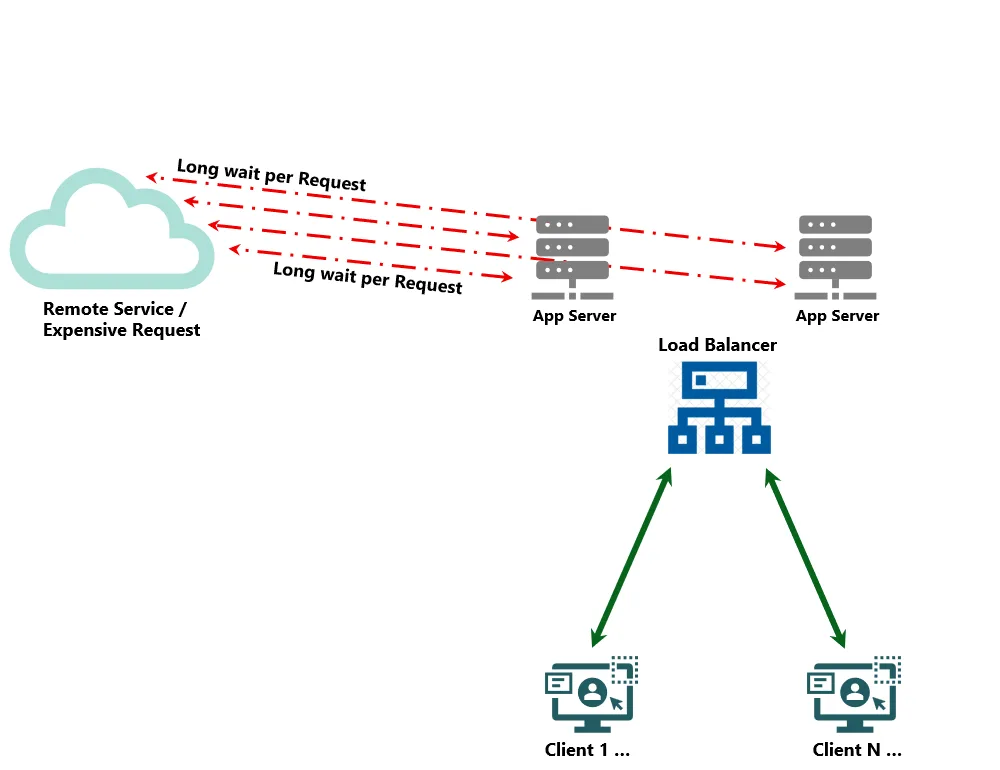 Slow performance without caching.
Add the Cache Packages
Next, let’s start to solve this problem by installing the following caching packages:
dotnet add package Microsoft.Extensions.Caching.Postgres
dotnet add package Microsoft.Extensions.Caching.Hybrid
Each package solves a different facet of the caching challenge:
- Microsoft.Extensions.Caching.Postgres persists distributed cache entries in a Postgres database.
- Microsoft.Extensions.Caching.Hybrid combines a fast in-memory layer together with a distributed cache.
Your project (.csproj) file should now contain these additional package references:
<ItemGroup>
  <PackageReference Include="Microsoft.Extensions.Caching.Hybrid" Version="10.4.0" />
  <PackageReference Include="Microsoft.Extensions.Caching.Postgres" Version="1.2.2" />
  <PackageReference Include="Microsoft.Extensions.Hosting" Version="10.0.5" />
</ItemGroup>
Configuring Our Service Properties
Note
In this example, we’re using a secrets store for our connection string value, however, there are multiple approaches to securely manage your sensitive application secrets. Be sure to review all of the options for safe storage of app secrets and pay close attention that you never inadvertently include any sensitive keys when committing to source control! In a production setting, we strongly suggest the use of environment variables or (Azure Key Vault) secrets managers for securely handling sensitive keys.
Let’s start by initializing our secure secrets storage:
dotnet user-secrets initOnce initialized, we can safely store and manage any sensitive application settings, such as our database connection string. You’ll want to replace the placeholder connection string with details for your Azure Database for PostgreSQL instance:
dotnet user-secrets set "ConnectionStrings:PostgresCache" "Host=your-server.postgres.database.azure.com;Port=5432;Username=your-user;Password=your-password;Database=your-database;Pooling=true;MinPoolSize=0;MaxPoolSize=100;Timeout=15;"Let’s now add our appsettings.json file and set the following distributed caching values:
{
  "PostgresCache": {
    "SchemaName": "public",
    "TableName": "cache",
    "CreateIfNotExists": true,
    "UseWAL": false,
    "ExpiredItemsDeletionInterval": "00:30:00",
    "DefaultSlidingExpiration": "00:20:00"
  }
}
In order for our appsettings values to be loaded into our host application runtime, let’s add the Configuration namespace:
using Microsoft.Extensions.Configuration;And now we can replace our placeholder configuration build with the following:
builder.ConfigureAppConfiguration((hostingContext, config) => {

    // Add additional configuration sources if needed
    config.AddUserSecrets<Program>();
    config.AddJsonFile("appsettings.json", optional: false, reloadOnChange: true);

    // Controlled via $env:DOTNET_ENVIRONMENT = "Production";
    if (hostingContext.HostingEnvironment.IsProduction()) {
        config.AddEnvironmentVariables();
    }

});
Finally, we want to ensure that our appsettings.json file is copied to our output directory during the build. To do so, let’s update our project (.csproj) file and add the following block below the existing ItemGroup section:
<ItemGroup>
  <None Update="appsettings.json">
    <CopyToOutputDirectory>PreserveNewest</CopyToOutputDirectory>
    <CopyToPublishDirectory>PreserveNewest</CopyToPublishDirectory>
  </None>
</ItemGroup>
Wire Up Azure Database for PostgreSQL Distributed Cache and HybridCache
Now we’re ready to add our caching functionality. Let’s add the HybridCache namespace reference:
using Microsoft.Extensions.Caching.Hybrid;We can also register and configure our distributed Azure Database for PostgreSQL cache. Note, our cache configuration is able to use values from the configuration settings that we recently wired in, ensuring that when we deploy to different environments, we can adjust our configuration properties easily.
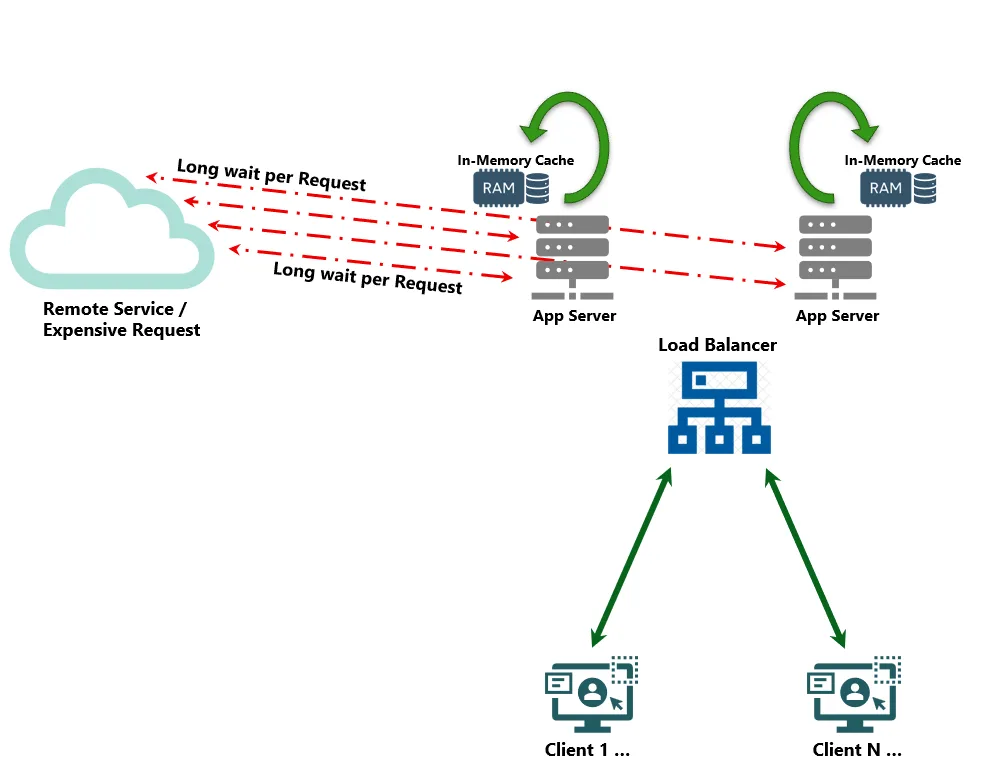 Adding caching improves performance, but…
Using Azure Postgres as a distributed cache unlocks several benefits, especially if our application is already using Postgres database. While we’re configuring our distributed cache, we can also incorporate HybridCache to complement our solution. Simply adding the single line to services.AddHybridCache() will automatically combine in-memory caching with our newly added distributed cache service and keep both stores in sync!
builder.ConfigureServices((hostingContext, services) => {

    // Register services as needed

    services.AddHostedService<ConsoleService>();

    services.AddDistributedPostgresCache(options => {
        options.ConnectionString = hostingContext.Configuration.GetConnectionString("PostgresCache");
        options.SchemaName = hostingContext.Configuration.GetValue<string>("PostgresCache:SchemaName", "public");
        options.TableName = hostingContext.Configuration.GetValue<string>("PostgresCache:TableName", "cache");
        options.CreateIfNotExists = hostingContext.Configuration.GetValue<bool>("PostgresCache:CreateIfNotExists", true);
        options.UseWAL = hostingContext.Configuration.GetValue<bool>("PostgresCache:UseWAL", false);

        var expirationInterval = hostingContext.Configuration.GetValue<string>("PostgresCache:ExpiredItemsDeletionInterval");
        if (!string.IsNullOrEmpty(expirationInterval) && TimeSpan.TryParse(expirationInterval, out var interval)) {
            options.ExpiredItemsDeletionInterval = interval;
        }

        var slidingExpiration = hostingContext.Configuration.GetValue<string>("PostgresCache:DefaultSlidingExpiration");
        if (!string.IsNullOrEmpty(slidingExpiration) && TimeSpan.TryParse(slidingExpiration, out var sliding)) {
            options.DefaultSlidingExpiration = sliding;
        }

    });

    services.AddHybridCache();

});
This is where our demo gets really interesting. We are no longer choosing between fast-but-volatile memory or externally available cache. We get the perfect combination of in-memory performance and the reliability of a distributed store together. If our app process happens to restart and we lose our in-memory cache, our cached entries still exist in the Azure Postgres database cache, and our services can continue without impact.
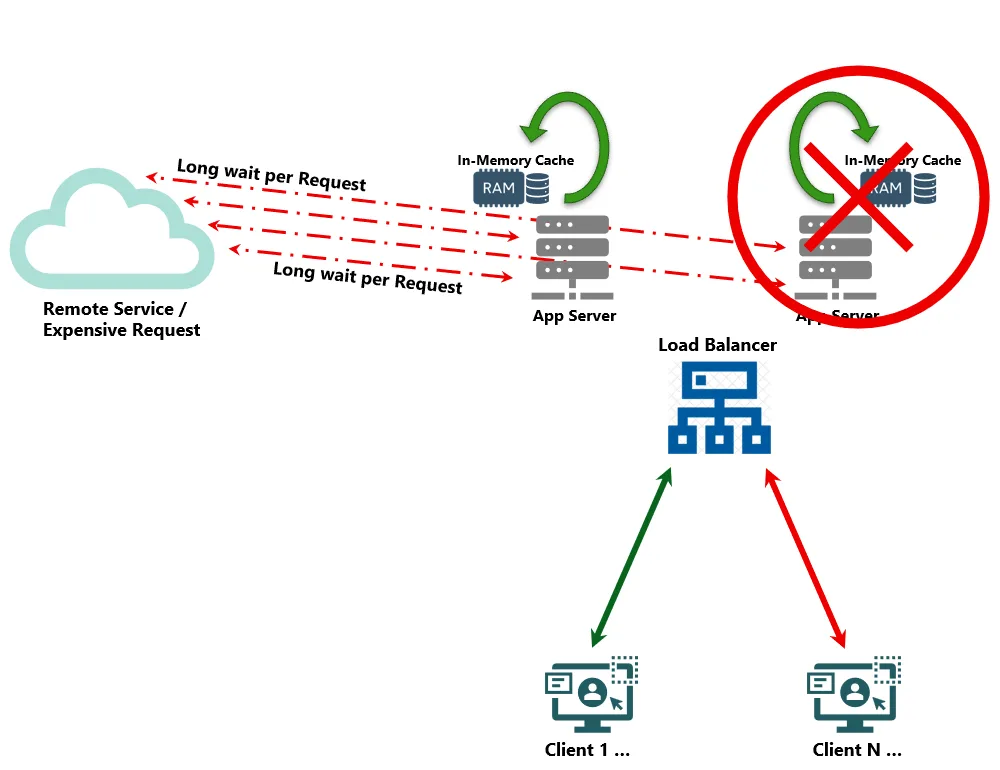 …in-memory caching is lost if nodes are offline.
Let’s Apply the Cache(s) to Our Console Service
Once HybridCache has been added, our distributed Azure Postgres cache and the in-memory caches will be managed for us automatically. Moving forward, we can reference our HybridCache, and the underlying storage integrations will be aligned seamlessly. Let’s wire up our ConsoleService class to use the HybridCache service that we’ve just registered. We can include the new cache in our class, and our constructor is now able to use the newly registered HybridCache service:
public class ConsoleService : BackgroundService {

    private readonly ILogger<ConsoleService> _logger;
    private readonly HybridCache _cache;

    public ConsoleService(ILogger<ConsoleService> logger, HybridCache cache) {
        _logger = logger;
        _cache = cache;
    }

    ...

}
Define Cache Expiration Behavior
For the purposes of our demo, we want both cache layers to expire quickly so that their behavior is easy for us to observe. We will customize the expiration properties of our tiered caches by explicitly setting their expiration as follows:
Let’s add a customized HybridCacheEntryOptions object to our ConsoleService:
private readonly HybridCacheEntryOptions _entryOptions = new HybridCacheEntryOptions {
    LocalCacheExpiration = TimeSpan.FromSeconds(3),
    Expiration = TimeSpan.FromSeconds(6),
};
We set our in-memory cache to expire after 3 seconds, and the distributed Azure Postgres cache to expire after 6 seconds. This gives us a nice demonstration window where we see requests hit the source, then the next few requests are the fastest because they come from in-memory. After in-memory caching expires, the database cache can still process requests extremely efficiently. After 6 seconds, both caches expire, and the source is called again.
Cache the Results
Let’s replace the time-consuming remote source request being invoked every time our service runs. We can now incorporate our caching infrastructure into our service.
Let’s replace this line:
var response = await GetDataFromTheSource(stoppingToken);with this:
var response = await _cache.GetOrCreateAsync(
    "weather:forecast:next-day",
    async cancel => {
        _logger.LogInformation("Cache miss for weather request. Fetching from source.");
        var result = await GetDataFromTheSource(cancel);
        return result;
    },
    cancellationToken: stoppingToken,
    options: _entryOptions
);
This is the key line in our example: the cache service is basically saying, “If the value is already cached, return the data to the caller. If there is no value in our cache(s), fetch the data we need from the source, store that result in our cache(s), and then return the data to the caller.”
One level lower, our cache service is evaluating, “If the value is in memory and hasn’t expired, return the in-memory result. If there’s no valid entry in memory, check our distributed cache for the same conditions, and return any matching result.”
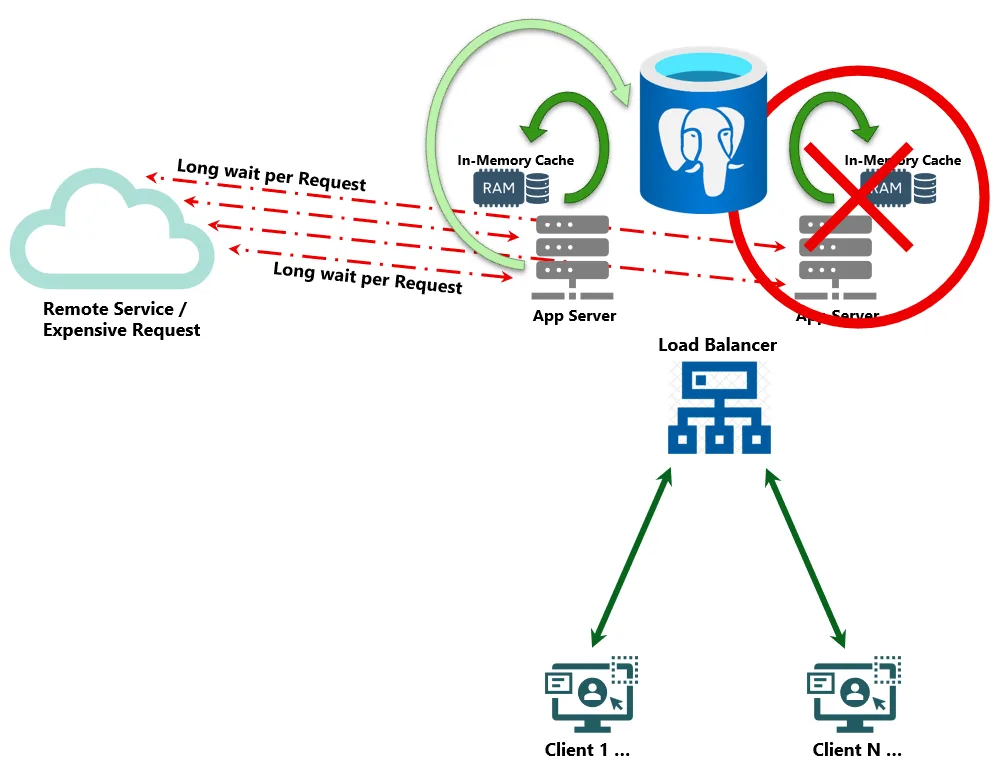 Tiered caching with HybridCache & Postgres provides performance and resiliency!
Measure the Difference
To make our demonstration more clearly visible, let’s add a Stopwatch around the data lookup logic:
var timer = System.Diagnostics.Stopwatch.StartNew();

//var response = await GetDataFromTheSource(stoppingToken);
var response = await _cache.GetOrCreateAsync(
    "weather:forecast:next-day",
    async cancel => {
        _logger.LogInformation("Cache miss for weather request. Fetching from source.");
        var result = await GetDataFromTheSource(cancel);
        return result;
    },
    cancellationToken: stoppingToken,
    options: _entryOptions
);

timer.Stop();

_logger.LogInformation("Returned {Count} forecast item(s) from HybridCache in {ElapsedMs} ms"
    , response.Count()
    , timer.Elapsed.TotalMilliseconds
);
Now the performance results are much more apparent. A new request makes the call to our source data service as expected. A cached in-memory response returns in under a millisecond, and a distributed-cache hit is no slouch either; our PostgreSQL database returns the results in a mere fraction of a second. After both caches have expired, the source data set is again requested and the process continues.
[2026-03-20 17:22:44.060938] info: Program[0] Console logging is now enabled!
[2026-03-20 17:22:44.347276] info: ConsoleService[0] Console Service Started.
[2026-03-20 17:22:44.347621] info: Microsoft.Hosting.Lifetime[0] Application started. Press Ctrl+C to shut down.
[2026-03-20 17:22:44.348932] info: Microsoft.Hosting.Lifetime[0] Hosting environment: Production
[2026-03-20 17:22:44.348969] info: Microsoft.Hosting.Lifetime[0] Content root path: /home/jared/dcache-demo
[2026-03-20 17:22:44.357857] info: ConsoleService[0] Cache miss for weather request. Fetching from source.
[2026-03-20 17:22:46.360481] info: ConsoleService[0] Fetching Weather
[2026-03-20 17:22:46.408653] info: ConsoleService[0] Returned 1 forecast item(s) from HybridCache in 2061.0478 ms
[2026-03-20 17:22:46.911366] info: ConsoleService[0] Returned 1 forecast item(s) from HybridCache in 0.6072 ms
[2026-03-20 17:22:47.415489] info: ConsoleService[0] Returned 1 forecast item(s) from HybridCache in 0.3266 ms
[2026-03-20 17:22:47.917801] info: ConsoleService[0] Returned 1 forecast item(s) from HybridCache in 0.2738 ms
[2026-03-20 17:22:48.421292] info: ConsoleService[0] Returned 1 forecast item(s) from HybridCache in 0.3115 ms
[2026-03-20 17:22:48.929037] info: ConsoleService[0] Returned 1 forecast item(s) from HybridCache in 0.2625 ms
[2026-03-20 17:22:49.446790] info: ConsoleService[0] Returned 1 forecast item(s) from HybridCache in 38.9606 ms
[2026-03-20 17:22:49.958174] info: ConsoleService[0] Returned 1 forecast item(s) from HybridCache in 0.2307 ms
[2026-03-20 17:22:50.463451] info: ConsoleService[0] Cache miss for weather request. Fetching from source.
[2026-03-20 17:22:52.474783] info: ConsoleService[0] Fetching Weather
Finished Service
Here is the complete cached data service example that we have built:
using Microsoft.Extensions.Hosting;
using Microsoft.Extensions.Logging;
using Microsoft.Extensions.DependencyInjection;
using Microsoft.Extensions.Configuration;
using Microsoft.Extensions.Caching.Hybrid;

var builder = Host.CreateDefaultBuilder(args);

builder.ConfigureAppConfiguration((hostingContext, config) => {

    // Add additional configuration sources if needed
    config.AddUserSecrets<Program>();
    config.AddJsonFile("appsettings.json", optional: false, reloadOnChange: true);

    // Controlled via $env:DOTNET_ENVIRONMENT = "Production";
    if (hostingContext.HostingEnvironment.IsProduction()) {
        config.AddEnvironmentVariables();
    }

});

builder.ConfigureServices((hostingContext, services) => {
    // Register services as needed
    services.AddHostedService<ConsoleService>();

    services.AddDistributedPostgresCache(options => {
        options.ConnectionString = hostingContext.Configuration.GetConnectionString("PostgresCache");
        options.SchemaName = hostingContext.Configuration.GetValue<string>("PostgresCache:SchemaName", "public");
        options.TableName = hostingContext.Configuration.GetValue<string>("PostgresCache:TableName", "cache");
        options.CreateIfNotExists = hostingContext.Configuration.GetValue<bool>("PostgresCache:CreateIfNotExists", true);
        options.UseWAL = hostingContext.Configuration.GetValue<bool>("PostgresCache:UseWAL", false);

        var expirationInterval = hostingContext.Configuration.GetValue<string>("PostgresCache:ExpiredItemsDeletionInterval");
        if (!string.IsNullOrEmpty(expirationInterval) && TimeSpan.TryParse(expirationInterval, out var interval)) {
            options.ExpiredItemsDeletionInterval = interval;
        }

        var slidingExpiration = hostingContext.Configuration.GetValue<string>("PostgresCache:DefaultSlidingExpiration");
        if (!string.IsNullOrEmpty(slidingExpiration) && TimeSpan.TryParse(slidingExpiration, out var sliding)) {
            options.DefaultSlidingExpiration = sliding;
        }
    });

    services.AddHybridCache();
});

builder.ConfigureLogging(logging => {
    logging.ClearProviders();
    logging.SetMinimumLevel(LogLevel.Information);
    logging.AddSimpleConsole(options => {
        options.TimestampFormat = "[yyyy-MM-dd HH:mm:ss.ffffff] ";
        options.SingleLine = true;
    });
});

var app = builder.Build();

var logger = app.Services.GetRequiredService<ILogger<Program>>();
logger.LogInformation("Console logging is now enabled!");

await app.RunAsync();

public class WeatherForecast {
    public DateOnly Date { get; set; }
    public int TemperatureC { get; set; }
    public int TemperatureF => 32 + (int)(TemperatureC / 0.5556);
    public string? Summary { get; set; }

    public static readonly string[] Summaries = new[] {
        "Freezing", "Bracing", "Chilly", "Cool", "Mild",
        "Warm", "Balmy", "Hot", "Sweltering", "Scorching"
    };
}

public class ConsoleService : BackgroundService {
    private readonly ILogger<ConsoleService> _logger;
    private readonly HybridCache _cache;

    private readonly HybridCacheEntryOptions _entryOptions = new HybridCacheEntryOptions {
        LocalCacheExpiration = TimeSpan.FromSeconds(3),
        Expiration = TimeSpan.FromSeconds(6),
    };

    public ConsoleService(ILogger<ConsoleService> logger, HybridCache cache) {
        _logger = logger;
        _cache = cache;
    }

    protected override async Task ExecuteAsync(CancellationToken stoppingToken) {
        _logger.LogInformation("Console Service Started.");

        while (!stoppingToken.IsCancellationRequested) {
            var timer = System.Diagnostics.Stopwatch.StartNew();

            //var response = await GetDataFromTheSource(stoppingToken);

            var response = await _cache.GetOrCreateAsync(
                "weather:forecast:next-day",
                async cancel => {
                    _logger.LogInformation("Cache miss for weather request. Fetching from source.");
                    var result = await GetDataFromTheSource(cancel);
                    return result;
                },
                cancellationToken: stoppingToken,
                options: _entryOptions
            );

            timer.Stop();

            _logger.LogInformation("Returned {Count} forecast item(s) from HybridCache in {ElapsedMs} ms"
                , response.Count()
                , timer.Elapsed.TotalMilliseconds
            );

            await Task.Delay(500, stoppingToken);
        }
    }

    async Task<IEnumerable<WeatherForecast>> GetDataFromTheSource(CancellationToken cancellationToken) {
        await Task.Delay(2000, cancellationToken);
        _logger.LogInformation("Fetching Weather");

        return Enumerable.Range(1, 1).Select(index => new WeatherForecast {
            Date = DateOnly.FromDateTime(DateTime.Now.AddDays(index)),
            TemperatureC = Random.Shared.Next(-20, 55),
            Summary = WeatherForecast.Summaries[Random.Shared.Next(WeatherForecast.Summaries.Length)]
        })
        .ToArray();
    }
}
Summary
Caching is not just a performance trick; it is one of the most powerful ways to add performance and scalability to an application. When you combine the reliability of a distributed cache with a lightning fast in-memory layer, you can reduce latency and ensure your systems behave consistently. The same approach we followed in this demo also fits naturally into APIs, asynchronous services, and larger distributed systems. By applying these key design patterns, you are not only making your applications faster, but you are also adding resiliency, scalability, and extensibility to your application platforms.
To find additional examples using Postgres as a distributed cache, including within a Web API combined with Aspire and Swagger API, check out our project samples included in our GitHub project: Azure/Microsoft.Extensions.Caching.Postgres: Distributed cache implemented with Postgres
The additional samples also contain more advanced utilization scenarios, including registering Azure Postgres cache configuration using Entra Authentication, or re-using an existing Postgres data source object when configuring your Postgres cache.
Many of these features came directly from the community, so we encourage everyone to reach out, get involved, share your ideas and feedback, and collaborate together with us!
For an in-depth dive into the benefits of using Postgres as a distributed cache, and why Postgres excels in this key area, check out our article: Postgres as a Distributed Cache Unlocks Speed and Simplicity for Modern .NET Workloads
Last, but not least, you can learn more about HybridCache from the blog post entitled: Hello HybridCache!
Let’s keep building!
