







A few months ago, we shared How Copilot Studio uses .NET and WebAssembly for performance and innovation, describing how Microsoft Copilot Studio runs C# in the browser via .NET WebAssembly (WASM) and the gains the team measured after moving from .NET 6 to .NET 8. Since then, the Copilot Studio team has upgraded their .NET WASM engine to .NET 10. This post is a quick look at how the upgrade went and what it delivered.
A smooth upgrade
Moving an existing .NET 8 WASM application to .NET 10 is largely a matter of updating the target framework in the .csproj files and ensuring all dependencies are compatible with the new version. For Copilot Studio, that’s exactly how the migration went, and the .NET 10 build is now running in production.
Automatic fingerprinting simplifies deployment
One of the most welcome changes in .NET 10 for WebAssembly applications is automatic fingerprinting of WASM assets. When you publish a WebAssembly app, each asset’s filename now includes a unique identifier, providing both cache-busting and integrity guarantees without any manual intervention.
Previously, Copilot Studio (like many WASM apps) had to:
- Read the published
blazor.boot.jsonmanifest to enumerate assets. - Run a custom PowerShell script to rename each file with an appended SHA256 hash.
- Pass an explicit
integrityargument from JavaScript when requesting each resource.
In .NET 10, all of that goes away. Resources are imported directly from dotnet.js, fingerprints are part of the published filenames, and integrity is validated automatically. The team was able to delete the custom renaming script and remove the integrity argument from the client-side resource loader. Existing caching and validation logic on top of these resources continues to work unchanged.
Tip
If you load the .NET WASM runtime inside a WebWorker, set dotnetSidecar = true when initializing to ensure proper initialization in a worker context.
Smaller AOT output with WasmStripILAfterAOT
The other headline change for .NET WASM in .NET 10 is that WasmStripILAfterAOT is now enabled by default for AOT builds. After ahead-of-time compiling .NET methods to WebAssembly, the original Intermediate Language (IL) for those methods is no longer needed at runtime, so .NET 10 strips it out of the published output by default. In .NET 8 this setting existed but defaulted to false.
Copilot Studio uses a slightly more advanced packaging strategy. To get the best of both startup time and steady-state performance, it ships a single NPM package that contains both a JIT engine (for fast startup) and an AOT engine (for maximum execution speed). At runtime, Copilot Studio loads JIT and AOT in parallel; the JIT engine handles initial interactions, then control hands off to AOT once it’s ready. Files that are bit-for-bit identical between the two modes are deduplicated to keep the package small.
Because WasmStripILAfterAOT produces AOT assemblies that no longer match their JIT counterparts, fewer files can be shared between the two engines:
- On .NET 8, 59 files were shared between the JIT and AOT engines.
- On .NET 10, only 22 files are shared.
The net effect on the Copilot Studio package is roughly a 15% size increase. In practice the impact on end users is small because the JIT engine is still what they download and run first, so initial interactivity is unaffected. The AOT download is around 6% (~200 ms) slower on a fast LAN and around 17% (~5 s) slower on a 4G connection, all happening in the background after the app is already responsive.
The runtime benefits clearly outweigh the packaging cost for Copilot Studio’s workloads:
- ~20% faster execution on the first call (cold path).
- ~5% faster execution on subsequent calls (warm path).
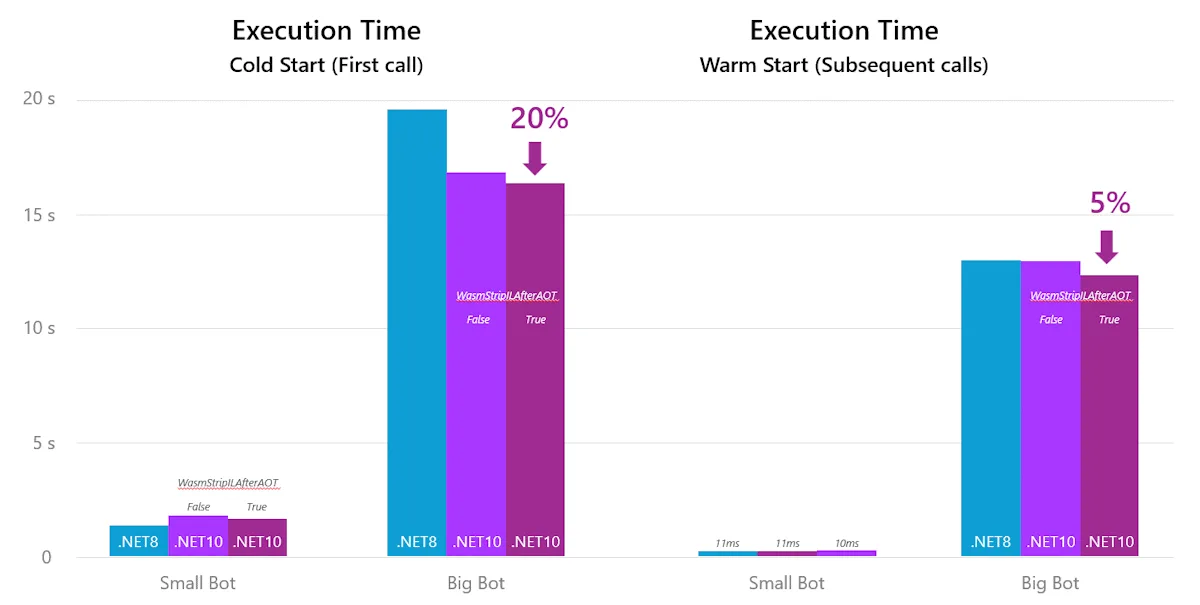
These gains are most visible in large, complex agents — the “big bots” scenarios where AOT-compiled code does the heavy lifting.
Try .NET 10 for your WebAssembly apps
If you’re running a Blazor or .NET WebAssembly application on .NET 8, .NET 10 is well worth trying:
- Update your project’s
<TargetFramework>tonet10.0and refresh yourMicrosoft.AspNetCore.*,Microsoft.Extensions.*, andSystem.*package references. - Remove any custom asset renaming or
integrityplumbing — fingerprinting is now built in. - If you AOT-compile, you’ll automatically benefit from the new
WasmStripILAfterAOTdefault.
Need help getting your apps to the latest version of .NET? GitHub Copilot app modernization for .NET can analyze your solution, plan the upgrade, and apply the necessary changes for you. Learn more about modernizing your .NET applications at dotnet.microsoft.com/platform/modernize.
Copilot Studio’s upgrade is one more example of how each release of .NET continues to make WebAssembly faster, smaller, and simpler to ship.
Special thanks to Denis Voituron from the Copilot Studio team for sharing the migration details and performance data that made this post possible.