


The new second-generation AirTag devices have 50% greater range, longer battery life and a louder speaker, improving the already invaluable tracking pucks over the originals (and keeping the design the same).
What's the big deal about these tiny metal and plastic pucks? If you've ever been traveling and reached your destination without your luggage, you know the anxiety of wondering where your bags might be. Were they put onto another flight? Left behind? Or maybe they're just stuck somewhere in the labyrinth of the airport. Whatever the case, putting Apple AirTags in your bags, as well as on your keys and other objects, is the best way to keep track of them.
Apple's portable Bluetooth trackers are so popular that major airports and airlines are now plugged in to Apple's Find My service and can help you pinpoint a bag that could be wending its way through an airport's luggage system or was left behind where you started your trip.
Here's all you want to know about AirTags. For more, learn about why you shouldn't put an AirTag on a pet and discover five unexpected places to stash an AirTag.
What's an Apple AirTag?
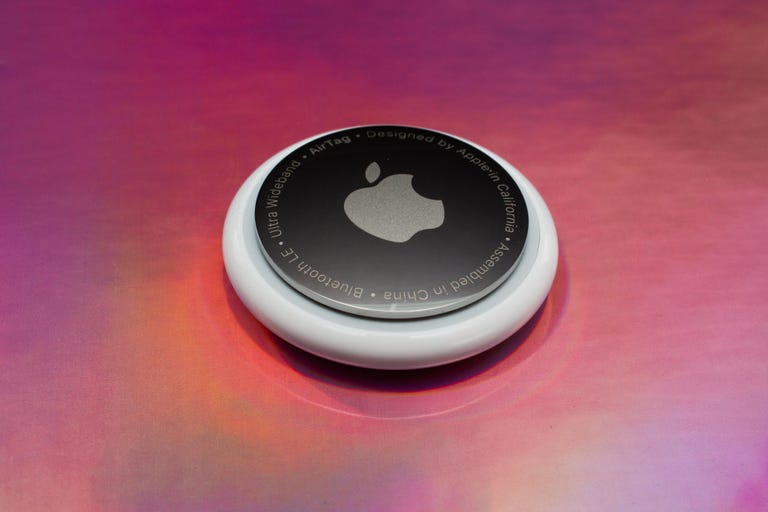
An AirTag is a tracking device that securely broadcasts its location via Bluetooth. It's a small glossy white puck, not much larger than a US quarter, and about the height of three stacked coins. A CR2032 coin cell battery keeps the AirTag powered for roughly a year.

AirTags, back and front.
AppleOnce the AirTag is paired with an iPhone or iPad, you can essentially forget about it. Hang it on a keychain or drop it into a bag -- whatever you want to track or find later.
What's new with the second-gen AirTag?
Apple didn't change the look of AirTags between the first and second generations, but the circuitry inside is what sets them apart. The new tags incorporate five improvements:
- Precision Finding range is improved: The new trackers include a second-generation ultra-wideband (UWB) chip, which extends the range at which they can be detected by a device such as an iPhone by 1.5 times compared to the original AirTags.
- Precision Finding with an Apple Watch: That new UWB chip also lets you use an Apple Watch Series 9 or later, or an Apple Watch Ultra 2 or later, to direct you to an AirTag. Update to WatchOS 26.2.1 to enable this feature.
- Longer Bluetooth range: A new Bluetooth chip also extends the range at which an AirTag can communicate. That's important when you're trying to locate a tag near you, but it's also for how AirTags securely communicate with nearby devices to report their locations to the Find My network (see more details below).
- The speaker is louder: Apple says it's 50% louder than the previous generation, which is good when you're searching your house to find where the AirTag's chirp is coming from.
- They make a new distinctive sound: Speaking of the chirp, the new AirTags produce a distinctive new chime that Apple says should be easier to hear in noisy environments.
How can I tell the difference between AirTag generations?
If you're holding a first-gen AirTag and a second-gen AirTag in each hand, you won't be able to tell them apart initially. (Unless you can sense that the second-gen tracker weighs 0.8 grams more.) But there are a couple of differences.
Flip the tags over to reveal the metal back and you'll see that the writing around the edge of the second-gen AirTag is in all caps. It also lists "Find My," "NFC" and "IP67" to denote its other communication capabilities and resistance to water and dust. The first-gen AirTag includes "Designed by Apple in California" and "Assembled in China."

Enlarge Image
Here's the 2nd-gen AirTag (left) next to a five-year-old 1st-gen AirTag.
Patrick Holland/CNETHow much do AirTags cost, and where can I buy them?
A single AirTag retails for $29 direct from Apple and can often be bought for about $24 at most electronics stores.
However, it's always more economical to buy AirTags in packs of four -- once you find a use for a solitary AirTag, you'll soon think of other things you want to track. Apple sells the set for $99. Some retailers, such as Amazon, Best Buy and Walmart, have them for about $75, bringing the per-item cost down below $20. AirTags are also frequently discounted during major sales like Black Friday and Prime Day.
Because the AirTag second-gen trackers are brand-new and offer more performance than the first generation, expect them to be priced at a higher retail price for a while. That makes the first-gen tags even more of a good deal until supplies run out if you don't need the newest features, such as a current $60 deal at Best Buy.

If you do order from Apple, you can engrave initials, numbers and emoji free, which can help you tell the AirTags apart (or just add a personal spin).

You can personalize AirTags with laser engraving if you order them directly from Apple.
Sarah Tew/CNETIs it difficult to set up a new AirTag?
In typical Apple fashion, activating a new AirTag is easy. Initially, a plastic tab slipped in between the electronics and the battery, keeping the AirTag inert. Once you pull that tab and the pieces make contact, the AirTag starts broadcasting its presence. When you bring it close to an iPhone or iPad, a dialog box appears, giving you the option to connect the AirTag.

An iPhone senses when a new AirTag is nearby and begins the connection process.
Screenshot by Jeff Carlson/CNETWhen you tap Connect, choose a description of what the tag will be associated with, such as "Handbag" or "Luggage"; you can also enter a custom name. Choose an emoji to represent the AirTag in the Find My app and tap Continue. The AirTag is linked to your Apple ID.
How do I locate an AirTag?
In the Find My app on your iPhone, iPad or Mac, tap the Items button to view the AirTags you've activated. On an Apple Watch, open the Find Items app.
Tap the item you want to locate. If you think it's close by, the easy option is to tap the Play Sound button to make the AirTag emit a high-pitched trill. However, if you have an iPhone 11 or later (not counting the iPhone SE), tapping Find uses the iPhone's ultra-wideband chip to locate the AirTag with more precision -- not just estimating the distance, such as "1.5 ft nearby," but also pointing you in the right direction as you move around. The second-gen AirTags use Apple's latest UWB chip, which means you can also use precision finding on an Apple Watch Series 9 or later.
If the item is not in your general vicinity, the Find button becomes a Directions button that passes the location to the Maps app for driving, walking, transit or cycling routes.

To locate a nearby item, tap its AirTag (left), tap the Find button (middle) and then let the iPhone guide you to it (right).
Screenshot by Jeff Carlson/CNETWhat if I forget items while I'm heading out?
Being able to find something I've lost is invaluable, but it would be better if I didn't forget it in the first place. For every AirTag, you can enable Notify When Left Behind, which sends a notification if you and the AirTag are no longer together.
That could be as simple as forgetting a bag at a restaurant or -- more alarming -- if someone swiped the item and is making a getaway.
What's the secret to how AirTags work?
You know how in many thrillers and spy movies someone plants a tracker on a person and is then able to pinpoint the target's location, no matter where they are? That always seemed far-fetched to me -- what sort of range would a tiny piece of electronics have, really? -- but an AirTag is essentially that.
The AirTag itself doesn't have that sort of range, but it has something better: millions of devices carried by Apple customers surrounding it. At regular intervals, the AirTag sends a low-power Bluetooth signal containing an encrypted ID. Any nearby iPhone, iPad, or Mac picks up the signal, adds its location coordinates (if it knows them), and sends it to Apple servers in a secure background transmission.
Apple AirTags are super useful, but how do they work, exactly?
Sarah Tew/CNETThat's how I knew, when my luggage chose to spend an extra day in Europe without me, that it was still at the airport in France. Likely, an iPhone owned by a traveler or employee picked up the AirTag's ID in my bag and relayed it to Apple. When I opened the Find My app on my iPhone in Seattle, it queried the servers and presented the AirTag's last known location.
All of this happens in the background -- no personal information is sent -- and the impact to the relaying device's performance and battery is negligible.
What about privacy? Can a hidden AirTag track me?
Just as you can use an AirTag to track your personal objects, it is possible that someone could drop an AirTag into your bag or coat pocket to try to track your movements. Apple has put a few safeguards in place to try to prevent that type of situation.
If your iPhone or iPad detects an unknown AirTag nearby that stays close to you, a notification appears that says "AirTag Found Moving With You." When you ransack your belongings and find it, open the Find My app on your iPhone or iPad, tap Items and then tap Identify Found Item. Place the AirTag against the back of the device at the top until you see a notification. When you tap that, you're taken to a web page with the tag's serial number and, optionally, contact information.
If it turns out a family member's AirTag fell out of a bag, no worries. If it's unfamiliar, you can follow the instructions to disable the tag.
For more, see how to protect yourself from being tracked.
What if I suspect that my AirTag is stolen?
You've looked everywhere and used the Find feature to scan for it, but your item with an AirTag is nowhere to be found. Now what?
In the AirTag's details in the Find My app, scroll down to Lost AirTag and tap Show Contact Info. If someone finds the tag and checks it as described above, you can have a phone number or email displayed, along with an optional message, when they look up its information.
The other option is to choose Share Item Location, which creates a link you can send to someone identifying where the tag is. The link is active for just one week, which is hopefully more than enough time for someone to track it down. For example, suppose your bag is swiped; you could share the link with the police so they can track it down. (For safety reasons, don't confront someone who's stolen your property.)

Share an AirTag's location temporarily with someone using a link.
Screenshots by Jeff Carlson/CNETWhen the item and its AirTag are returned, a notification appears that you've been reunited. Or you can hide the tag's location at any time by tapping Stop Sharing Item Location on the same screen, which invalidates the shared link.
How can I share an AirTag with someone I trust?
An AirTag is linked to your Apple Account, but for years, that presented a problem: AirTags assigned to other people in my household would trigger the "AirTag Found Moving With You" warning -- not great on family trips when we'd take my wife's car.
Fortunately, it's now possible to share an AirTag's location with up to five people. Tap a tag in the Find My app, and under Share AirTag, tap Add Person. Tap Continue on the screen explaining what will happen, then select a contact and tap Share.

Share an AirTag with a trusted friend so you can both view its location.
Screenshots by Jeff Carlson/CNETIn that person's Find My app, they can accept the shared item. Note that all people you add can track the location.
How long does the battery last, and how do I replace it?
In my experience, the CR2032 coin battery in each AirTag lasts about a year. When the level dips below about 10% remaining, you're alerted that the battery is low, and a red indicator appears in the Find My app.

When the battery in an AirTag gets low, an indicator appears in the Find My app.
Screenshots by Jeff Carlson/CNETTo replace the battery, turn the silver back counter-clockwise to release its latches. Lift the existing battery out and replace it with a new one, making sure the battery's identifying markings are facing you. Then align the tabs of the metal portion with the slots in the plastic piece, press lightly and turn clockwise. The AirTag will chirp when the electronics and battery are securely in contact.
The battery in an AirTag is easily accessible and simple to replace.
AppleCan I use AirTags with an Android phone?
AirTags are not directly compatible with Android phones -- there's no app that ties into Apple's Find My network. To get the same tracking functionality, consider the Chipolo One Point tracker, which uses Google's Find My Device network.
Apple once offered an Android app called Tracker Detect that let you identify a found AirTag, but it's no longer available on newer Android devices -- an app with that name in the Google Play Store is from a different developer. However, for phones with NFC chips installed, you can place a found AirTag against the back of the phone to view its information.
For more, learn about this year's best AirTag accessories and everything about Apple Intelligence.