








And Neo makes three. Apple's new budget laptop gives MacBook shoppers a third option next to the established MacBook Air and Pro lines. The MacBook Neo is a near-perfect starter Mac, and I'm willing to live without most of its features because of its low price. It costs $500 less than the cheapest MacBook Air. We've got reviews of the new Neo and M5 MacBook Air as well as the big 16-inch MacBook Pro with both the M5 Pro and M5 Max chips. We have a MacBook favorite for any budget.
The 15-inch MacBook Air is proof that you don't need a Pro to get a larger display. It supplies a larger screen, once found only on the pricier Pro models. If you're eyeing the 14- or 16-inch Pro models primarily for the added screen size, the MacBook Air 15 is the more affordable option you should go for.
Pros
- Optimal balance of screen size and system weight
- Improved app, graphics and AI performance from M5 chip
Cons
- Costs hundreds more than MacBook Neo
- Smooth ProMotion display still exclusive to MacBook Pro
The MacBook Neo is easily the best laptop for school use, especially if you (or the student you're buying for) already have an iPhone. The two devices work seamlessly together. At $599, the Neo is nearly half the price of the cheapest MacBook Air, and students and teachers can get it for only $499. Given the convenience and security that Touch ID provides, however, I'd view Apple's $100 educational discount as a way to get the added Touch ID (along with more storage) for free, rather than lowering the price of the base model.
Pros
- Premium MacBook look and feel at much lower cost
- 13-inch display not much smaller than Macbook Air's
- A18 Pro chip is powerful enough to provide fulfilling MacOS experience
- Surprisingly impressive sound from stereo speakers
Cons
- Touch ID costs $100 extra
- Baseline 256GB SSD will fill up fast
- No MagSafe or fast charging
- Smaller battery and shorter battery life than MacBook Air
The 14-inch MacBook Pro was the first to get Apple's latest M5 processor. CNET senior editor Lori Grunin tested the new M5 MacBook Pro and found the chip's upgraded GPU architecture delivers big performance improvements over the M4 in certain areas such as AI image generation and ray-traced graphics.
Pros
- Excellent screen, especially with nano-texture
- Great performance
- Good size and reasonable weight for everyday use
- Same first-rate design as previous models
Cons
- Screen notch remains irritating
- Big drop in performance in low-power mode
- Only two external displays supported in the M5 model
- Prone to fingerprint smudges
- Bundled 70-watt adapter doesn't support fast charging
Apple's latest update to its 16-inch MacBook Pro delivers M5 Pro and M5 Max processors along with Apple's N1 wireless chip for Wi-Fi 7 networking. Prices have crept up with this year's 16-inch Pro updates -- the global memory storage isn't helping to keep laptop pricing steady -- but Apple has doubled the minimum storage with this year's 16-inch Pros. The M5 Pro model starts at 1TB, and the M5 Max config starts at 2TB.
Pros
- Fast
- Excellent screen
- Same solid design as previous model
Cons
- Can get loud and hot
- Heavy
- Big drop in performance in low-power mode
LAPTOP DEALS OF THE WEEK
Deals are selected by the CNET Group commerce team, and may be unrelated to this article.
What is the best overall MacBook?
The new MacBook Neo is the perfect low-cost laptop for school and casual home use, and the MacBook Pro is great for those who need higher-level processing and graphics performance for content creation, graphic design, advanced STEM work and gaming. In between, the MacBook Air is more of an everyday laptop that favors portability over performance, although it has power to spare and a long battery life, according to our tests. That’s why the MacBook Air is still CNET’s pick for the best MacBook for most people.
The 15-inch MacBook Air acts as a bridge between the 13-inch MacBook Air and MacBook Pro line, providing a bigger display without the MacBook Pro premium. Starting at $1,299 at Apple (and currently $150 off at Amazon, the new 15-inch M5 MacBook Air sits in the sweet spot of productivity, portability, performance and price, making it the best MacBook for most people.
We've been reviewing MacBooks for two decades now -- ever since the very first polycarbonate MacBook appeared in 2006 -- and we covered Apple's PowerBooks and iBooks before that. Apple's current laptop lineup is split between MacBook Neo, Air and Pro lines, and the differences between the three are significant. For more, check out my MacBook Air versus MacBook Pro comparison, and you can also check out the new look and features of the newest version of Apple's Mac operating system, MacOS Tahoe.
Read more: Best VPN for Mac
Best MacBooks of 2026
Pros
- Optimal balance of screen size and system weight
- Improved app, graphics and AI performance from M5 chip
Cons
- Costs hundreds more than MacBook Neo
- Smooth ProMotion display still exclusive to MacBook Pro
The 15-inch MacBook Air is proof that you don't need a Pro to get a larger display. It supplies a larger screen, once found only on the pricier Pro models. If you're eyeing the 14- or 16-inch Pro models primarily for the added screen size, the MacBook Air 15 is the more affordable option you should go for.
Why we like it
Apple just updated the MacBook Air with its M5 processor, catching it up to the MacBook Pro that got an M5 refresh at the end of last year. I tested the smaller 13-inch M5 MacBook Air and found the new silicon adds incremental improvements, especially in the areas of graphics and AI performance. Apple also upped the minimum storage for the Air to 512GB, which actually makes it a better deal than last year's model despite the higher starting price. You can read my review of last year's 15-inch M4 MacBook Air -- much of it still applies because the design remains unchanged on what I think is the laptop that sits in the Goldilocks zone of Apple's MacBook lineup.
Who it's best for
People looking for a big-screen MacBook who don't need the power of a MacBook Pro. With its roomy display, trim design and ample performance for most users, the 15-inch MacBook Air should be viewed as the default Air, with its cheaper and smaller 13-inch sibling a good alternative for students and others with tighter budgets and busy, on-the-go lifestyles who might need more power than the MacBook Neo.
Who shouldn't get it
The majority of students who need a more affordable and portable laptop will be better off spending a lot less on the new MacBook Neo. Creative types who need more graphics oomph will need to spend more for the added power of a MacBook Pro.
Pros
- Premium MacBook look and feel at much lower cost
- 13-inch display not much smaller than Macbook Air's
- A18 Pro chip is powerful enough to provide fulfilling MacOS experience
- Surprisingly impressive sound from stereo speakers
Cons
- Touch ID costs $100 extra
- Baseline 256GB SSD will fill up fast
- No MagSafe or fast charging
- Smaller battery and shorter battery life than MacBook Air
The MacBook Neo is easily the best laptop for school use, especially if you (or the student you're buying for) already have an iPhone. The two devices work seamlessly together. At $599, the Neo is nearly half the price of the cheapest MacBook Air, and students and teachers can get it for only $499. Given the convenience and security that Touch ID provides, however, I'd view Apple's $100 educational discount as a way to get the added Touch ID (along with more storage) for free, rather than lowering the price of the base model.
Why we like it
It has the same luxurious, all-aluminum design as Apple’s other MacBooks, and its 13-inch display is nearly as big as the 13.6-inch Air’s. The Neo’s iPhone chip can’t match the performance of an M-series processor, but it’s still powerful enough to provide a smooth MacOS experience for most people.
Who it’s best for
Anyone on a student budget who can’t spend $1,000 or more on a laptop, especially if you already own an iPhone, because iOS and MacOS work so well together.
Who shouldn’t buy it
Students in STEM or design programs will likely need more power than the Neo offers and will need to spend more on a MacBook Air or even a MacBook Pro.
Pros
- Excellent screen, especially with nano-texture
- Great performance
- Good size and reasonable weight for everyday use
- Same first-rate design as previous models
Cons
- Screen notch remains irritating
- Big drop in performance in low-power mode
- Only two external displays supported in the M5 model
- Prone to fingerprint smudges
- Bundled 70-watt adapter doesn't support fast charging
The 14-inch MacBook Pro was the first to get Apple's latest M5 processor. CNET senior editor Lori Grunin tested the new M5 MacBook Pro and found the chip's upgraded GPU architecture delivers big performance improvements over the M4 in certain areas such as AI image generation and ray-traced graphics.
Why we like it
It offers a great mix of power and portability, and the mini-LED display is stunning -- especially with the optional nano-texture layer. And it’s a ProMotion display, meaning it has a smooth 120Hz refresh rate, which is one thing you don’t get with a MacBook Air.
Who it’s best for
Anyone who wants or needs more power than you get with a MacBook Air but doesn’t want to lug around (or pay even more for) the massive 16-inch Pro model.
Who shouldn’t get it
Budget shoppers can save hundreds by opting for a MacBook Air, either the even more portable 13-inch Air or the even roomier 15-inch Air. And power users who need a bigger display and the added power from the higher core counts of an M5 Pro or M5 Max chip are better off with the 16-inch MacBook Pro.
Pros
- Fast
- Excellent screen
- Same solid design as previous model
Cons
- Can get loud and hot
- Heavy
- Big drop in performance in low-power mode
Apple's latest update to its 16-inch MacBook Pro delivers M5 Pro and M5 Max processors along with Apple's N1 wireless chip for Wi-Fi 7 networking. Prices have crept up with this year's 16-inch Pro updates -- the global memory storage isn't helping to keep laptop pricing steady -- but Apple has doubled the minimum storage with this year's 16-inch Pros. The M5 Pro model starts at 1TB, and the M5 Max config starts at 2TB.
Why we like it
The design remains unchanged from the previous version, but under the hood, the new M5 Pro chip offers better overall performance. Although the design didn't receive an update, it's still solid and offers a reasonable weight given the roomy display.
Who it's best for
Graphics pros and creators who need the power and big screen of the 16-inch MacBook Pro will be best served by this laptop. The 16-inch MacBook Pro with the M5 Pro processor starts at $2,699, and the M5 Max model starts at $3,899. If you need the speed, it's worth the dough.
Apple MacBooks compared
See how the MacBook Air and MacBook Pro models measure up.
| MacBook Neo | 13-inch MacBook Air (M5) | 15-inch MacBook Air (M5) | 14-inch MacBook Pro (M5) | 16-inch MacBook Pro (M5 Pro) | |
|---|---|---|---|---|---|
| Starting price | $599 | $1,099 | $1,299 | $1,699 | $2,699 |
| CPU | A18 Pro | M5 | M5 | M5 | M5 Pro |
| No. of CPU cores | 6 | 10 | 10 | 10 | 18 |
| No. of GPU cores | 5 | 8 | 10 | 10 | 20 |
| Starting RAM | 8GB | 16GB | 16GB | 16GB | 24GB |
| Starting storage | 256GB | 512GB | 512GB | 1TB | 1TB |
| Screen size | 13 in | 13.6 in | 15.3 in | 14.2 in | 16.2 in |
| Screen resolution | 2,408x1,506 pixels | 2,560x1,664 pixels | 2,880x1,864 pixels | 3,024x1,964 pixels | 3,456x2,234 pixels |
| Weight | 2.7 lbs | 2.7 lbs | 3.3 lbs | 3.4 lbs | 4.7 lbs |
| Dimensions (HWD) | 0.5 x 11.71 x 8.12 in | 0.44 x 11.97 x 8.46 in | 0.45 x 13.4 x 9.35 in | 0.61 x 12.31 x 8.71 in | 0.66 x 14.01 x 9.77 in |
| Connections | USB-C x2, headphone | Thunderbolt 4 x2, headphone, MagSafe 3 | Thunderbolt 4 x2, headphone, MagSafe 3 | Thunderbolt 4 x3, HDMI, SDXC card, headphone, MagSafe 3 | Thunderbolt 5 x3, HDMI, SDXC card, headphone, MagSafe 3 |
| Battery | 36.5-watt‑hour | 52.6-watt‑hour | 66.5-watt‑hour | 72.4-watt-hour | 100-watt-hour |
The new MacBook Neo and the 16-inch MacBook Pro based on Apple's new M5 Pro and M5 Max processors are the newest additions to the list.
The first fork in the road you'll come to when shopping for a MacBook is whether to follow the Air path, head down the Pro road or take the Neo shortcut. For people who are looking for an everyday home laptop or a work laptop for running basic office apps, a MacBook Neo will suffice. For creative types who need the added processing and graphics muscle of Apple's new M5 Pro and Max chips, a MacBook Pro is worth the added cost. And in between, the MacBook Air remains an excellent mainstream laptop and the cheapest way to get a large display powered by an Apple M-series processor. To help you find the right MacBook for your needs and budget, here are the main considerations to keep in mind.
Price
The entry price for a MacBook is $599. That gets you the new MacBook Neo. Pricing starts at $1,099 for the 13-inch MacBook Air and $1,299 for the 15-inch MacBook Air. Stepping up to a MacBook Pro model starts at $1,699. Here are the starting prices of Apple's current MacBook lineup:
- MacBook Neo: $599
- 13-inch M5 MacBook Air: $1,099
- 15-inch M5 MacBook Air: $1,299
- 14-inch M5 MacBook Pro: $1,699
- 16-inch M5 Pro MacBook Pro: $2,699
Size and display
If you'll be taking your MacBook with you to class, work or even down to your local coffee shop most mornings, an Air is the better choice. The 13-inch MacBook Air models weigh less than 3 pounds, and the roomier 15-inch Air weighs only 3.3 pounds, which is still lighter than the 14-inch MacBook Pro.
The flip side to portability is screen size. The 16-inch MacBook Pro gives you ample room to work and multitask, while the 14-inch MacBook Pro tries to hit the sweet spot between roomy display and travel ease. Unless you need Pro-level performance, we feel the 15-inch Air does a better job of hitting that target.
- 13-inch MacBook Neo: 13-inch display (2,408x1,506 pixels), 2.7 pounds
- 13.6-inch M5 MacBook Air: 13.6-inch display (2,560x1,664 pixels), 2.7 pounds
- 15.3-inch M5 MacBook Air: 15.3-inch display (2,880x1,864 pixels), 3.3 pounds
- 14.2-inch M5 MacBook Pro: 14.2-inch display (3,024x1,964 pixels), 3.4 pounds
- 16.2-inch M5 Pro MacBook Pro: 16.2-inch display (3,456x2,234 pixels), 4.7 pounds
Processor
The processor, aka the CPU, is the brains of a laptop. MacBooks have used Apple's own processors since the introduction of the M1 processor in 2020. The M1-based MacBooks were clear improvements over Apple's earlier Intel-based machines in terms of overall performance, efficiency and battery life. The M1 MacBooks were more powerful, boasted longer runtimes and operated more coolly and quietly.
The latest lineup of MacBook Airs feature Apple's M5 chip, with the exception of the new MacBook Neo that's based on the A18 Pro chip borrowed from the iPhone 16 Pro. With the MacBook Pro line, more powerful configurations are available with Apple's M5 Pro and M5 Max processors.
Graphics
The graphics processor handles all the work of driving the screen and generating what gets displayed, as well as speeding up a lot of graphics-related (and increasingly, AI-related) operations. Apple's M-series CPUs integrate the GPU. The more processing cores the GPU has, the better the graphics performance. Here's the breakdown:
- A18 Pro: 5-core GPU
- M5: 10-core GPU
- M5 Pro: 16-core or 20-core GPU
- M5 Max: 32-core or 40-core GPU
Memory
Memory (or RAM) is where the operating system stores all the data for currently running applications, and it can fill up fast. After that, it starts swapping between RAM and SSD, which is slower. The MacBook Neo has 8GB of RAM, and MacBook Air models start at 16GB of RAM, along with the 14-inch M5 MacBook Pro. The minimum on the M5 Pro MacBook Pro models is 24GB, and the M5 Max MacBook Pros serve up 36GB or more.
You can't upgrade the memory on recent MacBooks post purchase, so you'll need to get all of the RAM you'll need upfront. MacBooks are able to smoothly run MacOS and the preinstalled apps with the minimum RAM offered, but doubling the RAM will make your MacBook feel faster and likely lead to a longer life of the laptop.
Storage
MacBooks feature solid-state drives, or SSDs. The MacBook Neo starts with a 256GB SSD, but MacBook Air models offer a minimum of 512GB. MacBook Pros now start at 1TB SSD. If you use cloud storage for your files, music collection and photo library, then you might be able to get away with a 256GB SSD without filling it up before too long.
The review process for laptops consists of two parts: performance testing under controlled conditions in the CNET Labs and extensive hands-on use by our reviewers. This includes evaluating a device's aesthetics, ergonomics and features with respect to price. A final review verdict is a combination of both objective and subjective judgments.
Our benchmark tests consist of a core set we run on every compatible system, including several we can run on both MacOS and Windows PCs. There's also an extended set of tests for specific use cases, such as gaming or content creation, where systems may have more powerful GPUs or higher-resolution displays that need to be evaluated.
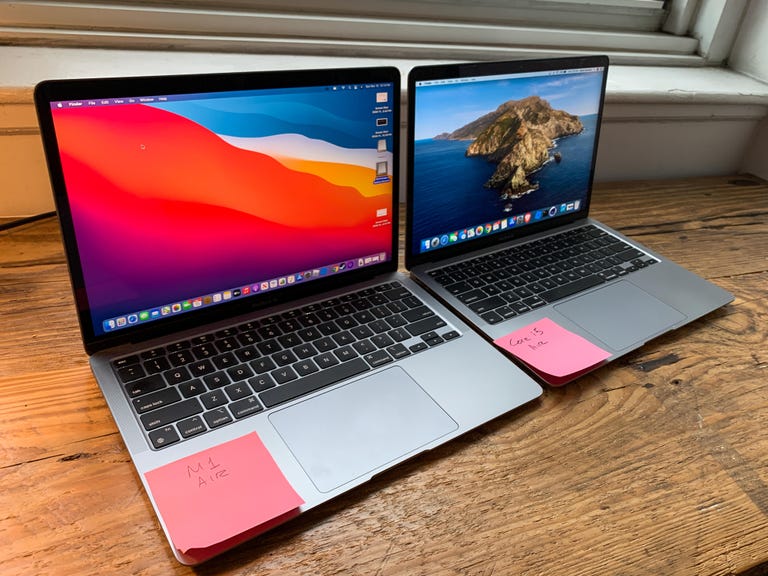
The new M1 Air next to the 2020 Intel Core i5 Air.
Dan Ackerman/CNETFor the hands-on portion of the review, the reviewer uses the laptop for their work during the review period, evaluating how well the design, features like the screen, camera and speakers and manufacturer-supplied software operate as a cohesive whole. We also place importance on how well everything works, given the cost, and where the manufacturer has potentially made upgrades or trade-offs for the price.
The list of benchmarking software and comparison criteria we use changes over time as the devices we test evolve. You can find a more detailed description of our test methodology on our How We Test Computers page.
Lenovo Yoga Slim 7x Gen 11: This slender laptop's second-gen Snapdragon X2 chip has truly impressive performance, but you'll need to keep looking if you're after strong graphics performance.
Dell XPS 16: It costs as much as Nvidia RTX models but lacks RTX graphics. Still, the XPS 16 is a strong overall performer with a thin-and-light design.
Acer Swift Edge 14 AI: It’s a sleek and solid OLED laptop, but it forces some compromises.
Asus Zenbook A16: It’s a true AI laptop among artificial imitators and also impossibly thin and light for its size.
Alienware 18 Area-51: It's a dazzling and heavy-duty (emphasis on "heavy") showcase of laptop technology for deep-pocketed gamers.
Dell XPS 14: It's great to see Dell bring back the XPS and do so with such style.
GeekBook X14 Pro: Geekom’s first laptop is impressively thin and light but battery life disappoints. And I detest the touch pad.
Lenovo IdeaPad 5i 16 2-in-1 Gen 10: Lenovo's low-cost, 16-inch two-in-one is a versatile machine, but it forces you to live with more than a couple of compromises in the design.
Lenovo Yoga Pro 9i 16 Aura Edition: Centered on a gorgeous 16-inch OLED display, this kick-ass Yoga laptop provides the performance and build that graphics pros demand.
Microsoft Surface Pro (12-inch): The 12-inch version of Microsoft's detachable two-in-one will suffice for most users, but getting nickel-and-dimed by optional accessories that feel quite necessary is annoying.
Dell 14 Premium: Dell’s creator laptop is rock solid to a fault.
HP OmniBook 5 14: Record-setting battery life is only part of its charm. It also has a pleasing design, OLED display and ample RAM and storage -- all at an affordable price.
Dell 16 Premium: It’s a good fit for creators, as long as you aren't turned off by its peculiar design, hefty weight and high price.
Acer Aspire 16 AI: Weighing less than 3.5 pounds and offering amazing battery life, this is the rare 16-inch laptop that's easy to take with you.
Lenovo Yoga 9i 2-in-1 Aura Edition: This premium two-in-one is a near-perfect package with a fantastic OLED display and record-setting battery life.
Lenovo LOQ 15: This budget gaming laptop has an outdated design but serves up modern components and good 3D performance for the price.
Which is better: MacOS or Windows?
For many people, deciding between a MacOS laptop and a Windows machine will come down to personal preference and budget. The new MacBook Neo starts at just $599, but you can find budget Windows laptops for even less.
For the money, you're getting great hardware top to bottom, inside and out, but you're limited to just Apple laptops. With Windows and Chromebooks, you get an amazing variety of devices at a wide range of prices.
Software between the two is plentiful, so unless you need to run something that's available on only one platform, you should be fine to go with either. Gaming performance is definitely an advantage for Windows laptops, though.
Show more
What’s the difference between the MacBook Air and MacBook Pro?
On the whole, MacBook Pro models are more powerful and more expensive, while also being slightly thicker and heavier than their Air counterparts.
The MacBook Air is available with a 13.6-inch or a 15.3-inch display. The 13-inch Air starts at $1,099, and the 15-inch Air starts at $1,299. The MacBook Pro is available with a 14.2-inch or 16.2-inch display. The 14-inch Pro starts at $1,699, and the 16-inch Pro starts at $2,699.
The 16-inch model has such a higher starting price because it has a more powerful M5 Pro chip, while the base model of the 14-inch Pro features the M5 chip, which is newer but offers fewer CPU and GPU cores. The M5 Pro chip in the 16-inch MacBook Pro is truly a pro-level processor, with 18 CPU cores and 20 GPU cores, while the M5 chip in the baseline 14-inch model has 10 CPU cores and 10 GPU cores.
If you don’t need the power of a MacBook Pro, you can save on weight with an Air. The 13-inch MacBook Air weighs 2.7 pounds, and the 15-inch Air weighs 3.3 pounds. The 14-inch MacBook Pro weighs 3.4 pounds, and the 16-inch Pro weighs 4.7 pounds.
For more, check out my MacBook Air vs. MacBook Pro article
Show more
Which Macs support Apple Intelligence?
The current generation of M5 MacBook Air and Pro models as well as the MacBook Neo allow you to use Apple Intelligence features. Previous-generation MacBooks also offer support. The M3, M4 and M5 chips feature a 16-core neural engine that supports Apple Intelligence.
Show more
What are the best MacBook alternatives?
The two Windows laptops I’ve tested that come closest to a MacBook Air’s mix of solid build quality, streamlined design, strong performance and long battery life are the Microsoft Surface Laptop 7 and HP OmniBook Ultra Flip 14. Based on a Qualcomm Snapdragon X CPU, the Surface Laptop 7 offers strong application and AI performance along with outstanding battery life. It was the first Windows laptop I've tested with a longer battery life than that of the MacBook Air. The OmniBook Ultra Flip 14 doesn’t offer as long a battery life but supplies a high-resolution OLED display that detracts from battery life, but is beautiful to look at.
Meanwhile, the new Dell XPS 14 does a reasonable facsimile of a MacBook Pro.
Show more