


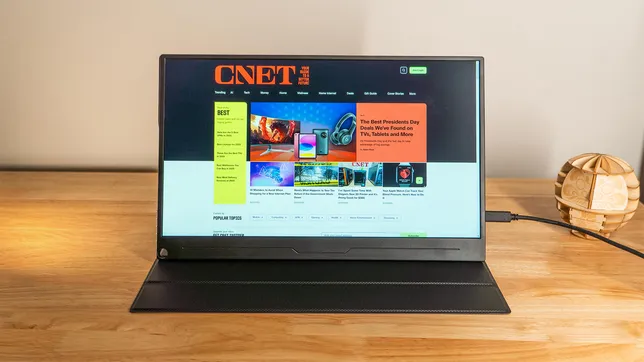
Uperfect A17 DS15607
Pros
- Sharp and bright
- Multiple connection options
- Comes with a stand and cover
Cons
- Can require auxiliary power
- Limited angle adjustments
The Uperfect A17 monitor doesn't quite deliver everything it promises, but don't write it off. It's competitively priced for what it can do, so you might still want to consider it.
The 15.6-inch panel packs in the pixels to deliver a 3,840x2,160-pixel resolution, making images look exceptionally sharp. Uperfect backs that up with solid brightness, which I measured at 426.6 nits (a touch shy of the 450-nit rating), and a surprising 1,610:1 contrast ratio. These pair well with a strong matte finish, making it easy on the eye.
I tested the A17 and found that it has a respectable 99% coverage of the sRGB color space. AdobeRGB performance fell short of what was promised, though. Uperfect says it's 100%, but my testing revealed just 81% coverage. P3 coverage was also a bit short, at 84%.
But despite coming up short of Uperfect's claims, the A17 performs well for a budget portable monitor. Its $250 retail price is reasonable, and I've seen it discounted as low as $190.
No surprises here, but it does the job.
Mark Knapp/CNETYou won't get the most exciting industrial design with the A17. It's just a big plastic slab, nearly half an inch thick with an inch-high bottom bezel. There's no integrated kickstand, either. Instead, you get a magnetic cover that protects the display when it's not in use, then holds the screen at a few different angles when it is. It's not elegant, but it's simple and effective.
The Uperfect A17 has two USB-C ports and an HDMI port.
Mark Knapp/CNETThe back of the display has VESA mounting holes, should you want more permanent placement.
There's a small hole at the bottom left corner. You can slot a pen or pencil into it, creating an improvised stand. This is something we've also seen from Asus portable monitors over the years.
No kickstand to hand? Use a pen.
Mark Knapp/CNETThe Uperfect A17 has two USB-C ports and an HDMI port. It can run off a single-cable connection but, as I've found with other monitors, this isn't always reliable. Running the monitor at maximum brightness and using its (bad) built-in speakers requires more power than one cable can supply. In my testing, it began to cycle on and off uncontrollably. I got over that hurdle by using an external speaker.
Your results might be different depending on how much power your laptop can pump through to the display. For instance, the Thunderbolt 4 USB-C port on one laptop I tested with provided enough power for this monitor, while a USB4 USB-C port on another system did not.
The case isn't very exciting, but it'll protect your monitor.
Mark Knapp/CNETThe A17 is far from an exceptional monitor. But it delivers strong brightness and clarity for the money, and it comes in a solid package for on-the-go productivity.
Uperfect A17 DS15607 test results
| Product name | Size | White point | Gamma | Peak brightness | Default brightness | Gamut coverage (P3 and sRGB) |
|---|---|---|---|---|---|---|
| Uperfect A17 DS15607 | 15.6 inch | 6,600K | 2.1 | 426.6 | 252.9 | 99% sRGB, 84% P3 |
How we test monitors
Measurements for the Uperfect A17 were taken using a Spyder X2 Ultra colorimeter using DataColor's Spyder X2 software for SDR. Color accuracy measurements results are reported in Delta E 1976 using Datacolor's 48-color patch test.
On the most basic models we may only test brightness, contrast and color gamut. With more capable displays we may also run tests of user-selectable modes for gaming or color-critical usage, uniformity and so on. We may also run tests to verify how white point accuracy varies with brightness. We also use Blur Busters' motion tests to judge motion artifacts (such as ghosting) or refresh rate-related problems that can affect gaming.
We tested HDR using VESA DisplayHDR Test app's patterns to display 100% and 10% windows for brightness measurements and RGBW values. These were also measured using the Spyder X2 Ultra to get CIE xyY color values to compare against the DCI-P3 color space's xyY color values to calculate HDR gamut coverage using this gamut calculator.
Keep in mind that individual results can and often do vary from a manufacturer's reported results for a variety of reasons.