



惯性聚合 高效追踪和阅读你感兴趣的博客、新闻、科技资讯
阅读原文 在惯性聚合中打开

推荐订阅源

C
Cisco Blogs
The Cloudflare Blog
云风的 BLOG
云风的 BLOG
Recorded Future
Recorded Future
F
Fortinet All Blogs
Microsoft Azure Blog
U
Unit 42
博客园 - 三生石上(FineUI控件)
Threat Intelligence Blog | Flashpoint
N
Netflix TechBlog - Medium
C
Check Point Blog
Security Latest
Security Latest
MongoDB | Blog
MongoDB | Blog
P
Proofpoint News Feed
J
Java Code Geeks
The GitHub Blog
The GitHub Blog
V
Vulnerabilities – Threatpost
阮一峰的网络日志
阮一峰的网络日志
P
Palo Alto Networks Blog
C
CERT Recently Published Vulnerability Notes
F
Full Disclosure
C
Cyber Attacks, Cyber Crime and Cyber Security
雷峰网
雷峰网
T
The Blog of Author Tim Ferriss
T
Threat Research - Cisco Blogs
Cisco Talos Blog
Cisco Talos Blog
V
V2EX
Latest news
Latest news
Engineering at Meta
Engineering at Meta
A
About on SuperTechFans
Cyberwarzone
Cyberwarzone
The Hacker News
The Hacker News
A
Arctic Wolf
CTFtime.org: upcoming CTF events
NISL@THU
NISL@THU
腾讯CDC
P
Privacy & Cybersecurity Law Blog
G
GRAHAM CLULEY
罗磊的独立博客
S
Schneier on Security
C
Cybersecurity and Infrastructure Security Agency CISA
博客园 - 司徒正美
K
Kaspersky official blog
L
Lohrmann on Cybersecurity
C
CXSECURITY Database RSS Feed - CXSecurity.com
月光博客
月光博客
cs.CL updates on arXiv.org
Project Zero
Project Zero
奇客Solidot–传递最新科技情报
奇客Solidot–传递最新科技情报
I
InfoQ

NetBird - Networking Knowledge Hub - RSS Feed

NetBird Is Now on the Vultr Marketplace Native NetBird on the GL.iNet Comet Pro (GL-RM10) NetBird v0.71 - IPv6 Overlay Addressing NetBird Exit Nodes - Appear at Home, or Anywhere Else Reporting Bugs and Requesting Features in NetBird Setup and Use Local AdGuard Home Anywhere with NetBird DNS How to Set Up NetBird on PiKVM for Secure Remote KVM Access NetBird v0.69 - CrowdSec IP Reputation for the Reverse Proxy Cloudflare Mesh vs NetBird vs Tailscale: Performance Compared Self-Hosting Nextcloud with Docker and NetBird Implementing Zero Trust with NetBird NetBird v0.67 - Layer 4 Proxy Support for TCP, UDP, and TLS Solwr Enhances Remote Connectivity with NetBird Self-Hosting NetBird with Authentik Jellyfin Media Server - Self-Host Your Movies, TV, and Music Cloudflare Tunnels vs. NetBird Reverse Proxy INFITX Builds Zero-Touch Kubernetes Networking with NetBird NetBird v0.66 - Expose Local Services to the Internet from the CLI Pangolin vs. NetBird Home Assistant Setup Guide with EASY Remote Access NetBird v0.65 - Built-in Reverse Proxy with Custom Domains Docker for Beginners - Everything You Need to Get Started NetBird for SOC 2 Compliance NetBird v0.63 - Custom DNS Zones for Private Network Resolution Vibecode This in a Weekend and Take 5% of the Company NetBird v0.62 - Built-in Local Users with Optional IdP Integration NetBird v0.61.0 - Granular SSH Access Control and Automatic Updates Top 5 Alternatives to OpenVPN Top 5 Open Source Alternatives to Tailscale Top 5 Alternatives to ZeroTier How to Set Up ZeroByte and REST Server for Backups with NetBird How to Install n8n v2.0 with NPM and PM2 ZeroTier vs. NetBird The Ultimate Immich Guide - Ditch Google and Amazon Photos for Good NetBird as Your Help with ISO 27001 Compliance NetBird and Huntress - Secure Network Access for MSPs How to Access Windows Shares from Anywhere with NetBird netgo Relies on Modern ZTNA with NetBird Connect to Your Homelab from Anywhere with a Raspberry Pi NetBird SSH - A New, Identity-Aware Approach The AI Mega Mesh: How to Connect 30+ GPU Cloud Providers Connect Multiple Ollama GPUs to OpenWebUI with NetBird Top 5 Tailscale Alternatives SSH and RDP, now in your browser NetBird–Acronis Integration: Empowering MSPs for Advanced Ransomware and Threat Defense Introducing the Control Center - Remote Access, Beautifully Visualized NetBird at MSP Global 2025 Understanding Overlay Networks - The Basics NetBird and SentinelOne Singularity™ - Automate Threat Response NetBird and Microsoft Intune - Enforcing Device Compliance for Zero Trust Rethinking Zero Trust Security with NetBird and pfSense Improving Unidirectional Access Control Proxmox VE for Beginners Guide with NetBird LXC Stronger Security: NetBird + GitHub Secure Open Source Fund NetBird's MSP Partner Program Signicat Enhances Cross-Cloud Accessibility with NetBird SonicWall SSL VPN NetExtender vs. NetBird NetBird Is Embracing the AGPLv3 License NetBird Profiles Have Landed - Manage Multiple Accounts Effortlessly Rethinking Access Control to Secure Your On-Premises SharePoint Servers Sport Alliance Increases Efficiency with Zero Trust Networking at Scale Rethinking Network Access: qwertiko Goes Zero Trust with NetBird Optimizing Network Efficiency with NetBird's Lazy Connections Use Port Ranges in Access Control Policies Generic HTTP Endpoint for Network Events Streaming NetBird’s Response to Spear-Phishing Campaign Targeting Financial Executives Zero-Trust Access to Internal Resources Without Installing Agents Enhance Network Visibility with NetBird’s Traffic Events Logging TrueNAS Made Easy - Install, Set Up, and Access From Anywhere Top 5 Alternatives for WireGuard Jump Hosts. Gateways for Remote Access NetBird Network Routes and Exit Nodes Security for All - SSO and MFA for Free Enhancing Network Access Control with NetBird's Identity Provider Feature Twingate vs. NetBird FortiClient ZTNA vs. NetBird OpenVPN vs. NetBird Tailscale vs. NetBird Getting Started with an Azure Site-to-Site VPN Getting Started with an On-premise-to-AWS Site-to-Site VPN Secure Remote Access to VPCs, LANs, and Offices regreSSHion - A New OpenSSH Server Remote Code Execution Vulnerability Evolve Bank & Trust Data Breach. What Happened? What Is a Site-to-Site VPN? IPSec Tunneling Demystified. Enhancing Data Security Across Networks Understanding IPSec Tunnel and Transport Modes Understanding the Differences Between IKEv1 and IKEv2 Understanding the IKEv1 Protocol in IPSec ZeroTier versus NetBird - Which Should You Choose? AWS Lambda Serverless Security. Mistakes, Oversights, and Potential Vulnerabilities Using NetBird for Kubernetes Access Serverless Security Vulnerabilities and Best Practices to Mitigate Them Security Best Practices for Serverless Azure Functions A Guide to Remote Access Security for SMEs IoT Security Essentials. How to Achieve Secure Remote Access Open Source Zero Trust Networking Using SSH for Secure Remote Access How We Integrated Rosenpass in NetBird The First Quantum-Resistant Mesh VPN Using eBPF and XDP to Share Default DNS Port Between Multiple Resolvers
Limit Network Access Based on Running Applications
Written byMisha Bragin · 2024-08-01 · via NetBird - Networking Knowledge Hub - RSS Feed

Could an unvetted device be the gateway for your network’s next big security breach? As businesses expand, the influx of connected devices – from laptops and smartphones to IoT gadgets – creates a complex security challenge.

It’s critical to set robust network controls, as any device can introduce malware, ransomware, and other cyber threats when connecting to your network. Ideally, antivirus software should be a mandatory control, requiring it to be active on any device attempting access. Antivirus won’t catch everything, but it adds a valuable layer of defense.

Yet it remains difficult to manage such secure controls without disrupting workflows or adding significant overhead for IT departments. Organizations need a solution that not only enforces access policies but also provides a user-friendly experience for both administrators and end-users. NetBird offers this balance, providing seamless network control through a unified, open source platform that simplifies private network configuration and remote access management.

Secure Every Connection with NetBird

NetBird takes network security to the next level by combining the simplicity and power of WireGuard with a user-friendly, open source network security platform. Designed for seamless integration and transparent operation, its zero-configuration approach makes managing network access a breeze.

In this guide, we'll show you how to set up NetBird and create a posture check that enforces antivirus requirements effectively and easily – keeping your network safe from potential threats. Here's what we'll cover:

  • What are posture checks, and what types are available with NetBird.
  • How to install the NetBird agent on your device.
  • How to create and configure a process check from the NetBird dashboard.
  • How to add your new process check to a network access policy.

By the end of this tutorial, you’ll have a network security setup that denies access to any device unprotected by antivirus software.

What are Posture Checks?

Posture checks enforce your security policies by verifying specific conditions on devices attempting to connect to your network. NetBird offers a range of posture checks that can be combined to build robust security policies:

  • NetBird Client Version check - Devices must have a specific version of the NetBird client.

  • Geolocation check – Uses IP addresses to permit or block access based on location.

  • Operating System check – Devices must have a specific OS and version.

  • Peer Network Range check – Access is restricted to approved IP ranges.

  • Process check – Verifies if a specific process is running.

Today, our focus is on the Process check. While it’s often used to verify that an antivirus program is running, it’s also versatile enough to check for other critical processes. For instance, you could use it to confirm that firewall software or endpoint protection agents are active on a device.

How to Create a Process Check with NetBird

Step 1: Install the NetBird Agent

Start by installing NetBird on your machine. Follow the appropriate steps for your operating system. This installation includes NetBird's GUI and CLI, which you will use to manage and control the agent. You can find the detailed documentation here.
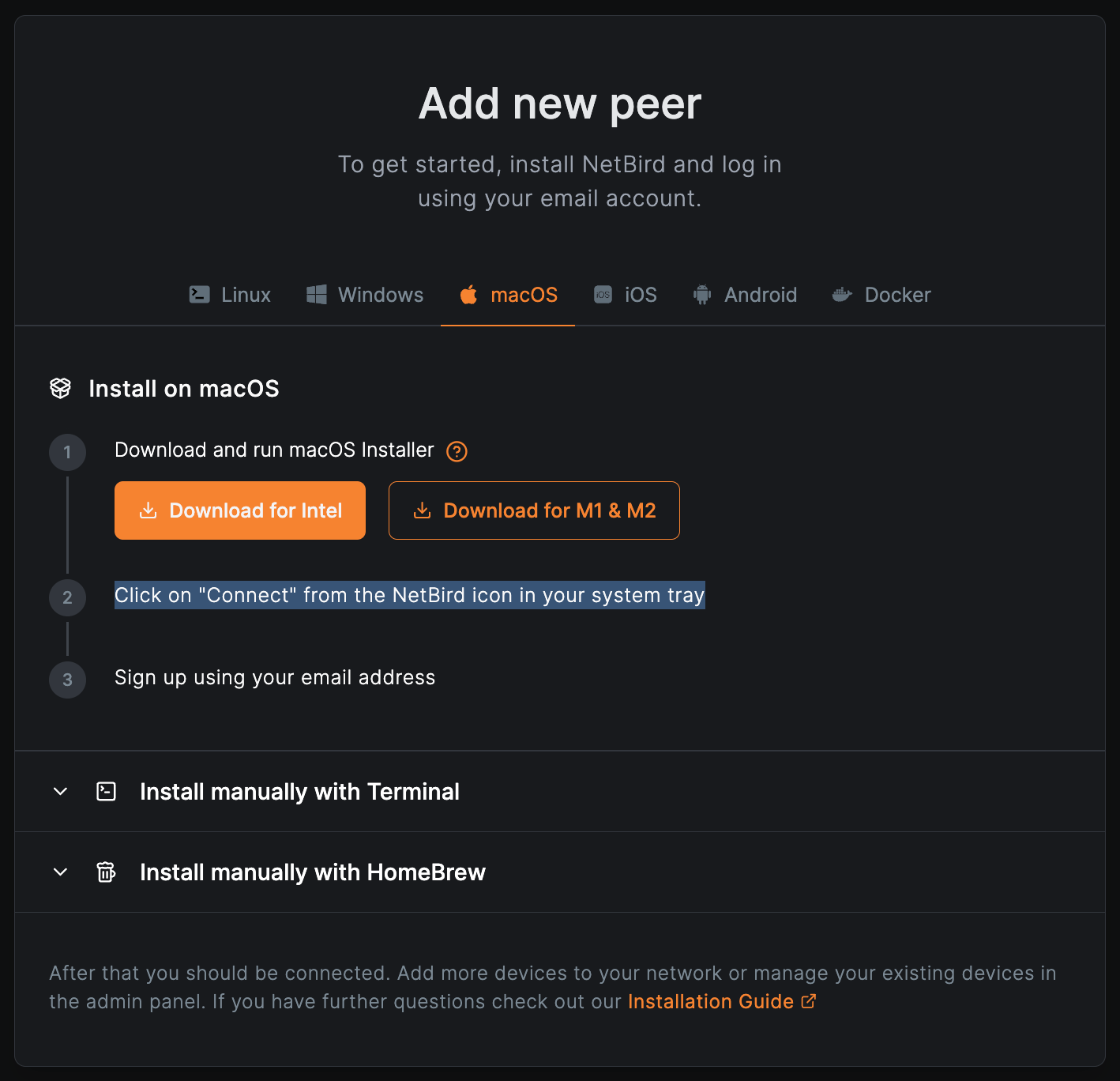
NetBird Installation

To authorize NetBird and connect your local machine to the peer-to-peer (P2P) network, use the Systray application and click “Connect”. Alternatively, you can use NetBird CLI and run the command in your terminal.
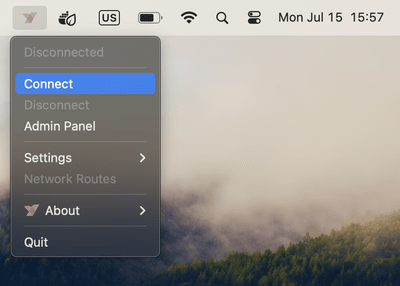
Connect NetBird

The application will redirect you to the NetBird login page. You can choose your identity provider of choice to create an account. If your identity provider supports multi-factor authentication (MFA), you will be prompted to pass the MFA challenge.
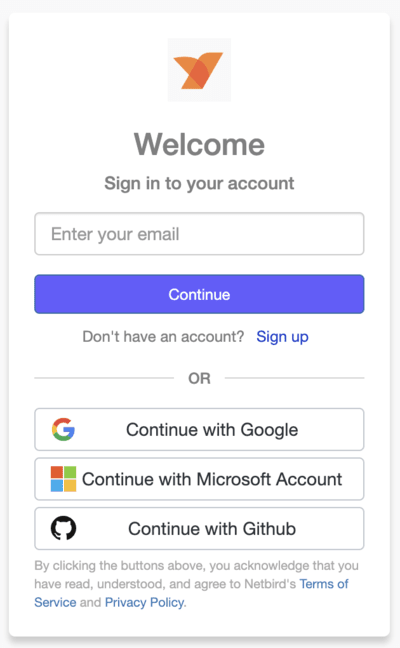
Connect NetBird

Once authenticated and connected, your local machine will appear in the Peers dashboard.

Step 2: Create and Configure a Process Check

To create a process check, navigate to the Access Control tab in the sidebar and select the Posture Checks subsection. In the Posture Checks view, click the Create Posture Check button:
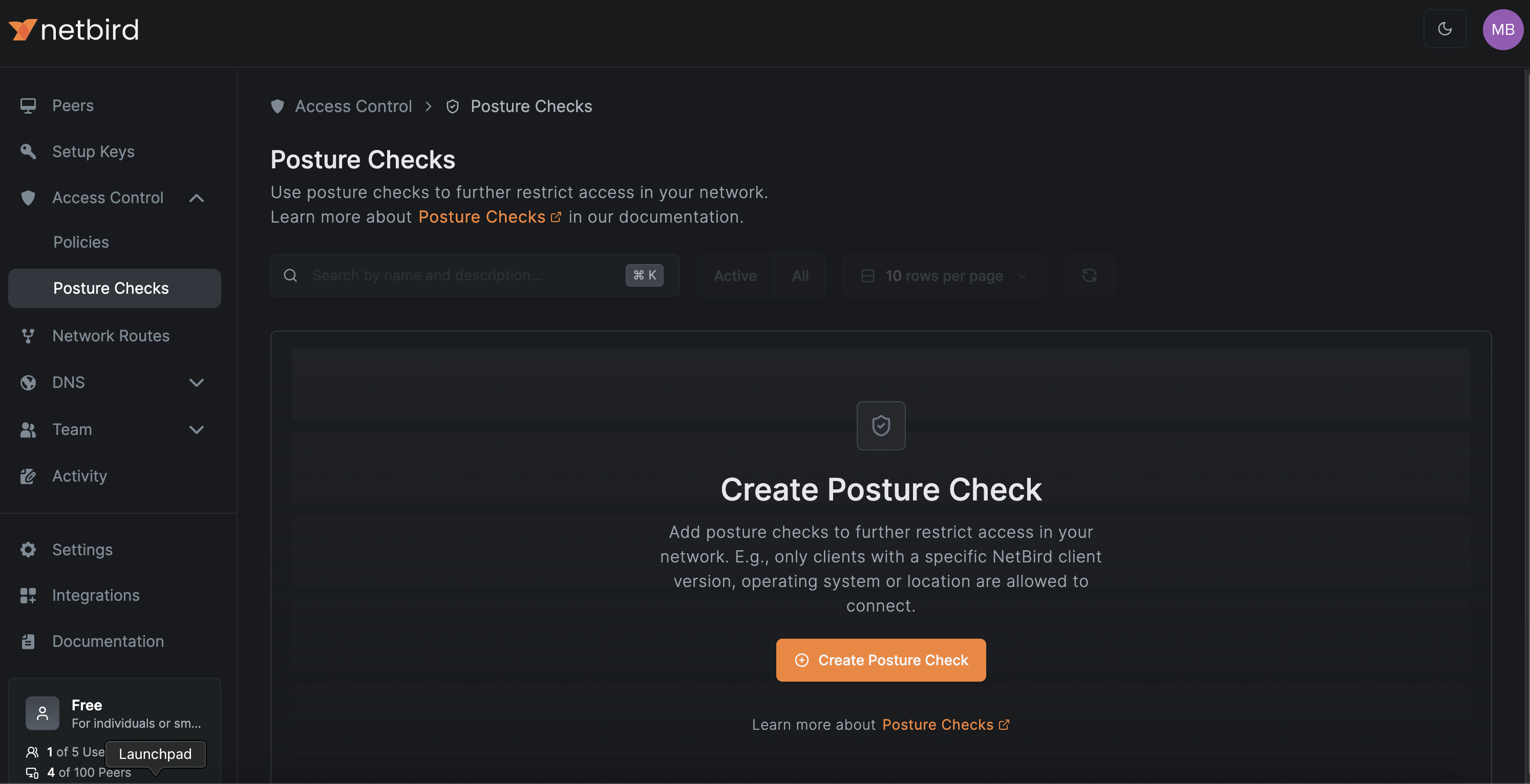
Create Posture Check

Select the Process option from the list:
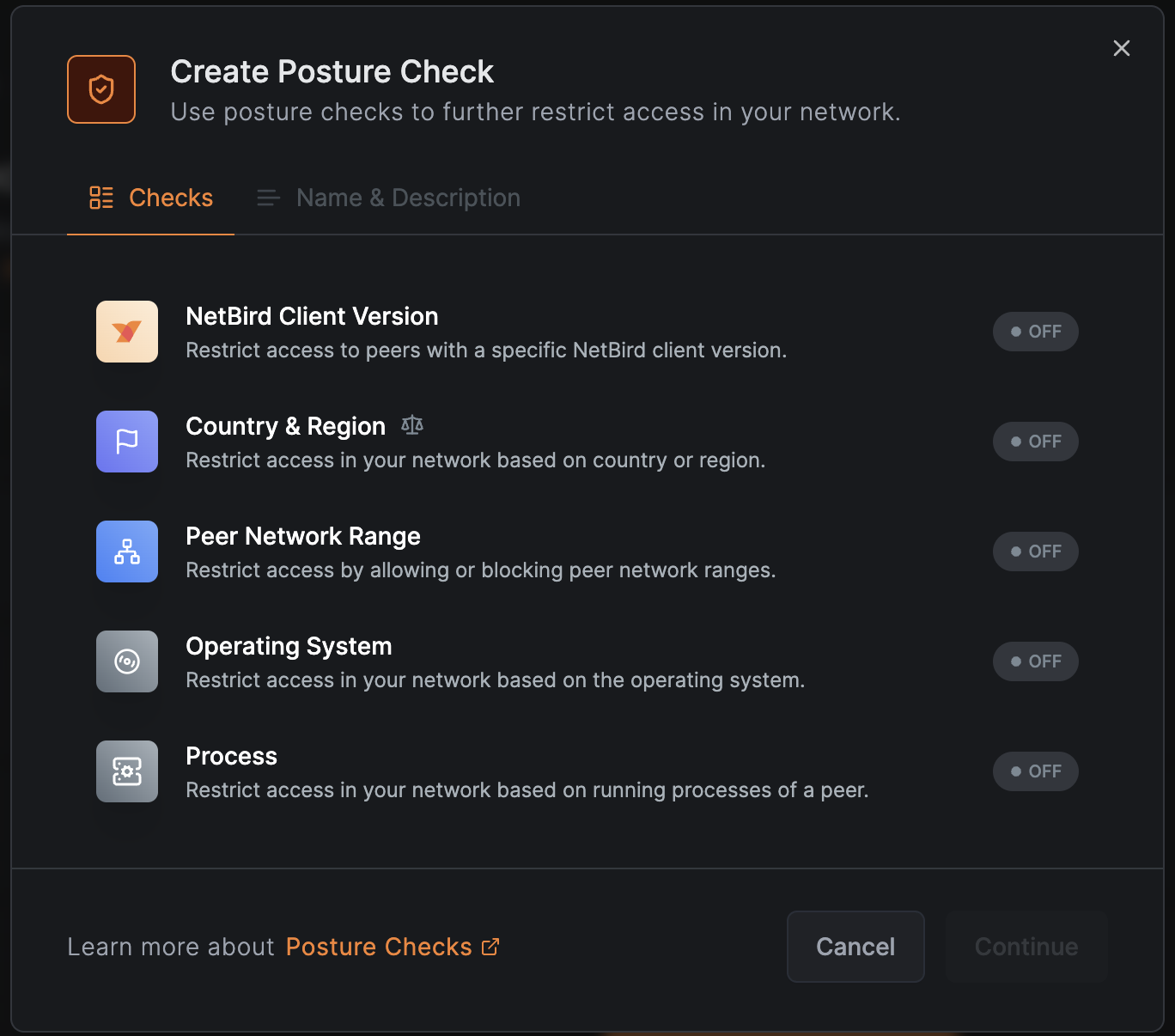
Create Posture Check

Now you need to specify the exact path of the required antivirus software. You can define paths for Windows, Linux, and macOS. If you don’t specify paths for certain operating systems, NetBird will block access for those systems by default. For example, if you specify a path for Windows only, access will be denied for all users on Linux or macOS machines. Since Android and iOS don’t support process checks, these OSs will always be denied.

You can also click Add Process if you’d like to add more than one antivirus program.
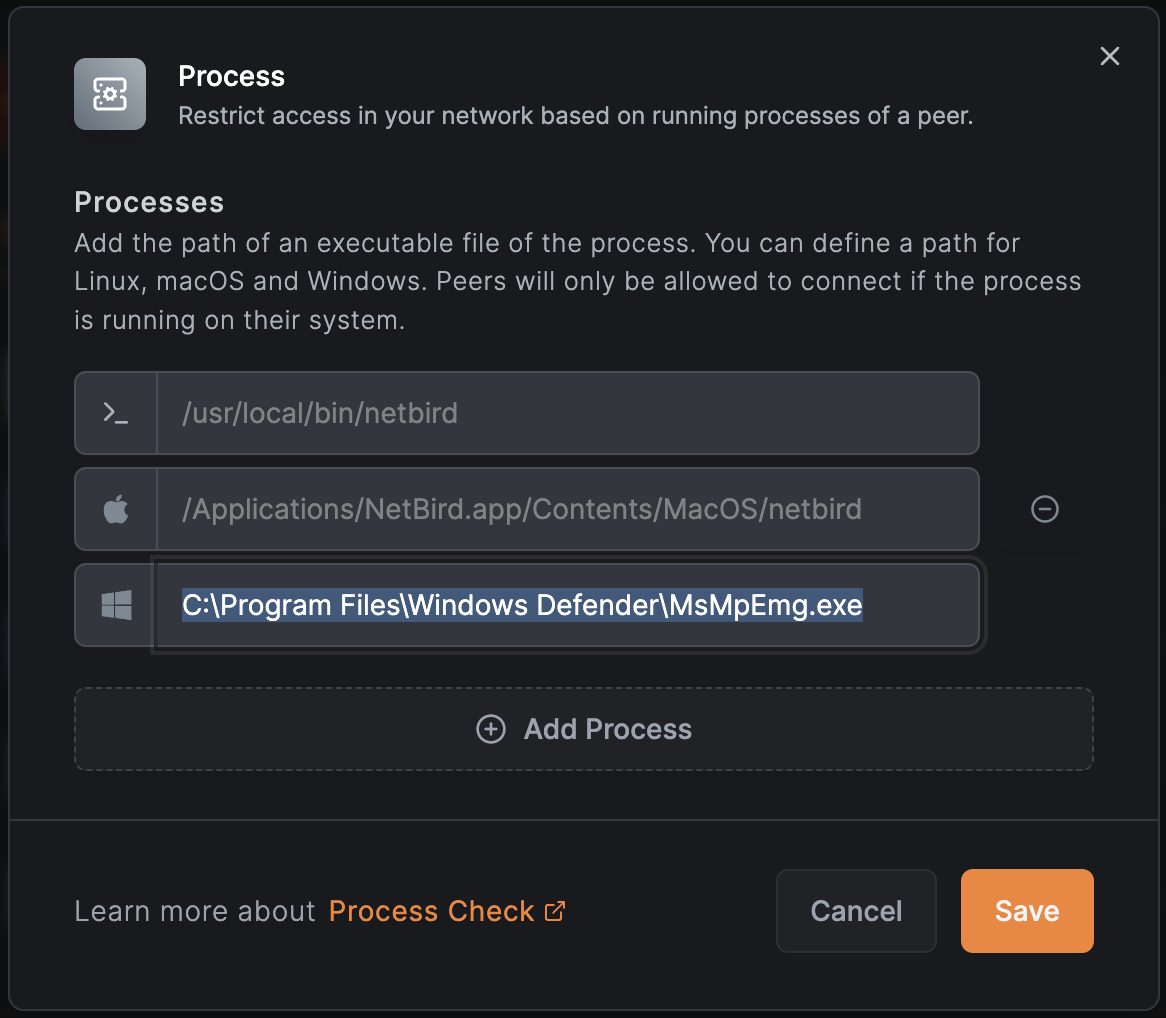
Select Antivirus Process

Click Save to toggle on the Process check. Then click Continue.
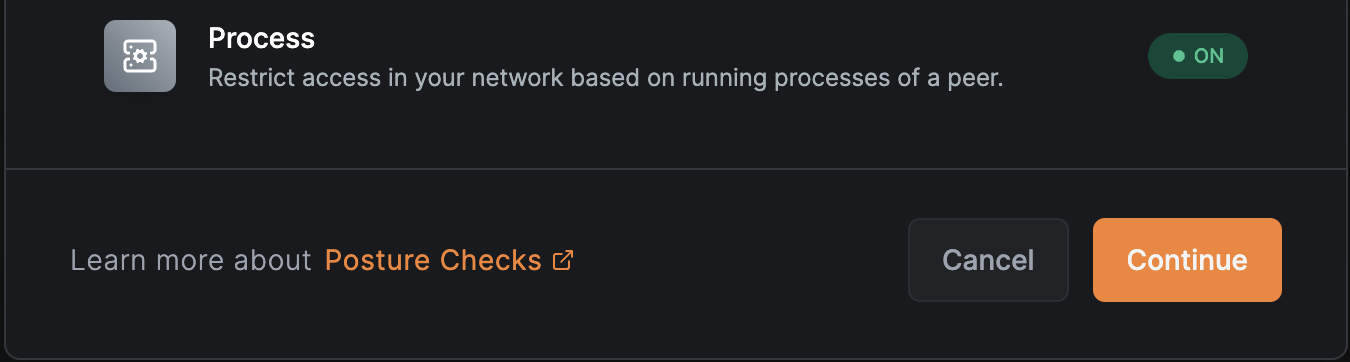
Save Process Check

Enter a clear and concise name for the posture check and provide a brief description explaining its purpose. When finished, click Create Posture Check.
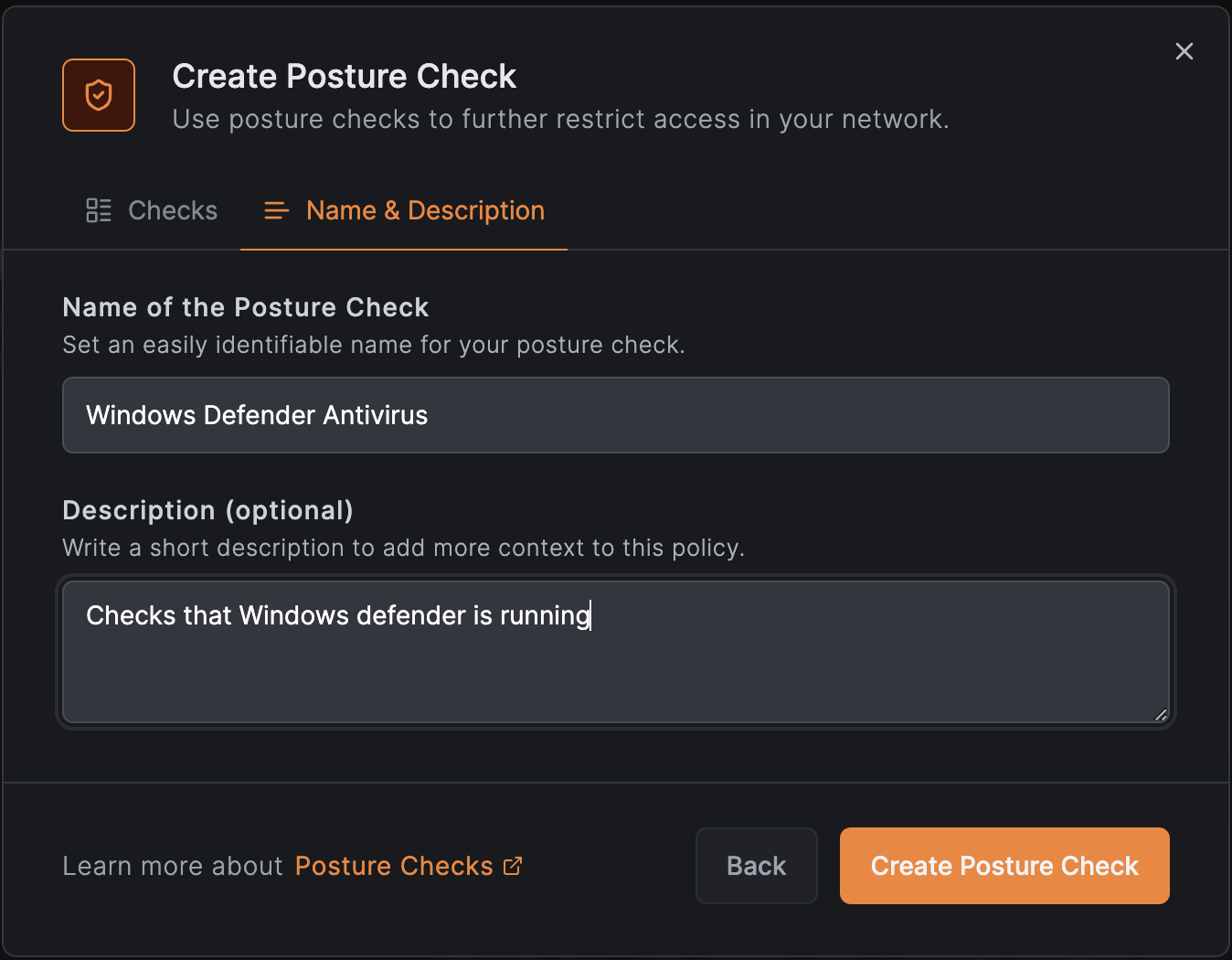
Create Posture Check

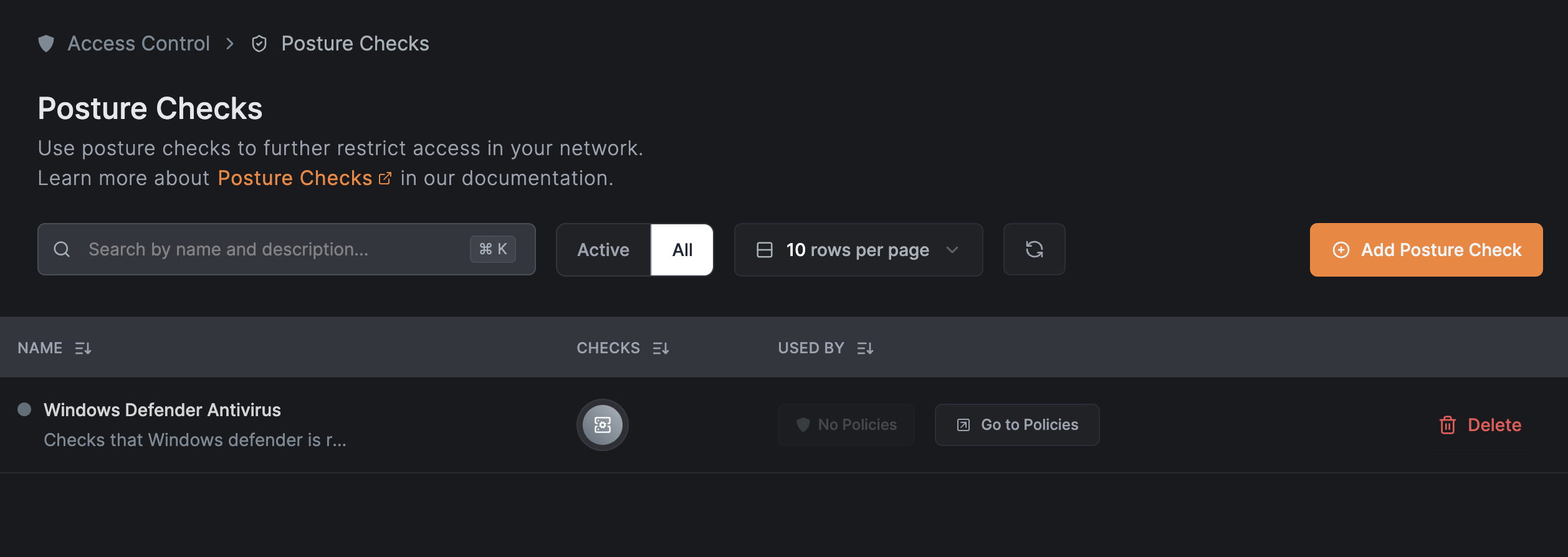
You should now see your new posture check listed in the Posture Checks view:
New Posture Check

Step 3: Adding Posture Checks to Policies

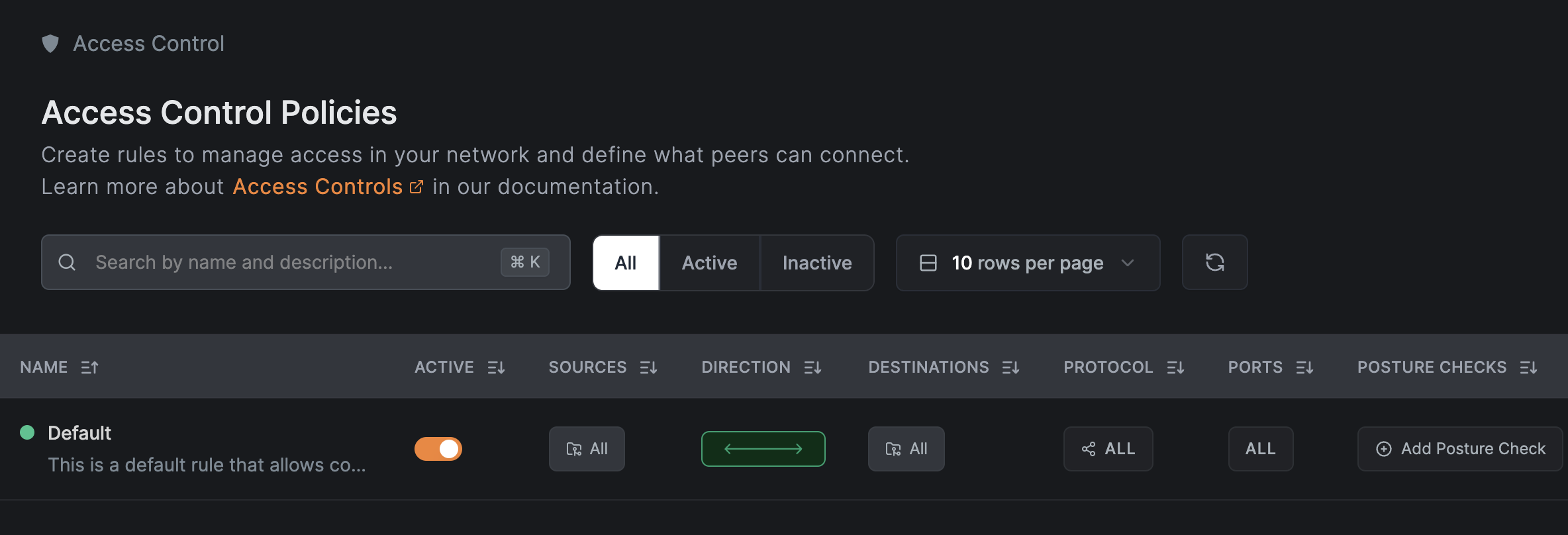
You may notice that the new posture check has no policies listed. To specify the policy, click Go to Policies or select Policies from the sidebar. If you haven’t created any custom policies yet, you can learn more about Access Controls in our documentation. For now, there is a default policy you can use that allows all connections from all devices. If you have multiple policies, choose the policy you want to enforce the posture check on and click Add Posture Check:
Default Policy

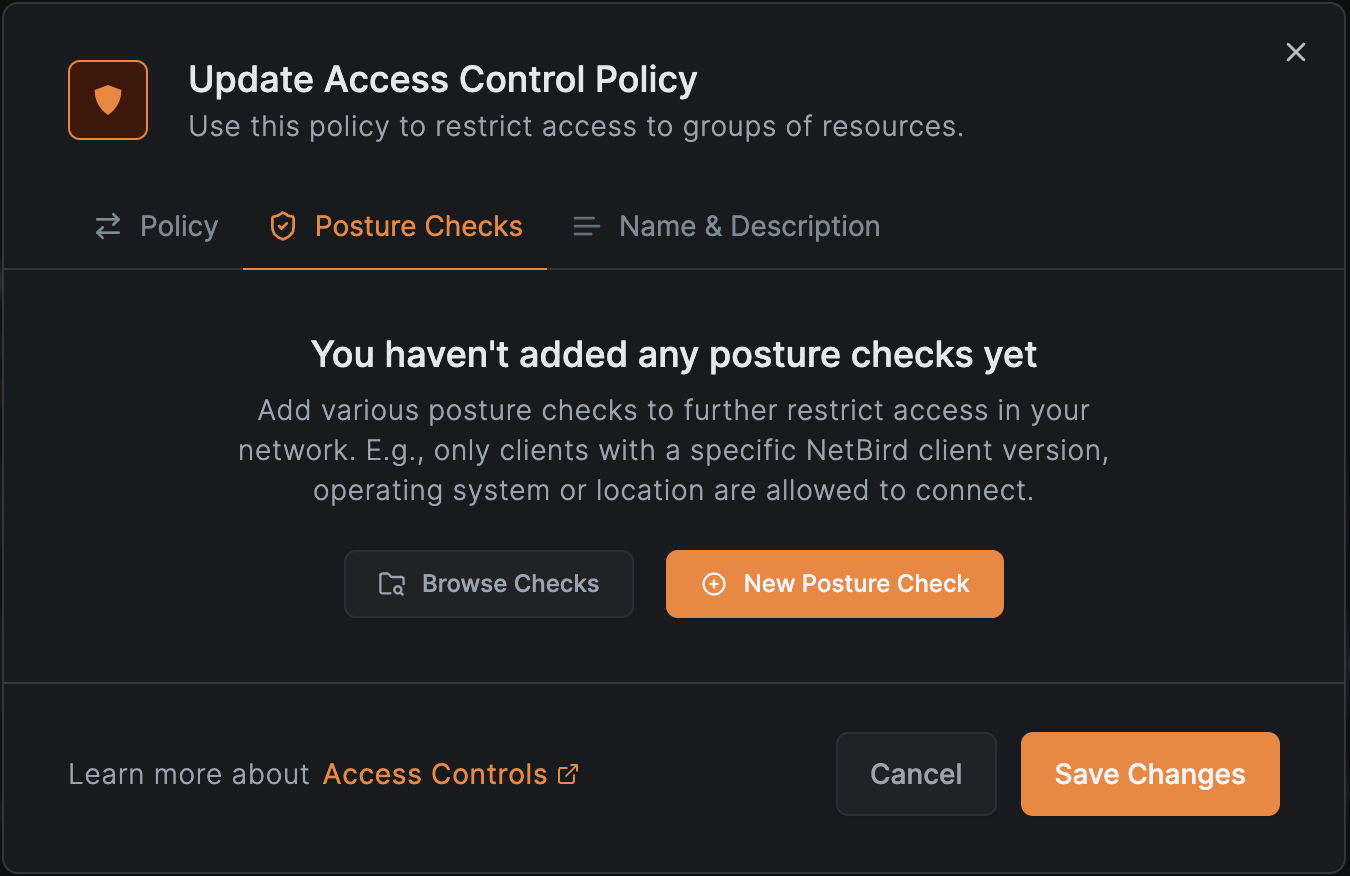
Within the Update Access Control Policy window, click Browse Checks.
Update Policy

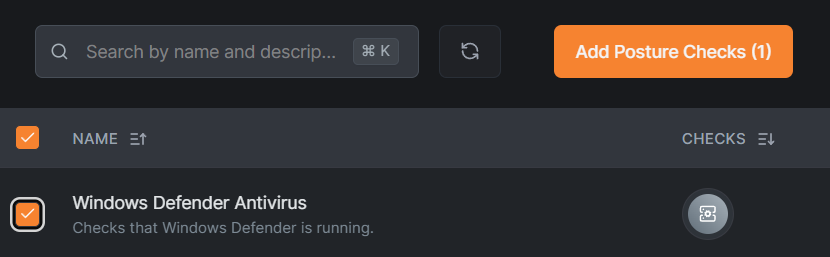
Select the checkbox for the antivirus process check and then select Add Posture Checks. On the next window, click Save Changes to save the policy updates.
Choose Posture Check

Manage Your Network the Easy Way With NetBird

If you’ve made it this far, then you’ve successfully learned how to prevent devices that lack active antivirus software from connecting to your P2P network by creating a process check through NetBird’s Peers dashboard. The zero-configuration approach makes it easy to manage access policies, customize posture checks, and meet your network security goals.

We invite you to explore more security features available with NetBird's peer-to-peer network, like EDR integrations .

Stay tuned for more NetBird guides and tutorials to help you secure your network and simplify network management tasks.