





The world of the Internet of Things (IoT) devices is a fascinating one. IoT devices enable you to get information about your devices and environments at a glance.
However, connecting these devices directly to the internet increases your attack surface, and bad actors can take advantage of the proliferation of IoT devices to compromise networks.
In this article, you'll learn how to securely access your IoT devices without directly exposing them to the internet.
The term IoT was first coined in 1999 by a computer scientist named Kevin Ashton , who proposed putting radio-frequency identification (RFID) chips on products to enable monitoring them throughout a supply chain. His idea was to use these chips and other sensors to connect miscellaneous things to the internet for tracking and measurement purposes.
Ever since then, whenever a nonstandard or noncomputing device gained the ability to connect to the internet, it became an IoT device. In June 2000, LG released the first internet refrigerator , which was an unsuccessful product, not only because it was expensive but because people didn't see the need for an internet-connected fridge. However, as more and more devices followed the trend of becoming internet-connected and better use cases were imagined and realized, IoT has only gained popularity.
In the agricultural space, IoT sensors help monitor soil moisture and nutrients . Sprinkler systems, for example, can be controlled to only activate if the moisture levels are low, saving money and potentially saving crops that are sensitive to overwatering.
More typical consumers can employ IoT-enabled luxuries, such as a coffee maker with a built-in alarm clock that starts the brewing process when your alarm goes off, ensuring that you have a hot cup waiting for you by the time you reach the kitchen.
Of course, the healthcare industry relies a lot on IoT to monitor patients' vital signs and alert healthcare practitioners when something is wrong.
As IoT devices gain popularity, both in the consumer and industrial markets, threat actors have taken notice. An IoT device can supply another possible entry into a vulnerable network. In fact, attacks on IoT devices have increased . While embracing IoT devices can increase your productivity or give you valuable insight into your company's processes, if you're not careful, you could be providing attackers with an exploitation target (or even a fleet of exploitation targets).
Originally, IoT devices were designed with a functionality-first mindset. In other words, the device does what it says on the box, and security is mostly an afterthought (if it's added at all). Nowadays, IoT device design considers security to be part of the process, but there are still many devices that ship with insecure defaults or overly permissive access controls.
Some of these bad security configurations include the following:
Securing your IoT devices and securing access to those devices are crucial parts of your security implementation. Regular audits should be completed, and access controls and methods should be reviewed from time to time.
There are several different ways you can secure your IoT devices, and you'll learn about some of the most popular options here. Some of these options are more traditional, such as firewalls or IoT gateways , while other options offer an alternative method.
Firewalls are a common network device that you can deploy to your network. A firewall commonly sits between your local home or corporate network and the internet.
You configure a firewall to allow only certain types of traffic or certain addresses or hosts to communicate to devices behind your firewall from the internet.
A firewall is a valid method to protect the IoT devices on your network from the general internet. However, depending on the restrictiveness of the firewall rules, you could still be allowing bad actors to access your IoT devices unless you have them properly locked down.
If you have a large amount of IoT devices, managing the firewall can be a tedious process.
Secure Shell (SSH) is a remote access protocol with strong encryption defaults and security configurations that allow for authentication methods, such as public key authentication . It's a widely accepted industry standard for establishing secure connections to servers, ensuring secure access, secure file transfer, and more.
Unfortunately, not all IoT devices support the SSH protocol for access, and even then, managing key rotations and key deployment to multiple users can quickly become an administrative nightmare.
An IoT gateway can be a physical or virtual device that serves as a crucial intermediary between IoT devices and the broader network infrastructure. It plays an important role in aggregating data from various IoT devices, processing it locally if needed, and then transmitting it securely to the cloud or other backend systems.
One of an IoT gateway's key functions is enhancing IoT device security by implementing robust authentication and encryption protocols, effectively safeguarding sensitive data from unauthorized access or manipulation. By serving as a centralized control point, IoT gateways enable and complement the implementation of security measures, such as firewalls, intrusion detection systems, and access controls, by providing a single point of access for all IoT devices. This, in turn, fortifies the overall security posture of IoT ecosystems.
It's important to note that you need to enforce and audit the use of an IoT gateway to make sure that all eligible devices make use of the gateway and don't bypass it.
Alternatively, you could add and/or configure your IoT devices to become part of a mesh network. For instance, NetBird is an open source mesh VPN platform that lets you quickly join peers in your mesh network simply by installing the client and authorizing the new peer. It makes for a zero-config VPN experience that you have to experience for yourself.
Built on top of the performant and lightweight WireGuard VPN protocol, the NetBird mesh network is secure and easy to configure. It supports many different operating systems and can even be installed in a container system like Docker .
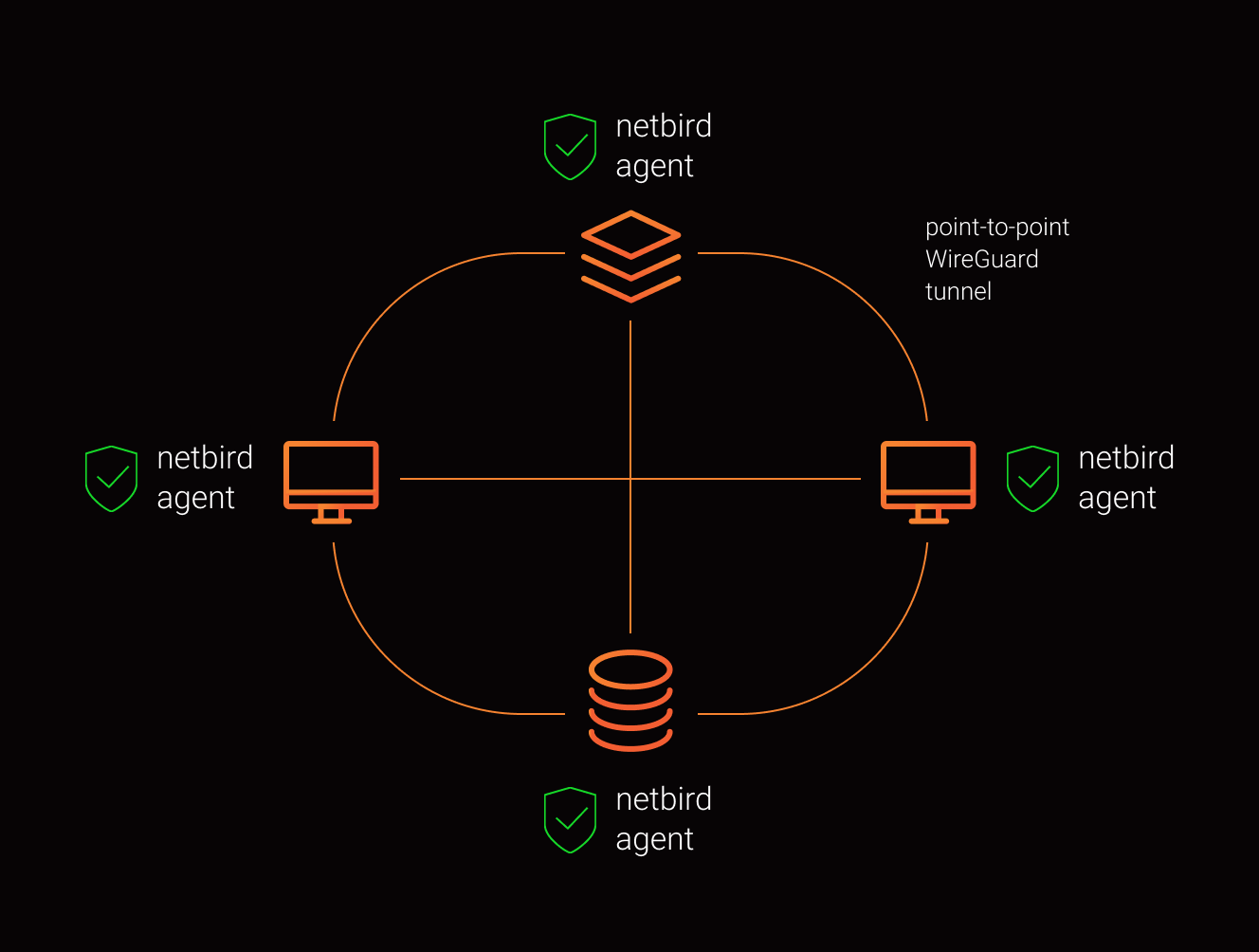
You can install NetBird on your IoT gateway to let your gateway become part of the mesh network.
For further security, you can isolate your IoT gateway from the public internet and make it available only to other devices that are also joined to your mesh network. Suppose all the IoT devices connect only to the gateway and are segmented to a private section of the network that cannot route to anything other than the gateway. In that case, you've effectively isolated your entire IoT fleet from the internet.
Because NetBird supports installation on so many different operating systems, you can install it on any PC acting as a router or even an OpenWRT -compatible router:
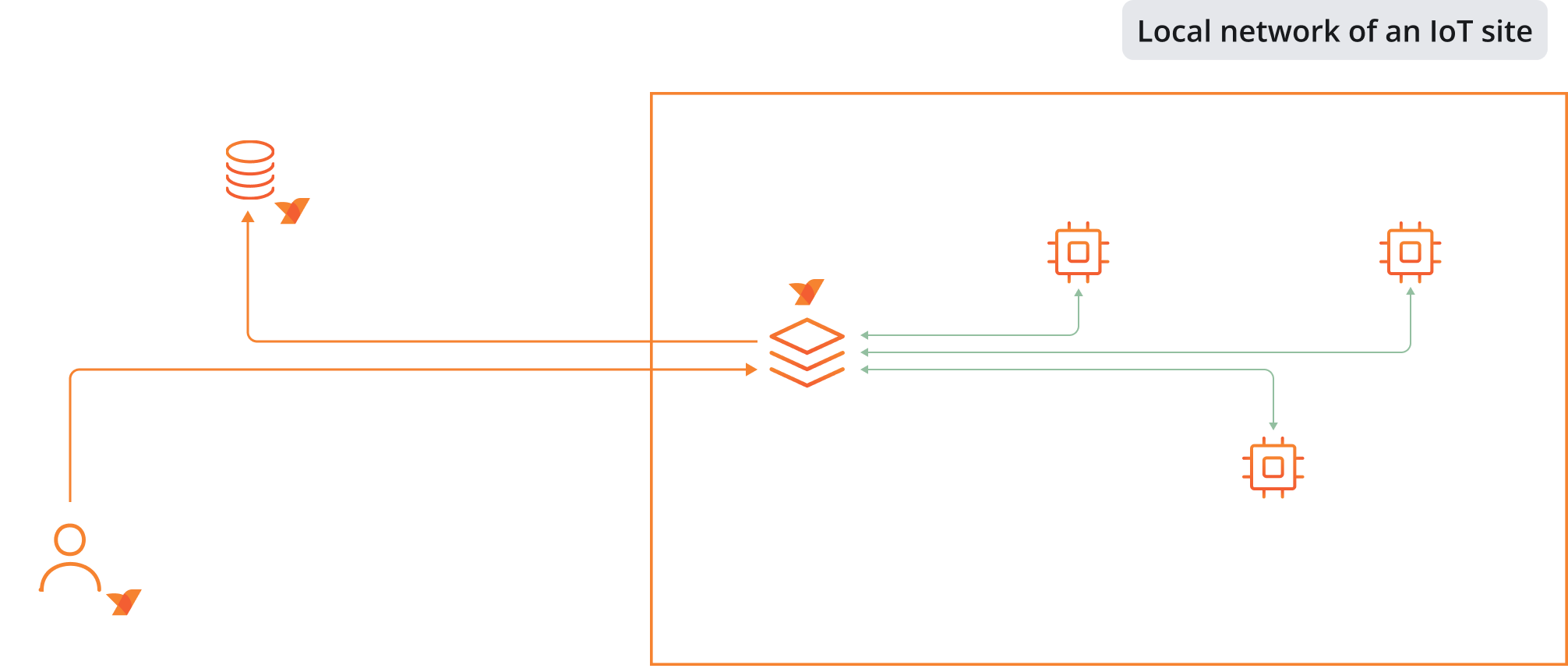
While you don't have the central data-gathering capability of an IoT gateway, you effectively have the same protective isolation as long as the router or PC is configured to connect only to other mesh devices. This makes your IoT devices accessible only from other mesh-connected devices, which could even be a mobile phone of an administrator if needed. Storing data collected by the IoT devices in the cloud or any remote storage becomes an easy task a well, as the gateway can have a direct connection to the storage system.
With the network address translation (NAT) traversal capabilities of NetBird, you should get a direct connection to your devices without resorting to special networking configurations.
Once your devices are safely located on a private mesh network, NetBird offers even more security features to further enhance the security posture of your IoT fleet.
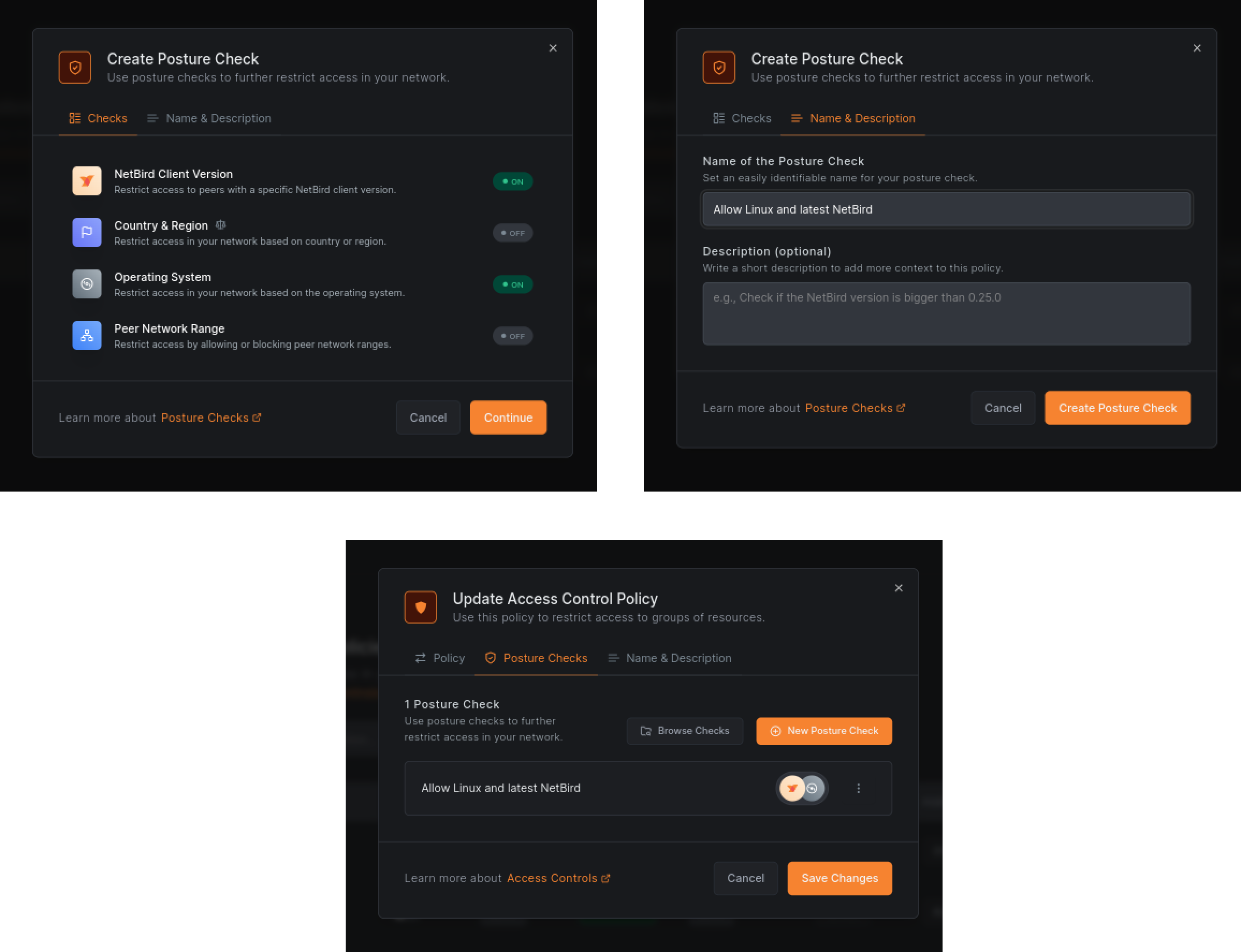
The NetBird client can be configured to allow only devices that meet a certain security posture. The posture checks are configurable and can be set to check certain variables before allowing a device to make a connection. Some of these variables include but aren't limited to the following:
Only once a client has passed all the checks will it be allowed to connect to any device or resource on the mesh network.
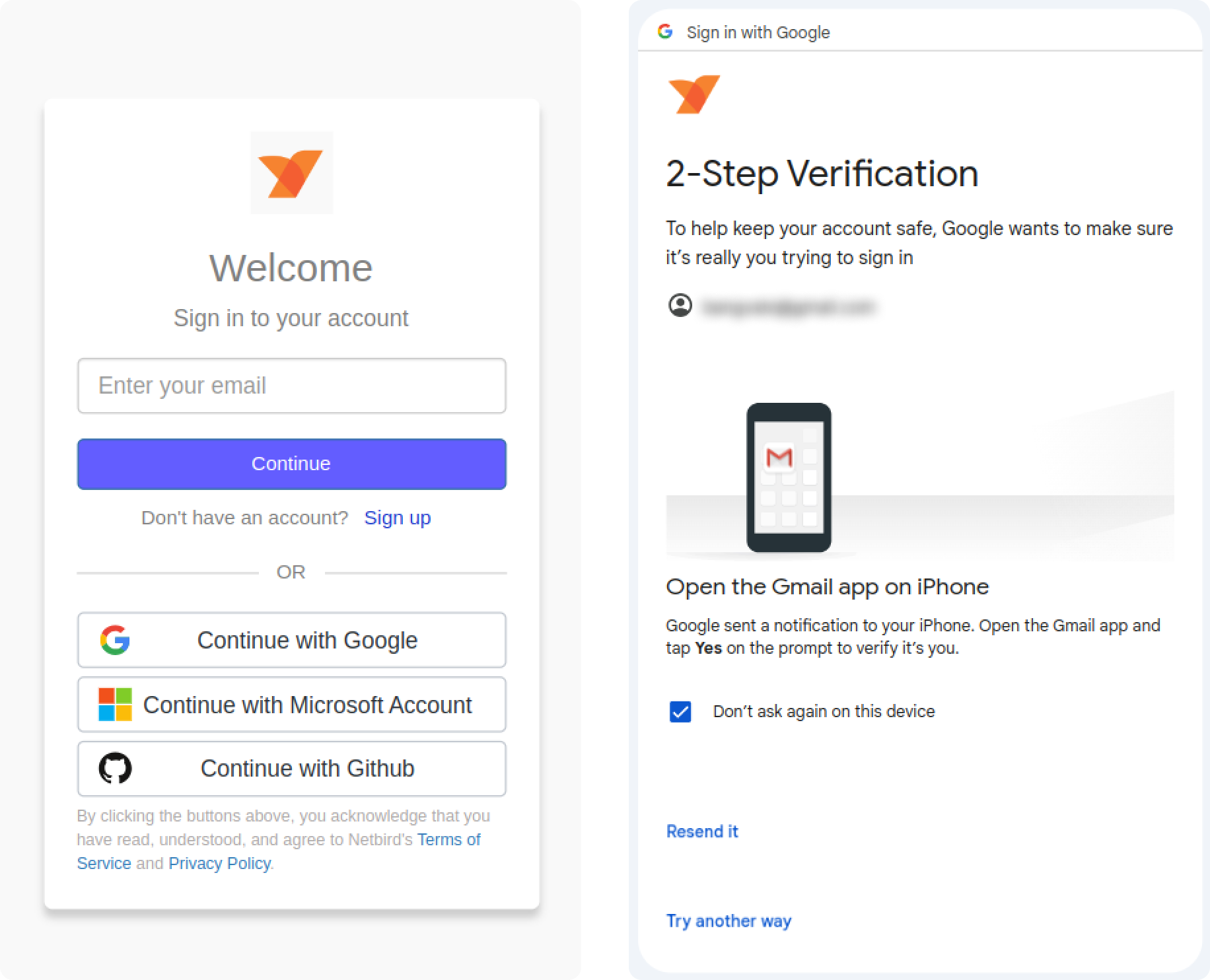
NetBird fully integrates with your existing identity provider , and you can enable security measures such as SSO and MFA .
NetBird has an embedded SSH server running on each NetBird client. On any device that runs the NetBird client, you can enable SSH access via the console.
The NetBird SSH server takes care of public key deployment and rotation. As long as you're an authorized user, you can SSH to any device that's allowed for your user via the access control list .
In this article, you learned about IoT devices and their growing popularity and general usefulness. You also learned that it's dangerous not to secure your IoT devices as they could provide an attacker with an easy path into your network.
Finally, you learned how you can use methods such as firewalls, IoT gateways, and mesh network configurations such as NetBird to not only isolate your IoT devices but also securely access them when you need to.
此内容由惯性聚合(RSS阅读器)自动聚合整理,仅供阅读参考。 原文来自 — 版权归原作者所有。