惯性聚合 高效追踪和阅读你感兴趣的博客、新闻、科技资讯
阅读原文 在惯性聚合中打开

推荐订阅源

Hacker News: Ask HN
Hacker News: Ask HN
WordPress大学
WordPress大学
GbyAI
GbyAI
T
Tailwind CSS Blog
Know Your Adversary
Know Your Adversary
小众软件
小众软件
Security Latest
Security Latest
博客园 - 聂微东
P
Privacy International News Feed
L
Lohrmann on Cybersecurity
爱范儿
爱范儿
云风的 BLOG
云风的 BLOG
阮一峰的网络日志
阮一峰的网络日志
C
Cyber Attacks, Cyber Crime and Cyber Security
博客园 - 叶小钗
Last Week in AI
Last Week in AI
The Register - Security
奇客Solidot–传递最新科技情报
奇客Solidot–传递最新科技情报
V
Vulnerabilities – Threatpost
Jina AI
Jina AI
AWS News Blog
AWS News Blog
L
LINUX DO - 热门话题
D
Darknet – Hacking Tools, Hacker News & Cyber Security
NISL@THU
NISL@THU
Spread Privacy
Spread Privacy
Google DeepMind News
P
Palo Alto Networks Blog
S
Schneier on Security
H
Hackread – Cybersecurity News, Data Breaches, AI and More
Cyber Security Advisories - MS-ISAC
T
The Exploit Database - CXSecurity.com
月光博客
月光博客
C
CERT Recently Published Vulnerability Notes
G
GRAHAM CLULEY
N
Netflix TechBlog - Medium
量子位
K
Kaspersky official blog
T
Threatpost
Latest news
Latest news
The Cloudflare Blog
MyScale Blog
MyScale Blog
C
Cisco Blogs
T
Tor Project blog
S
Securelist
Cisco Talos Blog
Cisco Talos Blog
The GitHub Blog
The GitHub Blog
A
Arctic Wolf
T
Threat Research - Cisco Blogs
H
Help Net Security
C
CXSECURITY Database RSS Feed - CXSecurity.com

NetBird - Networking Knowledge Hub - RSS Feed

NetBird Is Now on the Vultr Marketplace Native NetBird on the GL.iNet Comet Pro (GL-RM10) NetBird v0.71 - IPv6 Overlay Addressing NetBird Exit Nodes - Appear at Home, or Anywhere Else Reporting Bugs and Requesting Features in NetBird Setup and Use Local AdGuard Home Anywhere with NetBird DNS How to Set Up NetBird on PiKVM for Secure Remote KVM Access NetBird v0.69 - CrowdSec IP Reputation for the Reverse Proxy Cloudflare Mesh vs NetBird vs Tailscale: Performance Compared Self-Hosting Nextcloud with Docker and NetBird Implementing Zero Trust with NetBird NetBird v0.67 - Layer 4 Proxy Support for TCP, UDP, and TLS Solwr Enhances Remote Connectivity with NetBird Self-Hosting NetBird with Authentik Jellyfin Media Server - Self-Host Your Movies, TV, and Music Cloudflare Tunnels vs. NetBird Reverse Proxy INFITX Builds Zero-Touch Kubernetes Networking with NetBird NetBird v0.66 - Expose Local Services to the Internet from the CLI Pangolin vs. NetBird Home Assistant Setup Guide with EASY Remote Access NetBird v0.65 - Built-in Reverse Proxy with Custom Domains Docker for Beginners - Everything You Need to Get Started NetBird for SOC 2 Compliance NetBird v0.63 - Custom DNS Zones for Private Network Resolution Vibecode This in a Weekend and Take 5% of the Company NetBird v0.62 - Built-in Local Users with Optional IdP Integration NetBird v0.61.0 - Granular SSH Access Control and Automatic Updates Top 5 Alternatives to OpenVPN Top 5 Open Source Alternatives to Tailscale Top 5 Alternatives to ZeroTier How to Set Up ZeroByte and REST Server for Backups with NetBird How to Install n8n v2.0 with NPM and PM2 ZeroTier vs. NetBird The Ultimate Immich Guide - Ditch Google and Amazon Photos for Good NetBird as Your Help with ISO 27001 Compliance NetBird and Huntress - Secure Network Access for MSPs How to Access Windows Shares from Anywhere with NetBird netgo Relies on Modern ZTNA with NetBird Connect to Your Homelab from Anywhere with a Raspberry Pi NetBird SSH - A New, Identity-Aware Approach The AI Mega Mesh: How to Connect 30+ GPU Cloud Providers Connect Multiple Ollama GPUs to OpenWebUI with NetBird Top 5 Tailscale Alternatives SSH and RDP, now in your browser NetBird–Acronis Integration: Empowering MSPs for Advanced Ransomware and Threat Defense Introducing the Control Center - Remote Access, Beautifully Visualized NetBird at MSP Global 2025 Understanding Overlay Networks - The Basics NetBird and SentinelOne Singularity™ - Automate Threat Response NetBird and Microsoft Intune - Enforcing Device Compliance for Zero Trust Rethinking Zero Trust Security with NetBird and pfSense Improving Unidirectional Access Control Proxmox VE for Beginners Guide with NetBird LXC Stronger Security: NetBird + GitHub Secure Open Source Fund NetBird's MSP Partner Program Signicat Enhances Cross-Cloud Accessibility with NetBird SonicWall SSL VPN NetExtender vs. NetBird NetBird Is Embracing the AGPLv3 License NetBird Profiles Have Landed - Manage Multiple Accounts Effortlessly Rethinking Access Control to Secure Your On-Premises SharePoint Servers Sport Alliance Increases Efficiency with Zero Trust Networking at Scale Rethinking Network Access: qwertiko Goes Zero Trust with NetBird Optimizing Network Efficiency with NetBird's Lazy Connections Use Port Ranges in Access Control Policies Generic HTTP Endpoint for Network Events Streaming NetBird’s Response to Spear-Phishing Campaign Targeting Financial Executives Enhance Network Visibility with NetBird’s Traffic Events Logging TrueNAS Made Easy - Install, Set Up, and Access From Anywhere Top 5 Alternatives for WireGuard Jump Hosts. Gateways for Remote Access NetBird Network Routes and Exit Nodes Security for All - SSO and MFA for Free Enhancing Network Access Control with NetBird's Identity Provider Feature Twingate vs. NetBird Limit Network Access Based on Running Applications FortiClient ZTNA vs. NetBird OpenVPN vs. NetBird Tailscale vs. NetBird Getting Started with an Azure Site-to-Site VPN Getting Started with an On-premise-to-AWS Site-to-Site VPN Secure Remote Access to VPCs, LANs, and Offices regreSSHion - A New OpenSSH Server Remote Code Execution Vulnerability Evolve Bank & Trust Data Breach. What Happened? What Is a Site-to-Site VPN? IPSec Tunneling Demystified. Enhancing Data Security Across Networks Understanding IPSec Tunnel and Transport Modes Understanding the Differences Between IKEv1 and IKEv2 Understanding the IKEv1 Protocol in IPSec ZeroTier versus NetBird - Which Should You Choose? AWS Lambda Serverless Security. Mistakes, Oversights, and Potential Vulnerabilities Using NetBird for Kubernetes Access Serverless Security Vulnerabilities and Best Practices to Mitigate Them Security Best Practices for Serverless Azure Functions A Guide to Remote Access Security for SMEs IoT Security Essentials. How to Achieve Secure Remote Access Open Source Zero Trust Networking Using SSH for Secure Remote Access How We Integrated Rosenpass in NetBird The First Quantum-Resistant Mesh VPN Using eBPF and XDP to Share Default DNS Port Between Multiple Resolvers
Zero-Trust Access to Internal Resources Without Installing Agents
Written byJack Carter · 2025-05-19 · via NetBird - Networking Knowledge Hub - RSS Feed

NetBird provides a fast and secure peer-to-peer mesh network with end-to-end encryption. By default, you install the NetBird agent on every machine—be it a developer laptop, container, VM, or server—and each device securely connects to others on the mesh, forming a zero-trust overlay network.

But what if you can’t install the agent on all your machines?

In real-world deployments, especially within enterprise environments, it’s common to encounter private infrastructure that doesn’t support custom software. IoT devices, printers, managed services (like AWS RDS), or legacy servers might not be compatible with NetBird. Even if they are, you may be mid-migration and still need secure access to entire LANs, VPCs, or office networks where many machines haven’t yet joined the NetBird network.

To address these scenarios, NetBird introduced the Networks feature —starting in version . With Networks, you can map private networks, route traffic through NetBird-enabled gateways, and grant granular access without needing to install NetBird on every internal machine.

This article explains why you might need full network access, how the Networks feature works, and how to configure it for your infrastructure.

Why Access an Entire LAN or VPC?

There are many real-world use cases where installing NetBird on every device simply isn’t feasible. Let’s examine the most common ones:

Partial or side-by-side migrations: If your organization is transitioning from traditional VPNs or firewall-based access control to NetBird, some machines might already be using the new setup while others are still pending migration. During this phase, users and services need uninterrupted access to systems that don’t yet run the NetBird agent.

Systems with OS limitations: Certain classes of devices—such as industrial machines, IoT endpoints, legacy Windows servers, and network printers—often don’t support installing agents. Similarly, you can’t install third-party software on most managed services (like Google Cloud SQL or AWS RDS).

Legacy networks: Older infrastructure may be too sensitive or fragile to modify. Admins may face compatibility issues or lack permission to install software due to vendor restrictions, outdated operating systems, or production-critical environments.

In all of these cases, granting secure, audited access without modifying every host becomes essential. This is where NetBird’s Networks feature offers a powerful solution.

Introducing the “Networks” Feature

Networks in NetBird represent a major architectural improvement over the earlier Network Routes concept. Rather than requiring you to set up individual routes per IP or domain, you can now create a logical representation of your internal network, assign one or more routing peers, and define resources inside that network—whether IP ranges, hostnames, or entire wildcard domains.

You can think of a Network as a container that includes:

  • A set of internal resources you want to make accessible.
  • One or more routing peers to bridge NetBird traffic into that private environment.
  • Access control policies that define which groups of users or devices are allowed to reach which internal services.

This approach simplifies configuration, improves manageability, and provides more intuitive access control than the now-deprecated Network Routes feature.
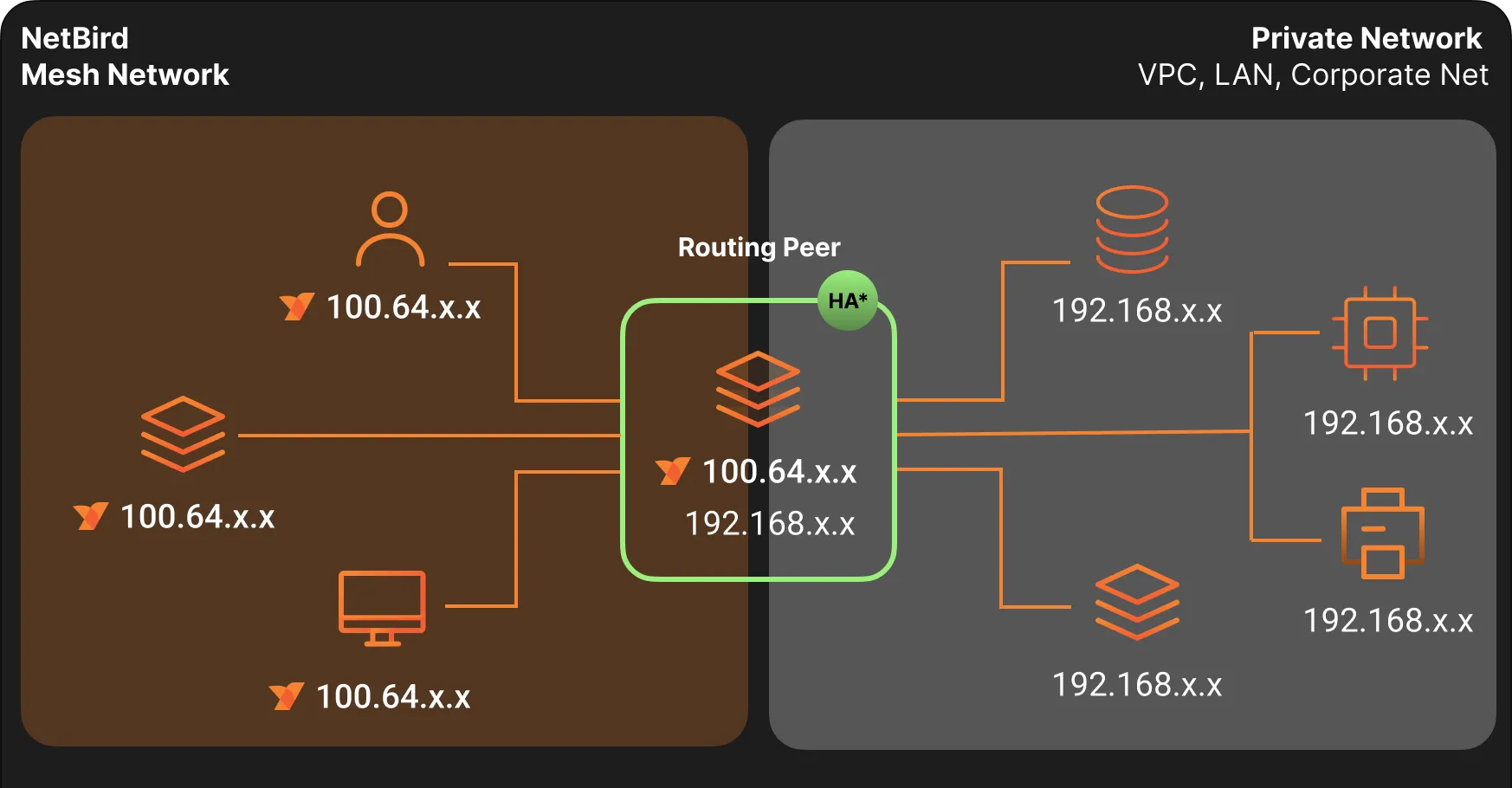
NetBird Network Routes

  • *HA - NetBird Networks support High Availability mode, which is explained below.

What Are Routing Peers?

A routing peer is a NetBird-enabled device that sits inside your private infrastructure—such as an EC2 instance inside an AWS VPC or a Linux server on your corporate LAN.

Routing peers:

  • Serve as the bridge between the NetBird overlay and your internal network.
  • Forward traffic to machines that don’t run the NetBird agent.
  • Can be configured to masquerade traffic, hiding the NetBird source IPs if needed.
  • Can be grouped for high availability and will choose the peer with the best connection.

You can assign a single peer or an entire peer group as your routing peer(s). This makes it easy to scale and build resilient access points into your infrastructure.

What Are Resources?

A resource in NetBird defines an internal service or destination you want to make accessible through the mesh network. Resources can be:

  • IP addresses (e.g., )
  • CIDR blocks (e.g., )
  • Domain names (e.g., )
  • Wildcard domains (e.g., )

Resources are grouped and assigned descriptive names, making them easier to organize and manage. This logical grouping is especially helpful when creating access policies for different user teams.

What Is an Access Control Policy?

NetBird uses access control policies to define which users or devices can access which resources. Policies define:

  • Source groups: users or peers requesting access.
  • Destination groups: the internal resources.
  • Protocols and ports: e.g., TCP/443, UDP/53, or all traffic.
  • Optional posture checks for device compliance.

Policies can be unidirectional or bidirectional—they specify who can access what—and can be adjusted at any time via the dashboard. This gives you complete control over internal access without having to modify your firewalls or DNS servers.

Example: Secure Access to an AWS VPC

Let’s walk through an example to demonstrate NetBird's ability to securely expose individual internal resources—without opening access to an entire subnet or installing agents on the resource itself.

Scenario

  • You have a PostgreSQL database hosted in Amazon RDS. It is accessible only from within your private VPC via its internal DNS name:
  • Your DevOps team needs remote access to this RDS instance for operational tasks. Other employees should not have access to the database or the rest of the VPC.
  • All other employees should only resolve DNS via the internal servers
  • Internal DNS servers run at and

Configuration Steps

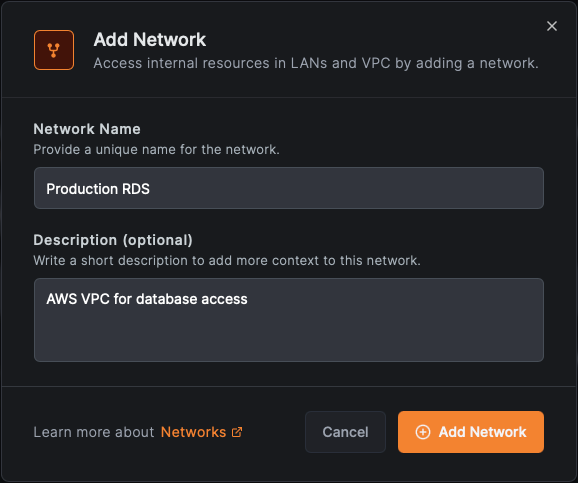
1. Create a Network

  • Name:
  • Description:

NetBird Create Network

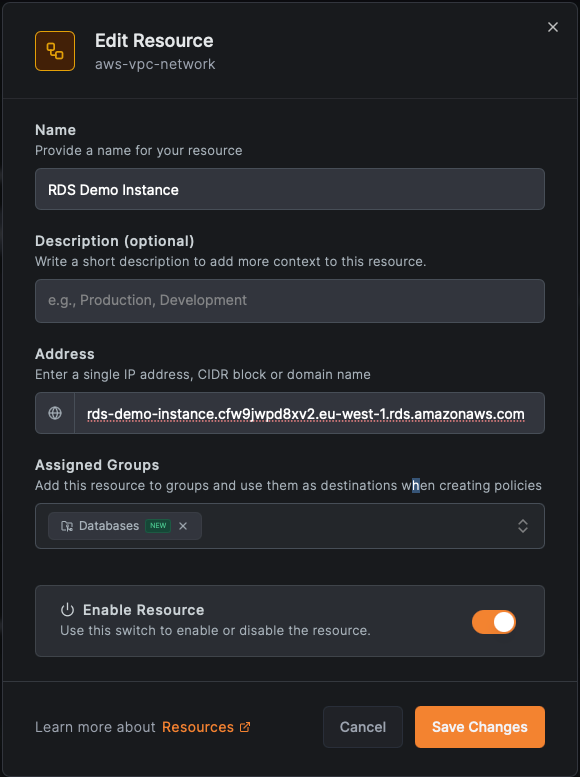
2. Add a Resource

  • Name: RDS Demo Instance
  • Domain
  • Group: Databases

NetBird Add Resource

3. Create an Access Policy

Click Create Policy and define access for just the DevOps group:

  • Source Group:
  • Destination Group:
  • Protocol:
  • Ports: (default PostgreSQL)

You can also add posture checks or device trust constraints to further restrict access.
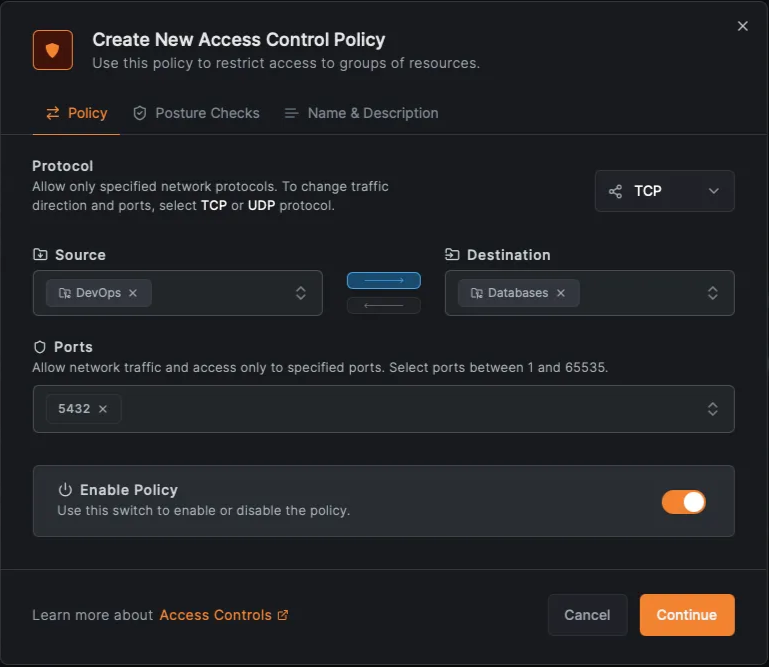
NetBird Create Access Policy

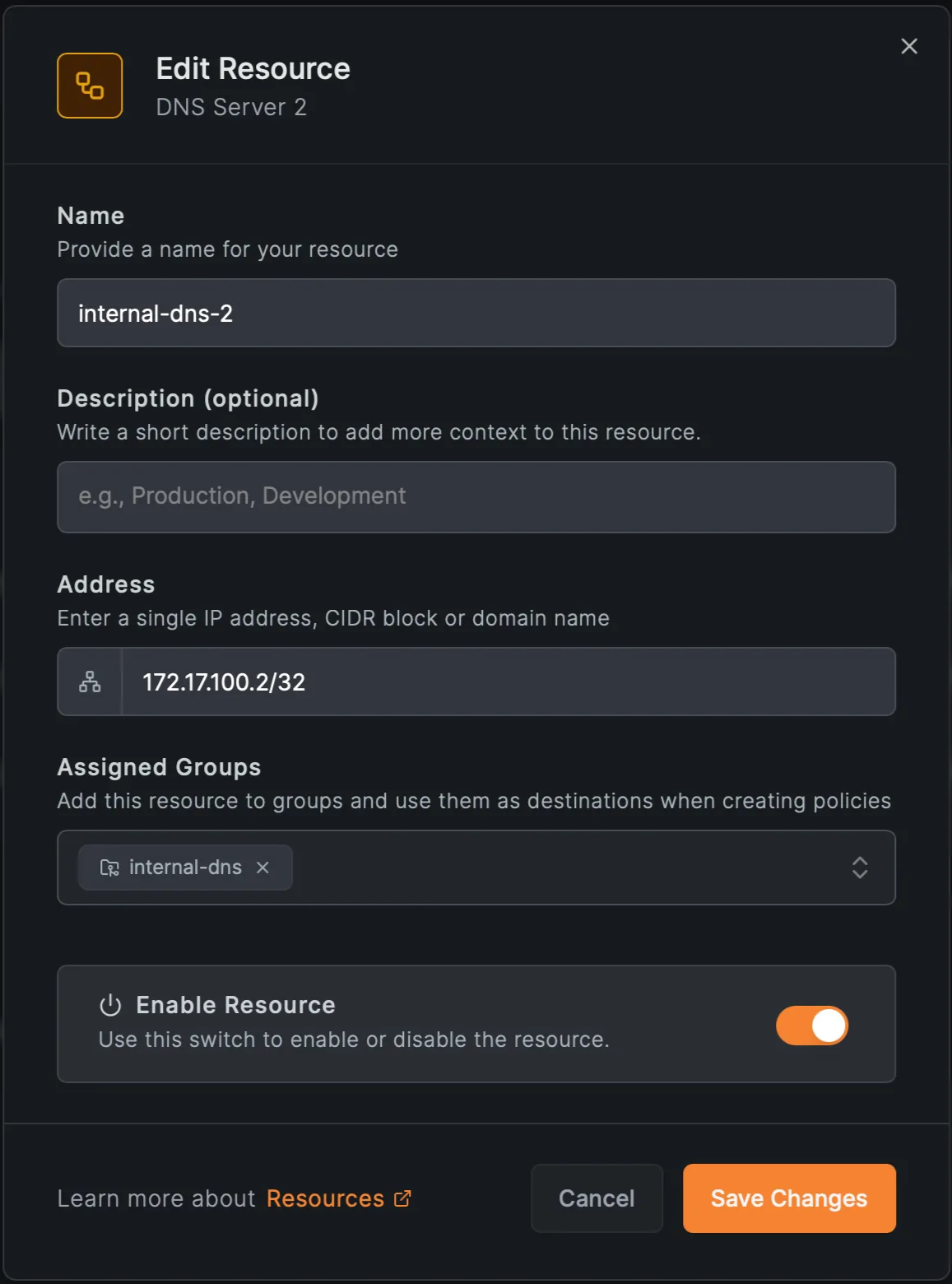
4. Create resources for the internal DNS servers
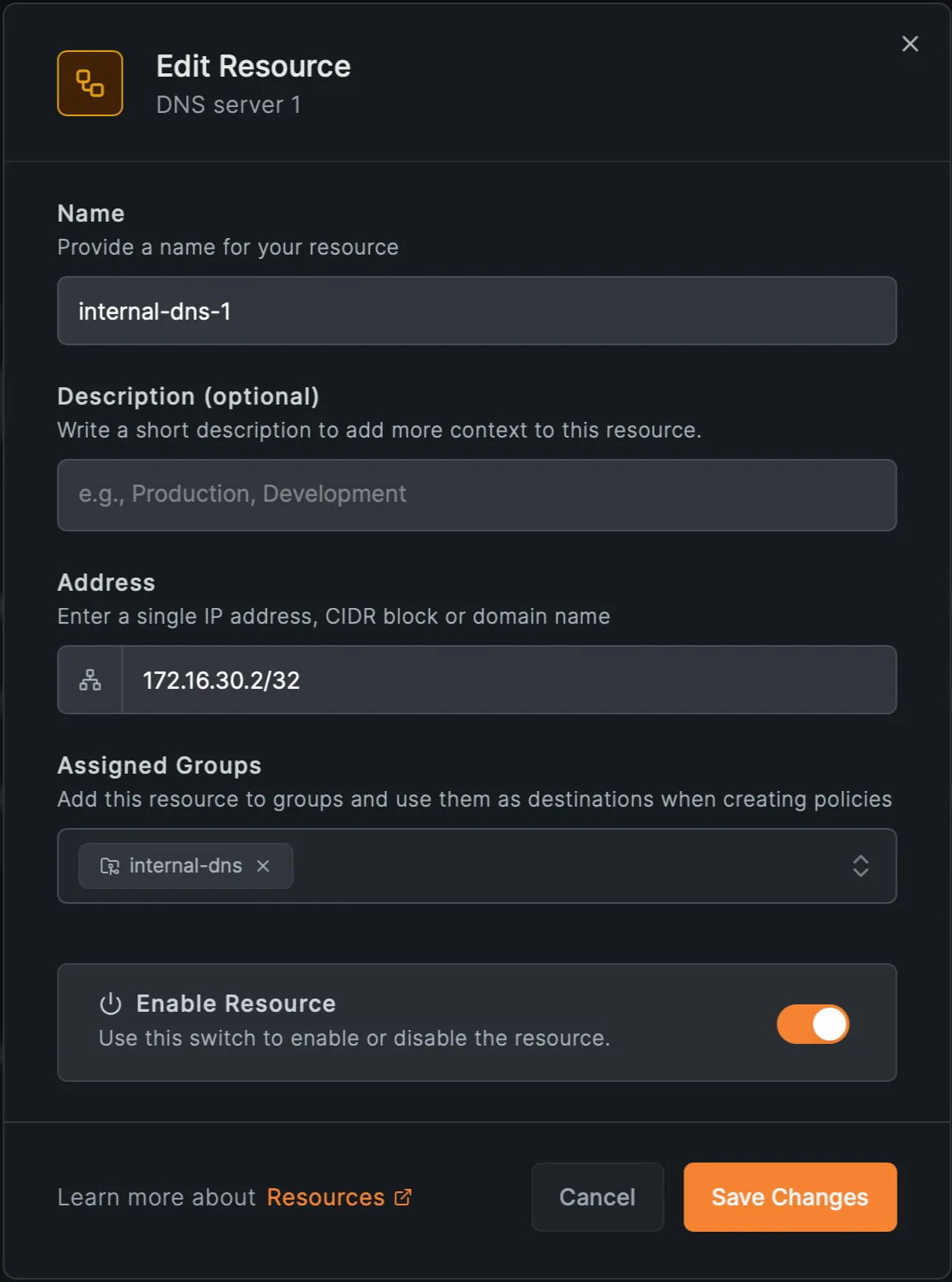
  • IPs and (group: )

NetBird DNS Server 1 NetBird DNS Server 2

5. Create an access policy for the DNS resources
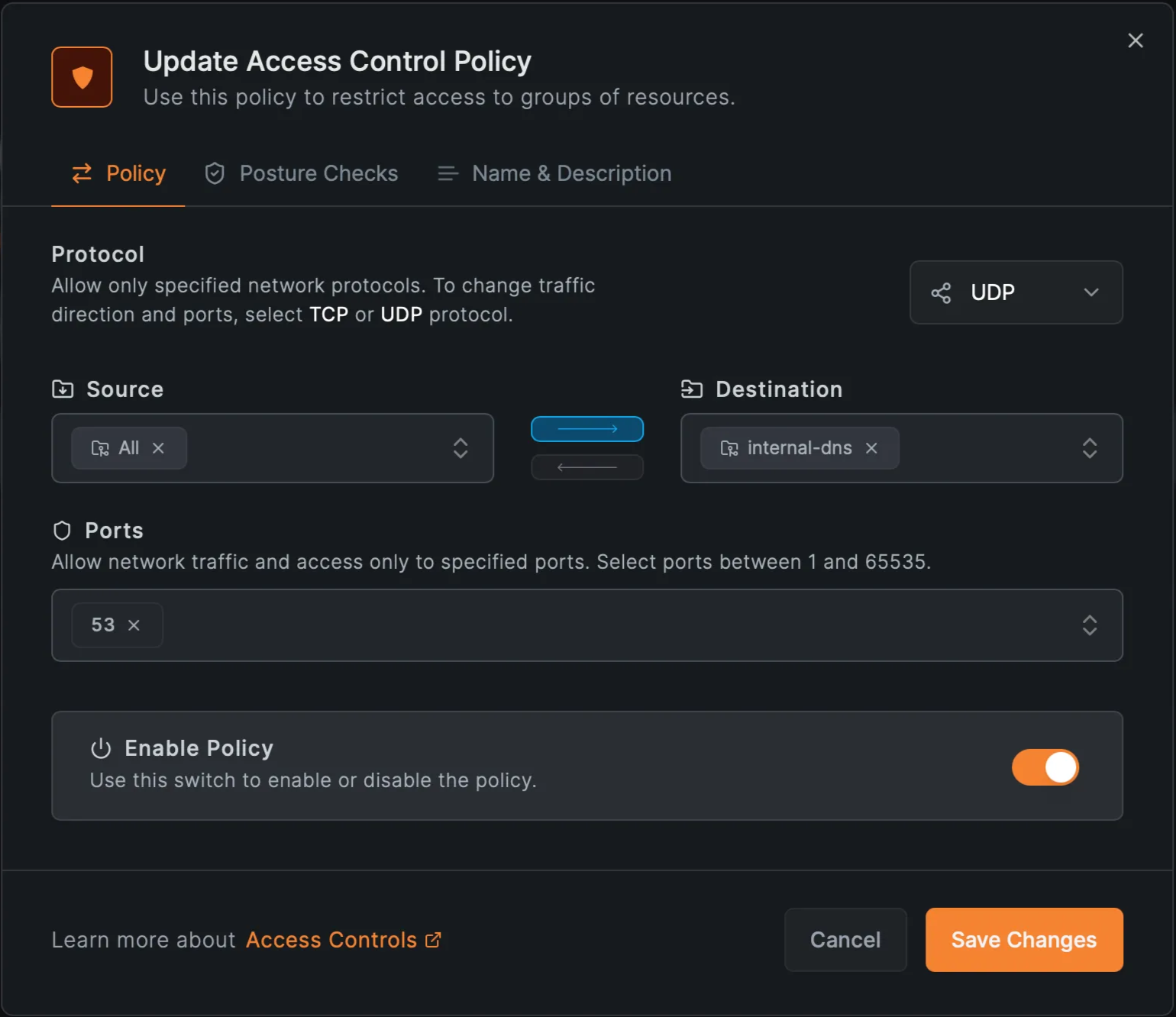
  • Allow group access to only on

NetBird Internal DNS Policy

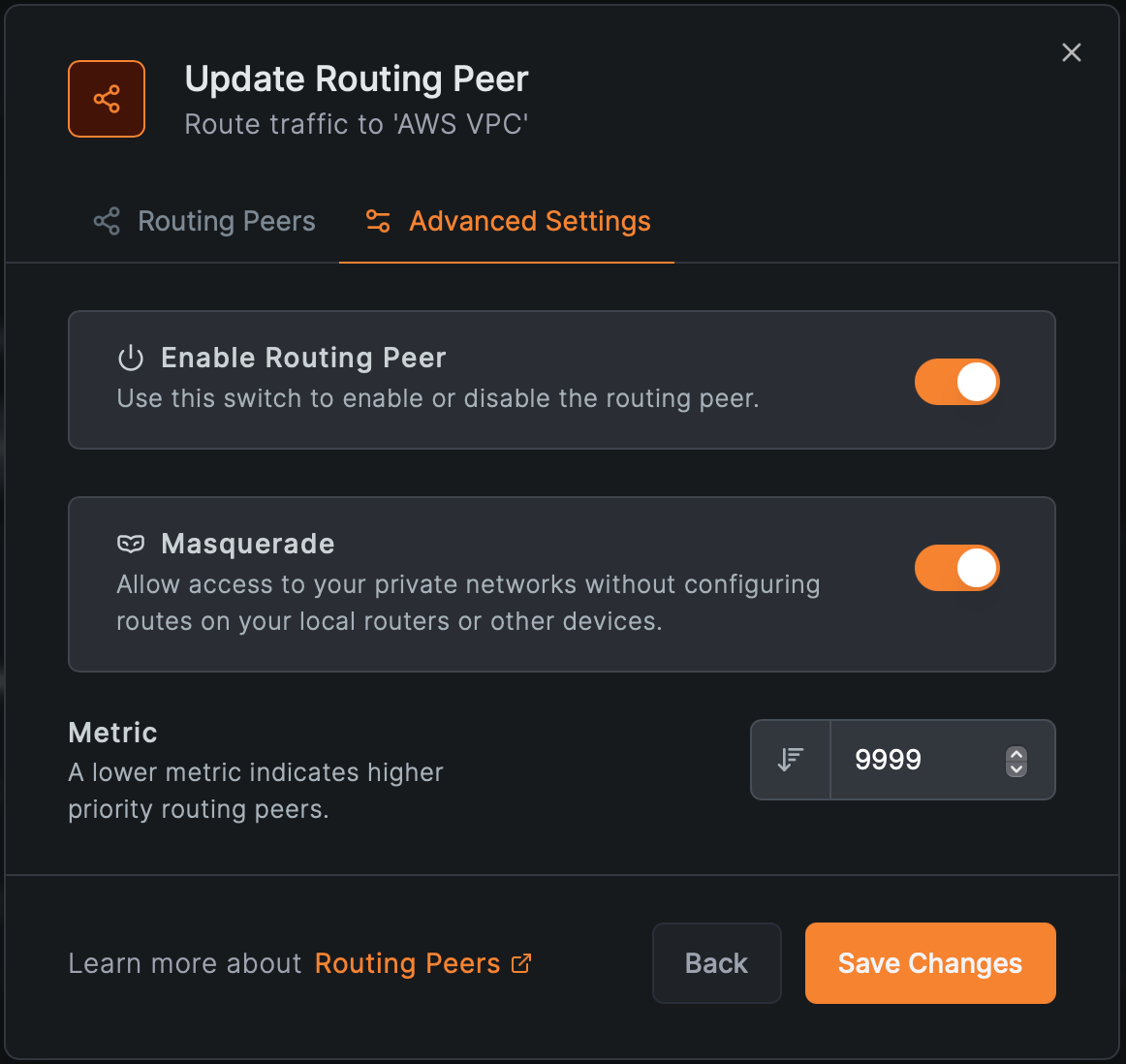
6. Add a Routing Peer

  • Any machine(s) or virtual machine(s) with NetBird agent installed in the VPC
  • Enable masquerade if internal routers can’t route NetBird IPs

NetBird Add Routing Peer NetBird Routing Peer Advanced Settings

Outcome

  • Only devices in the group can resolve and access the RDS instance
  • Traffic is routed securely through the designated routing peer
  • The rest of the VPC remains completely hidden
  • Other users (even if running NetBird) cannot access this database due to missing policies

That’s it! Now users only see the resources they are allowed to access, and DNS resolution flows securely through your internal infrastructure. This example showcases NetBird’s ability to granularly route and authorize access to internal services based on identity, protocol, and destination domain, all without altering the VPC firewall or installing agents on the RDS instance.

Wildcard and Domain-Based Routing

In many enterprise environments, services are addressed by domain name rather than static IPs. Load balancers, DNS-based failover, and dynamic scaling make it impractical to hardcode IP routes.

NetBird supports both specific domains and wildcard domains :

  • Access to by the Finance team.
  • SSH access to for AI model training.
  • Dev environments under .

When DNS wildcard routing is enabled, the routing peer—not the client—resolves domain names. This change from the legacy Network Routes behavior allows for:

  • Tighter access control policies.
  • Better DNS management for internal environments.
  • Seamless integration with your private DNS infrastructure.

High Availability and Redundancy

You can assign multiple routing peers or entire peer groups to each Network. NetBird handles:

  • Load balancing traffic across peers.
  • Automatically failing over if one peer goes down.
  • Prioritizing routes based on metrics.

When there are 2 or more routing peers for a network, this will enable the High Availability feature. This ensures that remote access remains reliable, even during maintenance or unexpected failures.

Masquerading and Priority

The masquerade setting hides NetBird peer IPs behind the routing peer's IP when accessing internal networks. This is useful if:

  • Internal routers can’t route to NetBird’s IP range.
  • You want to limit visibility of the overlay network.

Additionally, each routing peer can have a metric, allowing you to control which peer is preferred when multiple options exist (lower metric = higher priority).

Comparison with Network Routes

While Network Routes still function for legacy setups, we recommend migrating to Networks , which offer:

FeatureNetworksNetwork Routes
Simplified access control❌ (manual setup)
Wildcard domain support
Resource-level editability
Peer groups for HA
DNS routing at gateway
Exit-node support🚧 (planned)
Site-to-site routing🚧 (planned)

See the full migration guidance in NetBird's documentation .

Getting Started

  1. Open the NetBird dashboard.
  2. Navigate to the Networks tab.
  3. Click Add Network and walk through the guided wizard:
  • Add resources (IP, domain, wildcard).
  • Define access control policies.
  • Add posture checks for additional security and compliance.
  • Assign routing peers.

Need help? Refer to these official guides:

Conclusion

NetBird’s Networks feature is a powerful, scalable, and secure way to access internal infrastructure without requiring you to install agents on every device. Whether you’re connecting to cloud VPCs, legacy data centers, or restricted environments, Networks provide a single, unified mechanism for routing, access control, and observability.

Compared to the older Network Routes feature, Networks offer clearer configuration, more flexible access, and better future compatibility. If you're managing secure access in a hybrid or segmented environment, Networks should be your go-to solution.