





Have you tried configuring a local DNS resolver to use a port different from the default one? Changing port can be tricky since the DNS protocol is usually bound to this port. This is especially true if you need the software you develop to support as many operating systems as possible with various versions, ensuring it works on different platforms, too.
The NetBird team recently faced this and other challenges while working on the DNS feature that makes managing DNS in private networks easy. We spent a few days on a solution involving Go, eBPF, and XDP "magic" that allows sharing a single port between multiple DNS resolver processes. We also created a DNS manager for WireGuard® networks that universally works on macOS, Linux, Windows, Docker, and mobile phones. Now is the time to share our journey. Traditionally, as with the whole NetBird platform, the code is open source .
Before jumping into the details, it is worth mentioning why we've dived into this topic and how NetBird simplifies DNS management in private networks.
NetBird is a zero-configuration overlay network and remote access solution that automatically connects your servers, containers, cloud resources, and remote teams over an encrypted point-to-point WireGuard tunnel. There is also something special about NetBird that gave us a "little" headache while working on the DNS support and forced us to use XDP. I'm talking about kernel WireGuard. If available, NetBird uses the kernel WireGuard module shipped with Linux. Otherwise, it falls back to the userspace wireguard-go implementation, a common case for non-Linux operating systems.
To minimize the configuration effort on the administrator side, NetBird allocates network IPs from the range and distributes them to machines from a central place. Then, it configures a WireGuard interface locally on every machine, assigning IPs to create direct connections.
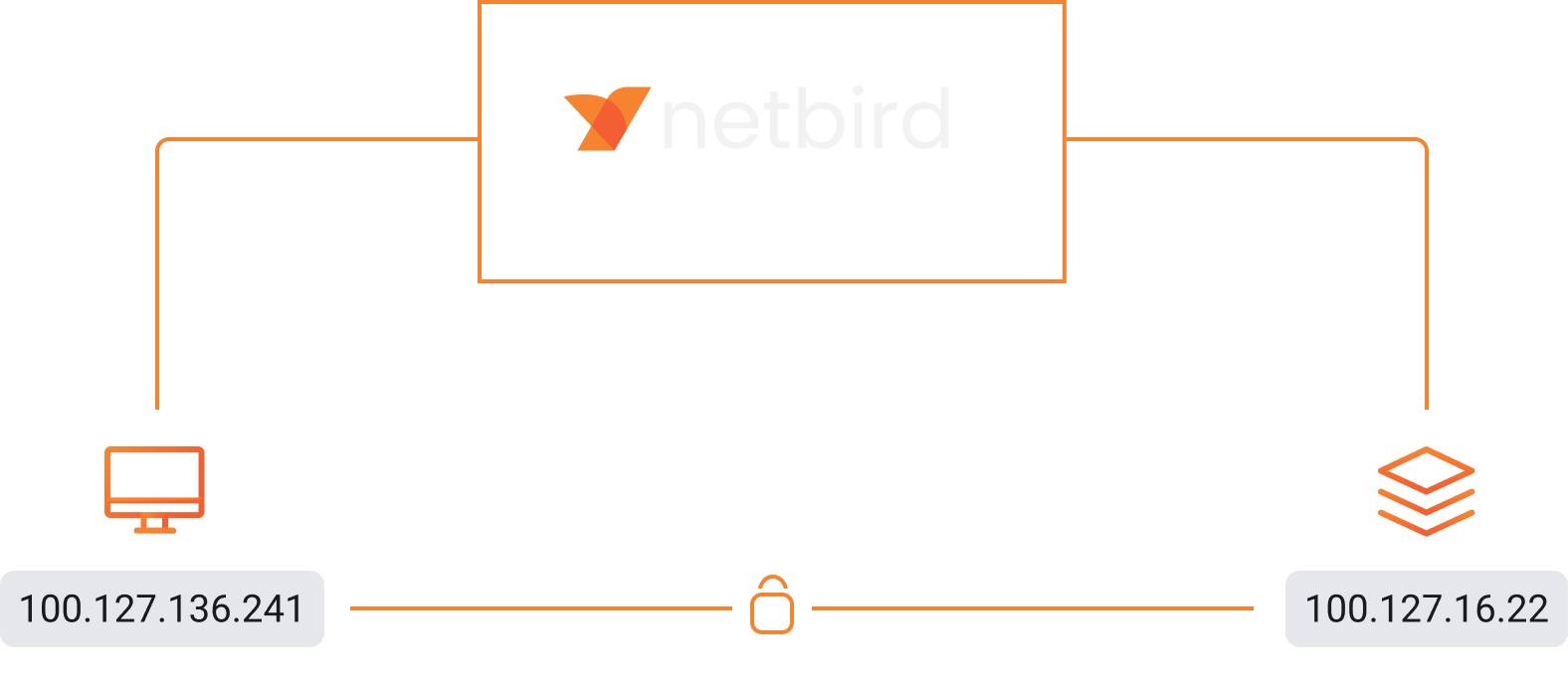
Here is how the WireGuard interface looks on my Ubuntu laptop after NetBird has done its configuration job:
NetBird assigned the private IP to the WireGuard interface on my machine. Similarly, it assigned private IPs to remote machines that my laptop is allowed to connect to ():
Now, what about DNS? Wouldn't it be much more convenient to have a meaningful and easily memorable name instead of the IP address to access a privately hosted Postgres database hidden behind this IP? To address this, NetBird automatically assigns a domain name to each peer in the private space that one can use for remote access.
Running the command shows that my machine has connected to and :
The ping command successfully resolves to :
How does NetBird do it so that DNS resolution works on Linux, Mac, Windows, mobile phones, and even inside Docker? While working on the feature, we had a few options. One was to set up a centralized DNS server, e.g., , and configure local resolvers on all connected machines to point to it. However, such an approach brings scalability, performance, and, more importantly, privacy issues. Like network traffic, we prefer our users' DNS queries not to go through our servers.
Another approach is to modify the local file on every machine, specifying the remote machines' name-IP pairs. The hosts file can quickly outgrow when dealing with large networks, and who would like it if NetBird modified this file?
We took the locality approach and avoided significant system configuration changes. Every NetBird agent starts an embedded DNS resolver that holds the NetBird name-IP pairs of accessible machines in memory and resolves the names when requested. The centralized NetBird management service sends DNS updates (essentially name-IP pairs) through the control channel when new machines join or leave the network or the administrator changes DNS settings.
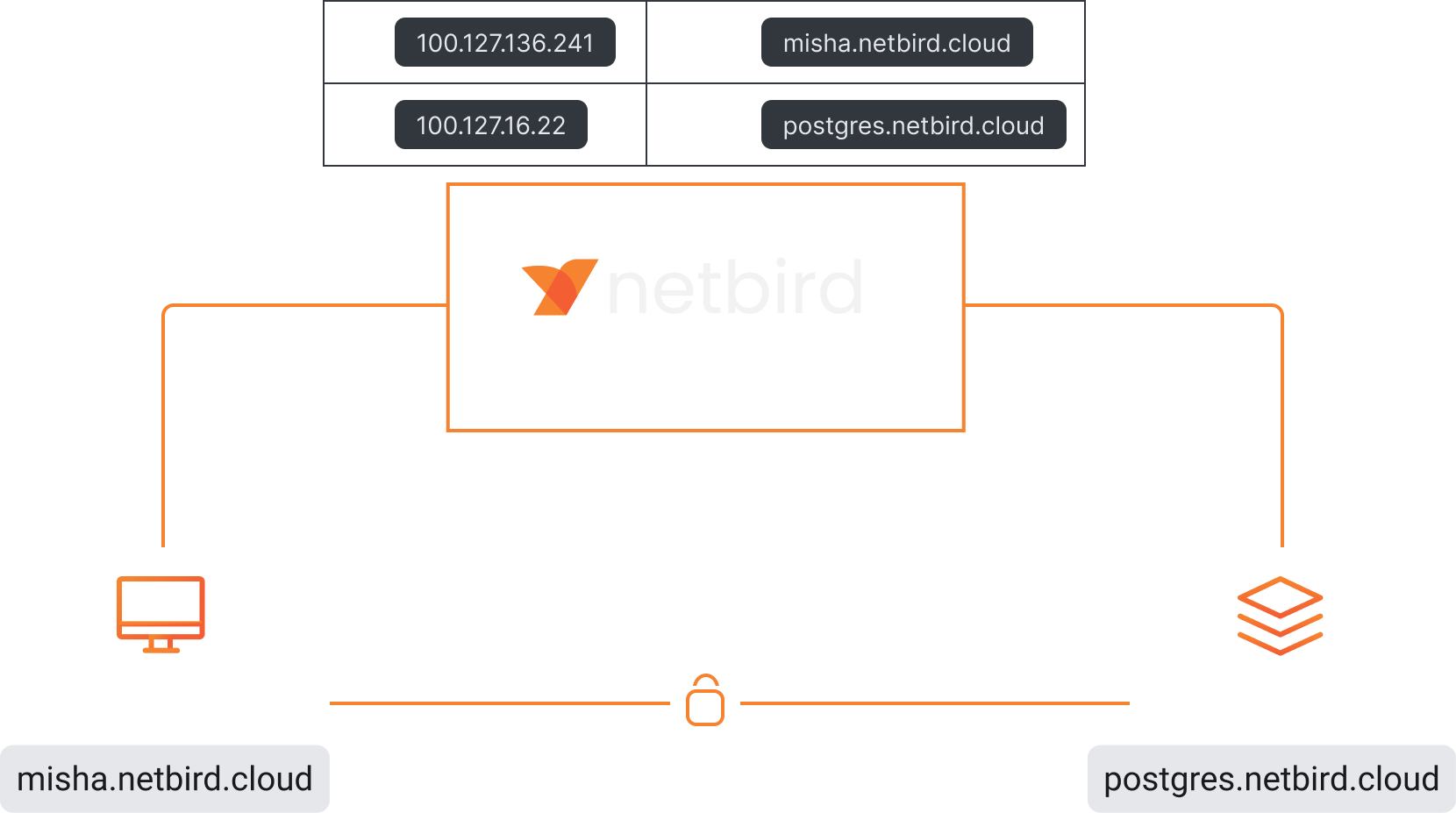
We applied this approach to all supported operating systems. However, there is a caveat. The NetBird agent must also configure the machine's operating system to point all queries to the local NetBird resolver.
Configuring DNS management varies from operating system to operating system and even version to version. Add kernel WireGuard to it, and you will get some interesting implementation differences. Read on, and you will finally get to the port issue!
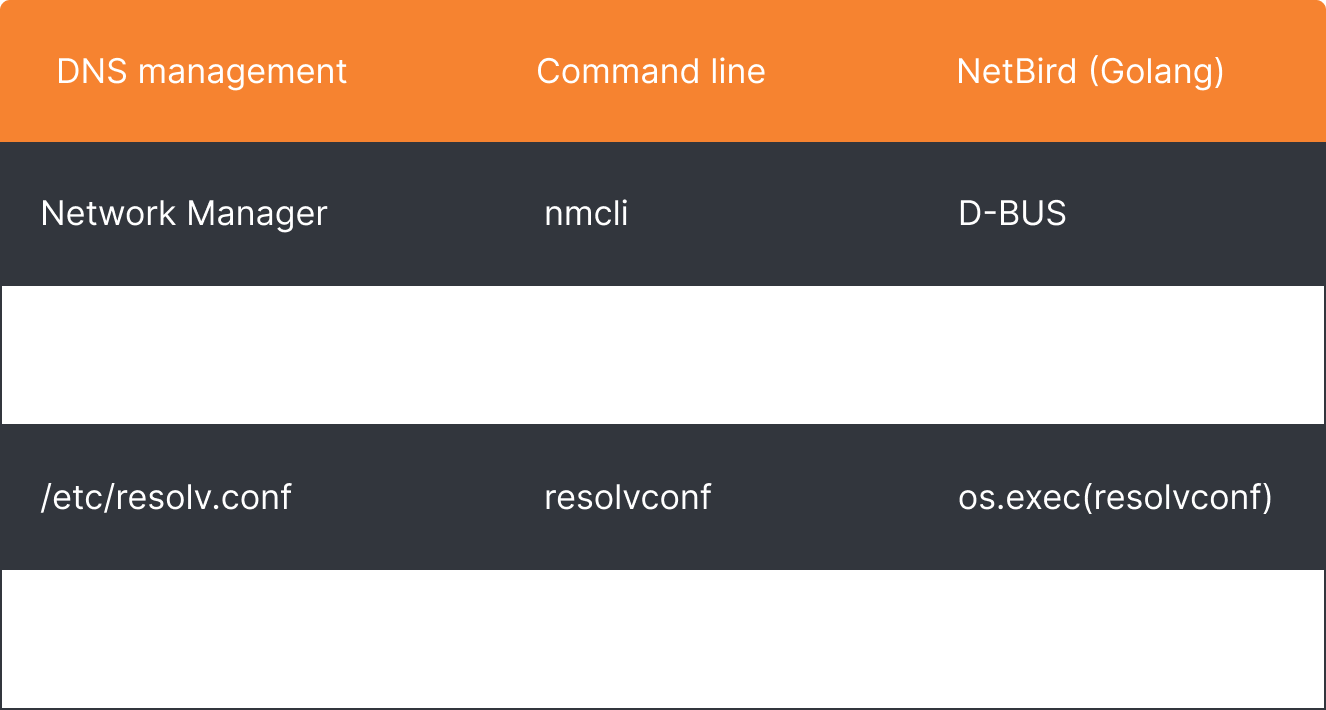
Linux is the most used OS in NetBird. The great variety of Linux flavors and versions make the administration, for lack of a better word, unpleasant. DNS configuration is not the exception - Linux offers different ways to do it. Depending on the system setup, you could use the NetworkManager service, systemd-resolved service, resolvconf command line tool, and a direct modification of the resolv.conf file.
Which one does NetBird use? As mentioned earlier, we avoid causing significant changes to the system configuration. Therefore, NetBird checks the file that usually contains a comment indicating how the system manages DNS:
My Ubuntu system uses the systemd-resolved service. There is also a clear warning not to edit; we follow the advice.
With a bunch of "if a string contains" conditions , NetBird chooses the right manager.
After picking the manager, NetBird starts configuring DNS. It uses D-Bus for communicating with NetworkManager and systemd-resolved, os.exec with resolvconf, and os.WriteFile for a direct file modification:
If you are familiar with the Go programming language, look at the open-sourced code calling the systemd-resolved service via D-Bus.
Below is the command-line equivalent of the Go code that uses Ubuntu's default utility to call D-Bus:
What does the configuration result look like? When I run the command on my machine, the applied DNS configuration appears as follows:
The agent reused its NetBird private IP and configured the system's DNS to resolve with the embedded resolver listening on the default DNS port .
The setup described above looks straightforward, doesn't it? The NetBird agent started a local resolver, received a configuration from the management server, and applied it to the system. However, there are always exceptions. Some of them are very common. Other processes like dnsmasq, Unbound, or Pi-hole might already occupy the default DNS port. On top of that, some systems won't allow administrators to specify a custom port. Support for custom DNS ports was added to the systemd-resolved service only in 2020 , while file doesn't support it to date. What to do in this situation? NetBird pursues the goal of a networking platform that works anywhere, universally, and without complex configurations. Therefore, we had to apply some logic to work around the issue and came up with two solutions to most of the corner cases.
The NetBird-embedded DNS resolver tries to listen for incoming DNS queries on the private NetBird IP or on the loopback address and port , e.g., and , respectively. As we discovered, this may not be possible due to some other process occupying port . NetBird yields to an unassigned loopback address, in this case. The Linux operating system will allow a combination of an unassigned loopback address and port even though it is occupied.
Below is a small Go program that simulates the situation and tries listening on and then on :
After compiling and running the code, we see that it worked without issues:
Netstat also indicates that there are two go processes listening on port 53:
By the way, the systemd-resolved service has a similar behavior and listens on .
That was a theory, but what does it look like in real life?
address, a private NetBird IP, may not be available because of the service that listens on all interfaces by default (omitting ipv6 for simplicity):
How about ? Similar to another DNS service unbound occupies this address:
Switching to should do the trick in most cases. But what if some process listens on all interfaces?
When a process listens on all interfaces, in other words, , Linux won't allow using unassigned loopback addresses. We can quickly test this scenario by modifying the address parameter in the Go testing code by placing first:
The code fails with the error:
That could happen when network administrators apply custom configurations to the system. NetBird uses eBPF with XDP (eXpress Data Path) to work around this issue and share the port with the other process.
From the documentation: XDP is a framework that enables high-speed packet processing within eBPF applications. To enable faster response to network operations, XDP runs a eBPF program as soon as possible, immediately as the network interface receives a packet. Here is how we use it in NetBird:
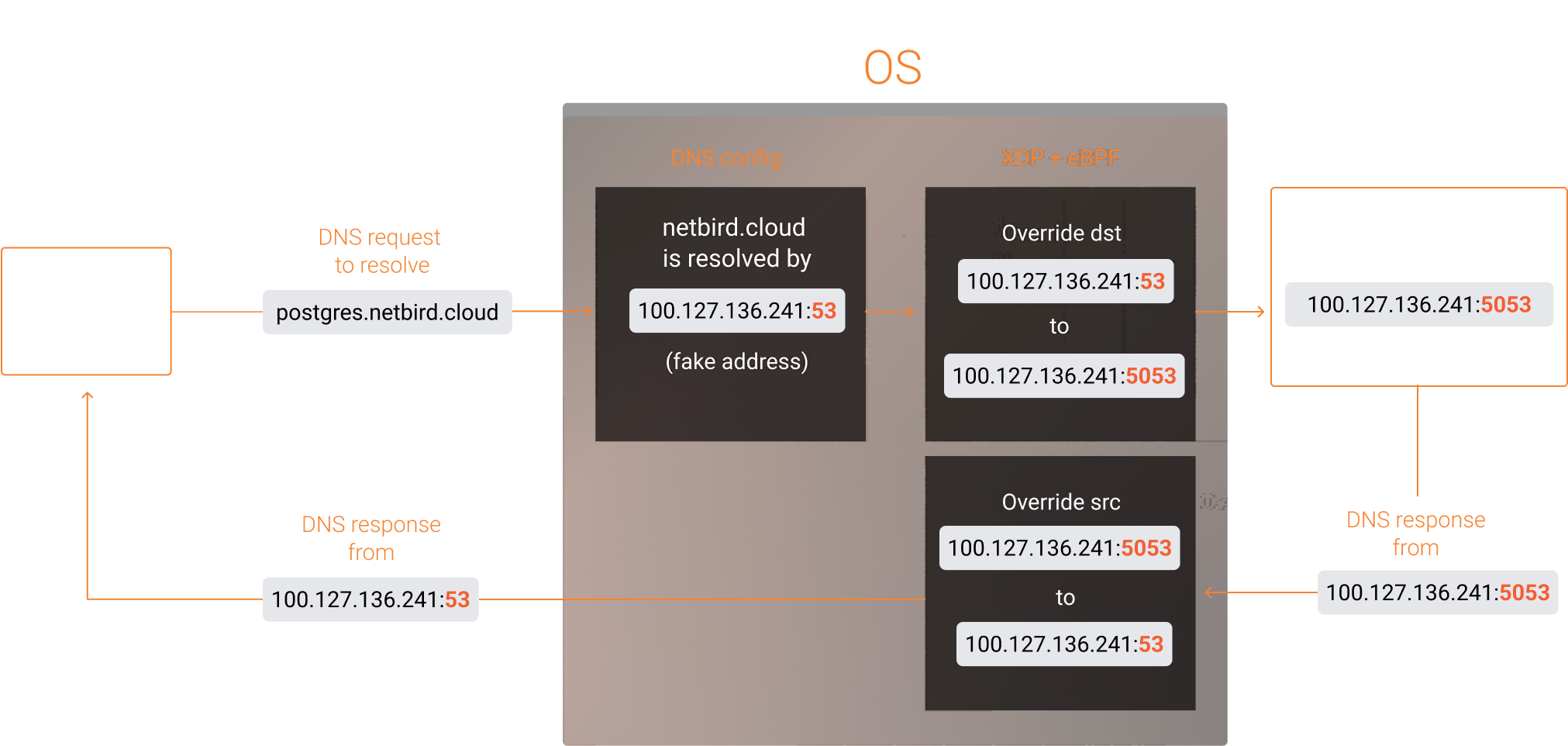
Shortly, the agent initiates an embedded NetBird DNS listener on a custom port and NetBird IP , that the NetBird management service assigned to the peer. However, due to issues encountered when using custom ports, the agent configures the system to reroute all queries to a "fake" resolver address using the peer's NetBird IP . This address is referred to as "fake" because there is no active listener on it. Subsequently, the eBPF program intercepts network packets destined for the fake address and forwards them to port , where the real embedded NetBird DNS resolver listens.
We developed the eBPF program in C with a core function shown below and attached it to the loopback interface with XDP. This function modifies the destination address of incoming DNS packets when it matches the . Specifically, it transforms the address to . Additionally, it handles outgoing DNS packets returning from the NetBird resolver to DNS clients by altering the source address. In this case, is changed to .
Why did we attach the XDP program to the loopback interface but not the WireGuard interface ? The reason is simple: the DNS resolution we are performing is local. The system understands this and optimizes the flow by using the loopback interface. That is also why we can modify the DNS response even though XDP only works on ingress traffic. Running while pinging demonstrates this behaviour:
You may have also noticed a call to the function. We use it to make the function more flexible and pass parameters from the Go code. It helps us configure the "fake" address with the and properties that the eBPF program uses to "catch" DNS packets. We achieved this by using BPF maps to pass these parameters from the userspace Go application to the eBPF program.
To put it all together and use the function in Go, we've built and compiled the program with bpf2go , which is a component of the Cilium ecosystem. The command generates Go helper files that contain the eBPF program's bytecode.
The generated files can be used to load eBPF functions and pass parameters via a BPF map:
You can find the complete eBPF code in our GitHub repository at the following link: GitHub Repo - netbirdio/netbird .
We didn't expect to use technologies like eBPF and XDP when we started working on the DNS feature, nor did we think there would be so many edge cases. The main reason for the complexity was our integration with the kernel WireGuard, where NetBird configures the interface and steps aside. NetBird doesn't have direct access to network packets in this mode, unlike the userspace wireguard-go implementation, where the DNS packets can be processed directly in Go. Therefore, the userspace mode doesn't require port forwarding with XDP and eBPF.
We intentionally picked the harder path, not just because we enjoy challenges but also because the kernel WireGuard mode offers high network performance, security, and efficiency. We are committed to bringing this value to our cloud and open-source users.
As for the userspace implementation, the NetBird DNS feature also works on Windows, macOS, and mobile phones where we used wireguard-go. How does it work there? We will cover this in a separate article. Meanwhile, try NetBird in the cloud with the QuickStart Guide or self-host it on your servers with the Self-hosting Quickstart Guide .
此内容由惯性聚合(RSS阅读器)自动聚合整理,仅供阅读参考。 原文来自 — 版权归原作者所有。