惯性聚合 高效追踪和阅读你感兴趣的博客、新闻、科技资讯
阅读原文 在惯性聚合中打开

推荐订阅源

Apple Machine Learning Research
Exploit-DB.com RSS Feed
S
Security @ Cisco Blogs
cs.CV updates on arXiv.org
Cisco Talos Blog
Cisco Talos Blog
Cyberwarzone
Cyberwarzone
SecWiki News
SecWiki News
Webroot Blog
Webroot Blog
L
LINUX DO - 最新话题
V
Vulnerabilities – Threatpost
T
Troy Hunt's Blog
Cloudbric
Cloudbric
L
LINUX DO - 热门话题
Google DeepMind News
H
Heimdal Security Blog
S
Schneier on Security
NISL@THU
NISL@THU
The Hacker News
The Hacker News
Attack and Defense Labs
A
Arctic Wolf
V2EX - 技术
V2EX - 技术
Security Latest
Security Latest
AWS News Blog
AWS News Blog
Scott Helme
Scott Helme
W
WeLiveSecurity
S
Secure Thoughts
Y
Y Combinator Blog
GbyAI
GbyAI
H
Hackread – Cybersecurity News, Data Breaches, AI and More
博客园 - Franky
量子位
人人都是产品经理
人人都是产品经理
雷峰网
雷峰网
K
Kaspersky official blog
P
Privacy & Cybersecurity Law Blog
T
Tenable Blog
The GitHub Blog
The GitHub Blog
cs.CL updates on arXiv.org
J
Java Code Geeks
Vercel News
Vercel News
Recent Commits to openclaw:main
Schneier on Security
云风的 BLOG
云风的 BLOG
小众软件
小众软件
Engineering at Meta
Engineering at Meta
宝玉的分享
宝玉的分享
C
CERT Recently Published Vulnerability Notes
Security Archives - TechRepublic
C
CXSECURITY Database RSS Feed - CXSecurity.com
P
Palo Alto Networks Blog

NetBird - Networking Knowledge Hub - RSS Feed

NetBird Is Now on the Vultr Marketplace Native NetBird on the GL.iNet Comet Pro (GL-RM10) NetBird v0.71 - IPv6 Overlay Addressing NetBird Exit Nodes - Appear at Home, or Anywhere Else Reporting Bugs and Requesting Features in NetBird Setup and Use Local AdGuard Home Anywhere with NetBird DNS How to Set Up NetBird on PiKVM for Secure Remote KVM Access NetBird v0.69 - CrowdSec IP Reputation for the Reverse Proxy Cloudflare Mesh vs NetBird vs Tailscale: Performance Compared Self-Hosting Nextcloud with Docker and NetBird Implementing Zero Trust with NetBird NetBird v0.67 - Layer 4 Proxy Support for TCP, UDP, and TLS Solwr Enhances Remote Connectivity with NetBird Self-Hosting NetBird with Authentik Jellyfin Media Server - Self-Host Your Movies, TV, and Music Cloudflare Tunnels vs. NetBird Reverse Proxy INFITX Builds Zero-Touch Kubernetes Networking with NetBird NetBird v0.66 - Expose Local Services to the Internet from the CLI Pangolin vs. NetBird Home Assistant Setup Guide with EASY Remote Access NetBird v0.65 - Built-in Reverse Proxy with Custom Domains Docker for Beginners - Everything You Need to Get Started NetBird for SOC 2 Compliance NetBird v0.63 - Custom DNS Zones for Private Network Resolution Vibecode This in a Weekend and Take 5% of the Company NetBird v0.62 - Built-in Local Users with Optional IdP Integration NetBird v0.61.0 - Granular SSH Access Control and Automatic Updates Top 5 Alternatives to OpenVPN Top 5 Open Source Alternatives to Tailscale Top 5 Alternatives to ZeroTier How to Set Up ZeroByte and REST Server for Backups with NetBird How to Install n8n v2.0 with NPM and PM2 ZeroTier vs. NetBird The Ultimate Immich Guide - Ditch Google and Amazon Photos for Good NetBird as Your Help with ISO 27001 Compliance NetBird and Huntress - Secure Network Access for MSPs How to Access Windows Shares from Anywhere with NetBird netgo Relies on Modern ZTNA with NetBird Connect to Your Homelab from Anywhere with a Raspberry Pi NetBird SSH - A New, Identity-Aware Approach The AI Mega Mesh: How to Connect 30+ GPU Cloud Providers Connect Multiple Ollama GPUs to OpenWebUI with NetBird Top 5 Tailscale Alternatives SSH and RDP, now in your browser NetBird–Acronis Integration: Empowering MSPs for Advanced Ransomware and Threat Defense Introducing the Control Center - Remote Access, Beautifully Visualized NetBird at MSP Global 2025 Understanding Overlay Networks - The Basics NetBird and SentinelOne Singularity™ - Automate Threat Response NetBird and Microsoft Intune - Enforcing Device Compliance for Zero Trust Rethinking Zero Trust Security with NetBird and pfSense Improving Unidirectional Access Control Proxmox VE for Beginners Guide with NetBird LXC Stronger Security: NetBird + GitHub Secure Open Source Fund NetBird's MSP Partner Program Signicat Enhances Cross-Cloud Accessibility with NetBird SonicWall SSL VPN NetExtender vs. NetBird NetBird Is Embracing the AGPLv3 License NetBird Profiles Have Landed - Manage Multiple Accounts Effortlessly Rethinking Access Control to Secure Your On-Premises SharePoint Servers Sport Alliance Increases Efficiency with Zero Trust Networking at Scale Rethinking Network Access: qwertiko Goes Zero Trust with NetBird Optimizing Network Efficiency with NetBird's Lazy Connections Use Port Ranges in Access Control Policies Generic HTTP Endpoint for Network Events Streaming NetBird’s Response to Spear-Phishing Campaign Targeting Financial Executives Zero-Trust Access to Internal Resources Without Installing Agents Enhance Network Visibility with NetBird’s Traffic Events Logging TrueNAS Made Easy - Install, Set Up, and Access From Anywhere Top 5 Alternatives for WireGuard Jump Hosts. Gateways for Remote Access NetBird Network Routes and Exit Nodes Enhancing Network Access Control with NetBird's Identity Provider Feature Twingate vs. NetBird Limit Network Access Based on Running Applications FortiClient ZTNA vs. NetBird OpenVPN vs. NetBird Tailscale vs. NetBird Getting Started with an Azure Site-to-Site VPN Getting Started with an On-premise-to-AWS Site-to-Site VPN Secure Remote Access to VPCs, LANs, and Offices regreSSHion - A New OpenSSH Server Remote Code Execution Vulnerability Evolve Bank & Trust Data Breach. What Happened? What Is a Site-to-Site VPN? IPSec Tunneling Demystified. Enhancing Data Security Across Networks Understanding IPSec Tunnel and Transport Modes Understanding the Differences Between IKEv1 and IKEv2 Understanding the IKEv1 Protocol in IPSec ZeroTier versus NetBird - Which Should You Choose? AWS Lambda Serverless Security. Mistakes, Oversights, and Potential Vulnerabilities Using NetBird for Kubernetes Access Serverless Security Vulnerabilities and Best Practices to Mitigate Them Security Best Practices for Serverless Azure Functions A Guide to Remote Access Security for SMEs IoT Security Essentials. How to Achieve Secure Remote Access Open Source Zero Trust Networking Using SSH for Secure Remote Access How We Integrated Rosenpass in NetBird The First Quantum-Resistant Mesh VPN Using eBPF and XDP to Share Default DNS Port Between Multiple Resolvers
Security for All - SSO and MFA for Free
Written byMisha Bragin · 2024-11-04 · via NetBird - Networking Knowledge Hub - RSS Feed

Robust network security measures are no longer optional—they’re essential. Single Sign-On (SSO) and Multi-Factor Authentication (MFA) are at the forefront of these defenses, providing critical protection for organizations and individuals alike. At NetBird, we recognize their importance, which is why our open source version already includes both SSO and MFA at no cost. Now, we're extending this commitment by making MFA completely free for all users in the cloud-hosted version of our platform, ensuring accessible network security for everyone.

This move represents more than just a feature update; it's a statement about our commitment to network security. We believe that fundamental security measures shouldn't be hidden behind paywalls or reserved for premium users. Instead, they should be accessible to everyone, regardless of budget or scale. By democratizing these essential security tools, NetBird is not just enhancing its own service—we're setting a new standard for the industry.

The Problem: Security Features Behind Paywalls

In the current cybersecurity landscape, a concerning trend has emerged: many service providers place crucial security features like SSO and MFA behind premium paywalls. This practice creates several significant challenges:

  • Increased Vulnerability: By restricting access to these essential security tools, providers inadvertently create a two-tier security system. Users who can't afford premium plans are left more vulnerable to cyber threats, potentially compromising their entire network.
  • Financial Burden: Organizations, especially small to medium-sized businesses, often face a difficult choice between allocating limited resources to security or other critical areas of their operations. This financial pressure can lead to compromises in security measures.
  • Barrier to Best Practices: By treating essential security features as premium offerings, the industry inadvertently sends a message that these are "nice-to-haves" rather than necessities, potentially slowing the adoption of best security practices.

This approach not only impacts individual users and organizations but also has broader implications for overall network security. As cyber threats continue to evolve and become more sophisticated, it's crucial that basic yet powerful security tools like SSO and MFA are widely available and implemented.

NetBird's Solution: Democratizing Essential Security

At NetBird, we believe in a different approach. We're committed to democratizing essential security features by making MFA freely available to all our users. Here's how we're addressing the pain points of network security:

Free SSO and MFA for All

We've removed the paywall for our MFA feature, previously available only in our Team plan . This means that every NetBird user, regardless of their plan, can now benefit from this crucial security feature.

Seamless Integration with Popular IdPs

NetBird offers effortless integration with popular Identity Providers (IdPs) such as Google, Azure, and Okta. This integration brings two significant advantages:

  • Automatic MFA Configuration: When users log in using their IdP credentials, MFA is automatically enabled, inheriting the security settings from the IdP. This ensures a consistent and robust security posture across all applications.
  • Simplified User Experience: Users can leverage their existing IdP credentials, reducing password fatigue and streamlining the login process.

Easy MFA Setup in NetBird's Web UI

For users who don't use an IdP or prefer direct authentication, we've made enabling MFA incredibly simple through our web UI. With just a few clicks, users can set up this additional layer of security, ensuring that their NetBird account remains protected.

Benefits for Users and Companies

  • Enhanced Security at No Extra Cost: By providing free access to MFA, we're enabling all our users to significantly boost their security posture without incurring additional expenses.
  • Reduced Attack Surface: With MFA in place, the risk of unauthorized access is dramatically reduced, even if passwords are compromised.
  • Improved Compliance: Many regulatory standards require MFA. By offering it for free, we're helping organizations meet compliance requirements more easily.
  • Simplified User Management: SSO integration streamlines user management, reducing administrative overhead and improving productivity.
  • Scalable Security: As organizations grow, their security measures can scale effortlessly without worrying about per-user licensing costs for these essential features.

Getting Started with NetBird's MFA

Enabling MFA is straightforward:

  • For users with an existing Identity Provider (IdP) integration: When logging into NetBird, simply select your IdP from the available options. The system will automatically adopt Single Sign-On (SSO) and Multi-Factor Authentication (MFA) from your chosen provider, streamlining the security process.
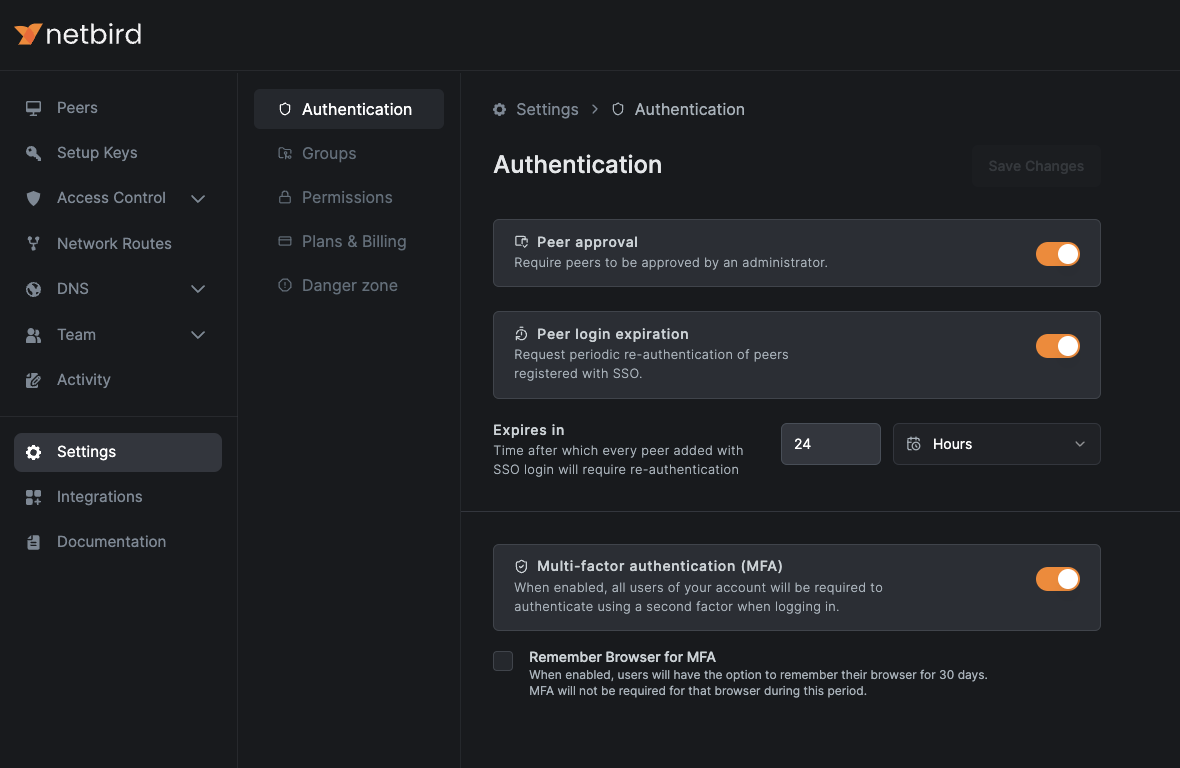
  • For users without IdP integration: Access your NetBird account and locate the section within the web user interface. This is where you'll find the MFA configuration options.
  • Within the page, find and activate the toggle switch.
  • As an additional convenience feature, you'll see a checkbox labeled . If selected, this option will remember your current browser for 30 days, reducing the frequency of MFA prompts while maintaining security on trusted devices.

NetBird Settings Enabling MFA

After enabling MFA, every user will be prompted to configure it when logging in. Upon logging in, a new window will appear, displaying a QR code. Use your preferred authentication app on your mobile device to scan this QR code. After successfully scanning, your app will generate a one-time code. Enter this code in the provided field and click to complete the MFA configuration process.
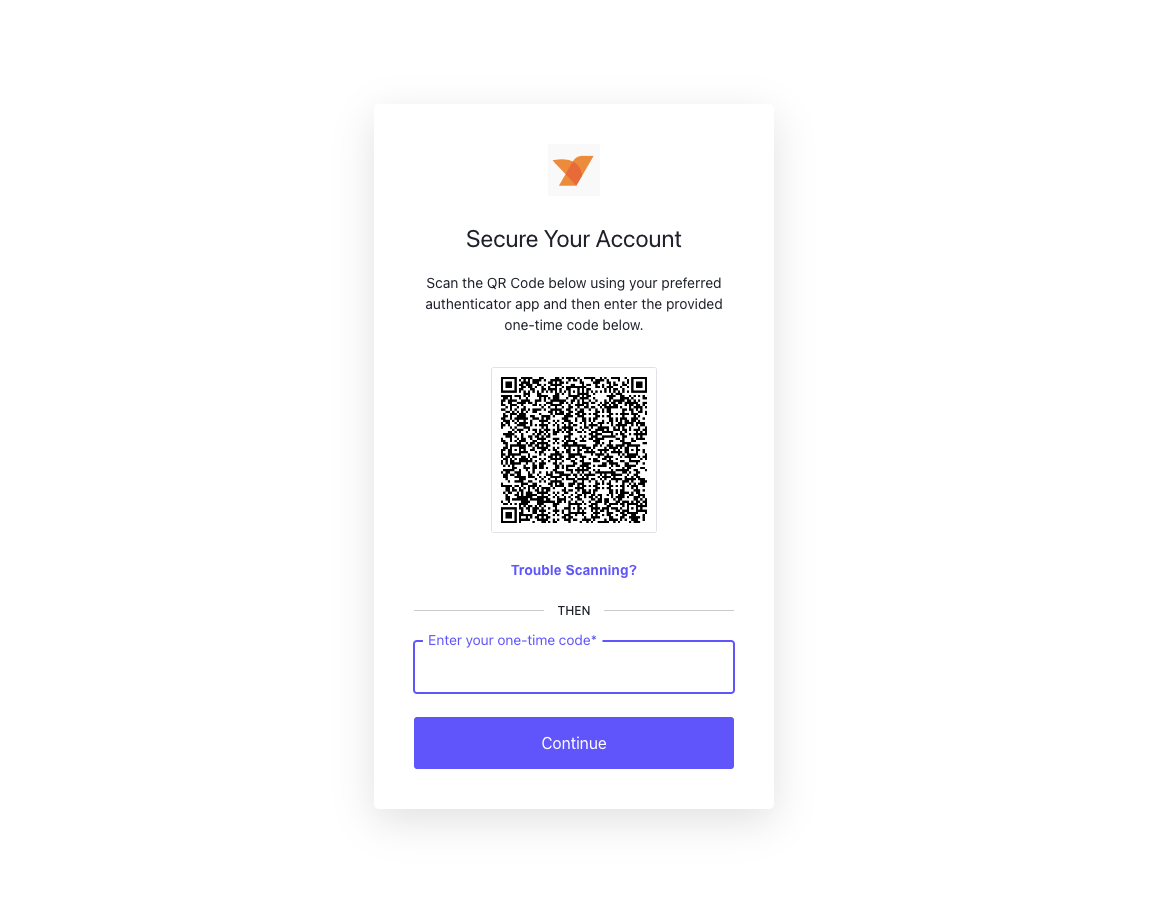
NetBird Scan QR Code

With MFA now activated, each subsequent login to NetBird will require you to input the current one-time code from your authentication app, adding an extra layer of security to your account.
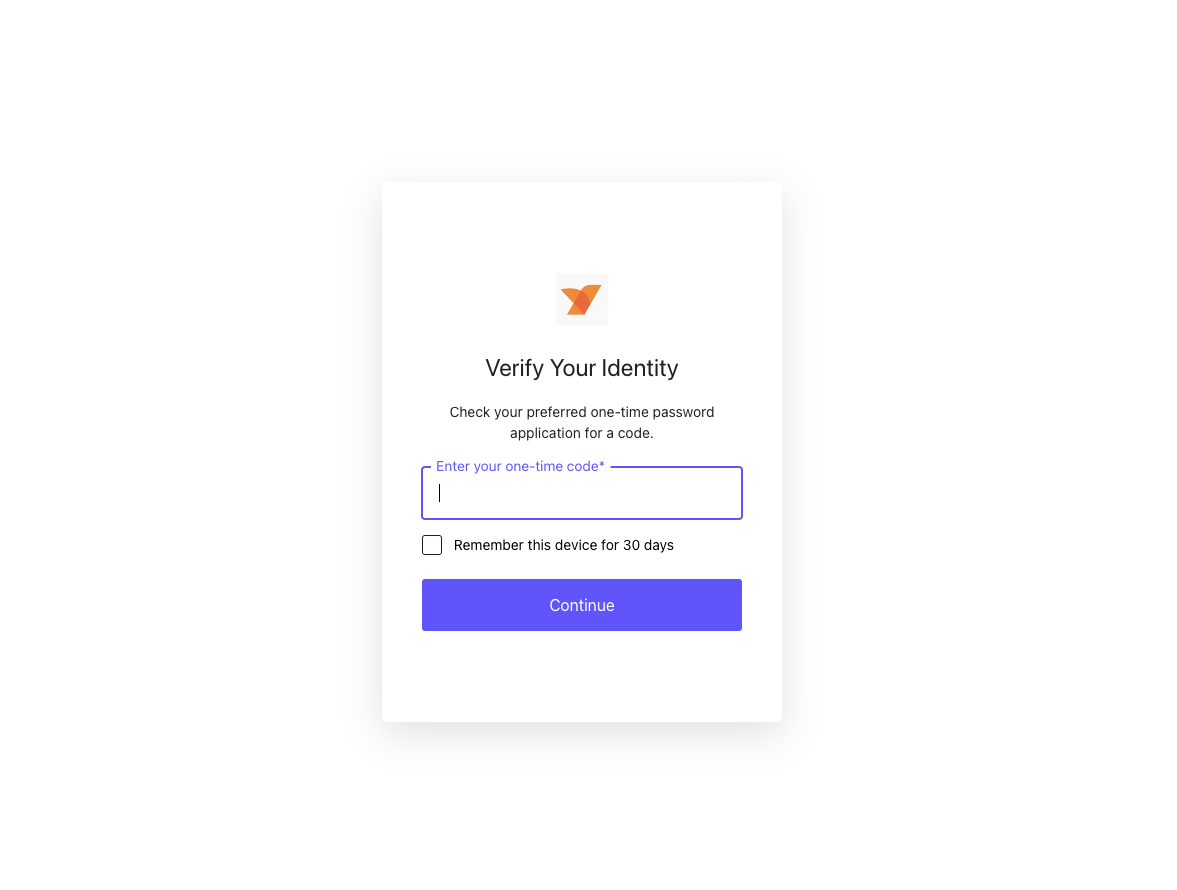
NetBird Verify with MFA

To verify the MFA status, return to the section and click on your user profile. You'll observe that the MFA status now shows as . Additionally, you'll notice a new button.
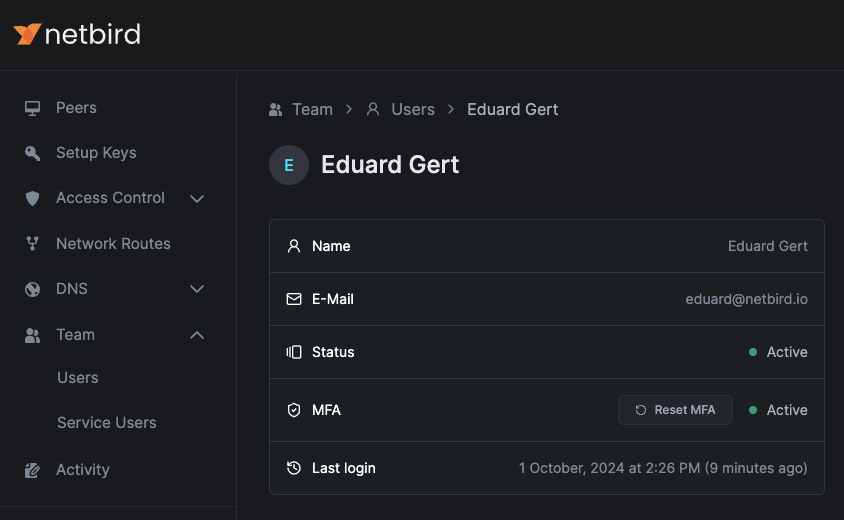
NetBird User MFA Status

This convenient button allows you to reinitiate the MFA configuration process if necessary, such as when changing devices or troubleshooting issues.
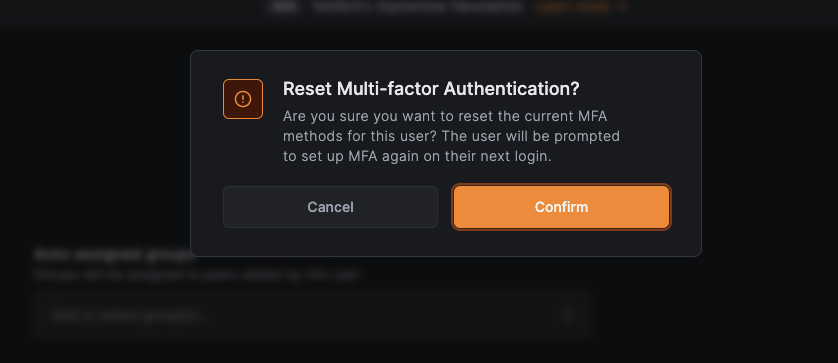
NetBird Reset MFA

Summing up, we encourage all users to take advantage of these free security feature. By doing so, you're not just protecting your own network—you're contributing to a more secure digital ecosystem for everyone.