


NetBird v0.61.0 builds on our SSH rewrite with fine-grained access control, letting you map NetBird user groups to specific local OS users on target machines. We're also introducing automatic client updates for Windows and macOS, keeping your fleet current without manual intervention.
Version 0.60 brought identity-aware SSH to NetBird, authenticate via your IdP, use native OpenSSH, and get proper audit trails showing which person accessed which server. But there was still something missing with this new workflow; once authenticated, users had access to any local account on the target machine. In enterprise environments and even well-organized homelabs, that's rarely what you want.
v0.61.0 closes that gap with fine-grained SSH access control.
Consider a typical infrastructure setup: you have developers who need to deploy code, DBAs who manage databases, and sysadmins who handle everything else. Each of these roles should map to different local accounts on your servers:
Before v0.61.0, you could control whether someone could SSH into a machine, but not which local user they could access. If someone from the dev team could reach a database server, nothing prevented her from attempting to SSH as even if that wasn't that person's role. Thus, trusting everyone with access to act responsibly.
The new implementation introduces a NetBird SSH protocol type in Access Control policies, distinct from generic TCP port 22 rules. When you create a policy using this protocol, you configure Authorized Groups that define explicit mappings between NetBird user groups and local OS users.
Here's what a typical configuration looks like:
| Source Group | Allowed Local Users |
|---|---|
| Developers | developer, deploy |
| DBAs | postgres |
| SysAdmins | root, admin |
When someone attempts to SSH into a peer:
If a developer tries to SSH as on a database server where they're only authorized as , the connection is denied, even though they have network access to that machine.
When configuring a NetBird SSH policy, you choose between two modes:
Full Access: Users in the source groups can SSH as any local user on destination machines. This maintains v0.60 behavior for teams that don't need granular restrictions.
Limited Access: You explicitly define which local users each group can access. This is the principle of least privilege applied to SSH, users get exactly the access they need and nothing more.
The implementation follows a fail-closed model: if no mapping exists for a requested local user, access is denied by default. Combined with JWT authentication, this creates multiple layers of verification:
Audit trails now show not just which person accessed which server, but which local account they used, critical information for compliance and incident response.
Keeping NetBird clients updated across a fleet of machines has traditionally required manual intervention or relying on other people in your networks to manually upgrade. v0.61.0 introduces automatic client updates for Windows and macOS, letting you ensure your network stays current without reaching out to users or interacting with each machine individually.
When enabled, the update process is straightforward:
Updates are triggered on connection, not on a schedule. This means long-running peers that stay connected won't automatically update mid active connection. A future release will address periodic update checks for always-on infrastructure.
Navigate to Settings → Clients in the NetBird dashboard and enable "Automatic Updates." You can configure updates to either:
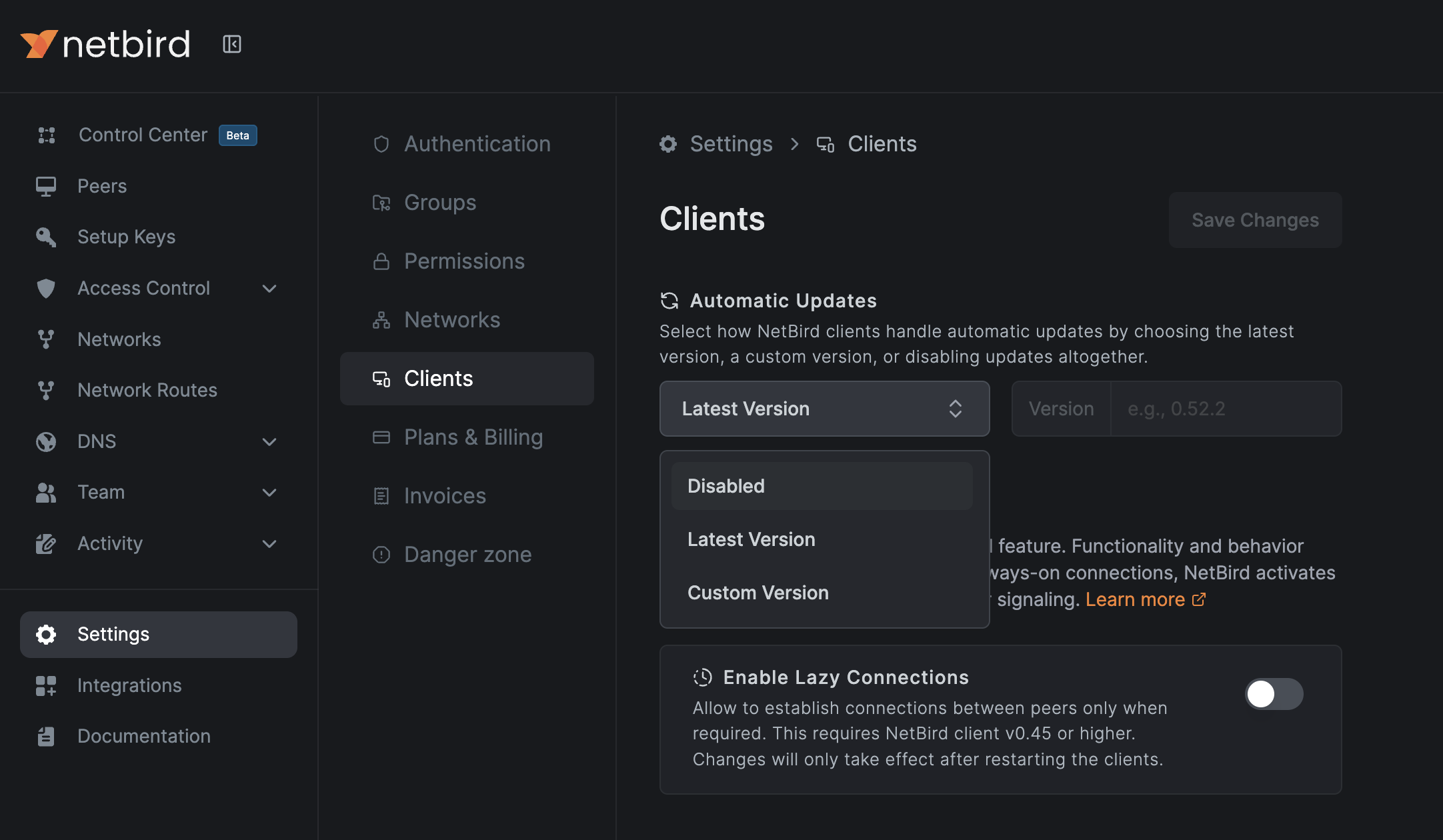
The feature is disabled by default; you opt in when you're ready. Users can also enable updates locally via Settings → Client in the NetBird application.
Automatic updates currently support Windows and macOS only. Linux support isn't available due to the variety of distributions and package managers, though future releases may add support for popular distributions.
This is a breaking change for self-hosted deployments. The fine-grained SSH access control requires coordination between Management server and clients. If you upgrade clients before the Management server, SSH access will break.
Existing TCP port 22 policies continue working for basic network-level SSH access. The new NetBird SSH protocol adds the fine-grained layer on top.
For detailed configuration options and troubleshooting, check out our SSH documentation and Auto-Update documentation .
此内容由惯性聚合(RSS阅读器)自动聚合整理,仅供阅读参考。 原文来自 — 版权归原作者所有。