


In Aalborg, Denmark, in the medieval age, secret passages under the town connected two convents, two churches, a bridge, and the castle of Aalborghus. Monks could use these passages secretly, protected from any evil outside.
In much the same way, secret virtual private network (VPN) tunnels connect company sites all over the world. Data packets travel securely through these tunnels, protected from eavesdroppers and intruders.
Site-to-site VPNs are essential for securely connecting multiple local area networks (LANs). Organizations with more than one office location use these VPNs to ensure that their internal data traffic remains confidential.
In this article, you'll learn about site-to-site VPNs, including their use cases and their advantages. You'll also take a look at the difference between site-to-site VPNs and remote access VPNs and how NetBird helps create and maintain site-to-site VPNs.
VPNs exist in different flavors and for different use cases. A site-to-site VPN is designed to connect local networks securely over the internet, turning them into a single network. It does this by creating secure, encrypted tunnels between the local networks. As a result, devices and applications can establish direct connections with devices or applications in a remote location without exposing sensitive information to the internet.
The goal of site-to-site VPNs is to connect whole local networks rather than individual devices. Of course, the definition of a local network can boil down to a single computer running the VPN gateway software, but the VPN does not specialize in device-to-device connections.
At a high level, a site-to-site VPN architecture typically involves three components:
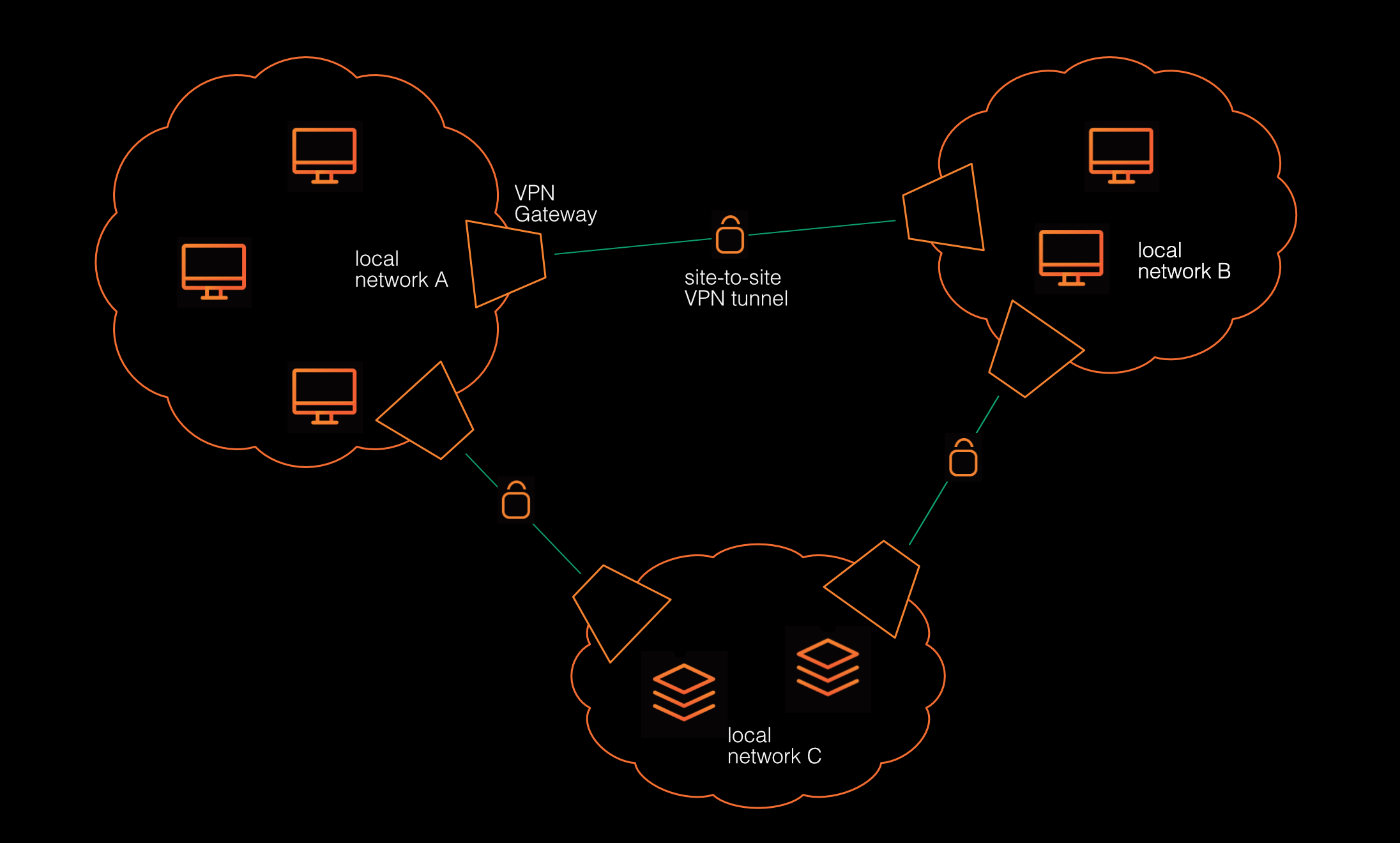
Following are several use cases where a site-to-site VPN is particularly applicable.
Keep in mind that an organization may have more than one use case for a site-to-site VPN, so you may notice some overlap. In fact, these use cases blend nicely with each other, so there is no need to decide between use cases. A site-to-site VPN is agnostic to what it is used for; it works the same in any case.
Organizations handling sensitive or proprietary data have an elevated interest in protecting this data from unauthorized access, both at rest and during transmission.
A possible solution to this could be to restrict the data to particular servers and devices that are connected through an encrypted and mutually authenticated one-to-one connection. However, as every server and device needs individual certificates for authentication, the effort to maintain these connections grows exponentially with the number of servers and devices to be connected.
With a site-to-site VPN, all traffic inside the organization is encrypted by default, and data traveling across locations can neither be intercepted nor tampered with.
Companies with multiple offices spread across the country (or even multiple countries) typically want to have all the separate local networks appear as a single, global network.
In the days before VPNs, these companies would have had to lease physical cables from their telecom service provider. The costs were often prohibitive so that only large corporations could afford to have dedicated data lines connecting their remote offices to the headquarters.
Site-to-site VPNs changed the game. The internet connects everything to everything. A site-to-site VPN needs to establish encrypted tunnels only between the sites to keep unwanted traffic and eavesdroppers out. No extra glass fibers or copper wires are required.
Large companies may decide to run a dedicated data center that provides services for all their offices. Possible applications are central databases, customer relationship management (CRM) systems, or other internal business tools that are available to employees in any location.
Now, those data centers could enable firewall-protected access to the servers and services. Web-based services would use Transport Layer Security (TLS) on port 443 to protect traffic, shell access would run on SSH port 22, and mail traffic would need the respective Internet Message Access Protocol (IMAP) and Simple Mail Transfer Protocol (SMTP) ports open. However, this approach can quickly turn into a firewall maintenance hell. Security incidents are just around the corner.
Site-to-site VPNs avoid this. Rather than protecting individual client-server connections, site-to-site VPNs connect whole networks, making the data center appear to run in the same building as the clients.
In the event of a service outage at one location, site-to-site VPN allows an organization to switch to a redundant service running at another site.
Modern, scalable software is often designed to scale horizontally by replicating services on multiple servers. If the services are replicated only within a single data center, the whole business of a company relies on the data center to be available. If the data center goes offline for whatever reason, the company's business stalls immediately. With site-to-site VPNs, a company can replicate the services securely across the data center and its own business locations for maximum redundancy. If the data center, or any of the company's local offices, goes offline, the rest of the company can continue to do business.
In this scenario, a site-to-site VPN allows for securely replicating services and reconnecting to services in a remote location should the local services be out of order.
The use cases may already have given you an idea about the various advantages of site-to-site VPNs; however, let's go through the particular advantages in detail.
The most fundamental and readily visible advantage of site-to-site VPNs is the secure connectivity between local networks. Organizations don't have to consider replicating infrastructure across their locations as every location has access to the same infrastructure, just as if all sites were sharing a single, uniform network.
A site-to-site VPN turns separate, distributed LANs into a single, unified virtual network. This has several benefits. To start, the whole network can be managed and monitored centrally. Network administrators can establish virtual subnetworks across site boundaries, thus managing access efficiently by logical units (such as departments or projects) rather than physical network structure. Additionally, new sites can seamlessly join the existing network, and network configuration can remain consistent across sites.
If all sites are connected, like in a single, uniform network, internal network security is important. A network where anyone can access anything is not well-protected against malicious behavior from inside.
Modern site-to-site VPN solutions address this concern through access control. Administrators can set up rules to control which person, device, or appliance can access which resources, whether these resources are single machines or large subnets.
As organizations grow and expand, site-to-site VPNs can easily scale to accommodate new locations. Adding a new site remains a straightforward process, regardless of the number of already existing sites.
Now that you know more about site-to-site VPNs, let's talk about how they differ from (the more traditional) remote-access VPNs. While both types of VPN facilitate secure communications, they serve different needs:
The centralized structure of a remote-access VPN is its biggest weakness. The central server can be overloaded by too many simultaneous connections, and a server outage means immediate connection loss for all remote devices, blocking work for anyone outside the local network.
In contrast, a site-to-site VPN has no single VPN server through which to route traffic. The aforementioned VPN gateways may turn out to be a bottleneck, but with services like NetBird, this isn't an issue (more on this later).
You can even consider a remote-access VPN as a special kind of site-to-site VPN. Think of one large local network and many small ones that contain only one device. NetBird's architecture is agnostic of constructs like site-to-site or remote access.
If you're already familiar with NetBird, you may know that NetBird establishes direct point-to-point connections between devices. No physical gateway appliances are required to tunnel traffic from one site to another. So how does NetBird's model enable the creation of a site-to-site VPN?
Let's assume two separate, local networks. Devices in each of the two networks can access the internet, but firewalls (and, in most cases, also the internet provider) block access to the local network from the outside.
If a device in one local network wants to connect to a device in another local network, it cannot reach out to that device directly.
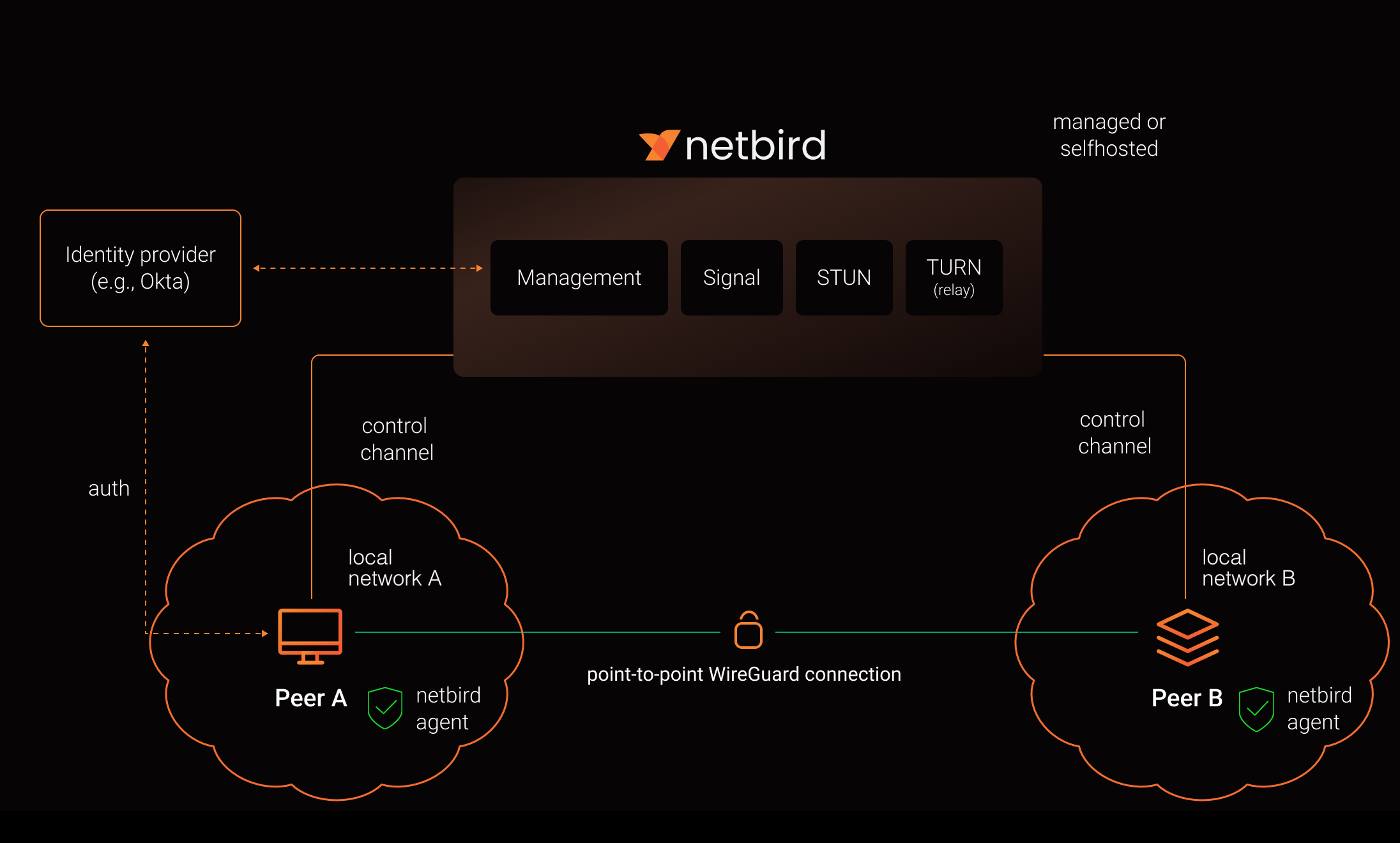
Now, let's assume the two devices have a NetBird client installed and are registered at a NetBird management server. This server runs outside any of the two local networks and is reachable by both.
A client in one local network that wants to connect to a client in another local network reaches out to NetBird's signaling service, which then contacts the target client to enable both clients to establish a point-to-point connection.
The following image is a slight modification from this architecture documentation , indicating the separate local networks:
The following image shows the connection negotiation in more detail. The two clients determine their public address from the Session Traversal Utilities for network address translator (STUN) service and then ask the signal service to make their public address known to the other client. The signal service then helps to establish the point-to-point connection:
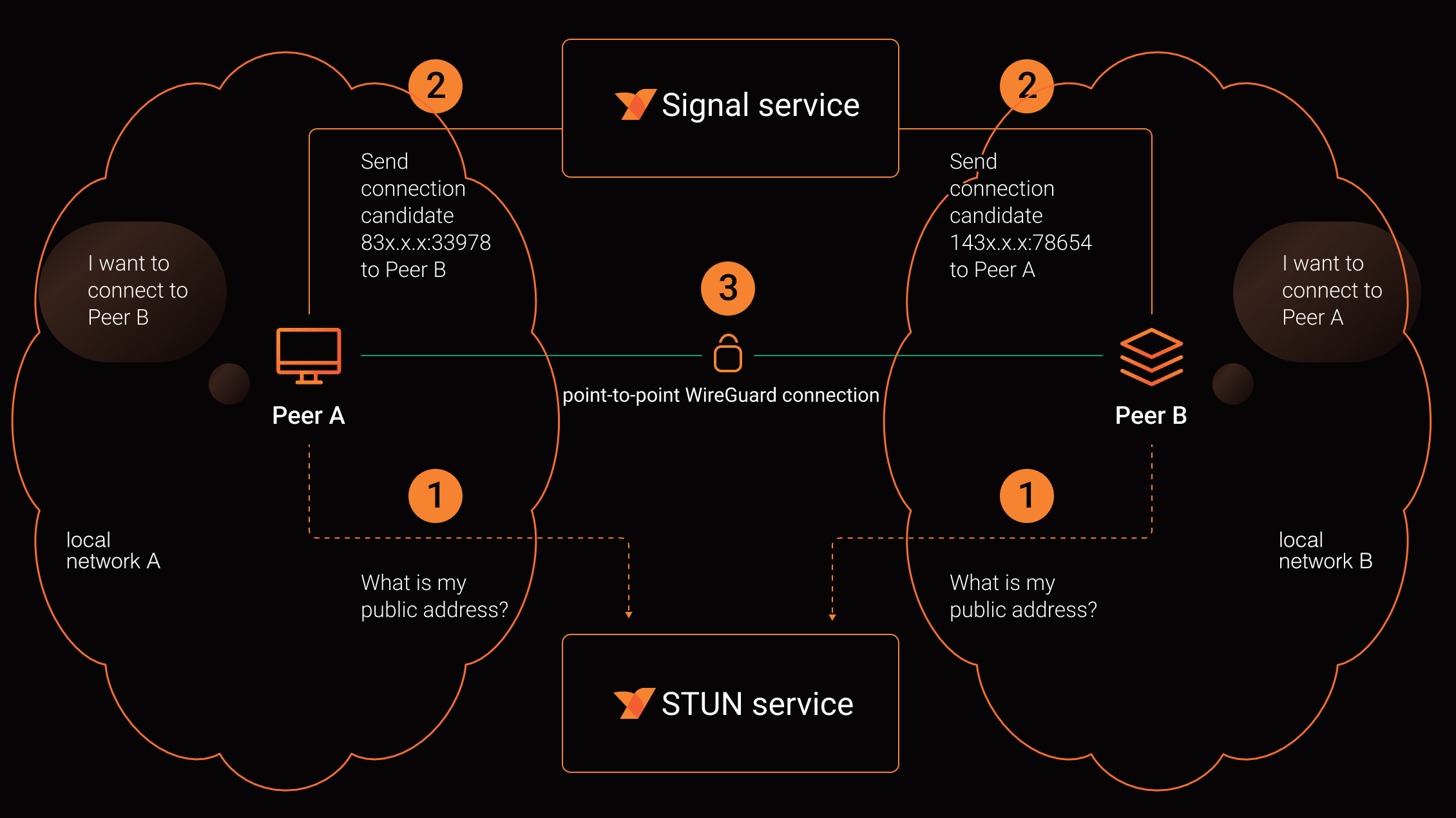
This way, NetBird achieves site-to-site connectivity without the need to install VPN gateways at each site. NetBird does not require that you think in terms of local versus remote networks (although there is a related concept for groups for access control purposes). The whole virtual network is simply a set of direct point-to-point connections. As mentioned previously, you can even include remote access into the mix. A device with a NetBird client installed can be in any location with access to the internet and connect to other clients in the same NetBird VPN.
If you don't want or can't install NetBird clients on every device of a local network, you can use the NetBird routing feature to simulate a VPN gateway. In this scenario, a NetBird client acts as a routing peer for an entire subnet, effectively mimicking a VPN gateway.
The flexibility of NetBird's managed point-to-point connectivity really shines when modeling various network topologies.
Site-to-site VPNs connect multiple local networks through secure connections to make all networks appear as one and allow machines in one location to access machines in other locations.
Site-to-site VPNs might be laborious to set up, but they don't have to be. NetBird is flexible and agnostic to network topologies. It allows administrators to set up and manage virtual networks with great flexibility and ease.
此内容由惯性聚合(RSS阅读器)自动聚合整理,仅供阅读参考。 原文来自 — 版权归原作者所有。