






I wrote about building websites with LLMs — (L)ots of (L)ittle ht(M)l page(s) — and I think it’s time for a post-mortem on that approach:
I like it.
I’ve tweaked a few things from that original post but the underlying idea is still the same, which I would describe as:
Avoid in-page interactions that require JavaScript in favor of multi-page navigations that rely on HTML and are enhanced with CSS view transitions (and a dash of JS if/where prudent).
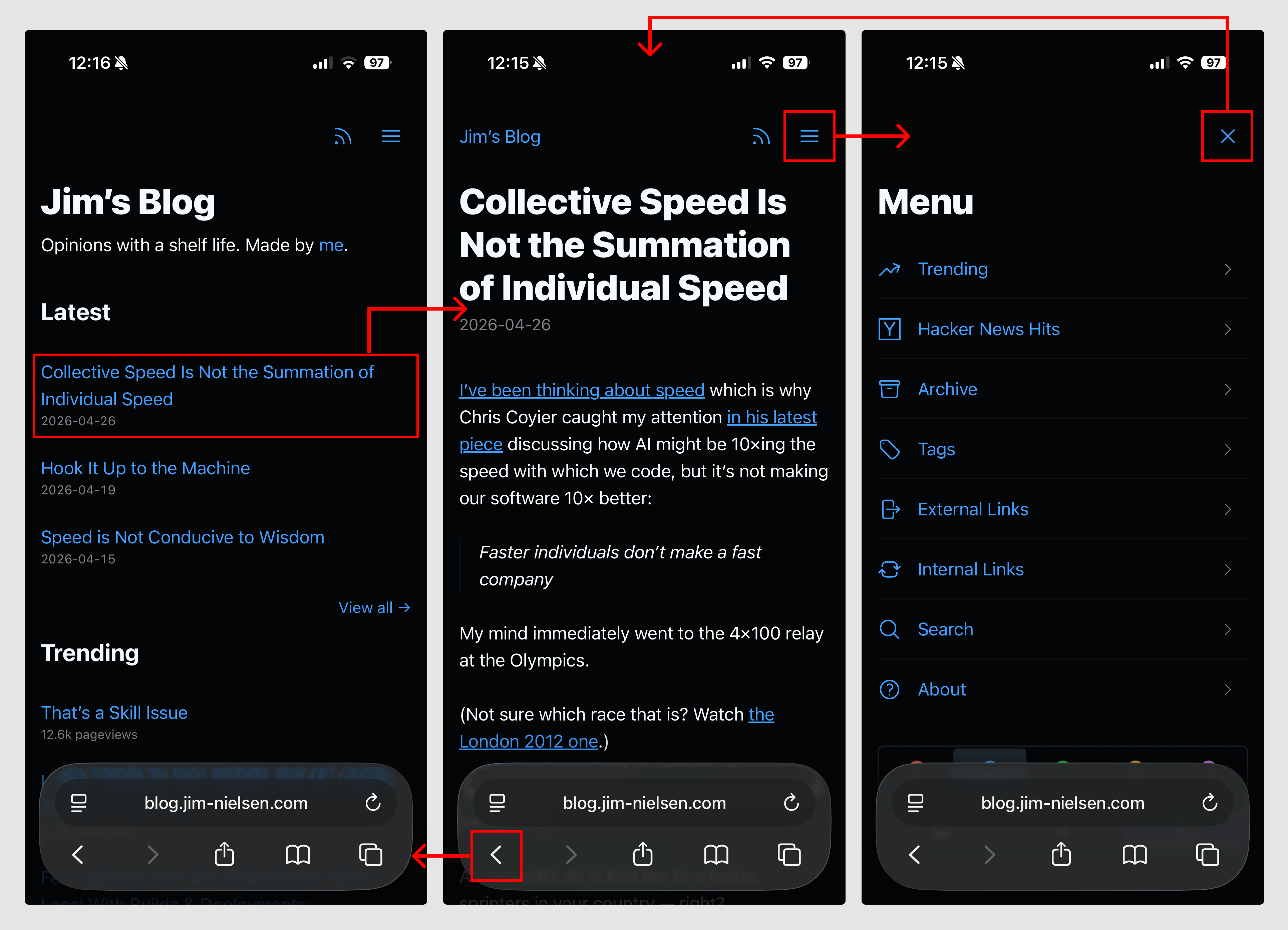
As an example, on my blog I have a “Menu”. It doesn’t “expand” or “slide out” or “pop in” or whatever else you can do with JS. Instead, it navigates to an entirely-new page that is focused on just the menu options of my site.
I say “navigates” because it’s just a link — <a href="/menu/"> — and it functions like a link, but the navigation interaction is enhanced by CSS view transitions.
Have a newer device with a modern browser? Great, you get a nicer effect.
Have an older device, or an older browser, or JS disabled, Et al.? It’ll still work.
If you can follow a link — which is the most fundamental thing a browser can do — it will work.
So how’s it all work under the hood? In essence, all the pages have a link to the menu (except the menu page). When you navigate to the menu, that link is changed to an “X” which “closes” the menu. The closing is still just a link (back to /) but it’s enhanced with JS to actually do a “back” in the browser history. This makes it so “opening/closing” the menu doesn’t add an entry to your browser history.
As a simplified example, the code looks like this:
<!-- Normal page -->
<nav>
  <a href="/menu/">
    <svg>...</svg>
  </a>
</nav>

<!-- Menu page -->
<nav>
  <a href="/" onclick="document.referrer ? history.back() : window.location.href = '/'; return false;">
    <svg>...</svg>
  </a>
</nav>
The document.referrer checks whether we came to this page as a navigation (mostly likely from within the blog itself) or via a direct visit (i.e. somebody typed it into the URL bar, unlikely but possible) which is how I suss out whether there’s a meaningful history.back() run or not.
Here’s a video of how it all works, if that’s your thing:
While this solution seems simplistic, it was not a simple thing to arrive at. It required me to spend time thinking about what was essential to navigation, how that interaction could work across multiple pages, and how I could ensure page size stayed small so the interaction was both fast and robust while remaining intuitive to use.
In other words, the approach shaped the design.
Turns out, if you have a website and you think of the browser as a way to navigate documents — rather than a runtime to execute arbitrary code and fetch, compile, and present them — things can be a lot simpler than our tools often prime us to make them.
此内容由惯性聚合(RSS阅读器)自动聚合整理,仅供阅读参考。 原文来自 — 版权归原作者所有。