


惯性聚合 高效追踪和阅读你感兴趣的博客、新闻、科技资讯
阅读原文 在惯性聚合中打开

推荐订阅源

酷 壳 – CoolShell
酷 壳 – CoolShell
P
Privacy & Cybersecurity Law Blog
G
GRAHAM CLULEY
T
The Exploit Database - CXSecurity.com
www.infosecurity-magazine.com
Threat Intelligence Blog | Flashpoint
Project Zero
Project Zero
S
Security @ Cisco Blogs
TaoSecurity Blog
TaoSecurity Blog
A
Arctic Wolf
Webroot Blog
Webroot Blog
Hacker News - Newest:
Hacker News - Newest: "LLM"
Security Latest
Security Latest
H
Heimdal Security Blog
N
News and Events Feed by Topic
N
News | PayPal Newsroom
T
Tor Project blog
OSCHINA 社区最新新闻
OSCHINA 社区最新新闻
GbyAI
GbyAI
The Last Watchdog
The Last Watchdog
Y
Y Combinator Blog
宝玉的分享
宝玉的分享
Scott Helme
Scott Helme
A
About on SuperTechFans
M
MIT News - Artificial intelligence
V
V2EX
V
Visual Studio Blog
Recorded Future
Recorded Future
博客园 - 叶小钗
F
Fortinet All Blogs
L
Lohrmann on Cybersecurity
The GitHub Blog
The GitHub Blog
博客园 - Franky
P
Proofpoint News Feed
MyScale Blog
MyScale Blog
D
Darknet – Hacking Tools, Hacker News & Cyber Security
S
Secure Thoughts
D
DataBreaches.Net
Cyber Security Advisories - MS-ISAC
博客园 - 三生石上(FineUI控件)
I
InfoQ
SecWiki News
SecWiki News
Blog — PlanetScale
Blog — PlanetScale
Engineering at Meta
Engineering at Meta
J
Java Code Geeks
B
Blog RSS Feed
AWS News Blog
AWS News Blog
Know Your Adversary
Know Your Adversary
V
Vulnerabilities – Threatpost
H
Help Net Security

Sysdig Blog

Masterclass: AI is more than ChatGPT and LLMs CVE-2026-39987 update: How attackers weaponized marimo to deploy a blockchain botnet via HuggingFace 5 steps to securing AI workloads Marimo OSS Python Notebook RCE: From Disclosure to Exploitation in Under 10 Hours Security briefing: March 2026 The Sysdig MCP server is now available in AWS Marketplace Risk isn’t reduced until you take action: How teams resolve issues in the cloud AI infrastructure security: Why it deserves its own category Three pillars for building effective runtime-powered cloud defense, the right way Closing the cloud security gap with runtime security Seeing risk isn’t stopping it: Why visibility alone isn’t enough TeamPCP expands: Supply chain compromise spreads from Trivy to Checkmarx GitHub Actions AI coding agents are running on your machines — Do you know what they're doing? Runtime security for AI coding agents: Protecting AI-assisted development How runtime insights power every cloud security use case CVE-2026-33017: How attackers compromised Langflow AI pipelines in 20 hours Inline Cloud Response: Accelerating AWS threat containment for SOC teams Runtime malware detection for AWS Fargate Detecting CVE-2026-3288 & CVE-2026-24512: Ingress-nginx configuration injection vulnerabilities for Kubernetes Malware detection with Sysdig Security briefing: February 2026 Leveling up Kubernetes Posture: From baselines to risk-aware admission Eliminating runtime blind spots: How CleanStart and Sysdig build continuous trust across the container lifecycle LLMjacking: From Emerging Threat to Black Market Reality Real risks live at runtime: Why CISOs must care about deep telemetry in 2026 Sysdig named a Leader in the Forrester Wave™: Cloud Native Application Protection Solutions, Q1 2026 How to run rootless containers AI-assisted cloud intrusion achieves admin access in 8 minutes Security briefing: January 2026 Securing GPU-accelerated AI workloads in Oracle Kubernetes Engine Bringing OSS runtime security to AWS: Falco integration with AWS Security Hub CSPM Our customers have spoken: Sysdig rated a Strong Performer in Gartner® Voice of the Customer for Cloud-Native Application Protection Platforms Protecting sensitive business data in preparation for the organization's Gen AI VoidLink threat analysis: Sysdig discovers C2-compiled kernel rootkits AI is still a workload: A practical guide to securing AI workloads How threat actors are using self-hosted GitHub Actions runners as backdoors How Sysdig Sage delivers AI-powered, real-world vulnerability management Security briefing: December 2025 Top 10 ways to get breached in 2026 EtherRAT dissected: How a React2Shell implant delivers 5 payloads through blockchain C2 Introducing runtime file integrity monitoring and response with Sysdig FIM How to detect multi-stage attacks with runtime behavioral analytics EtherRAT: DPRK uses novel Ethereum implant in React2Shell attacks Detecting React2Shell: The maximum-severity RCE vulnerability affecting React Server Components and Next.js The rise of AI agents: How autonomous AI Is transforming cloud security Kubernetes 1.35 - New security features The Urgency of Securing AI Workloads for CISOs Security briefing: November 2025 Quantum and the cloud: Science fiction turned security strategy Cloud security, the right way: What the industry should demand (and why "good enough" isn't) Return of the Shai-Hulud worm affects over 25,000 GitHub repositories Detecting CVE-2024-1086: The decade-old Linux kernel vulnerability that’s being actively exploited in ransomware campaigns What’s old is new again: How to demystify AI security with AIBOMs Securing Kubernetes with agentic cloud security How agentic cloud security reduces real risks Hunting reverse shells: How the Sysdig Threat Research Team builds smarter detection rules Shifting left with AI and MCP: Sysdig + Amazon Q Developer How Falco and Stratoshark close the gap between open source runtime detection and deep forensic analysis Investigating security issues with ChatGPT and the GitHub MCP server New runc vulnerabilities allow container escape: CVE-2025-31133, CVE-2025-52565, CVE-2025-52881 Harden your LLM security with OWASP Security briefing: October 2025 How agentic AI is changing cloud security Kubernetes Incident Response: Detect, investigate, and contain in under 10 minutes Sysdig recognized as a Cloud Security Leader in Latio Tech Cloud Security Market Report AI echolocation of cloud risks using Sysdig & Snyk MCP servers Sysdig MCP Server: Bridging AI and cloud security insights Understanding CVE-2025-49844: “RediShell” Critical Remote Code Execution in Redis How Sysdig secures your containers and Kubernetes Sysdig Security Briefing: September 2025 Cloud security, the right way: The 3 pillars of real-time defense Open source spotlight: Bringing web application security to Falco with Falcoya's Nginx plugin Malicious NPM packages: Are you exposed? AI for SOC teams: 5 cloud security prompts to start your day with Sysdig Sage™ Shai-Hulud: The novel self-replicating worm infecting hundreds of NPM packages ZynorRAT technical analysis: Reverse engineering a novel, Turkish Go-based RAT Modern vulnerability management, built for the cloud Build your AWS incident response playbook with open source tools 2025 Gartner® CNAPP Market Guide: Runtime visibility is no longer optional Threat hunting with Sysdig: Uncovering “IngressNightmare” Open source spotlight: From alerts to action with AI-powered Falco Vanguard From triage to action: How Sysdig’s agentic cloud security platform slashes noise and accelerates remediation The vision comes to life: Agentic cloud security with Sysdig Sage™ Data security findings: A technical deep dive Connecting runtime to source: Sysdig and Semgrep integration Fix what matters, faster: How Sysdig and Semgrep are unifying security without silos – from code to runtime Defending sensitive data with Sysdig Secure Redefining cloud security, the right way Join the movement: The Sysdig Open Source Community is live A smarter, safer cloud in the age of AI Unifying detection and response: Sysdig + Cortex XSOAR for security at cloud speed The future of security is open, and it needs a unified hub: The Sysdig Open Source Community is here CVE-2025-53104: Command injection via GitHub Actions workflow in gluestack-ui Why MCP server security is critical for AI-driven enterprises What’s new in Sysdig — June 2025 AI-powered CNAPP with Sysdig Sage™ Revolutionizing Cybersecurity Search with Sysdig Sage™ Sysdig Threat Bulletin: Iranian Cyber Threats The end of the prioritization-only era: Vulnerability management needs action Dangerous by default: Insecure GitHub Actions found in MITRE, Splunk, and other open source repositories
How to use AI to manage cloud security threats
Eric Carter · 2026-04-08 · via Sysdig Blog

Cloud defenders constantly face fast-moving security threats. Signals pour in from containers, Kubernetes, cloud services, and identities and security teams are left asking the same questions over and over:

  • What do all these alerts mean?
  • Which are related to the same incident?
  • What is at risk?
  • What should we do next?

To help analysts work at the incident level rather than drowning in raw alerts, Threat Management in Sysdig Secure consolidates related, high-confidence runtime events into a single, actionable security incident. Sysdig Sage™ takes that experience a step further, providing AI-generated threat summaries and a conversational assistant that helps teams understand and respond faster.

AI assistance for threat management

Sysdig Sage for Threats is an AI-powered enhancement to the Threats module in Sysdig Secure. It enriches each recorded threat with:
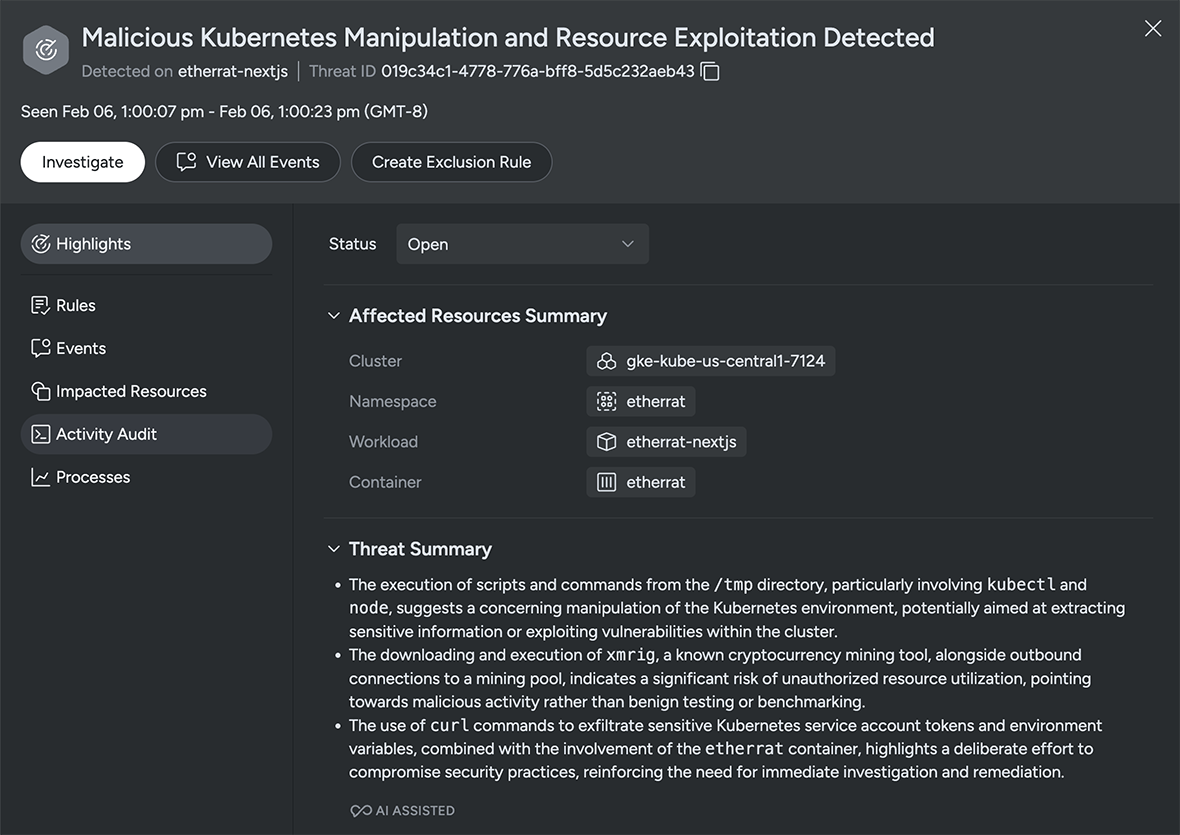
  • An AI-generated title that provides a plain-language description of the threat.
  • A three-bullet summary that explains what’s happening, why it matters, and who or what is impacted.

Three bullets that improve cloud threat triage

You can think of the AI-generated bullets as dynamically generated insights that answer three core questions:

  • What’s happening?
  • Why does it matter?
  • Who or what is affected?

Cloud defenders don’t have time to waste. Having a concise description of the suspicious behavior or attack pattern, as well as the scope, such as which clusters, cloud accounts, or identities are involved in the threat, helps teams prioritize issues and respond faster.

For teams contending with a large number of alerts, Sysdig Sage summaries help quickly scan threats to decide:

  • Is this a significant risk to production applications and sensitive data?
  • Is this a benign activity in a dev or test environment?
  • Which team needs to know about this?

Investigation by conversation: Chatting about threats

The second way Sysdig Sage enhances the Threats experience is through an embedded chat assistant. It is context-aware, so it knows which threat entry you’re viewing. You can use the chat assistant to ask for further threat details, explain rules and events, list related runtime events, show impacted resources, and suggest next steps for response and hardening.

Below are some concrete ways teams can use the chat to accelerate their threat workflow.

Explaining a threat in plain language

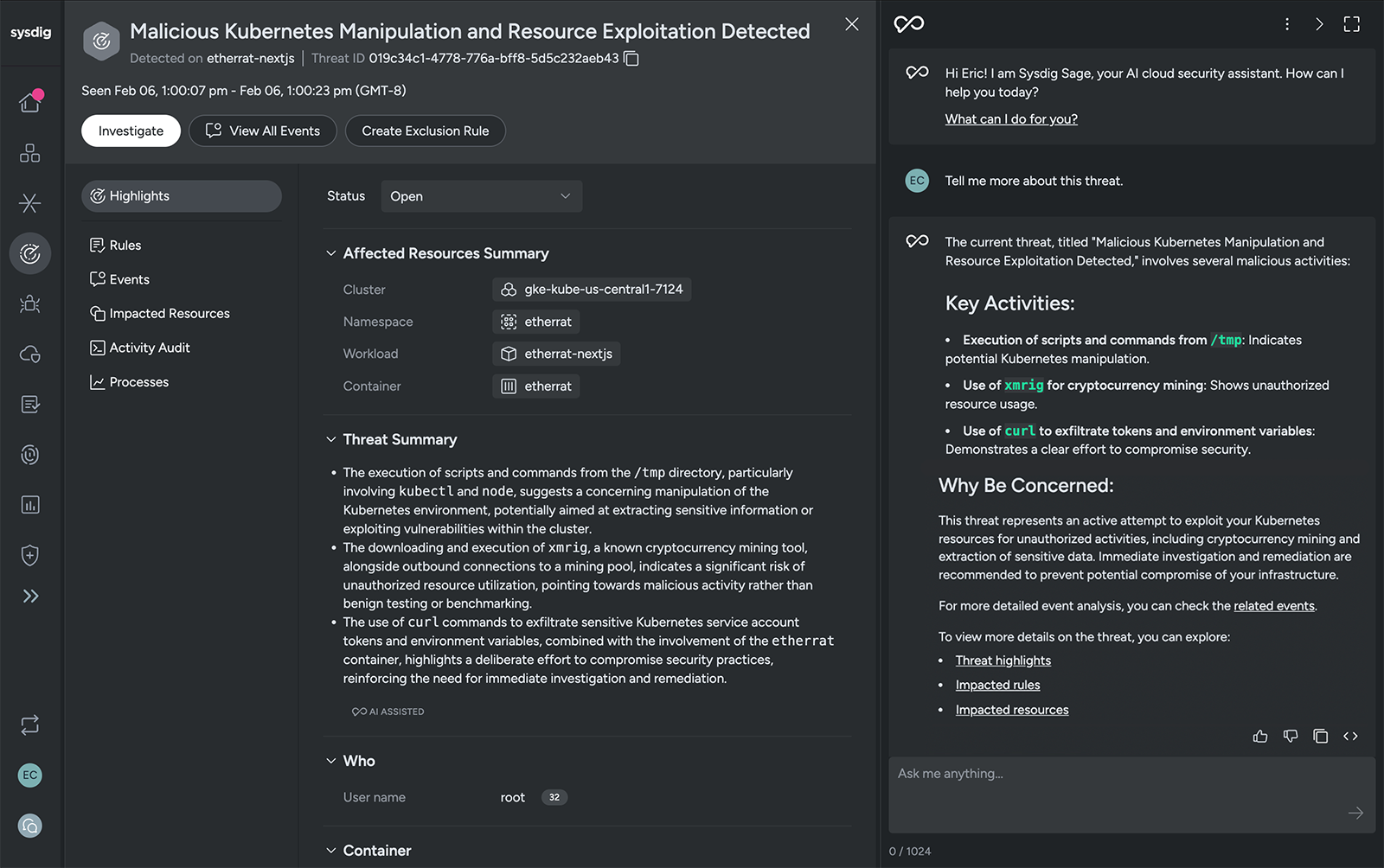
The three bullets generated for each threat give you a concise overview. Sometimes you still want to know more. Using natural language, you can start with a simple question and then drill down with follow-ups as you learn more. You can ask Sysdig Sage for more details with a simple prompt such as, “Tell me more about this threat.”

With contextual awareness, Sysdig Sage knows what threat you’re viewing and will expand on the AI-generated summary. It synthesizes information from the Sysdig platform and, in addition, draws upon the wealth of knowledge from its backing AI model. Armed with this information, it will return a narrative explanation of the activity, the techniques involved, and why it matters.
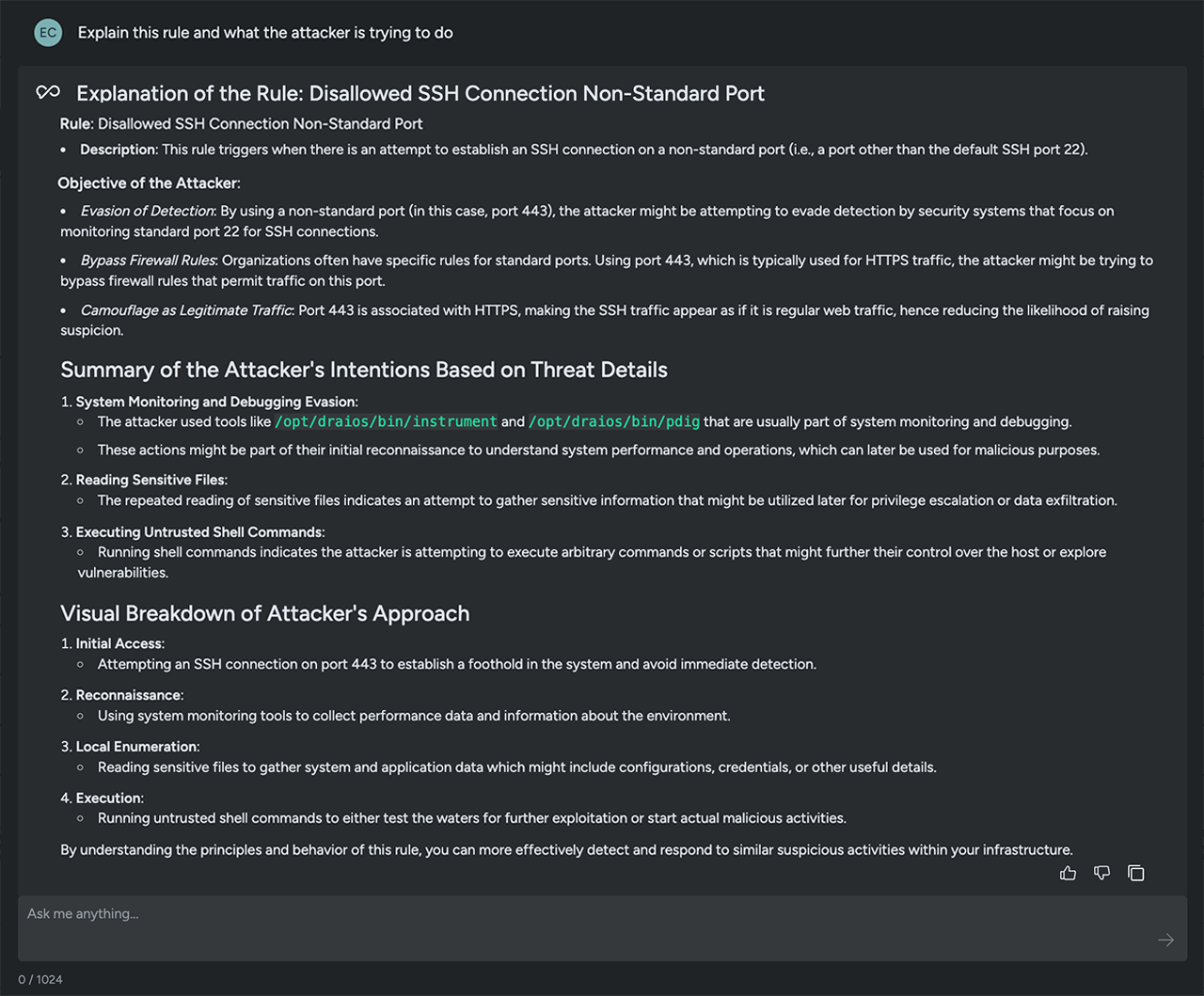
To understand what triggered an alert and the tactics being executed by an attacker, you can ask, “Explain this rule and what the attacker is trying to do.” Sysdig Sage brings you valuable intelligence. It can reflect insights aligned with the tactics and techniques outlined in the MITRE ATT&CK framework, helping teams stay ahead in the battle to protect critical systems.
Another option is to ask Sysdig Sage to summarize the existing threats. This gives you an easy-to-read digest of the type of concerning behaviors happening in your environment. You can use a prompt like, “Show me the top 5 threats based on potential impact,” to get an AI-based opinion on the issues that pose the greatest risk.

This is ideal for:

  • Prioritizing the threats that appear in your threat feed.
  • Identifying recurring issues that can be addressed by improving your security practices.
  • Summarizing issues for executives or stakeholders who request a threat status summary.

Navigating between events and threats

Investigations rarely move in a straight line. You may start from a suspicious event and work your way up to a threat, or begin at the threat and dive into the raw events behind it.

Sysdig Sage for Threats supports this bidirectional exploration through chat.

Example prompts:

  • From an event: “What threat is this runtime event associated with?”
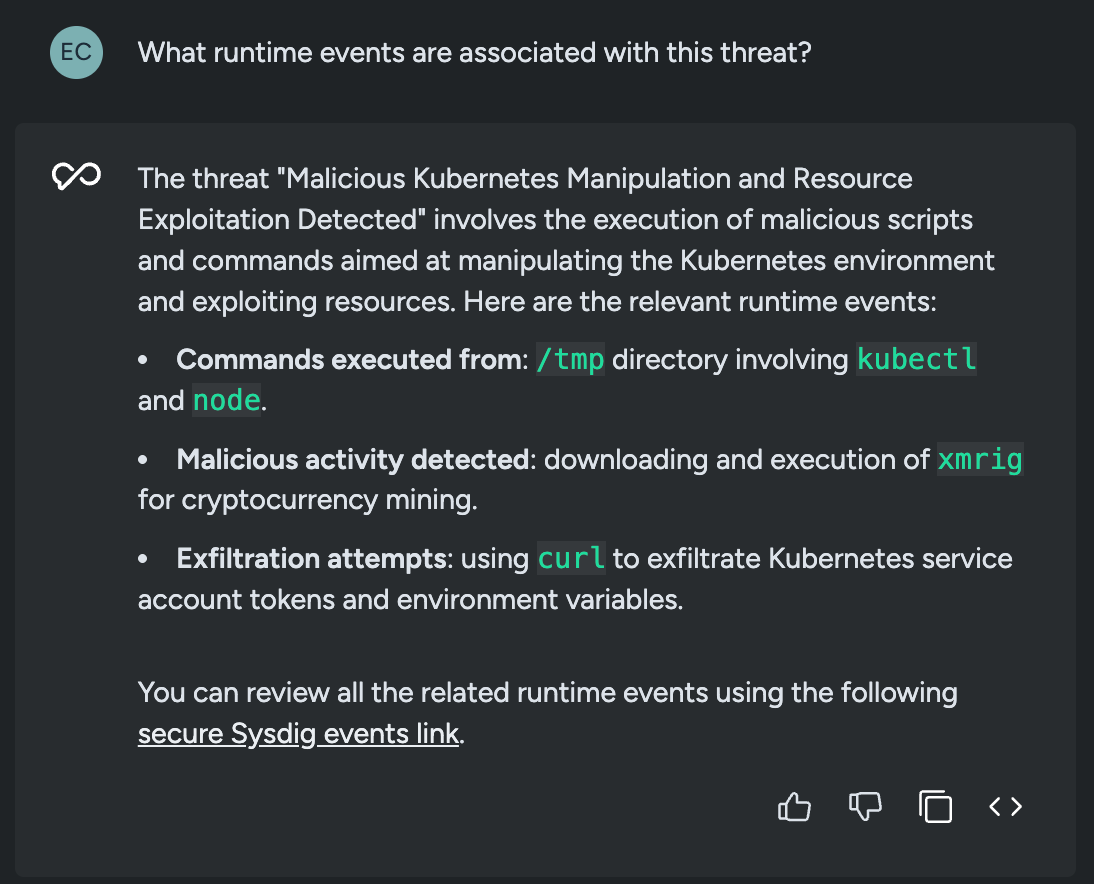
  • From a threat: “What runtime events are associated with this threat?”
  • While investigating: “Show me more details about this threat” or “Expand event details.”

In response, Sysdig Sage will:

  • Identify whether the runtime event is part of an existing threat and provide a direct link back to that threat.
  • Retrieve and display a list of events tied to the selected threat, with navigation back to individual event details.
  • Help you expand and explore relevant details in the UI without hunting through filters.

The result is less time spent clicking around the console and more time actually understanding what a potential attacker is doing.
Scoping the impact of a threat

Knowing a threat exists is only half the battle. You also need to understand scope and impact:

  • Which clusters or namespaces are involved?
  • Is a critical service or high-sensitivity environment affected?
  • Are any particular identities, roles, or cloud accounts implicated?

AI helps here, even with a simple question such as, “Who/what is impacted by this threat?”

Sysdig Sage responds by surfacing impacted resources and identity info — such as clusters, hosts, identities, cloud users, or cloud services — so analysts can quickly understand the blast radius and decide whether to escalate.

This is where the Threats module and Sysdig Sage intersect with the broader CNAPP context. The assistant can reference the same entities and metadata that the Threats engine used to build the threat in the first place, giving you an impact view rooted in real runtime behavior.

Asking for guidance on threat response

Understanding a threat is only valuable if it leads to action. Sysdig Sage is designed not just to describe what’s happening, but to help you figure out what to do about it.

Across Sysdig Secure, AI provides guidance on remediation and response. For runtime events, it explains what caused the event and offers suggestions for next steps to mitigate it. For vulnerable container images, AI recommends targeted fixes with step-by-step instructions. The same principles apply when you use the assistant from the Threats view.

Here are a few useful prompts focused on response:

Example prompts:

  • “What should I do to stop this threat?”
  • “What are my options to respond to this threat?”
  • “Give me step-by-step guidance to remediate and prevent this type of threat.”

When you ask these types of questions about a threat, Sysdig Sage can:

  • Suggest immediate containment ideas, such as isolating or restarting workloads, revoking suspicious credentials, or tightening network access.
  • Recommend hardening and prevention steps, such as improving IAM policies, Kubernetes RBAC, or configuration baselines.
  • Advise on practices your team should adopt to reduce the chance of a repeat incident.

Sysdig Sage essentially gives you a playbook you can use to:

  • Take immediate action
  • Open tickets with clear context.
  • Share concise, actionable guidance with other teams

A day in the life with Sysdig Sage for Threats

To see how this comes together, imagine a typical morning for a cloud threat responder:

  1. Log in and scan threats. Open the Threats page in Sysdig Secure and review the titles and summaries to identify the most concerning issues.
  2. Ask for context. Type: “Tell me more about this threat and who it impacts.”
    Sysdig Sage highlights the behavior it detected and which services and accounts are at risk.
  3. Drill into the evidence. You want to see how it started, so you ask: “What runtime events are associated with this threat?” Sysdig Sage lists the relevant events and helps you navigate in the UI to view the details.
  4. Clarify a response plan. “How should I respond to block this threat?” Sysdig Sage walks you through steps to guide your immediate and longer-term threat response.
  5. Share the plan. Using the context and details generated by Sysdig, you can share a summary and even create a ticket with suggested actions.

What previously required pivoting across dashboards, manual note-taking, and hallway conversations becomes a single, continuous workflow driven by AI-assisted summaries and conversations.

Why it matters for your team

Sysdig Sage AI assistance with cloud and container threat delivers three big benefits:

  • Faster time to understand. AI-generated titles and three-bullet summaries help analysts quickly grasp what a threat is, why it matters, and who it affects — without having to decipher raw events.
  • Investigation by conversation. The Sysdig Sage assistant lets you move fluidly between threats and runtime events, asking natural-language questions about context, impact, and relationships.
  • Guided response, built in. With multi-step reasoning and domain-specific knowledge, Sage can suggest response options, prevention strategies, and process improvements — essentially acting like a cloud security analyst embedded in your Threats view.

All of this is grounded in the real-time runtime visibility and threat detection that Sysdig already provides, so AI is working with high-fidelity signals instead of shallow or siloed data.

Get started

If you’re already using Sysdig Secure, once you enable Sysdig Sage, you’ll have access to AI assistance across the platform. If you’re not a customer, connect with us to request a demo or check out our product tour. You’ll see how quickly AI-powered insights can turn a wall of threat data into a clear, guided path from detection to response.