



惯性聚合 高效追踪和阅读你感兴趣的博客、新闻、科技资讯
阅读原文 在惯性聚合中打开

推荐订阅源

S
Schneier on Security
F
Fortinet All Blogs
博客园_首页
The GitHub Blog
The GitHub Blog
V
Visual Studio Blog
D
DataBreaches.Net
aimingoo的专栏
aimingoo的专栏
爱范儿
爱范儿
B
Blog
Cyber Security Advisories - MS-ISAC
N
Netflix TechBlog - Medium
阮一峰的网络日志
阮一峰的网络日志
P
Proofpoint News Feed
D
Docker
Engineering at Meta
Engineering at Meta
大猫的无限游戏
大猫的无限游戏
The Cloudflare Blog
罗磊的独立博客
云风的 BLOG
云风的 BLOG
Microsoft Azure Blog
T
The Exploit Database - CXSecurity.com
博客园 - 三生石上(FineUI控件)
量子位
The Last Watchdog
The Last Watchdog
MyScale Blog
MyScale Blog
钛媒体:引领未来商业与生活新知
钛媒体:引领未来商业与生活新知
T
The Blog of Author Tim Ferriss
Exploit-DB.com RSS Feed
小众软件
小众软件
Cloudbric
Cloudbric
博客园 - 司徒正美
H
Help Net Security
人人都是产品经理
人人都是产品经理
Application and Cybersecurity Blog
L
LangChain Blog
Latest news
Latest news
M
MIT News - Artificial intelligence
T
Threat Research - Cisco Blogs
博客园 - Franky
S
Security Affairs
W
WeLiveSecurity
F
Full Disclosure
Know Your Adversary
Know Your Adversary
Google DeepMind News
The Hacker News
The Hacker News
Cyberwarzone
Cyberwarzone
美团技术团队
PCI Perspectives
PCI Perspectives
C
Check Point Blog
Spread Privacy
Spread Privacy

Sysdig Blog

Masterclass: AI is more than ChatGPT and LLMs CVE-2026-39987 update: How attackers weaponized marimo to deploy a blockchain botnet via HuggingFace Kubernetes 1.36 - New security features 5 steps to securing AI workloads Marimo OSS Python Notebook RCE: From Disclosure to Exploitation in Under 10 Hours Security briefing: March 2026 The Sysdig MCP server is now available in AWS Marketplace Risk isn’t reduced until you take action: How teams resolve issues in the cloud AI infrastructure security: Why it deserves its own category Three pillars for building effective runtime-powered cloud defense, the right way Closing the cloud security gap with runtime security Seeing risk isn’t stopping it: Why visibility alone isn’t enough TeamPCP expands: Supply chain compromise spreads from Trivy to Checkmarx GitHub Actions AI coding agents are running on your machines — Do you know what they're doing? Runtime security for AI coding agents: Protecting AI-assisted development How runtime insights power every cloud security use case CVE-2026-33017: How attackers compromised Langflow AI pipelines in 20 hours Inline Cloud Response: Accelerating AWS threat containment for SOC teams Runtime malware detection for AWS Fargate Detecting CVE-2026-3288 & CVE-2026-24512: Ingress-nginx configuration injection vulnerabilities for Kubernetes Malware detection with Sysdig Security briefing: February 2026 Leveling up Kubernetes Posture: From baselines to risk-aware admission Eliminating runtime blind spots: How CleanStart and Sysdig build continuous trust across the container lifecycle LLMjacking: From Emerging Threat to Black Market Reality Real risks live at runtime: Why CISOs must care about deep telemetry in 2026 Sysdig named a Leader in the Forrester Wave™: Cloud Native Application Protection Solutions, Q1 2026 How to run rootless containers AI-assisted cloud intrusion achieves admin access in 8 minutes Security briefing: January 2026 Securing GPU-accelerated AI workloads in Oracle Kubernetes Engine Bringing OSS runtime security to AWS: Falco integration with AWS Security Hub CSPM Our customers have spoken: Sysdig rated a Strong Performer in Gartner® Voice of the Customer for Cloud-Native Application Protection Platforms Protecting sensitive business data in preparation for the organization's Gen AI VoidLink threat analysis: Sysdig discovers C2-compiled kernel rootkits AI is still a workload: A practical guide to securing AI workloads How threat actors are using self-hosted GitHub Actions runners as backdoors How Sysdig Sage delivers AI-powered, real-world vulnerability management Security briefing: December 2025 Top 10 ways to get breached in 2026 EtherRAT dissected: How a React2Shell implant delivers 5 payloads through blockchain C2 Introducing runtime file integrity monitoring and response with Sysdig FIM How to detect multi-stage attacks with runtime behavioral analytics EtherRAT: DPRK uses novel Ethereum implant in React2Shell attacks Detecting React2Shell: The maximum-severity RCE vulnerability affecting React Server Components and Next.js The rise of AI agents: How autonomous AI Is transforming cloud security Kubernetes 1.35 - New security features The Urgency of Securing AI Workloads for CISOs Security briefing: November 2025 Quantum and the cloud: Science fiction turned security strategy Cloud security, the right way: What the industry should demand (and why "good enough" isn't) Return of the Shai-Hulud worm affects over 25,000 GitHub repositories Detecting CVE-2024-1086: The decade-old Linux kernel vulnerability that’s being actively exploited in ransomware campaigns What’s old is new again: How to demystify AI security with AIBOMs Securing Kubernetes with agentic cloud security How agentic cloud security reduces real risks Hunting reverse shells: How the Sysdig Threat Research Team builds smarter detection rules Shifting left with AI and MCP: Sysdig + Amazon Q Developer How Falco and Stratoshark close the gap between open source runtime detection and deep forensic analysis Investigating security issues with ChatGPT and the GitHub MCP server New runc vulnerabilities allow container escape: CVE-2025-31133, CVE-2025-52565, CVE-2025-52881 Harden your LLM security with OWASP Security briefing: October 2025 How agentic AI is changing cloud security Kubernetes Incident Response: Detect, investigate, and contain in under 10 minutes Sysdig recognized as a Cloud Security Leader in Latio Tech Cloud Security Market Report AI echolocation of cloud risks using Sysdig & Snyk MCP servers Sysdig MCP Server: Bridging AI and cloud security insights Understanding CVE-2025-49844: “RediShell” Critical Remote Code Execution in Redis How Sysdig secures your containers and Kubernetes Sysdig Security Briefing: September 2025 Cloud security, the right way: The 3 pillars of real-time defense Open source spotlight: Bringing web application security to Falco with Falcoya's Nginx plugin Malicious NPM packages: Are you exposed? AI for SOC teams: 5 cloud security prompts to start your day with Sysdig Sage™ Shai-Hulud: The novel self-replicating worm infecting hundreds of NPM packages ZynorRAT technical analysis: Reverse engineering a novel, Turkish Go-based RAT Modern vulnerability management, built for the cloud Build your AWS incident response playbook with open source tools 2025 Gartner® CNAPP Market Guide: Runtime visibility is no longer optional Threat hunting with Sysdig: Uncovering “IngressNightmare” From triage to action: How Sysdig’s agentic cloud security platform slashes noise and accelerates remediation The vision comes to life: Agentic cloud security with Sysdig Sage™ Data security findings: A technical deep dive Connecting runtime to source: Sysdig and Semgrep integration Fix what matters, faster: How Sysdig and Semgrep are unifying security without silos – from code to runtime Defending sensitive data with Sysdig Secure Redefining cloud security, the right way Join the movement: The Sysdig Open Source Community is live A smarter, safer cloud in the age of AI Unifying detection and response: Sysdig + Cortex XSOAR for security at cloud speed The future of security is open, and it needs a unified hub: The Sysdig Open Source Community is here CVE-2025-53104: Command injection via GitHub Actions workflow in gluestack-ui Why MCP server security is critical for AI-driven enterprises What’s new in Sysdig — June 2025 AI-powered CNAPP with Sysdig Sage™ Revolutionizing Cybersecurity Search with Sysdig Sage™ Sysdig Threat Bulletin: Iranian Cyber Threats The end of the prioritization-only era: Vulnerability management needs action Dangerous by default: Insecure GitHub Actions found in MITRE, Splunk, and other open source repositories
Open source spotlight: From alerts to action with AI-powered Falco Vanguard
2025-08-06 · via Sysdig Blog

Sysdig is doubling down on open source innovation, and part of that process is getting projects out in the open to make them better. In our Open Source Spotlight, we’ll highlight some of the exciting work our community has come up with. If you would like to be part of the next Open Source Spotlight, join community.sysdig.com and submit your exciting work to the contest!

That said, this is an experimental project where things are moving fast! Features may change, evolve, or occasionally break — so we don’t recommend using this in production just yet. If you spot something unusual, have an idea, or want to contribute, please open an issue and help us make it awesome! 

Miguel De Los Santos started his journey with a simple goal: to augment Falco events with AI tools like OpenAI and Gemini. As he worked to hone his AI engineering skills, he quickly recognized a need within the Falco community. Raw Falco alerts, while crucial for security monitoring, often lacked the context and actionable guidance necessary for a rapid incident response. This insight inspired him to create Falco Vanguard. The project, which grew from a simple clone into a sophisticated, feature-rich tool, is an experimental AI-enhanced alert system designed to deliver real-time security analysis. Falco Vanguard not only provides rich telemetry but also offers advanced tooling and localized data processing to Falco users, with the ultimate goal of becoming an integral part of the Falco community, just like Falco Sidekick and Falco Talon.
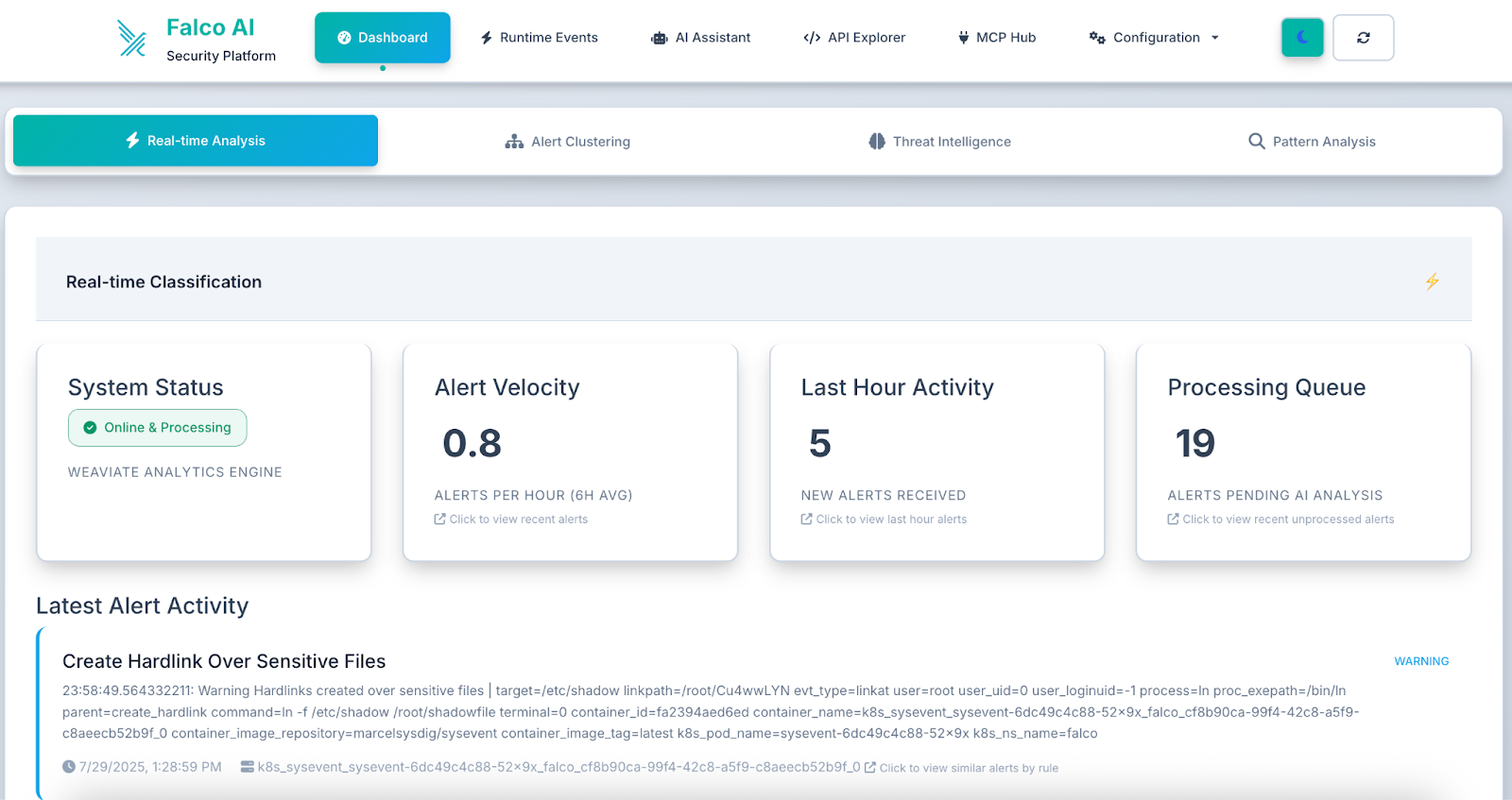
Figure 1.0 - Live monitoring of security events with real-time threat detection and analysis.

Introducing the Falco Vanguard

The Falco Vanguard is a comprehensive webhook-based solution that transforms basic Falco security alerts into actionable security intelligence. Built as a Flask application with an integrated web dashboard, this system enriches Falco alerts with AI-powered analysis using OpenAI, Gemini, or local Ollama models.

The platform provides real-time security analysis by processing Falco webhook alerts and delivering enhanced notifications to Slack channels with detailed security impact assessments, remediation steps, and suggested investigation commands.

This open source solution is available for deployment across various environments, including Docker, Kubernetes, and major cloud platforms (AWS, GCP, Azure). Organizations can use this system to:

  • Transform raw alerts into actionable intelligence with AI-powered security analysis
  • Reduce alert fatigue by providing context and priority guidance.
  • Accelerate incident response with automated investigation recommendations.
  • Maintain security awareness across teams with rich Slack notifications.
  • Gain immediate insights with real-time processing of security alerts, ensuring you're always aware of emerging threats.
  • Enhance threat detection accuracy through AI-powered analysis using leading models, such as OpenAI, Gemini, or Ollama, to provide intelligent context to raw alerts.
  • Visualize your security posture instantly with an interactive web dashboard offering real-time alert visualization and flexible display modes.
  • Centralize security operations by integrating with 15 security tools via 4 MCP protocols, all accessible from a unified dashboard.
  • Enhance team collaboration and response times with analyzed alerts sent directly to Slack, promoting shared awareness and faster action.
  • Achieve seamless deployment across any Kubernetes environment with automatic detection and optimization for GKE, EKS, AKS, DOKS, IBM Cloud, and local K8s.
  • Optimize performance and resource allocation with dynamic configuration that intelligently adjusts storage classes and resources based on your platform.
  • Ensure broad compatibility with multi-architecture support for both AMD64 and ARM64 Docker images.
  • Experience intuitive and efficient security management with an enhanced UI/UX featuring a modern, responsive design.

Keep reading to learn how to:

  • Deploy the Falco Vanguard in your environment
  • Configure multiple AI providers for intelligent analysis
  • Integrate with your existing Falco deployment
  • Set up automated Slack notifications with security insights

Architecture overview

The Falco Vanguard follows a microservices architecture designed for cloud-native environments:
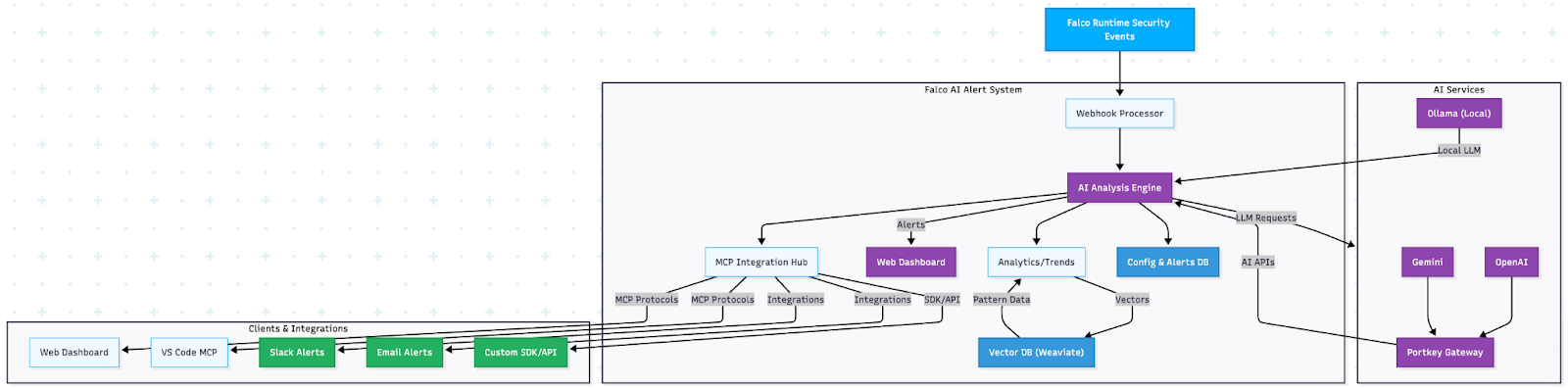
Core components

  1. Webhook receiver: Flask-based HTTP endpoint that receives Falco alerts
  2. AI analysis engine: Multi-provider AI integration for security analysis
  3. Web dashboard: Real-time alert visualization and management interface
  4. Slack integration: Rich message formatting with actionable security insights
  5. Database layer: SQLite-based storage for alert history and configuration

Requirements before you get started

Ensure you have the following prerequisites:

  • Container runtime: Docker 20.10+ and Docker Compose
  • Kubernetes (optional): v1.19+ for container orchestration deployment
  • AI provider access (using Portkey): API keys for OpenAI/Gemini via Portkey, or Ollama for local inference
  • Slack integration: Bot token with chat:write permissions
  • Falco installation: Running a Falco instance configured to send HTTP Outputs

AI provider options

The Falco + AI Alert System is highly adaptable to organizational needs, and at this point supports three AI provider configurations:

Option 1 (Default): Ollama (Local/Privacy-Focused)

PROVIDER_NAME=ollama
OLLAMA_MODEL_NAME=llama3
OLLAMA_API_URL=http://localhost:11434/api/generate

Option 2: OpenAI via Portkey (Cloud)

PROVIDER_NAME=openai
PORTKEY_API_KEY=pk-your-portkey-key
OPENAI_VIRTUAL_KEY=openai-your-virtual-key
MODEL_NAME=gpt-4

Option 3: Gemini via Portkey (Cloud)

PROVIDER_NAME=gemini
PORTKEY_API_KEY=pk-your-portkey-key
GEMINI_VIRTUAL_KEY=gemini-your-virtual-key
MODEL_NAME=gemini-pro

Quick deployment with Docker

The following four steps will get you started and set up for your Kubernetes deployment.

Step 1: Environment setup

Create your environment configuration:

# Clone the repository
git clone https://github.com/maddigsys/falco-vanguard
cd falco-vanguard


# Copy environment template
cp env.example .env


# Edit configuration for your environment
vim .env

Development environment

Step 2: Configure your AI provider

Edit your .env file with your chosen AI provider:

# Slack Configuration
SLACK_BOT_TOKEN=xoxb-your-slack-bot-token
SLACK_CHANNEL_NAME=#security-alerts


# AI Provider (choose one)
PROVIDER_NAME=ollama  # Default: local AI, no API keys needed
MODEL_NAME=llama3


# Alert Processing
MIN_PRIORITY=warning
IGNORE_OLDER=1
LOG_LEVEL=INFO

Step 3: Deploy the system

Start the complete system with Docker Compose:

# Start all services
docker-compose up -d


# Check service health
curl http://localhost:8080/health


# Access the web dashboard
open http://localhost:8080/dashboard

You'll see the live security dashboard with real-time alert processing:
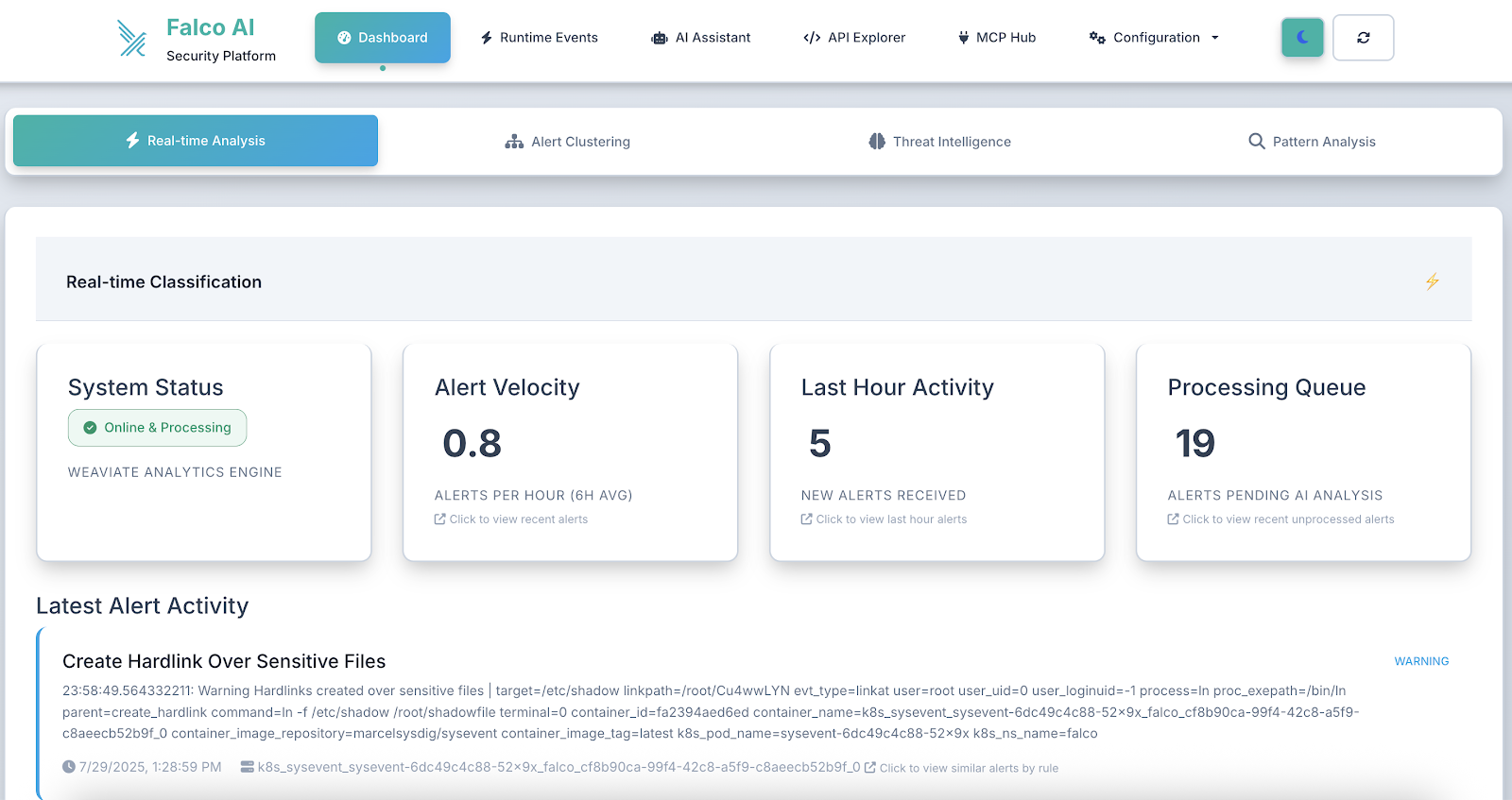
The dashboard immediately displays your security posture with key metrics and recent alerts, and offers easy access to an AI-enhanced chat assistant that can help you show configuration options through the top navigation bar.
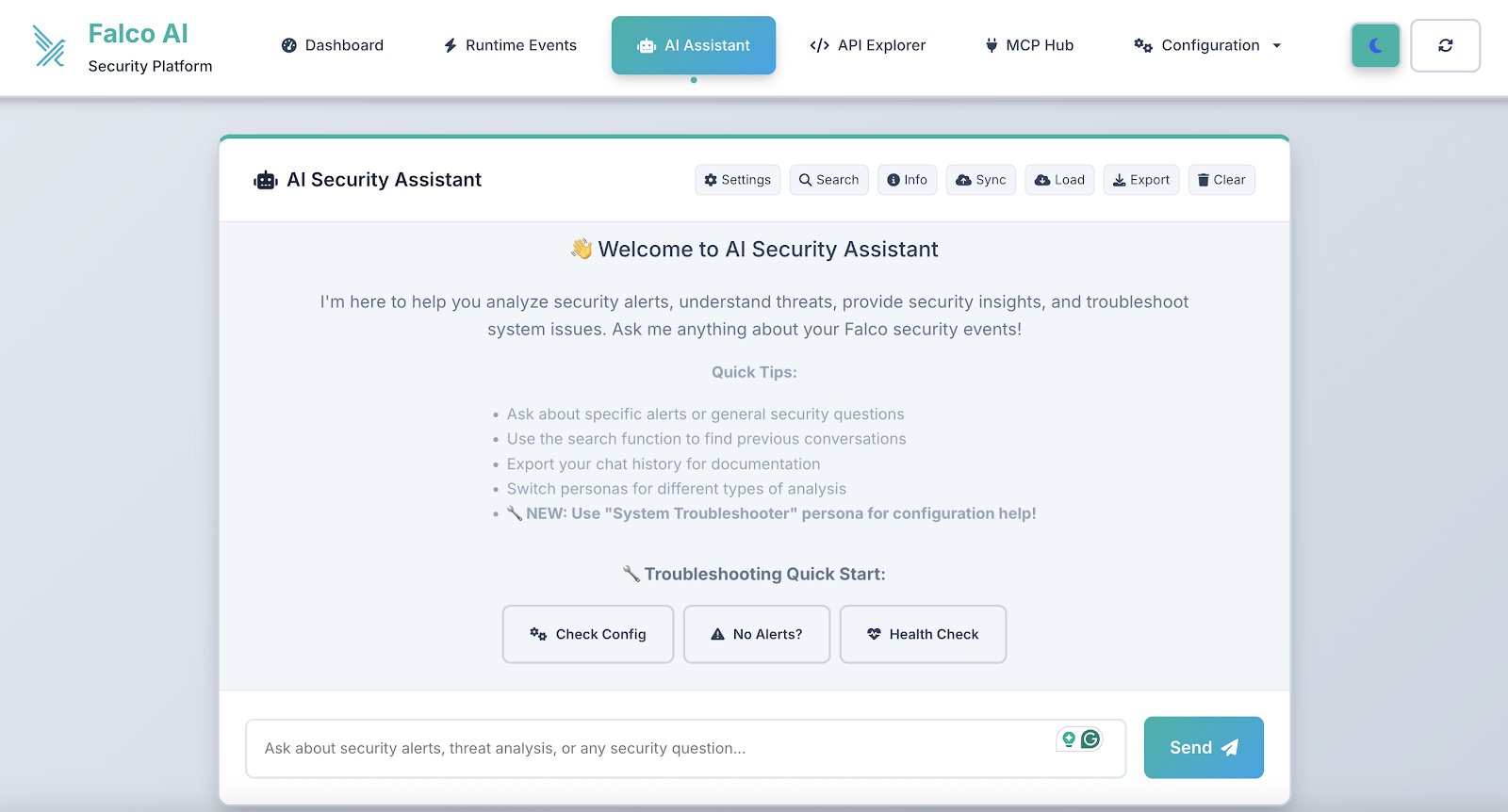
The dashboard provides real-time visibility into your security posture, with live alert statistics and an intuitive interface for managing security events.

Step 4: Configure Falco integration

Update your Falco configuration to send alerts to the webhook:

# Add to your falco.yaml
http_output:
  enabled: true
  url: "http://your-server:8080/falco-webhook"
  user_agent: "falcosecurity/falco"


json_output: true
json_include_output_property: true

Kubernetes deployment

Now that you have completed steps 1 through 4, it's time to deploy to Kubernetes. For development and production environments, deploy to Kubernetes using the provided manifests below:

Development environment

# Quick install with automated script
./k8s/install.sh dev


# Manual deployment
kubectl apply -k k8s/overlays/development/


# Access via port-forward
kubectl port-forward svc/dev-falco-vanguard 8080:8080 -n falco-vanguard-dev

Production environment

# Production deployment with auto-scaling
./k8s/install.sh prod


# Manual deployment
kubectl apply -k k8s/overlays/production/


# Production features:
# - HPA auto-scaling (3-10 replicas)
# - Network policies for security
# - Resource limits and monitoring
# - Dedicated webhook service

Resource requirements

Keep in mind that there are resource requirements for development, production, and enterprise environments.

Environment

Environment

Memory

CPU

Storage

AI Model

Development

8GB

2 cores

15GB

tinyllama (fast)

Production

16GB

4 cores

30GB

llama3 or cybersecurity model

Enterprise

24GB+

8+ cores

50GB+

Advanced models

AI-powered security analysis

Now your system is ready to transform basic Falco alerts into comprehensive security intelligence.

Before: Raw Falco alert

{
  "rule": "Terminal shell in container",
  "priority": "warning",
  "output": "A shell was used as the entrypoint/exec point into a container",
  "output_fields": {
    "container.name": "web-app",
    "proc.cmdline": "/bin/bash",
    "user.name": "root"
  }
}

After: AI-enhanced analysis

Falco Vanguard generates structured analysis, including the following.

Security impact:

An interactive shell in a container may indicate unauthorized access, container escape attempts, or legitimate administrative activity that requires verification.

Next steps:

Immediately verify if this shell access was authorized, check authentication logs, and investigate recent container activities for signs of compromise.

Remediation steps:

Review container security policies, implement proper RBAC controls, and consider removing shell binaries from production containers.

Suggested commands:

kubectl describe pod <pod-name> -n <namespace>
kubectl logs <pod-name> -n <namespace> --previous
docker logs <container-id> --since 1h

Web dashboard features

The integrated web dashboard provides comprehensive alert management with a modern, intuitive interface:

Real-time security monitoring

The dashboard shows live security metrics, including:

  • Total alerts: Complete count of processed security events
  • Critical alerts: High-priority threats requiring immediate attention
  • Recent activity: Last hour alert volume for trend analysis
  • Alert status tracking: Unread, read, and dismissed alert counts

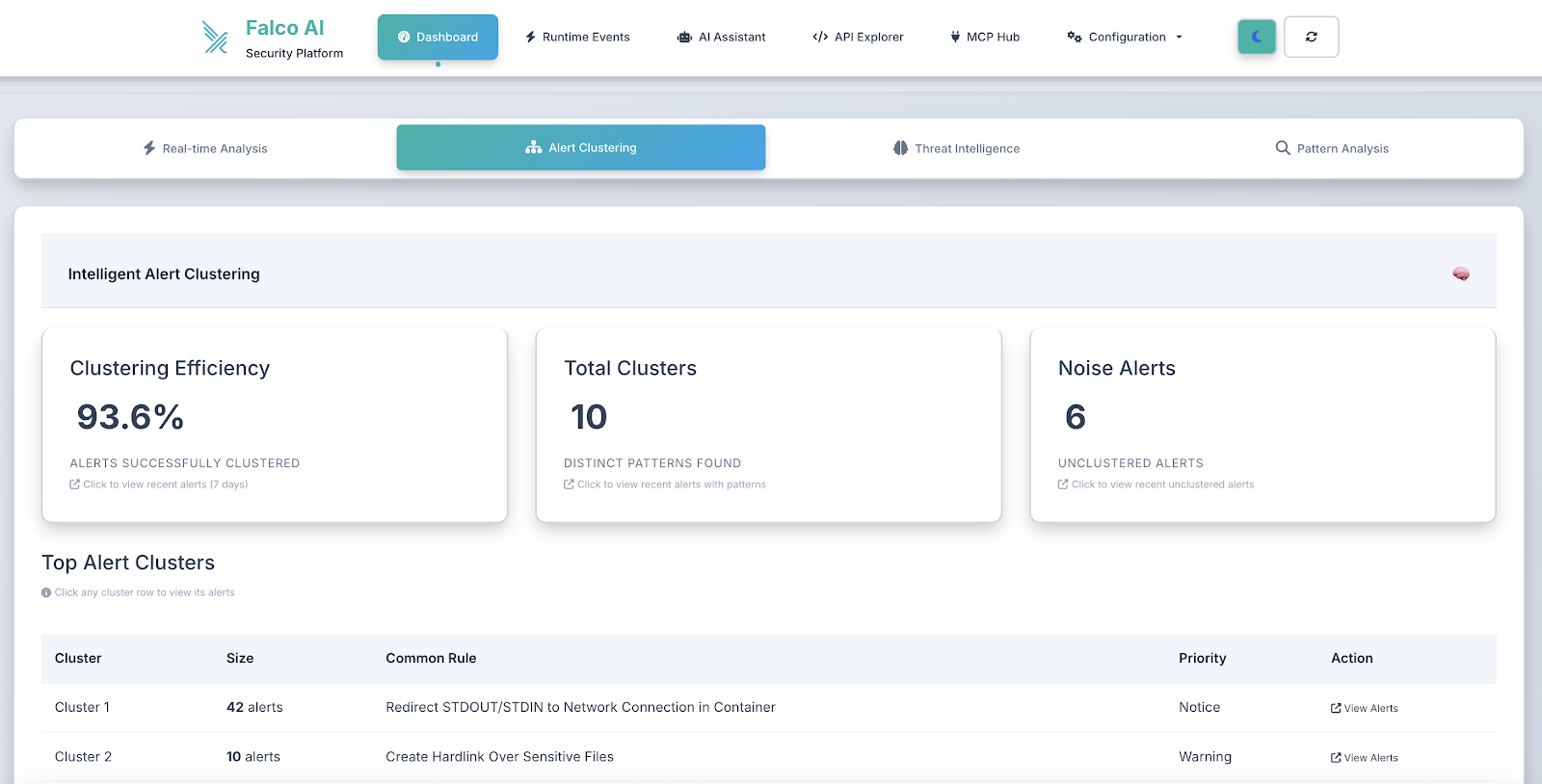
As alerts are processed and reviewed, the dashboard dynamically updates to reflect the current security posture, helping teams track their response progress.

Interactive alert management

  • Priority-based filtering (critical, error, warning, notice)
  • Time-range analysis (1h, 24h, 7d, 30d)
  • Alert status management (unread, read, dismissed)
  • Bulk operations for efficient alert processing

The system processes alerts in real time, with the dashboard updating automatically as new security events are detected and analyzed by the AI engine.
Advanced security analytics

  • Trend visualization showing security patterns over time
  • Alert correlation to identify related security events
  • Performance metrics for AI analysis and response times
  • Integration status monitoring for connected systems

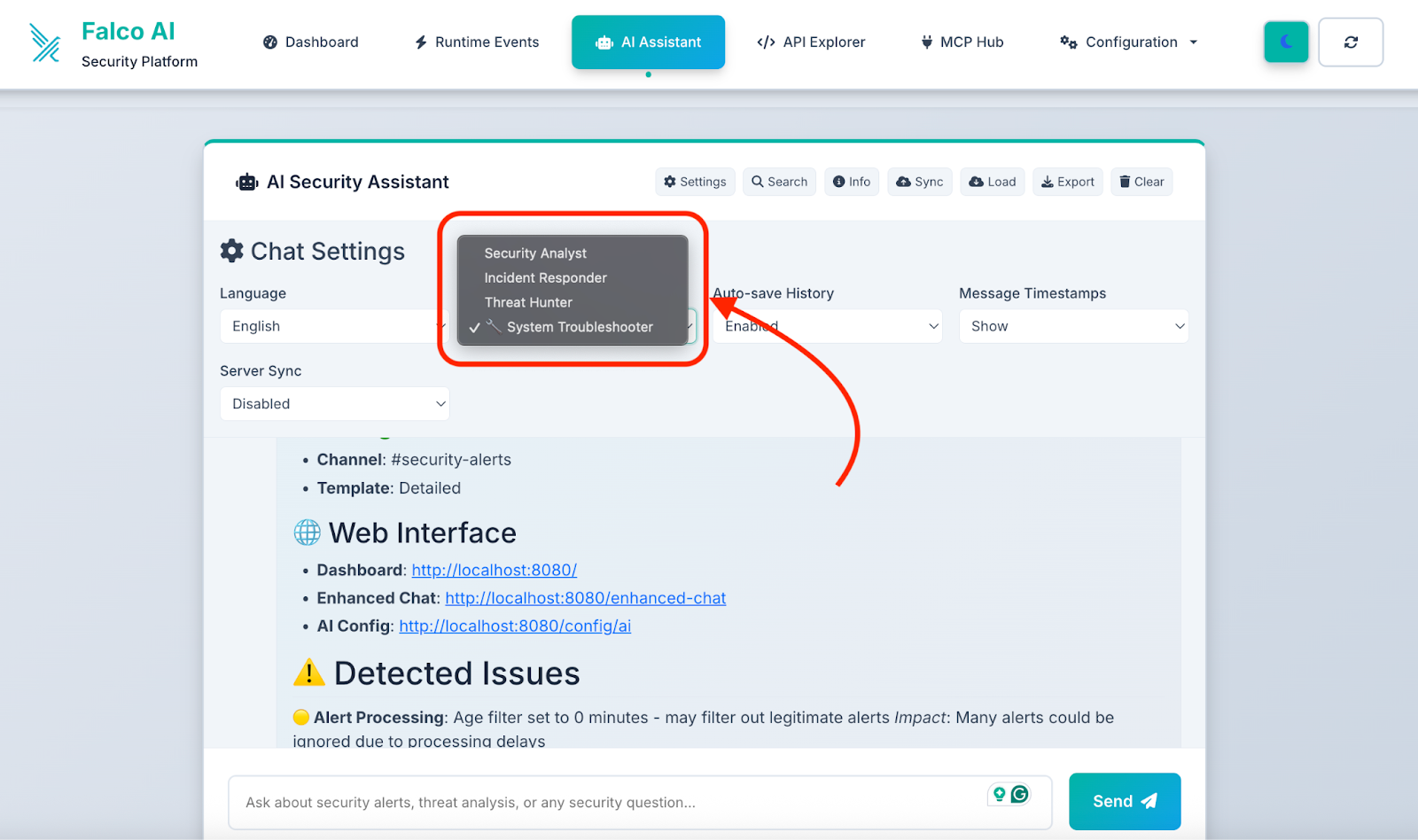
AI security chat

  • Persona-based conversational structure
  • Context-aware responses based on your alert data
  • Trend analysis and security recommendations
  • Custom queries about your security posture

Configuration management

  • AI provider settings: Switch between OpenAI, Gemini, and Ollama
  • Slack integration: Configure notifications and message templates
  • Alert processing: Customize filtering and deduplication rules
  • System monitoring: Real-time health checks and status

Advanced configuration

Multi-provider AI setup

Configure multiple AI providers for redundancy:

# Primary provider
PROVIDER_NAME=ollama
OLLAMA_MODEL_NAME=llama3


# Fallback providers (configured via web UI)
# OpenAI for high-priority alerts
# Gemini for batch analysis

Custom security models

For enhanced cybersecurity analysis, deploy specialized models:

# Cybersecurity-optimized model
OLLAMA_MODEL_NAME=jimscard/whiterabbit-neo:latest
# Requires: 16GB RAM, specialized security training

Slack message customization

The system supports rich Slack message formatting:

{
  "template_style": "detailed",
  "include_commands": true,
  "thread_alerts": false,
  "escalation_enabled": true
}

Testing your deployment

Send test alerts

Use the provided testing script to verify your setup:

# Send sample security alerts
./test-scripts/send-test-alert.sh

After sending test alerts, you'll see the dashboard update in real time:

The system processes each alert through the AI analysis pipeline, providing immediate feedback on security events with contextual analysis and recommended actions.

1# Test specific alert types
2curl -X POST http://localhost:8080/falco-webhook \
3  -H "Content-Type: application/json" \
4  -d '{
5    "rule": "Suspicious network activity",
6    "priority": "critical",
7    "output": "Outbound connection to known C2 server detected",
8    "output_fields": {
9      "fd.name": "malicious.example.com:443",
10      "proc.name": "curl"
11    }
12  }'
13

Monitor system health

# Check application health
curl http://localhost:8080/health


# View processing logs
docker-compose logs -f falco-vanguard


# Monitor AI analysis performance
kubectl logs -f deployment/prod-falco-vanguard -n falco-vanguard

Production considerations

Security hardening

For production deployments:

  • TLS termination: Use HTTPS for webhook endpoints
  • Network policies: Implement Kubernetes network security
  • RBAC controls: Limit service account permissions
  • Secrets management: Use external secret stores
  • Resource limits: Prevent resource exhaustion

Monitoring and observability

  • Prometheus metrics: Built-in health and performance metrics
  • Structured logging: JSON-formatted logs for analysis
  • Alert correlation: Track alert processing pipeline
  • Performance monitoring: AI inference timing and success rates

Scaling considerations

  • Horizontal pod autoscaling: Auto-scale based on CPU/memory
  • Database optimization: Configure retention and cleanup
  • AI provider load balancing: Distribute requests across providers
  • Webhook rate limiting: Handle high-volume alert scenarios

Best practices for implementation

Start with essential security controls

  • Prioritize critical alerts: Focus on container escapes and privilege escalation.
  • Use local AI first: Ollama provides privacy and reduces external dependencies.
  • Implement gradual rollout: Test with non-production environments

Automate with infrastructure as code

  • Kubernetes manifests: Version-controlled deployment configurations
  • Environment-specific overlays: Separate dev/staging/production configs
  • Automated deployment: CI/CD integration for updates and patches

Continuous improvement

  • Monitor false positives: Fine-tune alert filtering and AI prompts
  • Update AI models: Regular model updates for improved analysis
  • Security feedback loop: Incorporate incident learnings into alert processing

Getting started

Ready to enhance your Falco deployment with AI-powered analysis? Here's your quick start path:

  1. Deploy locally: Use Docker Compose for initial testing
  2. Configure AI provider: Start with Ollama for simplicity
  3. Test with sample alerts: Verify AI analysis quality
  4. Deploy to Kubernetes: Scale for production workloads
  5. Integrate with Falco: Configure webhook delivery
  6. Monitor and tune: Optimize for your environment

The Falco Vanguard transforms security monitoring from reactive alerting to proactive threat intelligence, helping security teams respond faster and more effectively to runtime threats.

For more information and detailed examples, refer to the project documentation and deployment guides.

About the project

Falco Vanguard is an open source project designed to bridge the gap between raw security alerts and actionable threat intelligence. Built by security practitioners for security teams, it provides enterprise-grade capabilities with the flexibility of open-source deployment.

Key features:

  • ✅ Multi-provider AI integration (OpenAI, Gemini, Ollama) using Portkey
  • ✅ Real-time web dashboard with security analytics
  • ✅ Kubernetes-native deployment with auto-scaling
  • ✅ Rich Slack integration with actionable insights
  • ✅ Privacy-focused local AI options
  • ✅ Production-ready security hardening

Visit the GitHub repository to get started, contribute, or learn more about extending the system for your specific security needs.

Want to see more projects like this or have yours featured? Join the Sysdig Open Source Community today!

Miguel De Los Santos, the creator of this project, is a results-oriented technology professional with extensive experience in sales engineering, cybersecurity, cloud computing, and education. As a Senior Sales Engineer at Sysdig, he acts as a trusted advisor, guiding customers toward achieving their goals with cloud security solutions. His expertise includes understanding customer needs, showcasing product capabilities, and ensuring seamless adoption. Before Sysdig, he held sales engineering roles at VISO TRUST and F5, specializing in third-party cyber risk and global solutions architecture, respectively. Miguel is also passionate about education, serving as an Adjunct Professor at Hult International Business School, teaching FinTech, and as an Adjunct Instructor at Urban College of Boston for over 11 years, focusing on computer applications and technology. He holds a Master of Applied Computer Science from the Wentworth Institute of Technology and is a Certified Third-Party Risk Professional. His achievements include awards like the 2018 Force Multiplier and the 2016 President's Club. He is fluent in English and Spanish.