
Need Some Help?
I help companies find and fix site-speed issues. Performance audits, training, consultancy, and more.


Written by on CSS Wizardry.
Independent writing is brought to you via my wonderful Supporters.
font-display: swap;preloadpreconnectfont-display: optional;Ten-Second Version: If you really can’t
be bothered going to all of the effort outlined in this post, there is a super
rough-and-ready, ten-second, alternative approach—place your Google
Fonts stylesheet at the closing </body> tag. This
means we don’t block rendering of the entire page just for the sake of web
fonts. Instead, we apply them after we’ve styled everything else.
Please note that this may have side-effects. If you want to be very thorough, keep reading…
Third parties getting you down? Read more or hire me.
For the most part, web fonts nowadays are faster than ever. With more
standardised FOUT/FOIT behaviour from browser vendors, to the newer
font-display specification, performance—and therefore the user—seems to have
been finally been put front-and-centre.
It’s widely accepted that self-hosted fonts are the fastest option: same origin
means reduced network negotiation, predictable URLs mean we can preload,
self-hosted means we can set our own cache-control
directives, and
full ownership mitigates the risks that come with leaving static assets on
third-party
origins.
That said, the convenience of a service like Google Fonts cannot be overstated. Their ability to serve the tiniest possible font files tailored to specific user agents and platforms is amazing, and with such a huge, freely-available library served from Google-grade CDNs… I definitely see why people continue to turn to it.
On this site, in which performance is the only name of the game, I forgo web fonts entirely, opting instead to make use of the visitor’s system font. This is fast, incredibly well suited to the device in question, and has almost zero engineering overhead. But, on harry.is, I really wanted to throw caution to the wind. To hell with it! Let’s have a web font!
However, I still needed it to be fast.
While prototyping, I turned to Google Fonts, and with their recent ability to
support font-display via a URL parameter (&display=swap), I knew that things
would stay pretty speedy. Then I had an idea.
It started with a tweet:
TIP: If you’re going to use
font-displayfor your Google Fonts then it makes sense to asynchronously load the whole request chain.
— @csswizardry
While font-display: swap; is a huge win, there are still a lot of things
leaving me feeling uneasy. What else could I do to make Google Fonts fast?
Suffice to say, I ended up going down a little rabbit hole…
Need Some Help?
I help companies find and fix site-speed issues. Performance audits, training, consultancy, and more.
I ran the same suite of tests against the harry.is and csswizardry.com homepages. I started out with harry.is because that’s where I was using Google Fonts, but I felt it was a page too simple to be realistic. So, I cloned the CSS Wizardry homepage a bunch of times and implemented the various different methods there. For each section of this post, I will list the results for both sites. My variants are:
font-display.font-display: swap;: Using Google Fonts’ new default.preload: preloading the CSS file to increase its priority.preconnect: Warming up
the fonts.gstatic.com origin myself.Further, each variant is additive—it includes the previous variant as well as
its own additions. I didn’t try just preload or just async, because it
would be pointless—we know that a combination will fare better than any on their
own.
For each test, I captured the following metrics:
N.B. All tests were conducted using a private WebPageTest instance (WebPageTest is down right now so I was unable to use the public instance, which means I can’t share any URLs—apologies). The specific profile was a Samsung Galaxy S4 over 3G.
To make the snippets easier to read, I’m going to replace all instances of
https://fonts.googleapis.com/css2?family=Roboto:ital,wght@0,400;0,700;1,400;1,700
with $CSS.
Google Fonts played a really great move in the last year or so. By default, any
newly created Google Font snippet comes with the &display=swap parameter that
injects font-display: swap; into all of the @font-face at-rules. The value
of the parameter can be any of swap, optional, fallback, or block. You
can read more on
MDN.
For my baseline, however, I was going to trim the font-display back off. This
is the legacy format that a lot of sites will likely still use, and it makes for
a more suitable baseline to compare against.
Snippet:
<link rel="stylesheet"
      href="$CSS" />
There are two key issues here:
@font-face at-rules with no font-display descriptors.It’s synchronous on top of synchronous—not good.
Results (s) – harry.is:
| FP | FCP | FWF | VC | Lighthouse |
|---|---|---|---|---|
| 3.4 | 4.6 | 4.9 | 5.0 | 98 |
Results (s) – CSS Wizardry:
| FP | FCP | FWF | VC | Lighthouse |
|---|---|---|---|---|
| 3.4 | 4.3 | 4.4 | 4.4 | 96 |
Alright. Here’s our baseline. The Google Fonts file is the only render-blocking external resource either of the two tests has, and we can see they both have the exact same first paint. One thing I was happily surprised by during these experiments was the consistency of Google Fonts.
At this point, Lighthouse is giving one error and one warning:
(Error) Ensure text remains visible during webfont load
(Warning) Eliminate render-blocking resources
The first is a result of not having a web font loading solution (e.g.
font-display); the second is a result of the synchronous Google Fonts CSS
file.
Now, let’s start adding some progressive changes and, hopefully, improvements.
font-display: swap;For this test, I added the &display=swap back in. In effect, this makes the
font files themselves asynchronous—the browser immediately displays our fallback
text before swapping to the web font whenever it arrives. This means we’re not
going to leave users looking at any invisible text (FOIT), which makes for both
a faster and more pleasant experience.
N.B. It’s only more pleasant if you make the effort to define a suitable fallback to display in the interim—flashing a page full of Times New Roman before settling on Open Sans would likely be a net worse experience. Thankfully, Monica has made this process not only easy, but surprisingly fun. I wouldn’t be able to do this bit without her Font Style Matcher.
Snippet:
<link rel="stylesheet"
      href="$CSS&display=swap" />
Results – harry.is:
| FP | FCP | FWF | VC | Lighthouse | |
|---|---|---|---|---|---|
| 3.4 | 3.4 | 4.5 | 5.2 | 99 | |
| Change from Baseline: | 0 | −1.2 | −0.4 | +0.2 | +1 |
Results – CSS Wizardry:
| FP | FCP | FWF | VC | Lighthouse | |
|---|---|---|---|---|---|
| 3.6 | 3.6 | 4.6 | 4.6 | 95 | |
| Change from Baseline: | +0.2 | −0.7 | +0.2 | +0.2 | −1 |
We haven’t removed any render-blocking resources from the critical path, so I wasn’t expecting to see any improvements in first paint. In fact, while harry.is remained identical, CSS Wizardry got 200ms slower. What we do see, however, is a dramatic improvement in first contentful paint—over a second on harry.is! First web font improved on harry.is, but not on csswizardry.com. Visually complete was 200ms slower.
I’m happy to say, for the metrics that matter the most, we are 700–1,200ms faster.
While this does massively improve the time it takes the web font to render, it’s still defined inside a synchronous CSS file—we can only expect so much improvement from this move.
Predictably, Lighthouse now only gives one warning:
(Warning) Eliminate render-blocking resources
Therefore, the next step is to solve the synchronous CSS file.
To quote, err, myself: If you’re going to use
It
was this initial thought that led to my tweet in the first place—if I’ve
effectively made the contents of the CSS file asynchronous, then it kinda sucks
to leave the CSS file itself fully synchronous.font-display for your Google
Fonts then it makes sense to asynchronously load the whole request chain.
font-display: swap; is a good idea.
Making your CSS asynchronous is one of the key techniques involved in employing Critical CSS. While there are a number of ways to achieve this, I’d dare say the simplest and most ubiquitous is Filament Group’s print media type trick.
This will implicitly tell the browser to load the CSS file in a non-blocking
fashion, applying the styles only to the print context. However, the moment the
file arrives, we tell the browser to apply it to all contexts, thus styling
the rest of the page.
Snippet:
<link rel="stylesheet"
      href="$CSS&display=swap"
      media="print" onload="this.media='all'" />
While the trick is devilishly simple—which is what makes it so cool—I’ve long had my reservations. Y’see, a regular, synchronous stylesheet blocks rendering, so a browser will assign it Highest priority. A print stylesheet (or any stylesheet that doesn’t match the current context) is assigned the priority at the complete opposite end of the spectrum: Idle.
This means that as browsers begin making requests, the asynchronous CSS file often gets grossly under-prioritised (or rather, it’s prioritised correctly, but probably way less than you expect). Take for example Vitamix, a client for whom I implemented asynchronous CSS for their own font provider(s):

The browser is doing exactly what we told it: request these CSS files with
a print-stylesheet’s worth of priority. Thus, on a 3G connection, it takes over
nine seconds to download each file. The browser puts almost everything else,
including in-body resources, ahead of our print stylesheets. This means that
the page in question didn’t render its custom font until an eyewatering 12.8s on
3G.
Thankfully, while dealing with web fonts, this isn’t the end of the world:
font-display: optional;.For below the fold CSS, however, delays of almost 10 seconds are unacceptable—it’s almost 100% certain that a user will have scrolled within that timeframe.
Still! What happens to Google Fonts if we load it asynchronously?
Results – harry.is:
| FP | FCP | FWF | VC | Lighthouse | |
|---|---|---|---|---|---|
| 1.8 | 1.8 | 4.5 | 5.1 | 100 | |
| Change from Baseline: | −1.6 | −2.8 | −0.4 | +0.1 | +2 |
| Change from Previous: | −1.6 | −1.6 | 0 | −0.1 | +1 |
Results – CSS Wizardry:
| FP | FCP | FWF | VC | Lighthouse | |
|---|---|---|---|---|---|
| 1.7 | 2.2 | 4.9 | 5.0 | 99 | |
| Change from Baseline: | −1.7 | −2.1 | +0.5 | +0.6 | +3 |
| Change from Previous: | −1.9 | −1.4 | +0.3 | +0.4 | +4 |
These results are tremendous.
I’m really happy with these outcomes. First paint was a staggering 1.6–1.7s improvement on our baseline, and up to a 1.9s improvement on the previous variant in the case of CSS Wizardry. First contentful paint was improved as much as 2.8s against our baseline, and Lighthouse scores hit 100 for the first time.
As far as the critical path is concerned, this was a huge win.
However—and this is a big however—as a result of lowering the priority of the CSS file, our first web font is up to 500ms slower in the case of CSS Wizardry against our baseline. This is the danger of the print media hack.
Asynchronously loading Google Fonts is a net good idea, but reducing the priority of the CSS file has actually slowed down the rendering of our custom font.
I’m going to say that asynchronous CSS is an overall good idea but I need to somehow mitigate the priority issue.
preloadOkay, so if print CSS is too low priority, what we need is a high priority
asynchronous fetch. Enter preload.
Complementing our media-trick stylesheet with a preload ensures we get the
best of all worlds:
N.B. We can’t go full preload as it isn’t widely enough supported. In
fact, at the time of writing, about 20% of this site’s visitors would be unable
to make use of it. Consider the print stylesheet a fallback.
Snippet:
<link rel="preload"
      as="style"
      href="$CSS&display=swap" />

<link rel="stylesheet"
      href="$CSS&display=swap"
      media="print" onload="this.media='all'" />
N.B. In future, we should be able to use Priority Hints to solve this issue.
Results – harry.is:
| FP | FCP | FWF | VC | Lighthouse | |
|---|---|---|---|---|---|
| 1.8 | 1 .8 | 4.5 | 5.3 | 100 | |
| Change from Baseline: | −1.6 | −2.8 | −0.4 | +0.3 | +2 |
| Change from Previous: | 0 | 0 | 0 | +0.2 | 0 |
Results – CSS Wizardry:
| FP | FCP | FWF | VC | Lighthouse | |
|---|---|---|---|---|---|
| 2.0 | 2.0 | 4.3 | 4.3 | 98 | |
| Change from Baseline | −1.4 | −2.3 | −0.1 | −0.1 | +2 |
| Change from Previous | +0.3 | −0.2 | −0.6 | −0.7 | −1 |
While first paint either remained the same or got slower, first contentful paint either remained the same or got faster, and in the case of CSS Wizardry, first web font was a staggering 600ms faster than the previous iteration.
In the case of harry.is, almost nothing changed since our previous variant. Visually complete was 200ms faster, but any first- metrics were untouched. It was seeing these results that actually spurred me to also test against CSS Wizardry. Because harry.is is such a small and simple page, there wasn’t much network contention for a print stylesheet to yield to—changing its priority didn’t really help it out much at all.
In the case of CSS Wizardry, we see first paint 300ms slower, which is unexpected but unrelated (there is no render blocking CSS, so changing the priority of an asynchronous CSS file can have no bearing here—I’m going to chalk it up to an anomaly in testing). Happily, first contentful paint improved by 200ms, first web font was 600ms faster, and visually complete was 700ms faster.
preloading Google Fonts is a good idea.
preconnectThe last piece of the puzzle I wanted to solve the trip to yet-another origin.
While we link out to fonts.googleapis.com for our CSS, the font files
themselves are hosted on fonts.gstatic.com. On a high-latency connection, this
spells bad news.
Google Fonts are good to us—they preconnect the fonts.gstatic.com origin
preemptively via an HTTP header attached to the fonts.googleapis.com response:

However, the execution of this header is bound by the response’s TTFB, which on high-latency networks can be very, very high. The median TTFB (including request queueing, DNS, TCP, TLS, and server time) for the Google Fonts CSS file across all tests was 1406ms. Conversely, the median download time for the CSS file was just 9.5ms—it took 148× longer to get to the headers of the file than it did to download the file itself.
Put another way: even though Google are preconnecting the fonts.gstatic.com
origin for us, they’re only gaining about a 10ms head-start. Put another-other
way, this file is latency-bound, not
bandwidth-bound.
If we implement a first-party preconnect, we should stand to make some pretty
huge gains. Let’s see what happens.
Snippet:
<link rel="preconnect"
      href="https://fonts.gstatic.com"
      crossorigin />

<link rel="preload"
      as="style"
      href="$CSS&display=swap" />

<link rel="stylesheet"
      href="$CSS&display=swap"
      media="print" onload="this.media='all'" />
We can visualise the benefits well in WebPageTest:
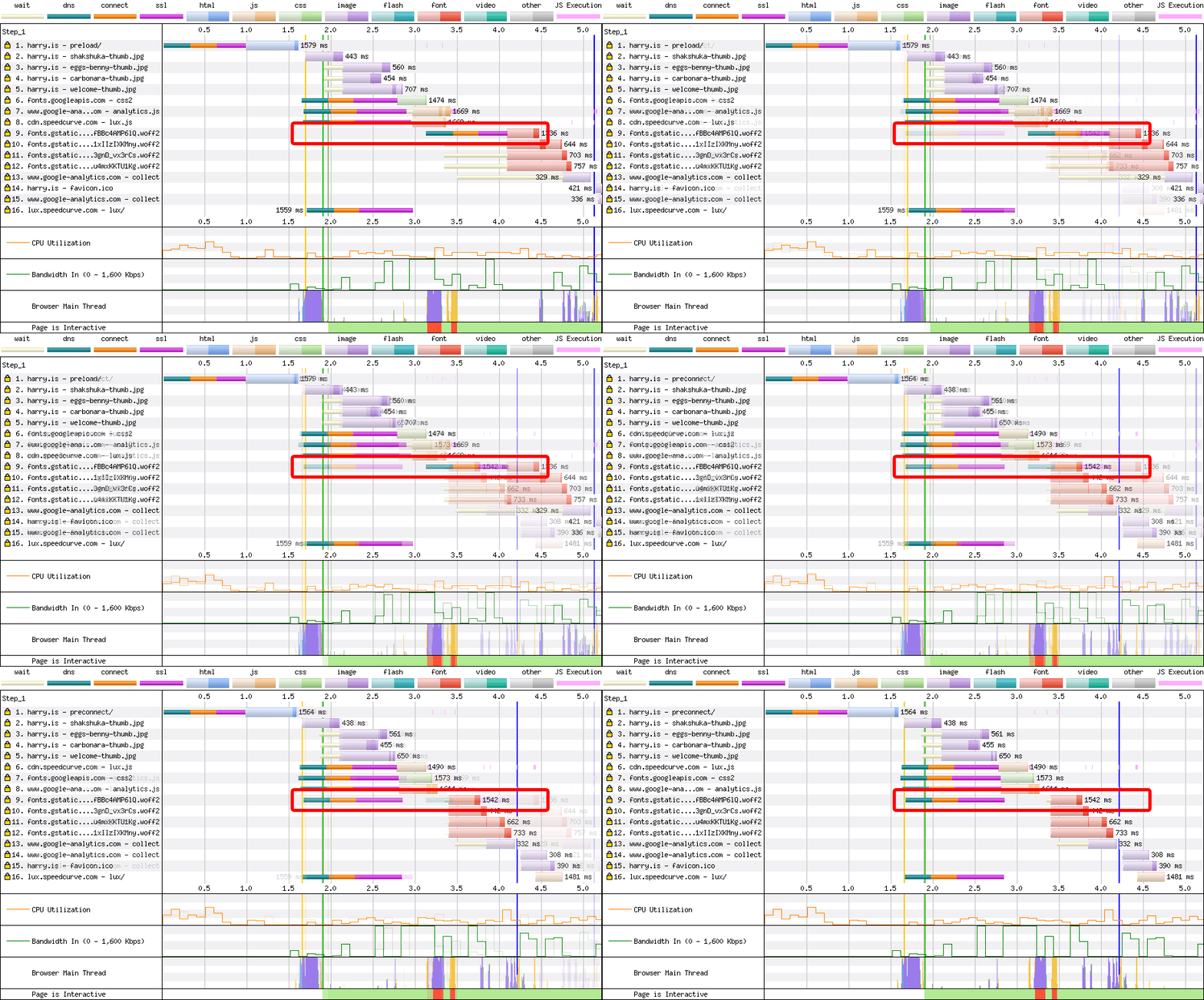
preconnect.Results – harry.is:
| FP | FCP | FWF | VC | Lighthouse | |
|---|---|---|---|---|---|
| 1.8 | 1.8 | 3.8 | 4.4 | 100 | |
| Change from Baseline | −1.6 | −2.8 | −1.1 | −0.6 | +2 |
| Change from Previous | 0 | 0 | −0.7 | −0.9 | 0 |
Results – CSS Wizardry:
| FP | FCP | FWF | VC | Lighthouse | |
|---|---|---|---|---|---|
| 1.9 | 1.9 | 3.5 | 3.6 | 99 | |
| Change from Baseline | −1.5 | −2.4 | −0.9 | −0.8 | +3 |
| Change from Previous | −0.1 | −0.1 | −0.8 | −0.7 | +1 |
Here we go! First (contentful) paint is realistically untouched. Any changes
here are unrelated to our preconnect as the preconnect only impacts
resources after the critical path. Our focus is on first web font and visually
complete, both of which show tremendous improvement. 700–1,200ms improvement
on first web font and 700–900ms improvement on visually complete against
our previous variant, and 600–900ms and 600–800ms respective improvements
against our baseline. Lighthouse scores are sitting pretty at 100 and 99.
preconnecting fonts.gstatic.com is a good idea.
font-display: optional;Using asynchronous CSS and font-display leaves us susceptible to FOUT (or,
hopefully, FOFT if we’ve designed our Fallbacks properly). To try and
mitigate this, I decided to run a test using font-display: optional;.
This variation tells the browser that web fonts are considered optional, and if
we can’t get hold of the font files during our extremely small block
period
then we offer no swap period
. The practical upshot of which is
that in the event that the web fonts takes too long to load, that pageview won’t
utilise it at all. This helps to prevent the FOUT which will in turn lead to
a more stable experience for your user—they won’t see text restyle part-way
through their pageview—and a better Cumulative Layout Shift score.
However, this proved consistently troublesome when using asynchronous CSS. When
the print stylesheet gets turned into an all stylesheet, the browser updates
the CSSOM then applies it against the DOM. In this moment, the page is told it
needs some web fonts, and the extremely small block period
kicks in,
showing a FOIT midway through the page load lifecycle. To make things worse, the
browser will replace the FOIT with the same fallback it started with, so the
user doesn’t even get the benefit of a new font. It basically looks like a bug.
It’s much easier to visualise it than it is to explain, so here’s a screenshot of the filmstrip:

And a video showing the issue in DevTools:
I would not recommend using font-disply: optional; alongside asynchronous
CSS; I would recommend using asynchronous CSS. Ergo, I would not recommend
font-display: optional;. It’s better overall to have non-blocking CSS with
a FOUT than it is to have the needless FOIT.
In these slow-motion videos, you can see the differences quite clearly.
harry.is
preload, and preconnect all start rendering at 1.8s.
swap both start rendering at 3.4s.
preconnect loads its web font at 3.8s.
swap is deemed complete at 5.2s.preload is deemed visually complete at 5.3s.CSS Wizardry
preconnect starts rendering at 1.9s.
preload starts rendering at 2s.
swap makes it first- and first contentful paint at 3.6s.preconnect is deemed visually complete at 3.6s.preload is visually complete at 4.3s.swap completes at 4.6s.preconnect is fastest across all metrics
While self-hosting your web fonts is likely to be the overall best solution to performance and availability problems, we’re able to design some fairly resilient measures to help mitigate a lot of these issues when using Google Fonts.
A combination of asynchronously loading CSS, asynchronously loading font files, opting into FOFT, fast-fetching asynchronous CSS files, and warming up external domains makes for an experience several seconds faster than the baseline.
This is something that I strongly recommend adopting if you are a Google Fonts user.
If Google Fonts isn’t your only render-blocking resource, and if you’re
violating any of the other principles for fast
CSS (e.g. if
you’re @importing your Google Fonts CSS file), then your mileage will vary.
These optimisations are most beneficial on project where Google Fonts is posing
one of your biggest performance bottlenecks.
There a lot of techniques combined here, but the resulting code is still slim
and maintainable enough that it should’t pose a problem. The snippet doesn’t
need breaking apart and can all be kept together in the <head> of your
document.
Here is the optimum snippet to use for fast Google Fonts:
<!--
  - 1. Preemptively warm up the fonts’ origin.
  -
  - 2. Initiate a high-priority, asynchronous fetch for the CSS file. Works in
  -    most modern browsers.
  -
  - 3. Initiate a low-priority, asynchronous fetch that gets applied to the page
  -    only after it’s arrived. Works in all browsers with JavaScript enabled.
  -
  - 4. In the unlikely event that a visitor has intentionally disabled
  -    JavaScript, fall back to the original method. The good news is that,
  -    although this is a render-blocking request, it can still make use of the
  -    preconnect which makes it marginally faster than the default.
  -->

<!-- [1] -->
<link rel="preconnect"
      href="https://fonts.gstatic.com"
      crossorigin />

<!-- [2] -->
<link rel="preload"
      as="style"
      href="$CSS&display=swap" />

<!-- [3] -->
<link rel="stylesheet"
      href="$CSS&display=swap"
      media="print" onload="this.media='all'" />

<!-- [4] -->
<noscript>
  <link rel="stylesheet"
        href="$CSS&display=swap" />
</noscript>It depends on the trade-offs you want, but strong options include reducing the number of files requested, using the right loading strategy, and adding supporting hints such as preconnect or preload where appropriate.
Yes. font-display can improve perceived performance by controlling how text is shown while the font loads, with swap and optional being especially useful.
Sometimes. preload can speed up font discovery, but it needs to be used carefully because it can also add unnecessary work if applied indiscriminately.
Yes. preconnect can reduce the setup cost of talking to the Google Fonts origins, which often helps the fonts start downloading sooner.
此内容由惯性聚合(RSS阅读器)自动聚合整理,仅供阅读参考。 原文来自 — 版权归原作者所有。