


Written by on CSS Wizardry.
Independent writing is brought to you via my wonderful Supporters.
The other day I finally got a proper workspace sorted out. This is something I knew I’d need to sort properly since working for myself, but I’d spent so much time on the road that I’d just not had time to even think about it.
I got everything set up a couple of days ago and fired a tweet out about how, for once, my desk looked presentable. I got a few replies asking me about a few things, so I thought I’d also put together a short post about my setup and the tools I use. I enjoy reading about other peoples’ setups, so I thought I might as well share my own.
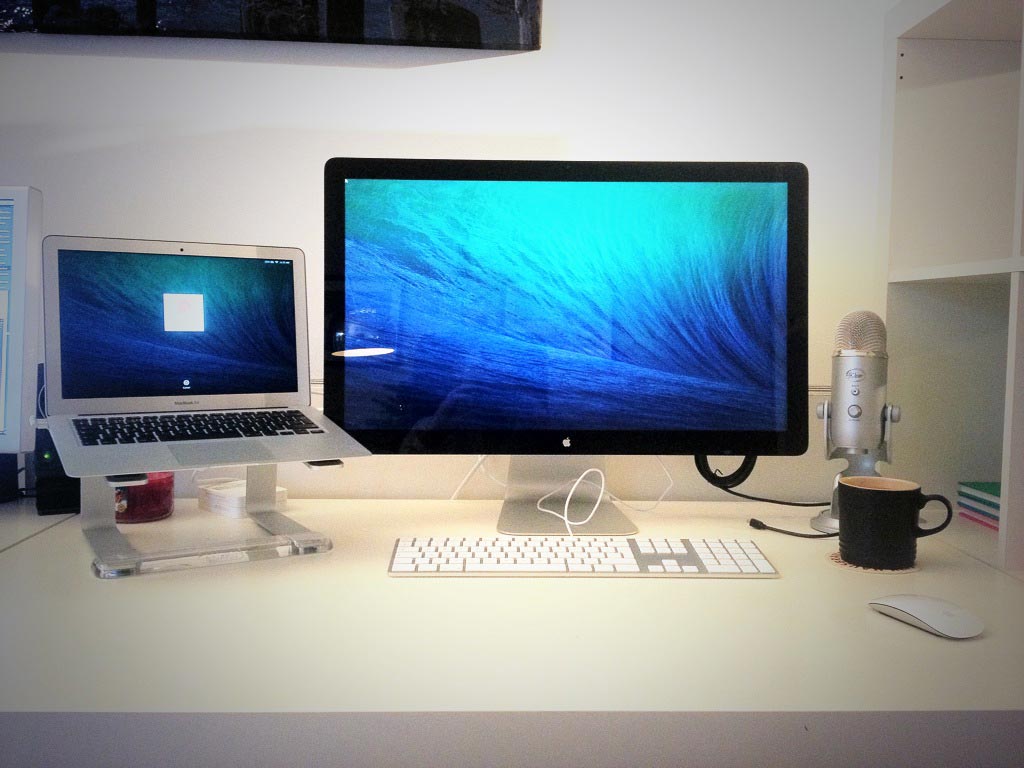
I bought my first Air—actually my first ever Mac—back in 2011. Back then I opted for the 11″ model which, although a great little machine, was exactly that: little. I knew that, if I was going to start working for myself, I’d need a bigger laptop. A couple of months ago I nipped out and got the 13″ Air and I haven’t looked back.
A lot of people asked if this is my primary computer, and it is. It’s fairly modest; it has 4GB memory and 256GB of storage. My previous machine had half the RAM and only 64GB of storage, and I never came close to running out of either. This is largely thanks to my minimal software requirements, which I will detail later in the post.
The beauty of the Air, for me, is its sheer portability; it weighs next to nothing and it’s barely noticeable in any bag I might carry it in. As I tend to be on the move a lot, this is vital. The majority of my clients and engagements have been overseas, and having a light machine has been really important. It’s also perfect for taking to-and-from conferences and workshops, and as I often like to work from coffee shops (as I am right now), being able to pack up and move at the drop of a hat is really important.
Another great thing about the new Airs is the improved battery life; I can do a full day’s work on this machine without needing to plug it in once. Amazing!
In all, it’s a quality machine that I can take everywhere (and, believe me, I do).
Link: apple.com/macbook-air
One of the first things CSS Wizardry Ltd. spent some money on was a decent display. For all the Air is perfect when hopping about, it’s a little cramped—not not to mention unhealthy—to work on as-is when I’m stationary.
The extra real estate is great, and feels a real luxury. The quality of the screen goes some way to helping justify the price, and I particularly love that the Thunderbolt allows me to connect more than just ‘a display’. Not cheap but, so far, worth every penny.
Link: apple.com/displays
I needed a decent keyboard and just decided to go for the Apple wired one. I have to have a numeric keypad, so the wireless version wasn’t really an option for me. I’ve always loved how MacBook keyboards feel to type on, but I feel that the dedicated keyboards just don’t quite feel the same. I feel like there isn’t enough ‘feedback’, and that I’m almost typing on a flat surface. I don’t love it, but I’m getting used to it.
Link: store.apple.com
As with the keyboard, I’m not totally sold on Apple’s mouse yet, either. It’s lovely to look at, and the gestures are great (I’ve always loved the MacBooks’ trackpad gestures), but it feels a little too flat. From a pure comfort point of view, I’m surprised that this mouse was ever made (or perhaps I’m just holding it wrong); it doesn’t seem to fit anywhere in my hand. I’m getting used to it, and the gestures are a major selling point, but it’s not the comfiest thing in the world. Luckily I spend most of my time in Terminal, specifically Vim, where there is no concept of a mouse anyway.
Link: apple.com/magicmouse
I love this stand. The only reason I know it exists is because we used to use them at Sky, and they’re so functional and affordable that I couldn’t ask for anything else. I got this for just over £20 on Amazon and it does its job perfectly. It’s not the prettiest thing in the world, but it doesn’t need to be; it holds my laptop up off the desk, nothing more, nothing less.
Link: griffintechnology.com/elevator
I picked this up for client calls and podcasts. Usually they’re pretty expensive but I happened to spot one out and about at a cut price, so I took advantage of the special offer. It’s simple to use, but would have definitely been overkill for my needs at full price. Unless you plan to host a podcast, you can probably manage with something much cheaper or—as I did—only get one of these if you spot them discounted somewhere.
Link: bluemic.com/yeti
I love this mug. Matte black finish, nothing written on it, just a humble, plain mug for the copious amounts of tea and coffee I seem to get through. Naomi has the white version.
Link: lecreuset.co.uk/Stoneware-Mugs
As I hinted at earlier, my software requirements are incredibly lean. To do my job the only applications I really ever need are Terminal and Chrome. Of course, Terminal is a broad way of covering a lot more software, so I’ll outline that stuff below.
When I say I use Terminal, I really use iTerm2. It’s like OSX’s regular Terminal but on steroids. I do everything in here; I traverse the filesystem, I write code, I use Git, I move files around, you name it. I rarely find myself in Finder any more these days; I can handle 99% of my requirements from the command line.
Link: iterm2.com
Chrome is my browser of choice, and I use it for everything internetty (except browser testing, naturally).
Link: google.com/chrome
I write all my code in Vim, from the command line. In fact, I’m actually writing this article in Vim right now.
Link: vim.org
Naturally all my work is version controlled, and for this I use Git. I also run Git from the command line, which I’m glad I started doing; I feel it’s really improved my Git knowledge, instead of hiding everything in a black box behind some GUI.
Link: git-scm.com
See below.
I fell in love with iA Writer as soon as it was announced. As someone who does a lot of writing, I find it invaluable. I wrote my section of the latest Smashing Book in iA Writer, I write out long emails in iA Writer, I usually write out blog posts in iA Writer. I love it. Simple, hassle free writing.
Link: iawriter.com/mac
I also make use of a few vital services. These are critical to my everyday work, and are all incredibly cheap.
I usually have to use Photoshop every now and again, and I’m subscribed to Adobe’s Creative Cloud service. This service is one of the best things that Adobe has done in recent years; making powerful software affordable. I couldn’t wait to give them my money when they announced their rolling, subscription pricing model.
Link: adobe.com/products/creativecloud
I love music (I can’t make it, but I love consuming it) so I have Spotify on perhaps 12 hours a day. I can’t work without music, and Spotify is the most reasonable £10/mo I spend. They could triple the cost for all I’m concerned, it is such a great value service and is a vital part of my life.
Link: spotify.com
All of my files (although there aren’t very many) are on Dropbox. Such a simple, effective and vital piece of kit that I am always happy to pay for.
Link: dropbox.com
All of my remote repositories are kept on GitHub. I have a private account in which I keep a few closed-source projects (client stuff, workshop files, etc.). GitHub is an incredible service, for me personally, but also for the internet as a whole. Who can remember a life before GitHub? I can’t…
Link: github.com
So that’s my setup; pretty humble, pretty lean. There will be some things I’ve missed, but they’re so infrequently used that I’d not consider them part of my core setup at all.
此内容由惯性聚合(RSS阅读器)自动聚合整理,仅供阅读参考。 原文来自 — 版权归原作者所有。