惯性聚合 高效追踪和阅读你感兴趣的博客、新闻、科技资讯
阅读原文 在惯性聚合中打开

推荐订阅源

WordPress大学
WordPress大学
Security Latest
Security Latest
C
Cisco Blogs
P
Palo Alto Networks Blog
Know Your Adversary
Know Your Adversary
Project Zero
Project Zero
C
Cyber Attacks, Cyber Crime and Cyber Security
NISL@THU
NISL@THU
Exploit-DB.com RSS Feed
S
Secure Thoughts
P
Privacy International News Feed
V
Vulnerabilities – Threatpost
D
Docker
Google Online Security Blog
K
KPMG report finds enterprise disconnect between AI and its ROI | CIO
Recent Announcements
T
The Exploit Database - CXSecurity.com
G
Google Developers Blog
Schneier on Security
小众软件
小众软件
爱范儿
爱范儿
GbyAI
GbyAI
J
Java Code Geeks
T
Tailwind CSS Blog
Cisco Talos Blog
Cisco Talos Blog
The Hacker News
The Hacker News
D
DataBreaches.Net
Blog — PlanetScale
Blog — PlanetScale
TaoSecurity Blog
TaoSecurity Blog
MyScale Blog
MyScale Blog
B
Blog RSS Feed
Cyberwarzone
Cyberwarzone
有赞技术团队
有赞技术团队
Martin Fowler
Martin Fowler
C
CXSECURITY Database RSS Feed - CXSecurity.com
S
Securelist
L
Lohrmann on Cybersecurity
cs.CL updates on arXiv.org
Y
Y Combinator Blog
S
Schneier on Security
Latest news
Latest news
Apple Machine Learning Research
博客园 - 叶小钗
F
Fortinet All Blogs
M
MIT News - Artificial intelligence
PCI Perspectives
PCI Perspectives
V
V2EX
V2EX - 技术
V2EX - 技术
O
OpenAI News
W
WeLiveSecurity

CSS Wizardry

Front-End’s Missing Metric: The TBT Window Meet Your Users Where They Are with Obs.js Better Browser Caching with No-Vary-Search font-family Doesn’t Fall Back the Way You Think What Is CSS Containment and How Can I Use It? When All You Can Do Is All or Nothing, Do Nothing Obs.js: Context-Aware Web Performance for Everyone Low- and Mid-Tier Mobile for the Real World (2025) The Fastest Site in the Tour de France Making Sense of the Performance Extensibility API Why Do We Have a Cache-Control Request Header? HTML Is Not a Programming Language… Build for the Web, Build on the Web, Build with the Web Licensing Code on CSS Wizardry A Layered Approach to Speculation Rules Designing (and Evolving) a New Web Performance Score Core Web Vitals Colours The Ultimate Contract Templates for Tech Consultants: Protect Your Business and Get Paid Optimising for High Latency Environments Cache Grab: How Much Are You Leaving on the Table? blocking=render: Why would you do that?! Correctly Configure (Pre) Connections The Three Cs: 🤝 Concatenate, 🗜️ Compress, 🗳️ Cache What Is the Maximum max-age? How to Clear Cache and Cookies on a Customer’s Device The Ultimate Low-Quality Image Placeholder Technique Core Web Vitals for Search Engine Optimisation: What Do We Need to Know? The HTTP/1-liness of HTTP/2 In Defence of DOM­Content­Loaded Site-Speed Topography Remapped Why Not document.write()? Speeding Up Async Snippets Critical CSS? Not So Fast! Measure What You Impact, Not What You Influence Optimising Largest Contentful Paint Measuring Web Performance in Mobile Safari Site-Speed Topography Speed Up Google Fonts Real-World Effectiveness of Brotli Performance Budgets, Pragmatically Lazy Pre-Browsing with Prefetch Making Cloud.typography Fast(er) Self-Host Your Static Assets Tips for Technical Interviews Cache-Control for Civilians Bandwidth or Latency: When to Optimise for Which ITCSS × Skillshare What If? CSS and Network Performance The Three Types of Performance Testing Getting to Know a Legacy Codebase Image Inconsistencies: How and When Browsers Download Images Identifying, Auditing, and Discussing Third Parties My Digital Music Setup Measuring the Hard-to-Measure Finding Dead CSS The Fallacies of Distributed Computing (Applied to Front-End Performance) Ten Years Old Relative Requirements Airplanes and Ashtrays Performance and Resilience: Stress-Testing Third Parties Refactoring Tunnels Little Things I Like to Do with Git Writing Tidy Code Configuring Git and Vim Base64 Encoding & Performance, Part 2: Gathering Data Base64 Encoding & Performance, Part 1: What’s Up with Base64? Code Smells in CSS Revisited Typography for Developers Moving CSS Wizardry onto HTTPS and HTTP/2 Ack for CSS Developers A New Year, a New Focus Preparing Vim for Apple’s Touch Bar Choosing the Correct Average CSS Shorthand Syntax Considered an Anti-Pattern CSS Wizardry Newsletter Nesting Your BEM? Improving Perceived Performance with Multiple Background Images Continue Normalising Your CSS Pure CSS Content Filter Pragmatic, Practical, and Progressive Theming with Custom Properties Refactoring CSS: The Three I’s Speaker’s Checklist: Before and After Your Talk Improving Your CSS with Parker The Importance of !important: Forcing Immutability in CSS Mixins Better for Performance Managing Typography on Large Apps White October Events Workshop Partnership BEMIT: Taking the BEM Naming Convention a Step Further Travelling Like You Want to, When You Have To Contextual Styling: UI Components, Nesting, and Implementation Detail Subtleties with Self-Chained Classes Cyclomatic Complexity: Logic in CSS Immutable CSS Can CSS Be Too Modular? More Transparent UI Code with Namespaces When to use @extend; when to use a mixin The Specificity Graph CSS Wizardry Ltd.: Year 1 in review CSS Guidelines 2.0.0
Time to First Byte: What It Is and How to Improve It
Harry Roberts · 2019-08-08 · via CSS Wizardry

Written by on CSS Wizardry.

Table of Contents

Independent writing is brought to you via my wonderful Supporters.

  1. What is TTFB?
  2. Demystifying TTFB

I’m working on a client project at the moment and, as they’re an ecommerce site, there are a lot of facets of performance I’m keen to look into for them: load times are a good start, start render is key for customers who want to see information quickly (hint: that’s all of them), and client-specific metrics like how quickly did the key product image load? can all provide valuable insights.

However, one metric I feel that front-end developers overlook all too quickly is Time to First Byte (TTFB). This is understandable—forgivable, almost—when you consider that TTFB begins to move into back-end territory, but if I was to sum up the problem as succinctly as possible, I’d say:

While a good TTFB doesn’t necessarily mean you will have a fast website, a bad TTFB almost certainly guarantees a slow one.

Even though, as a front-end developer, you might not be in the position to make improvements to TTFB yourself, it’s important to know that any problems with a high TTFB will leave you on the back foot, and any efforts you make to optimises images, clear the critical path, and asynchronously load your webfonts will all be made in the spirit of playing catchup. That’s not to say that more front-end oriented optimisations should be forgone, but there is, unfortunately, an air of closing the stable door after the horse has bolted. You really want to squish those TTFB bugs as soon as you can.

Need Some Help?

I help companies find and fix site-speed issues. Performance audits, training, consultancy, and more.

What is TTFB?

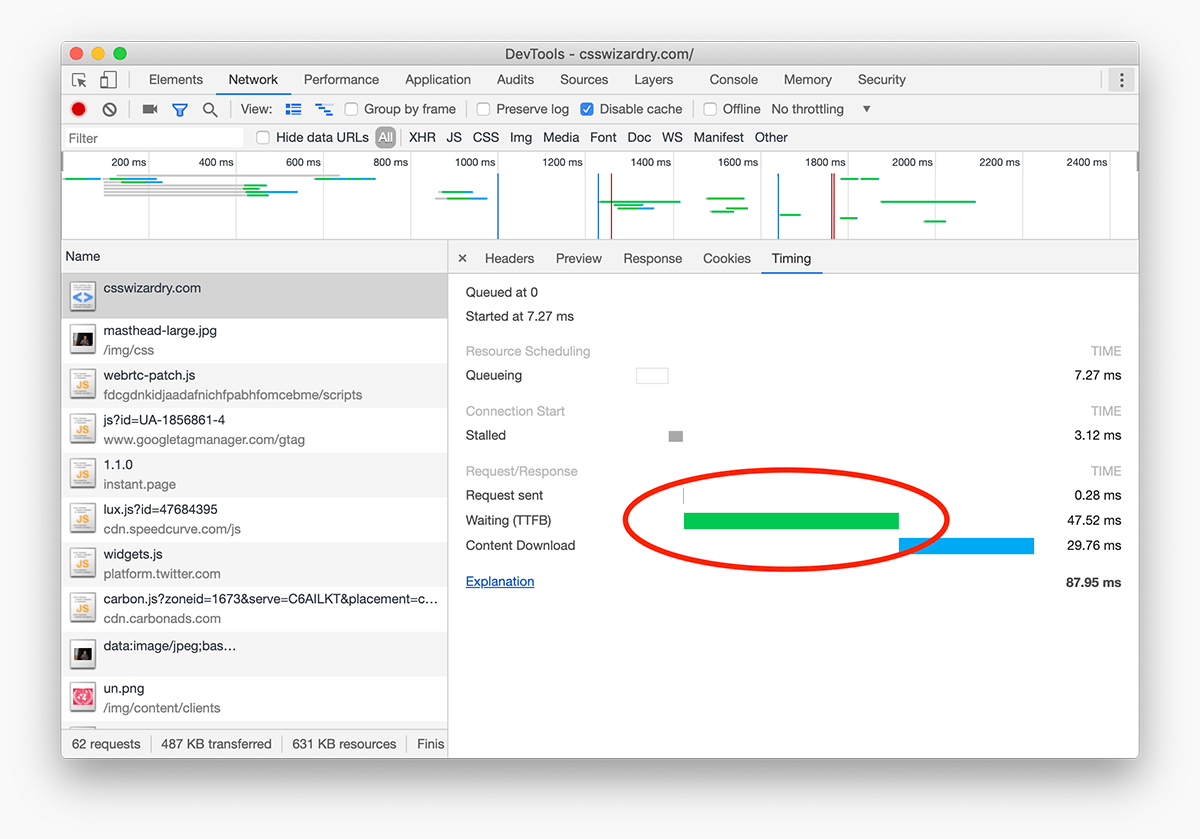
The TTFB timing entry isn’t particularly insightful. View full size/quality (375KB)

TTFB is a little opaque to say the least. It comprises so many different things that I often think we tend to just gloss over it. A lot of people surmise that TTFB is merely time spent on the server, but that is only a small fraction of the true extent of things.

The first—and often most surprising for people to learn—thing that I want to draw your attention to is that TTFB counts one whole round trip of latency. TTFB isn’t just time spent on the server, it is also the time spent getting from our device to the sever and back again (carrying, that’s right, the first byte of data!).

Armed with this knowledge, we can soon understand why TTFB can often increase so dramatically on mobile. Surely, you’ve wondered before, the server has no idea that I’m on a mobile device—how can it be increasing its TTFB?! The reason is because mobile networks are, as a rule, high latency connections. If your Round Trip Time (RTT) from your phone to a server and back again is, say, 250ms, you’ll immediately see a corresponding increase in TTFB.

If there is one key thing I’m keen for your to take from this post, its is that TTFB is affected by latency.

But what else is TTFB? Strap yourself in; here is a non-exhaustive list presented in no particular order:

  • Latency: As above, we’re counting a trip out to and a return trip from the server. A trip from a device in London to a server in New York has a theoretical best-case speed of 28ms over fibre, but this makes lots of very optimistic assumptions. Expect closer to 75ms.
    • This is why serving your content from a CDN is so important: even in the internet age, being geographically closer to your customers is advantageous.
  • Routing: If you are using a CDN—and you should be!—a customer in Leeds might get routed to the MAN datacentre only to find that the resource they’re requesting isn’t in that PoP’s cache. Accordingly, they’ll get routed all the way back to your origin server to retrieve it from there. If your origin is in, say, Virginia, that’s going to be a large and invisible increase in TTFB.
  • Filesystem reads: The server simply reading static files such as images or stylesheets from the filesystem has a cost. It all gets added to your TTFB.
  • Prioritisation: HTTP/2 has a (re)prioritisation mechanism whereby it may choose to stall lower-priority responses on the server while sending higher-priority responses down the wire. H/2 prioritisation issues aside, even when H/2 is running smoothly, these expected delays will contribute to your TTFB.
  • Application runtime: It’s kind of obvious really, but the time it takes to run your actual application code is going to be a large contributor to your TTFB.
  • Database queries: Pages that require data from a database will incur a cost when searching over it. More TTFB.
  • API calls: If you need to call any APIs (internal or otherwise) in order to populate a page, the overhead will be counted in your TTFB.
  • Server-Side Rendering: The cost of server-rendering a page could be trivial, but it will still contribute to your TTFB.
  • Cheap hosting: Hosting that is optimised for cost over performance usually means you’re sharing a server with any number of other websites, so expect degraded server performance which could affect your ability to fulfil requests, or may simply mean underpowered hardware trying to run your application.
  • DDoS or heavy load: In a similar vein to the previous point, increased load with no way of auto-scaling your application will lead to degraded performance where you begin to probe the limits of your infrastructure.
  • WAFs and load balancers: Services such as web application firewalls or load balancers that sit in front of your application will also contribute to your TTFB.
  • CDN features: Although a CDN is a huge net win, in certain scenarios, their features could lead to additional TTFB. For example, request collapsing, edge-side includes, etc.).
  • Last-mile latency: When we think of a computer in London visiting a server in New York, we tend to oversimplify that journey quite drastically, almost imagining that the two were directly connected. The reality is that there’s a much more complex series of intermediaries from our own router to our ISP; from a cell tower to an undersea cable. Last mile latency deals with the disproportionate complexity toward the terminus of a connection.

It’s impossible to have a 0ms TTFB, so it’s important to note that the list above does not represent things that are necessarily bad or slowing your TTFB down. Rather, your TTFB represents any number of the items present above. My aim here is not to point fingers at any particular part of the stack, but instead to help you understand what exactly TTFB can entail. And with so much potentially taking place in our TTFB phase, it’s almost a miracle that websites load at all!

So. Much. Stuff!

Need Some Help?

I help companies find and fix site-speed issues. Performance audits, training, consultancy, and more.

Demystifying TTFB

Thankfully, it’s not all so unclear anymore! With a little bit of extra work spent implementing the Server Timing API, we can begin to measure and surface intricate timings to the front-end, allowing web developers to identify and debug potential bottlenecks previously obscured from view.

The Server Timing API allows developers to augment their responses with an additional Server-Timing HTTP header which contains timing information that the application has measured itself.

This is exactly what we did at BBC iPlayer last year:
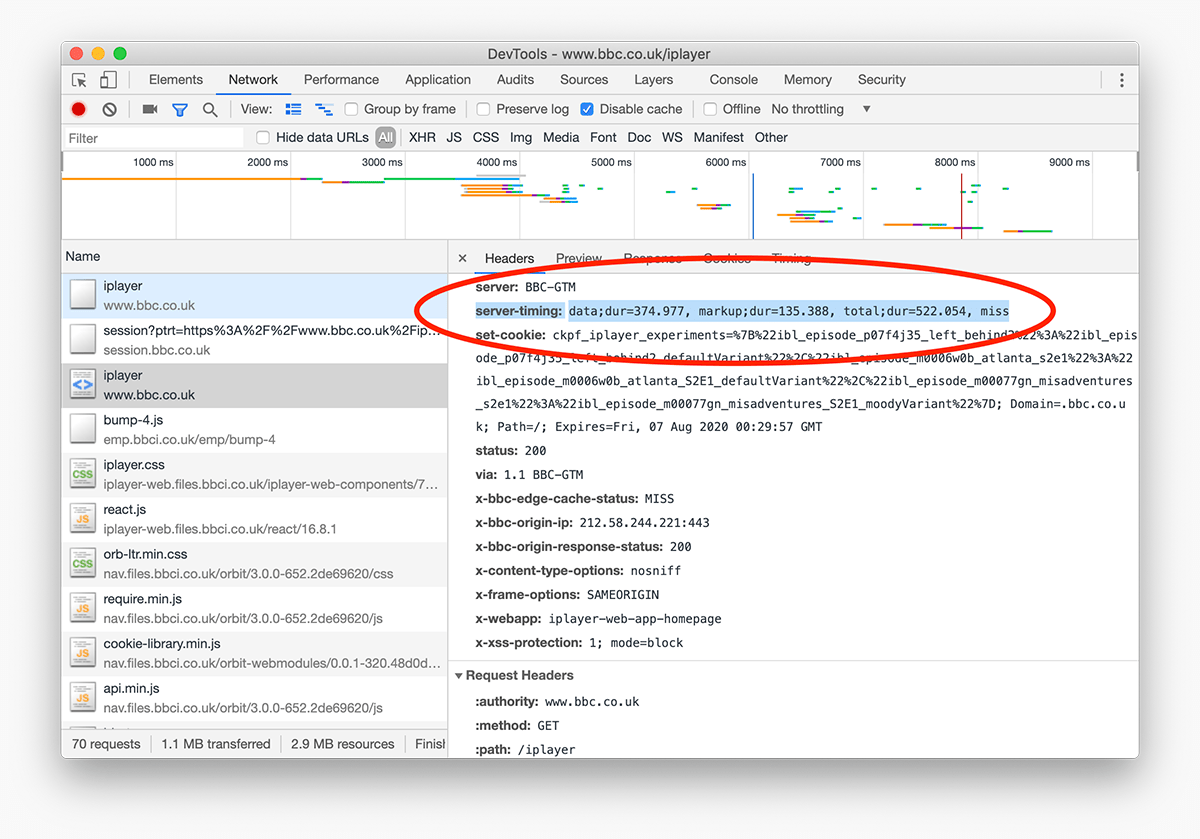
The newly-available Server-Timing header can be added to any response. View full size/quality (533KB)

N.B. Server Timing doesn’t come for free: you need to actually measure the aspects listed above yourself and then populate your Server-Timing header with the relevant data. All the browser does is display the data in the relevant tooling, making it available on the front-end:
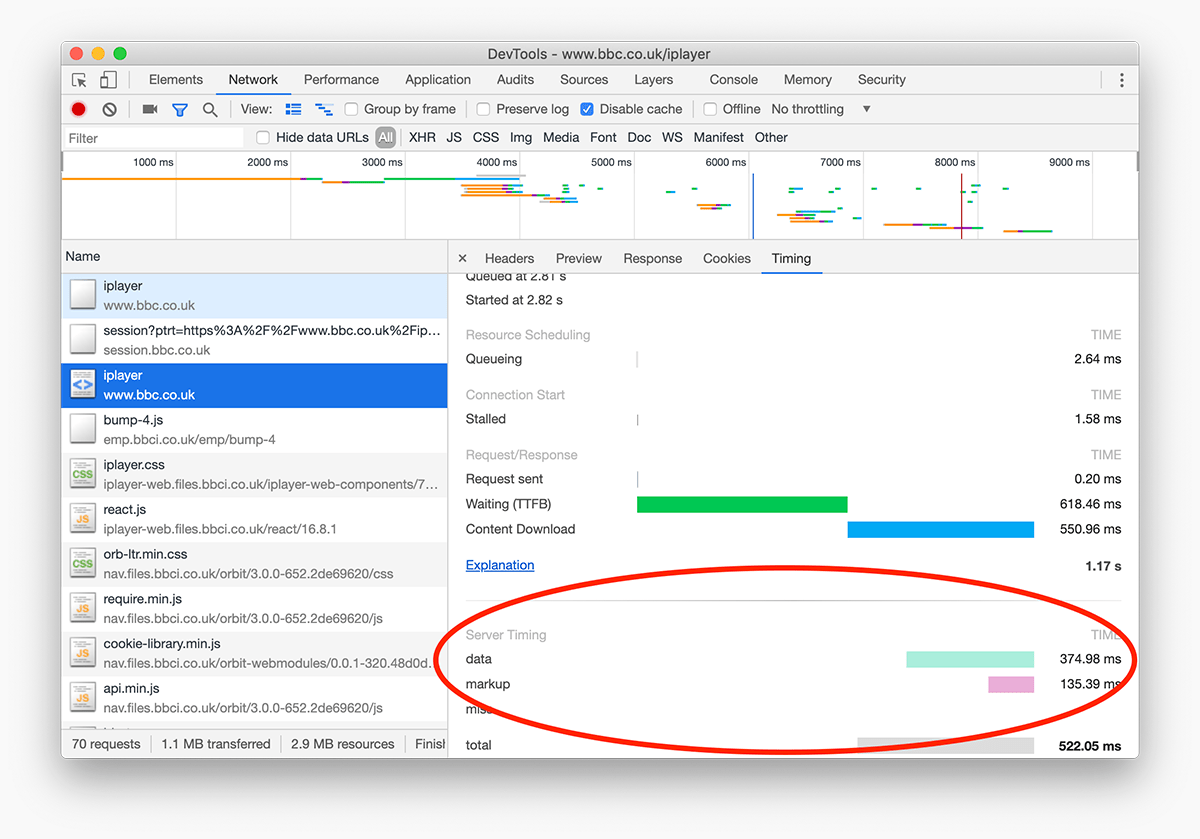
Now we can see, right there in the browser, how long certain aspects of our TTFB took. View full size/quality (419KB)

To help you get started, Christopher Sidebottom wrote up his implementation of the Server Timing API during our time optimising iPlayer.

It’s vital that we understand just what TTFB can cover, and just how critical it can be to overall performance. TTFB has knock-on effects, which can be a good thing or a bad thing depending on whether it’s starting off low or high.

If you’re slow out of the gate, you’ll spend the rest of the race playing catchup.


Frequently Asked Questions

What is Time to First Byte?

Time to First Byte measures how long it takes from making a request until the first byte of the response arrives back from the server.

Why does TTFB matter?

TTFB matters because every downstream task depends on it. A slow first byte delays rendering, resource discovery, and other performance milestones.

What causes a slow TTFB?

Slow TTFB can come from network latency, redirects, slow application logic, overloaded infrastructure, or cache misses closer to origin.

How can I improve TTFB?

Common improvements include reducing server work, caching more effectively, cutting redirects, using a CDN, and bringing content physically closer to users.