
惯性聚合 高效追踪和阅读你感兴趣的博客、新闻、科技资讯
阅读原文 在惯性聚合中打开

推荐订阅源

S
Securelist
C
CERT Recently Published Vulnerability Notes
Forbes - Security
Forbes - Security
Exploit-DB.com RSS Feed
L
LINUX DO - 最新话题
The Hacker News
The Hacker News
Google Online Security Blog
SecWiki News
SecWiki News
K
KPMG report finds enterprise disconnect between AI and its ROI | CIO
The Last Watchdog
The Last Watchdog
S
Schneier on Security
T
Troy Hunt's Blog
N
News | PayPal Newsroom
cs.CL updates on arXiv.org
Schneier on Security
P
Privacy & Cybersecurity Law Blog
T
Tor Project blog
T
Threatpost
Threat Intelligence Blog | Flashpoint
A
Arctic Wolf
S
Secure Thoughts
P
Proofpoint News Feed
cs.CV updates on arXiv.org
Security Latest
Security Latest
Scott Helme
Scott Helme
Security Archives - TechRepublic
Latest news
Latest news
PCI Perspectives
PCI Perspectives
cs.AI updates on arXiv.org
Hacker News - Newest:
Hacker News - Newest: "LLM"
L
LINUX DO - 热门话题
P
Palo Alto Networks Blog
www.infosecurity-magazine.com
G
GRAHAM CLULEY
V2EX - 技术
V2EX - 技术
Google DeepMind News
Project Zero
Project Zero
V
Vulnerabilities – Threatpost
T
Threat Research - Cisco Blogs
Webroot Blog
Webroot Blog
OSCHINA 社区最新新闻
OSCHINA 社区最新新闻
N
News and Events Feed by Topic
TaoSecurity Blog
TaoSecurity Blog
大猫的无限游戏
大猫的无限游戏
T
Tenable Blog
钛媒体:引领未来商业与生活新知
钛媒体:引领未来商业与生活新知
V
Visual Studio Blog
H
Hacker News: Front Page
Simon Willison's Weblog
AWS News Blog
AWS News Blog

CSS Wizardry

Front-End’s Missing Metric: The TBT Window Meet Your Users Where They Are with Obs.js Better Browser Caching with No-Vary-Search font-family Doesn’t Fall Back the Way You Think What Is CSS Containment and How Can I Use It? When All You Can Do Is All or Nothing, Do Nothing Obs.js: Context-Aware Web Performance for Everyone Low- and Mid-Tier Mobile for the Real World (2025) The Fastest Site in the Tour de France Making Sense of the Performance Extensibility API Why Do We Have a Cache-Control Request Header? HTML Is Not a Programming Language… Build for the Web, Build on the Web, Build with the Web Licensing Code on CSS Wizardry A Layered Approach to Speculation Rules Designing (and Evolving) a New Web Performance Score Core Web Vitals Colours The Ultimate Contract Templates for Tech Consultants: Protect Your Business and Get Paid Optimising for High Latency Environments Cache Grab: How Much Are You Leaving on the Table? blocking=render: Why would you do that?! Correctly Configure (Pre) Connections The Three Cs: 🤝 Concatenate, 🗜️ Compress, 🗳️ Cache What Is the Maximum max-age? How to Clear Cache and Cookies on a Customer’s Device The Ultimate Low-Quality Image Placeholder Technique Core Web Vitals for Search Engine Optimisation: What Do We Need to Know? The HTTP/1-liness of HTTP/2 In Defence of DOM­Content­Loaded Site-Speed Topography Remapped Why Not document.write()? Speeding Up Async Snippets Critical CSS? Not So Fast! Measure What You Impact, Not What You Influence Optimising Largest Contentful Paint Measuring Web Performance in Mobile Safari Site-Speed Topography Speed Up Google Fonts Real-World Effectiveness of Brotli Performance Budgets, Pragmatically Lazy Pre-Browsing with Prefetch Making Cloud.typography Fast(er) Time to First Byte: What It Is and How to Improve It Self-Host Your Static Assets Tips for Technical Interviews Cache-Control for Civilians Bandwidth or Latency: When to Optimise for Which ITCSS × Skillshare What If? CSS and Network Performance The Three Types of Performance Testing Getting to Know a Legacy Codebase Image Inconsistencies: How and When Browsers Download Images Identifying, Auditing, and Discussing Third Parties My Digital Music Setup Measuring the Hard-to-Measure Finding Dead CSS The Fallacies of Distributed Computing (Applied to Front-End Performance) Ten Years Old Relative Requirements Airplanes and Ashtrays Performance and Resilience: Stress-Testing Third Parties Refactoring Tunnels Little Things I Like to Do with Git Writing Tidy Code Configuring Git and Vim Base64 Encoding & Performance, Part 2: Gathering Data Base64 Encoding & Performance, Part 1: What’s Up with Base64? Code Smells in CSS Revisited Typography for Developers Moving CSS Wizardry onto HTTPS and HTTP/2 Ack for CSS Developers A New Year, a New Focus Preparing Vim for Apple’s Touch Bar Choosing the Correct Average CSS Shorthand Syntax Considered an Anti-Pattern CSS Wizardry Newsletter Improving Perceived Performance with Multiple Background Images Continue Normalising Your CSS Pure CSS Content Filter Pragmatic, Practical, and Progressive Theming with Custom Properties Refactoring CSS: The Three I’s Speaker’s Checklist: Before and After Your Talk Improving Your CSS with Parker The Importance of !important: Forcing Immutability in CSS Mixins Better for Performance Managing Typography on Large Apps White October Events Workshop Partnership BEMIT: Taking the BEM Naming Convention a Step Further Travelling Like You Want to, When You Have To Contextual Styling: UI Components, Nesting, and Implementation Detail Subtleties with Self-Chained Classes Cyclomatic Complexity: Logic in CSS Immutable CSS Can CSS Be Too Modular? More Transparent UI Code with Namespaces When to use @extend; when to use a mixin The Specificity Graph CSS Wizardry Ltd.: Year 1 in review CSS Guidelines 2.0.0
Nesting Your BEM?
Harry Roberts · 2016-11-28 · via CSS Wizardry

Written by on CSS Wizardry.

Table of Contents

Independent writing is brought to you via my wonderful Supporters.

  1. Nesting in CSS
  2. Specificity
  3. Chain the First Class
  4. Simplifying with Sass
  5. Practical Upshot
    1. Downsides
  6. Use Cases
  7. To Use or Not to Use?

Let me please start this post by saying that this is not a recommendation or new ‘best practice’. This is me thinking out loud.

I’m a huge fan and proponent of BEM, and have been for many years. It’s kinda funny looking, sure, but it provides me with a lot of things:

  • Soft encapsulation which helps to reduce naming collisions.
  • Self-documenting CSS which helps me to learn about DOM nodes’ relationships with one another.
  • Targetted selection which helps to reduce subtree collisions and capturing too much of the DOM.
  • Managed specificity which is always a huge plus.
  • Strict implementation rules which prevent me from using classes outside of a given context.

Except that last point is only half true…

BEM tells us that a class of, say, .widget__title, can only be used inside of .widget. However, this is only by agreement. A developer could drop .widget__title inside of .modal and things would still work. They might do this because

  • they haven’t seen BEM before, and don’t know about the usage it enforces, or;
  • they’re being lazy and have spotted that—even though they shouldn’t—they can reuse the .widget__title styling inside of .modal and leave work five minutes early.

They could do this, and it would work out for them: things would still render correctly. They wouldn’t get any errors because BEM is just a convention, and conventions require agreement.

To circumvent this, we could write our CSS like this:

.widget { }

.widget .widget__title { }

Now the developer can’t use .widget__title inside of .modal, because we’ve told our CSS that .widget__title only works if we put it inside of .widget. Now we are beginning to enforce things, and this will prevent abuse.

There’s a problem though: nesting.

Nesting in CSS

For a very long time now, I have actively claimed that nesting in CSS is a bad thing, because it

  • increases specificity (which should always be well managed);
  • introduces location dependency (a hallmark of an inflexible system)
  • reduces portability (meaning we can’t move things around if we need to);
  • increases fragility (nesting means more chances for the selector to go wrong).

In short, keep your CSS selectors short.

But in the case of nesting BEM we see that nesting does in fact give us tangible benefits. How do we deal with the downsides?

Specificity

It is often noted that it is important to keep specificity low at all times. This is certainly true, and is very good advice, but, as ever, it is a little more nuanced than that. What people really mean when they say this is that specificity should be well managed at all times. That is to say, we should have consistency and very little difference between our selectors.

In theory (although please, dear lord, do not ever do this), a project whose only selectors are IDs would have well managed specificity: the specificity would be universally high, but would at least all be equal and consistent.

When we talk about well managed specificity, we’re talking about Specificity Graphs which are as flat as possible.

If we look at the following CSS for a series of components:

.nav-primary { }

  .nav-primary__item { }

    .nav-primary__link { }


.masthead { }

  .masthead__media { }

  .masthead__text { }

    .masthead__title { }


.sub-content { }

  .sub-content__title { }

  .sub-content__title--featured { }

  .sub-content__img { }

…we see that they all have the exact same specificity of one class each, which gives us a nice flat specificity graph:
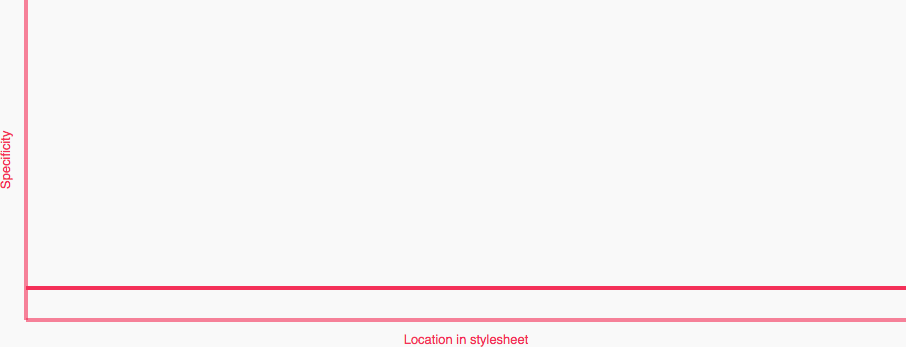
Graph showing low and flat specificity
View full size/quality

As soon as we nest the Element classes, like so:

.nav-primary { }

  .nav-primary .nav-primary__item { }

    .nav-primary .nav-primary__link { }


.masthead { }

  .masthead .masthead__media { }

  .masthead .masthead__text { }

    .masthead .masthead__title { }


.sub-content { }

  .sub-content .sub-content__title { }

  .sub-content .sub-content__title--featured { }

  .sub-content .sub-content__img { }

…we see a Specificity Graph more like this:
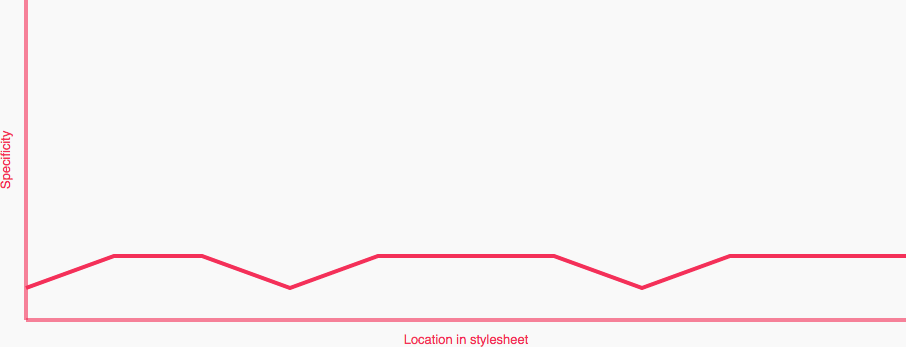
Graph showing changes in specificity
View full size/quality

Uh oh! Spikes! Spikes are exactly what we want to avoid as they represent fluctuations between low and high specificity selectors within close proximity in the project.

Here we are visualising the specificity downside to nesting. Can we circumvent it? How?

Chain the First Class

If we were to chain the first class (the Block) with itself, like this:

.nav-primary.nav-primary { }

  .nav-primary .nav-primary__item { }

    .nav-primary .nav-primary__link { }


.masthead.masthead { }

  .masthead .masthead__media { }

  .masthead .masthead__text { }

    .masthead .masthead__title { }


.sub-content.sub-content { }

  .sub-content .sub-content__title { }

  .sub-content .sub-content__title--featured { }

  .sub-content .sub-content__img { }

…we can make its specificity match that of all of the nested Elements with zero side effects:

  • We don’t need to know where the Block exists in the DOM, so we we’re not increasing its specificity based on a location that could change.
  • We’re not chaining with another, different, or specific element or class, which means that the Block class is still very portable.

This specificity increase is completely self contained. Now we see a Specificity Graph that looks like this:
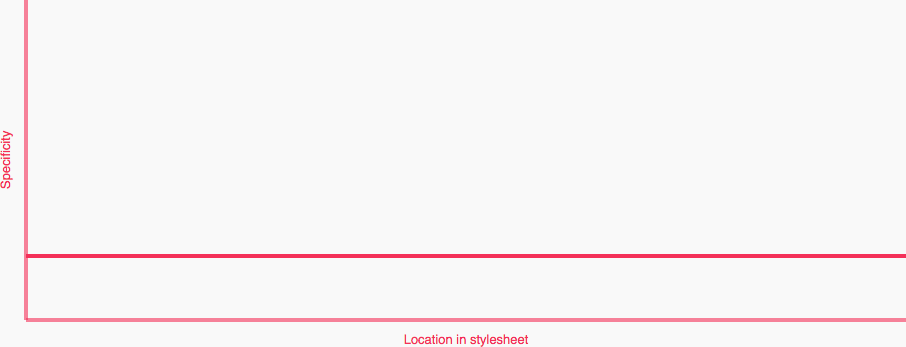
Graph showing higher but still flat specificity
View full size/quality

Higher than the first graph, but still perfectly flat. Although our specificity is now two classes high, it is still well managed: there are no specificity heavyweights across our components’ selectors.

Simplifying with Sass

To make this nesting and chaining much easier, we can lean on a preprocessor. In this case, Sass.

We should all be familiar with how nesting regular selectors in Sass looks:

.nav-primary {

  .nav-primary__item { }

  .nav-primary__link { }

}

Which gives us, as we’d expect:

.nav-primary { }

  .nav-primary .nav-primary__item { }

    .nav-primary .nav-primary__link { }

But how do we quickly and effectively chain the first class with itself? Like this:

.nav-primary {

  &#{&} { }

  .nav-primary__item { }

  .nav-primary__link { }

}

By using &#{&}, we can chain the parent class with itself. This means that all our styles for the Block (in this case, .nav-primary) go here:

.nav-primary {

  &#{&} { /* Block styles */ }

}

See a small example on Sassmeister.

Practical Upshot

Now we are in a position where we are actually enforcing usage, and actively stopping selectors from working if we move them outside of the correct part of the DOM. This can help us working in environments where other developers do not understand how BEM works, or who are prone to just hacking things around until things look right.

We also have a managed (albeit increased) specificity across all of our classes.

Downsides

We’re increasing specificity, which is generally something we should always strive to avoid.

Use Cases

If you would like to try rolling out this technique, it would be worth identifying some key use cases and starting from there. One that immediately springs to mind is grid systems. Time and time again I see developers trying to use .grid__item classes outside of the .grid parent, so if I were to start using this technique I would probably start there:

.grid.grid {  }

  .grid .grid__item {  }

To Use or Not to Use?

I’m not sure. Like I said at the beginning, this is not a technique I am actively recommending or promoting. I just want to put it out there as an option, particularly for developers who find them in an environment where other developers are prone to abusing CSS.

However, I will say this: if you are already nesting your BEM then go back and level out your Specificity Graph by chaining your first class.