


Written by on CSS Wizardry.
Independent writing is brought to you via my wonderful Supporters.
blocking=render?async, defer, and type=moduleWebKit have recently announced their intent to
implement the blocking=render
attribute for <script> and <style> elements, bringing them in line with
support already available in
Blink and generally positive
sentiment in Firefox.
The blocking=render attribute allows developers to explicitly mark a resource
as render blocking, but… why on earth would you want to do that?!
The short answer is: generally, you wouldn’t. Unless you know you need this behaviour, you don’t need it.
But how do you know if you do need it? Read on…
blocking=render?The spec says:
A blocking attribute explicitly indicates that certain operations should be blocked on the fetching of an external resource. The operations that can be blocked are represented by possible blocking tokens, which are strings listed by the following table […]
— 2.5.8 Blocking attributes
Currently, there is only one token specified: render. The spec is extensible
so that other values could be added as the need arises—potential scenarios that
have been
discussed
include parse, load, and even a negation to encourage the opposite, such as
blocking=!render.
Generally speaking, when loading resources into web pages, there are three possible blocking states:
Visually, this is how that process looks for each scenario:

<head>—even though you can
never see <head> tags or their children, they still get
rendered just like any other HTML, they’re just set to display:
none;. That said, these diagrams also apply to a downloading file (pink)
that is in the middle of the <body>. HTML is parsed
line-by-line and is very predictable. We ❤️ HTML.
The two main file types that impact the blocked status of a web page are stylesheets and scripts. In their default states:
<link rel=stylesheet href=app.css>: This will block the rendering of
subsequent content, but not its parsing. The browser is free to continue
parsing the HTML and building out the DOM, but cannot display any of it until
app.css is fully fetched and parsed. Stylesheets are render blocking.<script src=app.js></script> This will block parsing (and therefore also
rendering) of subsequent content. The browser may not parse or construct any
DOM until app.js is fully fetched and parsed, at which point it now has two
tasks ahead of it: build the DOM and render it. Scripts are parser
blocking.All other file types are, by default, non-blocking.
The pedant in me wants to point out that even inline <script> and
<style> are still technically parser blocking. Colloquially, we refer to them
as non-blocking, but even for the handful of milliseconds that the browser is
parsing either the JS or CSS contained in them, it’s blocked from doing anything
else.
async, defer, and type=moduleWithout going into too much detail, the presence of any of these attributes on
a <script> will cause it to fall into the first camp: non-blocking. Therefore,
<script>s can occupy either extreme: non-blocking, the fastest option; or
parser blocking, the slowest option.
The primary use-case for blocking=render is to grant <script>s access to
the middle option: render- but not parser-blocking.
Let’s look at two examples of putting blocking=render to use.
I wrote this entire section before Ryan Townsend
pointed out that blocking specifically for rel=preload was removed from the
spec. I’m keeping the following for
posterity, but this does not currently work in any implementation.
This is one of the least compelling examples, in my opinion. Also, for this to
work, the blocking attribute needs specifying for <link> elements,
which is currently only possible in Blink. But let’s take a look
anyway…
Imagine you’ve built a simple countdown or stopwatch app:
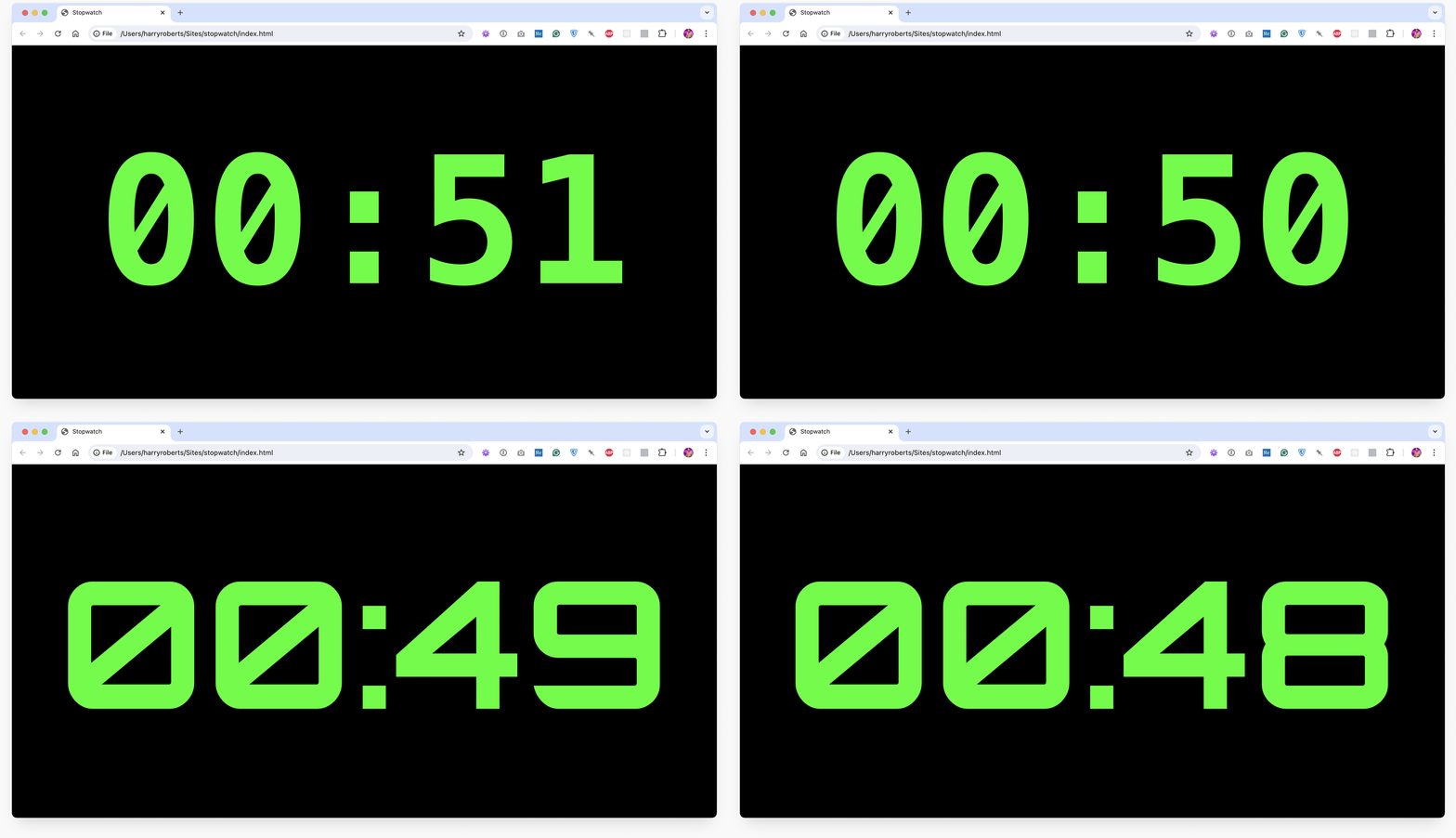
Given a UI such as this, even with the best will in the world, the switch from
any fallback font to the intended web font is quite a leap. Is it too much? If
you decide it is, you could block on the preload of that font (if you were
preloading it in the first place). That would look like this:
<link rel=preload
      as=font
      href=font.woff2
      crossorigin
      blocking=render>
Typically, I would strongly recommend not blocking rendering on web fonts. Using
the relevant font-display to ensure that text can render as soon as possible
is almost always the correct thing to do: reading something in the ‘wrong’ font
is better than reading nothing at all.
However, in scenarios where a flash of fallback font (FOFT) might be particularly jarring—or create severe layout shifts—then perhaps waiting on the web font might (might) be the right thing to do. Maybe. I’m not actively recommending it.
Note that almost the exact same behaviour could be achieved by adding
font-display: block; to the relevant @font-face rule, but blocking=render
provides would have provided two distinct additions:
font-display: block; will time out after three seconds, whereas
blocking=render has no such timeout. In that sense, it’s much more
aggressive.font-display: block; will still render the current UI, only without text—a
flash of invisible text (FOIT). blocking=render won’t render anything at
all.If a web font is your content (which, for 99.999% of you, it isn’t), you might
want to maybe use blocking=render. But even then, I wouldn’t.
Interestingly, Chrome exhibits blocking=render-style behaviour on
web-font preloads already. It’s non-standard behaviour, but Chrome will
make font preloads block rendering until they finish or until
a timeout
. This is
already happening and you don’t need blocking=render.1
blocking=render’s application in client-side A/B testing is, for me, its most
compelling use-case.
Client-side A/B testing tools work by altering the DOM and presenting a variant of a component to a user. In order for this to work, the original DOM must already be constructed (you can’t alter a DOM if you don’t have one), so there’s an aspect of doing the work twice. A problem arises if and when a user actually sees that work happening twice. It’s a jarring experience to see one version of a hero change to something completely different in front of your eyes, and it may even influence the outcome of the experiment itself.
To circumvent this, many A/B testing tools implement what is known as an anti-flicker snippet. They deliberately hide the page (visually) until the variants have been constructed, or a timeout is met—whichever happens sooner.
This is the anti-flicker snippet from the now defunct Google Optimize.
<!-- Anti-Flicker Snippet -->
<style>
  .async-hide { opacity: 0 !important }
</style>

<script>
  (function(a,s,y,n,c,h,i,d,e) {
    s.className+=' '+y;
    h.start=1*new Date;
    h.end=i=function(){
      s.className=s.className.replace(RegExp(' ?'+y),'')
    };
    (a[n]=a[n]||[]).hide=h;
    setTimeout(function(){i();h.end=null},c);
    h.timeout=c;
  });
  (window, document.documentElement, 'async-hide', 'dataLayer', 4000, {'GTM-XXXXXX':true});
</script>
This snippet works by applying the class async-hide to the <html> element
(document.documentElement). This aggressively sets opacity: 0; so that the
page is rendered, only invisibly. The class is then removed either when the A/B
tool’s work is done, or a 4000ms timeout is reached—whichever is first.
One immediate failing with this is that an invisible page is still interactive,
and users could still click on or interact with elements inadvertently. The page
is rendered, but invisibly. blocking=render ensures that the page is not
rendered at all, and therefore can’t be interacted with.
Another problem is that we’re going through more paint cycles than we need to:
paint the page invisibly, modify it, paint it again visibly… It would be nicer
to hold off painting anything at all until we have all of the relevant
information about what to paint. blocking=render gives us this ability.
A further issue is the big-reveal phenomenon: with an anti-flicker snippet, the
page is totally invisible until it’s totally visible. Behind the opacity: 0;,
there may well have been a progressive render of the page—which is a familiar
and good user experience—but a user didn’t benefit from it. Anti-flicker
snippets eschew this behaviour and take an all-or-nothing approach: nothing,
nothing, nothing, everything.

blocking=render leaves the browser to its usual rendering process, so we can
still get a progressive render of the page, only now we do it in a way more
akin to loading a CSS file.
Finally, and this is counter to my own preferences and beliefs as a performance
engineer, we still risk leaking the experiment to the user when using an
anti-flicker snippet. Knowingly hiding a page for up to four seconds feels like
insanity to me, but at least we do have a timeout. The problem with anti-flicker
snippets is that if that four-second timeout is reached, we’ll still display the
page even if experiments haven’t completed—the 4000ms is a magic number that
we use to hopefully win a race condition.
By using blocking=render, that timeout now becomes governed by the browser’s
own heuristics, which is
almost definitely going to be longer than four seconds. While that does terrify
me, it does guarantee we don’t paint anything too soon. No more race
conditions, but a potentially longer render-blocked period.
As I said at the top of the article, most of us won’t need blocking=render,
and those of us who do will know that we do.
One handy takeaway is that, at present, blocking=render would cause any of the
following:
<script src async></script><script src defer></script><script src type=module></script><script type=module>...</script>…to behave like this:
<link rel=stylesheet href>Generally, we don’t! The primary use case thus far is to grant scripts the ability to be render- but not parser-blocking, which is not currently possible. This would be particularly helpful for A/B testing libraries who currently rely on anti-flicker snippets to achieve the results they want.
此内容由惯性聚合(RSS阅读器)自动聚合整理,仅供阅读参考。 原文来自 — 版权归原作者所有。