
惯性聚合 高效追踪和阅读你感兴趣的博客、新闻、科技资讯
阅读原文 在惯性聚合中打开

推荐订阅源

Cloudbric
Cloudbric
T
Threat Research - Cisco Blogs
Simon Willison's Weblog
AWS News Blog
AWS News Blog
P
Privacy & Cybersecurity Law Blog
H
Help Net Security
云风的 BLOG
云风的 BLOG
G
GRAHAM CLULEY
Spread Privacy
Spread Privacy
Cyber Security Advisories - MS-ISAC
A
Arctic Wolf
Project Zero
Project Zero
Engineering at Meta
Engineering at Meta
P
Privacy International News Feed
Blog — PlanetScale
Blog — PlanetScale
Stack Overflow Blog
Stack Overflow Blog
M
MIT News - Artificial intelligence
The Register - Security
Recorded Future
Recorded Future
cs.AI updates on arXiv.org
C
Cisco Blogs
PCI Perspectives
PCI Perspectives
Recent Announcements
Martin Fowler
Martin Fowler
A
About on SuperTechFans
W
WeLiveSecurity
GbyAI
GbyAI
V
Vulnerabilities – Threatpost
The GitHub Blog
The GitHub Blog
D
Darknet – Hacking Tools, Hacker News & Cyber Security
C
Check Point Blog
Y
Y Combinator Blog
月光博客
月光博客
Scott Helme
Scott Helme
奇客Solidot–传递最新科技情报
奇客Solidot–传递最新科技情报
Google DeepMind News
F
Fortinet All Blogs
U
Unit 42
G
Google Developers Blog
钛媒体:引领未来商业与生活新知
钛媒体:引领未来商业与生活新知
T
Threatpost
Application and Cybersecurity Blog
Google Online Security Blog
Recent Commits to openclaw:main
OSCHINA 社区最新新闻
OSCHINA 社区最新新闻
Cisco Talos Blog
Cisco Talos Blog
博客园 - 三生石上(FineUI控件)
Hugging Face - Blog
Hugging Face - Blog
MongoDB | Blog
MongoDB | Blog
博客园 - 司徒正美

CSS Wizardry

Front-End’s Missing Metric: The TBT Window Meet Your Users Where They Are with Obs.js Better Browser Caching with No-Vary-Search font-family Doesn’t Fall Back the Way You Think What Is CSS Containment and How Can I Use It? When All You Can Do Is All or Nothing, Do Nothing Obs.js: Context-Aware Web Performance for Everyone Low- and Mid-Tier Mobile for the Real World (2025) The Fastest Site in the Tour de France Making Sense of the Performance Extensibility API Why Do We Have a Cache-Control Request Header? HTML Is Not a Programming Language… Build for the Web, Build on the Web, Build with the Web Licensing Code on CSS Wizardry A Layered Approach to Speculation Rules Designing (and Evolving) a New Web Performance Score Core Web Vitals Colours The Ultimate Contract Templates for Tech Consultants: Protect Your Business and Get Paid Optimising for High Latency Environments Cache Grab: How Much Are You Leaving on the Table? blocking=render: Why would you do that?! Correctly Configure (Pre) Connections The Three Cs: 🤝 Concatenate, 🗜️ Compress, 🗳️ Cache What Is the Maximum max-age? How to Clear Cache and Cookies on a Customer’s Device The Ultimate Low-Quality Image Placeholder Technique Core Web Vitals for Search Engine Optimisation: What Do We Need to Know? The HTTP/1-liness of HTTP/2 In Defence of DOM­Content­Loaded Site-Speed Topography Remapped Why Not document.write()? Speeding Up Async Snippets Critical CSS? Not So Fast! Measure What You Impact, Not What You Influence Optimising Largest Contentful Paint Measuring Web Performance in Mobile Safari Site-Speed Topography Speed Up Google Fonts Real-World Effectiveness of Brotli Performance Budgets, Pragmatically Lazy Pre-Browsing with Prefetch Making Cloud.typography Fast(er) Time to First Byte: What It Is and How to Improve It Self-Host Your Static Assets Tips for Technical Interviews Cache-Control for Civilians Bandwidth or Latency: When to Optimise for Which ITCSS × Skillshare What If? CSS and Network Performance The Three Types of Performance Testing Getting to Know a Legacy Codebase Image Inconsistencies: How and When Browsers Download Images Identifying, Auditing, and Discussing Third Parties My Digital Music Setup Measuring the Hard-to-Measure Finding Dead CSS The Fallacies of Distributed Computing (Applied to Front-End Performance) Ten Years Old Relative Requirements Airplanes and Ashtrays Performance and Resilience: Stress-Testing Third Parties Refactoring Tunnels Little Things I Like to Do with Git Writing Tidy Code Configuring Git and Vim Base64 Encoding & Performance, Part 2: Gathering Data Base64 Encoding & Performance, Part 1: What’s Up with Base64? Code Smells in CSS Revisited Typography for Developers Moving CSS Wizardry onto HTTPS and HTTP/2 Ack for CSS Developers A New Year, a New Focus Preparing Vim for Apple’s Touch Bar Choosing the Correct Average CSS Shorthand Syntax Considered an Anti-Pattern CSS Wizardry Newsletter Nesting Your BEM? Continue Normalising Your CSS Pure CSS Content Filter Pragmatic, Practical, and Progressive Theming with Custom Properties Refactoring CSS: The Three I’s Speaker’s Checklist: Before and After Your Talk Improving Your CSS with Parker The Importance of !important: Forcing Immutability in CSS Mixins Better for Performance Managing Typography on Large Apps White October Events Workshop Partnership BEMIT: Taking the BEM Naming Convention a Step Further Travelling Like You Want to, When You Have To Contextual Styling: UI Components, Nesting, and Implementation Detail Subtleties with Self-Chained Classes Cyclomatic Complexity: Logic in CSS Immutable CSS Can CSS Be Too Modular? More Transparent UI Code with Namespaces When to use @extend; when to use a mixin The Specificity Graph CSS Wizardry Ltd.: Year 1 in review CSS Guidelines 2.0.0
Improving Perceived Performance with Multiple Background Images
Harry Roberts · 2016-10-24 · via CSS Wizardry

Written by on CSS Wizardry.

Table of Contents

Independent writing is brought to you via my wonderful Supporters.

  1. CSS Gradients and Multiple Backgrounds
  2. Making the Approximation
  3. Practicality
  4. Update 2016-11-11

I’m on a train right now, which means the wifi is awful. A lot of sites are refusing to load at all, and those that do have lots of images missing, leaving big blank holes in their web pages. Most of the images, thankfully, aren’t critical to understanding the content I’m looking for, but their absence does remind me that I’m waiting for something else to arrive, and in many cases it is perceived performance that is more important than the actual performance itself. This gave me a little idea.

A while back, I was consulting on a very high profile and very highly trafficked campaign website for a client that I’m, unfortunately, not allowed to name. I was brought in mid way through development to help make things fast.

The site featured a very large masthead image that, even when optimised, took a little while to load. I did a bunch of stuff in order to prefetch the image, fire off its request earlier, etc., but one of the simplest techniques I employed was to apply the image’s average colour as a background-color, so that the user wasn’t looking at a huge white space whilst the image loaded. This improved perceived performance dramatically, and was and incredibly low-effort implementation:

  1. Open the image in Photoshop
  2. Filter » Blur » Average
  3. Use the Eyedropper to sample the block of colour that is left
  4. Apply that colour as a background-color:

    .masthead {
      background-image: url(/img/masthead.jpg);
      background-color: #3d332b;
    }
    

This is a technique that I also use on this site’s homepage, on my very own masthead: if the image is taking too long to load, show the user a solid colour. However, just now on the train, I visited my own site and saw this:

View full size/quality (104KB)

The image isn’t actually content-critical, so it doesn’t matter that it hasn’t loaded, but—whilst probably better looking than my face—it’s still pretty jarring: it’s just a big, flat, soulless lump of colour. How can we improve it?

CSS Gradients and Multiple Backgrounds

Very simply put, I wanted to make a rough approximation of the photograph in a CSS gradient. I can’t stress the words rough approximation enough here: we’re literally talking about a few blobs of similar average colours. I was then going to apply this as a background-image on the image itself, only: oh no! This image already is a background image. Not to worry, we’ve been able to define multiple backgrounds on the same element since IE9. We can define the actual image and its gradient approximation in one go, in one declaration.

This means that, if the browser has the CSS,

  1. it can paint the CSS approximation;
  2. it can make the request for the actual image, which can make its way over the network in its own time.

Read more about multiple backgrounds on MDN.

Making the Approximation

To get my CSS-blob version of my masthead, I opened it up in Photoshop and divided it up into regions of colour. Because most of the objects in this image run top to bottom, I made vertical slices. Very conveniently for me, those regions all occurred at 25% intervals:
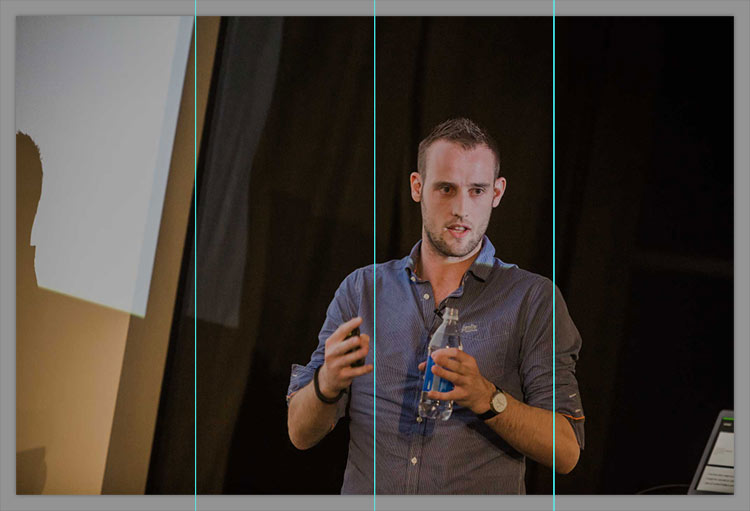
View full size/quality (140KB)

I then selected each section individually and ran Filter » Blur » Average, which left me with this:
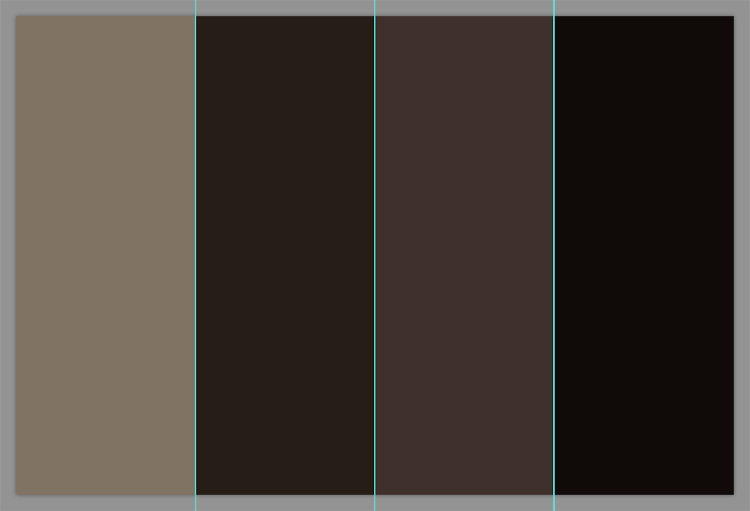
View full size/quality (2KB)

The next step was to sample each colour and plug them into a CSS gradient:

linear-gradient(to right, #807363 0%, #251d16 50%, #3f302b 75%, #100b09 100%)

That looks like this:

All I need to do now is apply this as a second value of my background-image property:

.page-head--masthead {
  background-image: url(/img/css/masthead-large.jpg),
                    linear-gradient(to right, #807363 0%, #251d16 50%, #3f302b 75%, #100b09 100%);
}

The stacking order of multiple backgrounds is such that the first value (in this case, an actual image) is the topmost image, then the next sits underneath that, and so on.

This means that, if this image ever fails to load again, we see this:

View full size/quality (144KB)

Not a huge difference, but certainly less blunt than a completely flat image: it’s enough to add a little bit of texture and hint at the general composition of the missing images.

Practicality

There is, as you can see, quite a lot of manual work involved in implementing this technique. Unless/until there’s a way to reliably automate this, I think it’s a technique best used in use cases just like mine: a very specific image with a very low rate of change.

The next level down from this would be just taking the average colour of the image and applying that as a background-color. There’s no need for gradients and multiple backgrounds with that, but it does still require per-image intervention.

However, I’m actually really happy with this as a way to provide something a little more substantial to users on poor network conditions. If your site has similar static images, I’d recommend experimenting with this technique yourself.

Update 2016-11-11

Since publishing this post, a couple of people have produced ways of (semi) automating this process.

Louis Bourque has a Color Extractor tool which will give you back the relevant gradient without having to fire up Photoshop.

Ben Briggs built postcss-resemble-image which will: Provide a gradient fallback for an image that loosely resembles the original.

Pretty neat! Thanks, gentlemen.