








Written by on CSS Wizardry.
Independent writing is brought to you via my wonderful Supporters.
One thing I encourage all of my clients to remember is that web performance happens somewhere between you and your user. The exact same page on the exact same infrastructure can feel vastly different to two different people, and knowing where the two meet is key to designing truly fast experiences.
Over the last few years, I’ve written a fair bit about high latency environments and low- and mid-tier mobile, and one of the recurring themes in both is that site-speed is only partly a property of the site itself. A large part of it is a property of the conditions under which that site is being consumed.
Sometimes, web performance really is a them problem.
It’s not our fault that someone is on a struggling connection, a weaker device, or a battery that is nearly dead, but it is still our responsibility to design around those scenarios where we can. To help, I built Obs.js, a tiny library which tells us a large amount about our users’ context.
I released Obs.js in summer 2025, and while it’s been incredibly useful and insightful (instrumental, even) on several client projects, I haven’t really talked about it much since then. Today, I will.
If you want the more direct technical walkthrough, I’ve written that up in Obs.js: Context-Aware Web Performance for Everyone. This piece is the companion to that one. This is less about the API itself and more about why I think having this sort of signal available to us matters.
Obs.js reads browser signals about our users’ connection, device capability, battery status, and more. We can then use this information to adapt and tailor our front-end code to suit their conditions. And while I can’t share client work here, I can share a small but very real example of my own.
On my homepage, I use Obs.js to alter the masthead imagery depending on the browser’s inferred delivery mode. In the faster case, I use the full, high-res image stack:
.page-head--masthead {
  background-image:
    url(/img/css/masthead-small.jpg),
    url(/img/css/masthead-small-lqip.jpg),
    var(--base64);
}
And if Obs.js decides the visitor is better served by lite mode, I drop down
to the LQIP-only variant:
.has-delivery-mode-lite .page-head--masthead {
  background-image:
    url(/img/css/masthead-small-lqip.jpg),
    var(--base64);
}
There’s nothing massively sophisticated going on here, and that’s exactly why I like it. I’m not trying to build some elaborate adaptive-delivery system; I’m just making a small adjustment in response to a signal from the browser.
The page is still the same page, on the same infrastructure, served by the same code. Only one visitor gets the richer masthead stack, and another gets the LQIP-only version. The difference lies not in my application but in the context in which it is being viewed.
What I find reassuring is that this is not creating some sort of second-rate
experience for visitors in lite mode, and, happily, the numbers prove it:
SpeedCurve shows that across 3,777 page views in
lite mode and 4,965 in rich mode, Largest Contentful
Paint is only 80ms apart!
Virtually identical experiences.
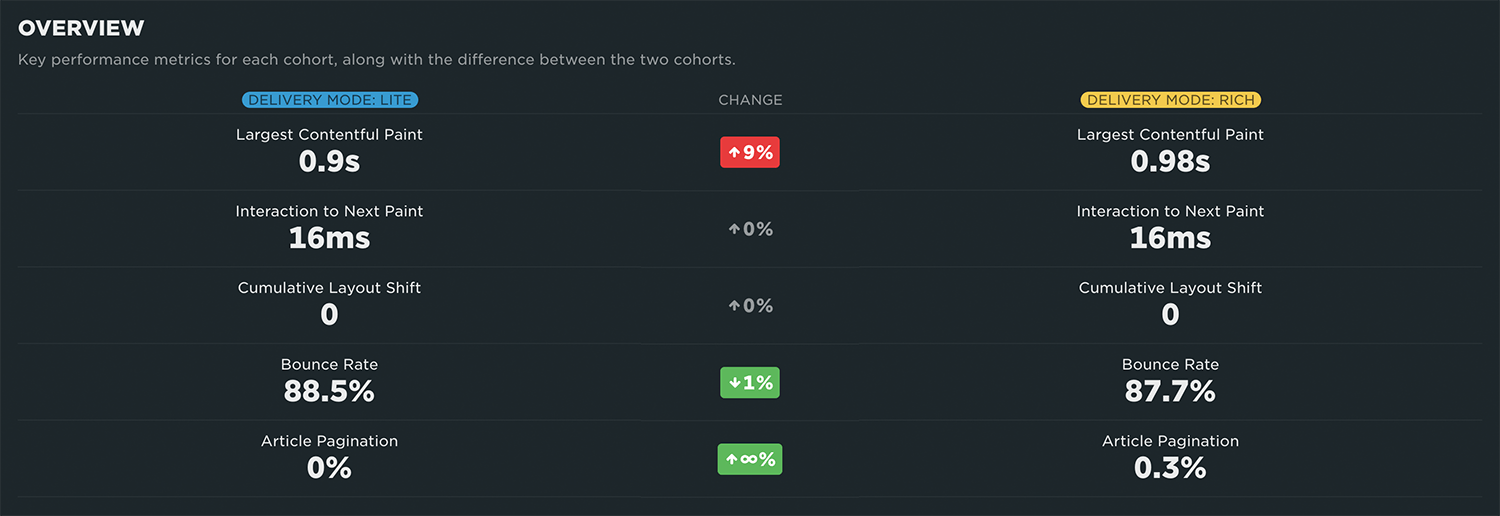
lite and rich cohorts, LCP remains within 80ms, while INP and CLS are identical.I make similar adaptations with my nav—users with low- or critically-low battery will not be shown any superfluous animations, and instead just have a much simpler open/closed experience. Every little helps, and I can adapt to fit.
What I like about Obs.js is that it is very honest about the problem it’s addressing. It is not pretending to make weak devices stronger or poor networks faster; it cannot reduce the distance between somebody and your servers, prolong battery life, or upgrade their handset from within the confines of a browser tab. But what it can do is give us a slightly clearer picture of the conditions under which our work is being experienced.
It reads a handful of browser signals—latency, bandwidth, Data Saver, battery,
CPU, memory—and exposes them as classes on the <html> element and as a small
window.obs object in JavaScript. This simple functionality opens up a whole
world of potential, and it’s up to us as developers to exploit it.
The value is not that it makes decisions for us—it doesn’t—the value is that it gives us better information with which to make our own decisions. Perhaps that means avoiding rich media; perhaps it means serving lower resolution imagery. Perhaps it means toning down motion; perhaps it means holding back a web font. The exact response is still up to us, as it should be, but we get to replace a little guesswork with a little evidence.
Remember, web performance is partly about you, and partly about them. Prior to Obs.js, there wasn’t much we could do to know about them until it was too late.
The library makes the distinction between Statuses and Stances.
A Status is factual: the user has Data Saver enabled, the observed latency
is high, the battery is low, the device is weak. A Stance is the
opinion we derive from that: the connection looks weak, the user may prefer
to conserve resources, the safest delivery mode is lite, rich media is
probably not a great idea right now.
That distinction matters because it keeps raw signals separate from opinions and
decisions. Sometimes I want the low-level information because I already know how
I want to react to it. At other times, I am perfectly happy for the library to
have an opinion and hand me something a little more usable, such as
deliveryMode, canShowRichMedia, or shouldAvoidRichMedia.
This is a nice level of abstraction to have because it leaves room for both approaches. If you want to be opinionated yourself, you can be. If you would rather start from a decent default and get on with it, you can do that, too.
I do not think this sort of work is interesting because it makes sites feel clever. I think it is interesting because it gives us a better shot at making them feel more considerate.
It is very easy to ship the heaviest possible version of an experience by
default simply because our own machines can tolerate it. It is very easy to look
at a feature in isolation and decide that, yes, obviously the autoplaying
video or the heavy animation or the higher-resolution image would be better if
circumstances are ideal, but what if we had a better idea of whether
circumstances actually are ideal?
That’s the bit I care about. It shifts us away from asking can we ship
this?
and more toward asking should we ship this to this visitor, under
these conditions, right now?
The answer may often still be yes, but at least
we are asking the question.
One of the less flashy but still very practical side effects of Obs.js is that it doubles as a segmentation layer for your analytics. If your tooling supports custom dimensions, you can beacon some of the Obs.js signals off alongside the rest of your performance data and stop treating your audience as one opaque average.
At that point, you can start asking much more useful questions. How much worse
is INP for weaker devices? What proportion of your traffic is on
high-latency connections? How often are you seeing Data Saver in the wild? Are
visitors in lite delivery mode behaving differently? Even if you never adapt
a single byte of the UI, that is still useful knowledge to have because it
gives you a richer picture of who your users actually are.
For example, while INP is a developer’s problem to solve, it is highly influenced by the power of the device being used. Same code, three different scores:

Sometimes, it’s a them-thing.
This has helped me immensely in recent projects where we had unknown unknowns that left us completely in the dark. Knowing if it’s an us-problem or a them-problem can completely change the course of an engagement, and it has! One particular project showed us that conversion rates were higher among users with low or critical battery. This hints at a potential sense of urgency, so perhaps we adapt the checkout flow to remove as much unnecessary friction as possible, delivering the absolute most bare-minimum checkout experience we can.
Most of the underlying APIs are Chromium-heavy. Safari, in particular, is not going to tell you very much, and I do not really see that as a flaw in Obs.js so much as a reminder of the limits of what the platform currently exposes. Obs.js is progressive enhancement at its finest, so treat it as an extra vector rather than a baseline.
The library does not pretend to know what it cannot know. It gives you the signals it can get, and it leaves the fallback policy up to you. Maybe your default is the richer experience and the browser helps you dial things down where needed, or maybe your default is the lighter experience and the browser helps you selectively dial things up. Either approach is reasonable, the important thing is that the decision becomes explicit rather than accidental.
There are a lot of good ideas in web performance that remain just slightly too academic, or slightly too fiddly, to make it into real work. Obs.js tries to avoid that problem.
It is tiny, it gives you a bit more context than you would otherwise have, and
it asks very little in return. Paste it into the <head>, look at the classes
it adds, and start making small decisions from there: serve the smaller image,
skip the autoplay, avoid the custom font, tone down the motion, defer the
nice-to-have. None of those are especially dramatic interventions, but they are
sensible adjustments made with a little more information than we usually have.
That is why I like it so much. It gives us a practical and honest way to
acknowledge a truth that has always been there: performance does not happen in
a vacuum, and the front end does not arrive at the user unchanged by the journey
it took. If you have never looked at Obs.js before, go and play with the
demo, check out the
repo, and inspect
obs.js itself.
I think the underlying idea is a useful one whether you use my little library or
not.
If you’re already using Obs.js, open a Pull Request to submit your site to the showcase.
此内容由惯性聚合(RSS阅读器)自动聚合整理,仅供阅读参考。 原文来自 — 版权归原作者所有。