
惯性聚合 高效追踪和阅读你感兴趣的博客、新闻、科技资讯
阅读原文 在惯性聚合中打开

推荐订阅源

S
Securelist
C
CERT Recently Published Vulnerability Notes
Forbes - Security
Forbes - Security
Exploit-DB.com RSS Feed
L
LINUX DO - 最新话题
The Hacker News
The Hacker News
Google Online Security Blog
SecWiki News
SecWiki News
K
KPMG report finds enterprise disconnect between AI and its ROI | CIO
The Last Watchdog
The Last Watchdog
S
Schneier on Security
T
Troy Hunt's Blog
N
News | PayPal Newsroom
cs.CL updates on arXiv.org
Schneier on Security
P
Privacy & Cybersecurity Law Blog
T
Tor Project blog
T
Threatpost
Threat Intelligence Blog | Flashpoint
A
Arctic Wolf
S
Secure Thoughts
P
Proofpoint News Feed
cs.CV updates on arXiv.org
Security Latest
Security Latest
Scott Helme
Scott Helme
Security Archives - TechRepublic
Latest news
Latest news
PCI Perspectives
PCI Perspectives
cs.AI updates on arXiv.org
Hacker News - Newest:
Hacker News - Newest: "LLM"
L
LINUX DO - 热门话题
P
Palo Alto Networks Blog
www.infosecurity-magazine.com
G
GRAHAM CLULEY
V2EX - 技术
V2EX - 技术
Google DeepMind News
Project Zero
Project Zero
V
Vulnerabilities – Threatpost
T
Threat Research - Cisco Blogs
Webroot Blog
Webroot Blog
OSCHINA 社区最新新闻
OSCHINA 社区最新新闻
N
News and Events Feed by Topic
TaoSecurity Blog
TaoSecurity Blog
大猫的无限游戏
大猫的无限游戏
T
Tenable Blog
钛媒体:引领未来商业与生活新知
钛媒体:引领未来商业与生活新知
V
Visual Studio Blog
H
Hacker News: Front Page
Simon Willison's Weblog
AWS News Blog
AWS News Blog

Adrian Roselli

Link + Popover Navigation Focusgroup Tests ∪ of Target Audiences (Accessibility, SEO, AEO/GEO) headingoffset is Not the Document Outline Algorithm Maybe Don’t Rely on Google’s “Modern Web Guidance” WCAG3 Contrast as of April 2026 Accessibility Law of Headlines Honoring Mobile OS Text Size You Know What? Just Don’t Split Words into Letters Barriers from Links with ARIA
Your Browser Can Already Speak a Page
Adrian Roselli · 2026-03-05 · via Adrian Roselli
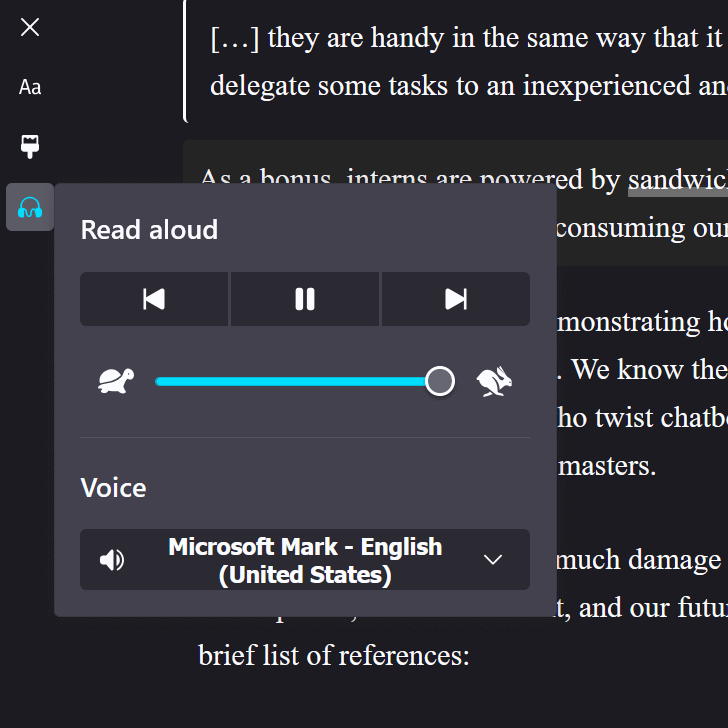
“Read aloud” controls on a web page showing back, forward, and play buttons, a slider to control speaking speed, and a select menu to choose voice, with Microsoft Mark selected.
Users can customize the features built into the browser, something not often available from third-party approaches.

Is an “AI” company offering to provide spoken versions of your pages for users? Is an overlay company promising to make your content more accessible by its overlay speaking it? Is some other vendor pitching you on some kind of thing that reads your web pages aloud to users?

You don’t need it.

Or, rather, your users may not need it. Their browser already offers it. At no cost to you. Nor them.

No Really, Try It

These features may not appear for pages that are not well-formed (lack a main region, are nothing but div-soup, etc.). If they don’t appear for your content, that’s a signal that you may have work to do on the underlying HTML. Any fixes you make would likely result in a better experience for everyone.

Instructions for common browsers:

  • Firefox:
    • for Firefox on desktop, you can enter reader view (F9) and then activate the headphone / “Read aloud” button (N).
    • for Firefox on Android, you can use Android’s read aloud feature. Select some text, from the context menu choose “More”, and then choose “Read aloud.” I suggest entering Firefox’s reader mode, choosing “Select all” from the context menu, and then “Read aloud.”
  • Chrome:
    • in Chrome desktop, right-click, choose “Open in reading mode”, and then hit the play button (K).
    • in Chrome mobile, activate the “More” kebab, then choose “Listen to this page.”
  • Edge:
    • Edge on desktop offers the Read Aloud feature (Ctrl + Shift + U).
    • Edge on mobile uses the immersive reader, where you can choose “Read aloud” from the toolbar.
  • Safari:
    • on iDevice Safari, activate the “Page menu” button (the double-underlined rectangle on the left of the address bar) and choose “Listen to Page.”
    • on macOS Safari, choose “Edit” from the menu bar, then “Speech,” then “Start Speaking.”

In most cases, users can choose the reading speed and voice, pause or restart it, and even jump back and forth through paragraphs. This is more control than third-party products offer.

But Also

If an “AI” company offered on-demand or pre-recorded audio, they’re leveling up our overall destruction of the environment.

If an overlay vendor offered it through its overlay, you’re adding legal risk, trusting them to not be liars, letting them track your users, and assuming it will work. Because, as I’ve documented extensively, overlays don’t work (sometimes at all but usually as advertised).

Any other vendor is probably a mix of data harvester, crypto miner, scam platform, or government panopticon node.

Users who most benefit from a page being spoken to them know about browsers’ built-in features. Those users may rely on extensions for even more control. They are unlikely to benefit from (or care about) these third-party offerings.

However

If you have good research, not provided by the vendor, that your specific users are asking for this specific feature then sure. Go for it. But also track its use and understand you’re taking on the vendor’s risks as your own — for those users whose blockers don’t block it.