
惯性聚合 高效追踪和阅读你感兴趣的博客、新闻、科技资讯
阅读原文 在惯性聚合中打开

推荐订阅源

K
Kaspersky official blog
小众软件
小众软件
Engineering at Meta
Engineering at Meta
博客园 - 三生石上(FineUI控件)
WordPress大学
WordPress大学
G
Google Developers Blog
Cyber Security Advisories - MS-ISAC
V
V2EX
freeCodeCamp Programming Tutorials: Python, JavaScript, Git & More
Google DeepMind News
Security Archives - TechRepublic
CTFtime.org: upcoming CTF events
C
Check Point Blog
aimingoo的专栏
aimingoo的专栏
罗磊的独立博客
钛媒体:引领未来商业与生活新知
钛媒体:引领未来商业与生活新知
MongoDB | Blog
MongoDB | Blog
L
LINUX DO - 热门话题
酷 壳 – CoolShell
酷 壳 – CoolShell
奇客Solidot–传递最新科技情报
奇客Solidot–传递最新科技情报
H
Help Net Security
Martin Fowler
Martin Fowler
G
GRAHAM CLULEY
Simon Willison's Weblog
OSCHINA 社区最新新闻
OSCHINA 社区最新新闻
博客园 - Franky
V
Vulnerabilities – Threatpost
云风的 BLOG
云风的 BLOG
博客园_首页
C
Cybersecurity and Infrastructure Security Agency CISA
量子位
Stack Overflow Blog
Stack Overflow Blog
Recent Announcements
让小产品的独立变现更简单 - ezindie.com
I
Intezer
Scott Helme
Scott Helme
A
About on SuperTechFans
博客园 - 司徒正美
Hacker News: Ask HN
Hacker News: Ask HN
The GitHub Blog
The GitHub Blog
Forbes - Security
Forbes - Security
Threat Intelligence Blog | Flashpoint
博客园 - 聂微东
人人都是产品经理
人人都是产品经理
The Cloudflare Blog
cs.CV updates on arXiv.org
Spread Privacy
Spread Privacy
T
Tailwind CSS Blog
S
Security Affairs
宝玉的分享
宝玉的分享

CodePen

433: CodePen 2.0 is Backward Compatible with Any Classic Pen or Project 432: Trends of 2026 (So Far) 431: Versions are Deeply Integrated into CodePen Chris’ Corner: Layers of Layers 430: The Wild World of Keyboard Shortcuts in Web Apps Chris’ Corner: Makin’ Stuff 429: Why CodePen Rebuilt Its Realtime Service Chris’ Corner: The Edge, Man 428: Improving The Entire Billing System (is Very Worth It) Chris’ Corner: Design Chris’ Corner: A11Y 427: Next.js and The Journey of SSR 426: Browserslist in CodePen 2.0 Chris’ Corner: Finding Type Chris’ Corner: View Transitions 425: Help Your Users Help You with Debug Logs Chris’ Corner: Check It B4 U Wreck It Chris’ Corner: Import Maps 424: File List Optimization Chris’ Corner: ZIP first? 423: 2.0 Templates Chris’ Corner: URLs 422: Supporting Packages Chris’ Corner: Share What You Do 421: View Control of the 2.0 Editor Chris’ Corner: Design Chris’ Corner: Even Grids 420: What are Blocks? Chris’ Corner: Anchors 419: Why 2.0? Chris’ Corner: Cool Things Chris’ Corner: SVG Tools 418: CodeMirror 6 Chris’ Corner: All Together Now Chris’ Corner: Light & Boxes Chris’ Corner: Lovingly Esoteric CSS Chris’ Corner: Type Chris’ Corner: Two Liners Chris’ Corner: Type Chris’ Corner: Freshly-Fallen CSS Chris’ Corner: Cloud Four Chris’ Corner: HTML Chris’ Corner: Web Components Chris’ Corner: Kagi Blog Typography 417: Iframe Allow Attribute Saga Chris’ Corner: Cursors Chris’ Corner: Browser Feature Testing 416: Upgrading Next.js & React Chris’ Corner: AI Browsers 415: Babel Choices 414: Apollo (and the Almighty Cache) Google Chrome & Iframe `allow` Permissions Problems Chris’ Corner: Stage 2 413: Still indie after all these years Chris’ Corner: Design (and you’re going to like it) 412: 2.0 Embedded Pens Chris’ Corner: Discontent 411: The Power of Tree-Sitter Chris’ Corner: Word Search 410: Trying to help humans in an industry that is becoming increasingly non-human Chris’ Corner: Little Bits of CSS 409: Our Own Script Injection Chris’ Corner: Terminological Fading 408: Proxied Third-Party JavaScript Chris’ Corner: Simple, Accessible Multi-Select UI 407: Our Own CDN Chris’ Corner: Clever Clever 406: Hot Trends of 2025 Chris’ Corner: Pretty Palettes 405: Elasticsearch → Postgres Search Chris’ Corner: Faces Chris’ Corner: Browser Wars Micro Edition 404: Preventing Infinite Loops from Crashing the Browser Chris’ Corner: Scroll-Driven Excitement 403: Privacy & Permissions Chris’ Corner: AI for me, AI for thee 402: Bookmarks Chris’ Corner: We Can Have Nice Things 401: Outgoing Email Chris’ Corner: Tokens Chris’ Corner: Modern CSS Features Coming Together Chris’ Corner: Liquid Ass Chris Corner: For The Sake of It Chris’ Corner: Type Stuff! Chris’ Corner: Doing a Good Job Chris’ Corner: Design Do’s and Don’ts Chris’ Corner: CSS Deep Cuts Chris’ Corner: GSAP, more like FREESap Chris’ Corner: Reacting Chris’ Corner: Rounded Triangle Boxes and Our Shapely Future Chris’ Corner: Fairly Fresh CSS Chris’ Corner: 10 HTML Hits Chris’ Corner: CSS Powered Componentry Chris’ Corner: The New Web Safe Chris’ Corner: PerformanCSS Chris’ Corner: Color Accessibility Chris’ Corner: onChange Chris’ Corner: Accessible Takes Chris’ Corner: Creative Coding
Chris’ Corner: Processing
Chris Coyier · 2026-03-19 · via CodePen

The other week when I was talking about Web Components in the Corner, I mentioned zero-md, a nice little Web Component for doing exactly that. I had to bite my tongue a little bit though, as the 2.0 public beta hadn’t quite made it out of the door yet.

See, the new compiler, among its many powers, has a cool trick up its sleeve we call Inline Block Processing. When you’re in any HTML-ish language, you’ve got the lang attribute you can put on elements. Our compiler sees those, and if the language matches a file extension that we currently support via Blocks, we’ll process the content of that element with that block.

Meaning you could write HTML like this:

<p>Blah blah just hanging out.</p>
<div lang="md">
  - I'm a list
  - in Markdown format
  - cool, right?
</div>
<style lang="scss">
  $listColor: red;
  ul {
    color: $listColor;
  }
</style>Code language: HTML, XML (xml)

And that will… work. As you might be able to guess, it does. In the final processed code, the lang attributes are removed and the guts of those elements are replaced with the processed code produced by the relevant Block.

It’s just a neat little ability! In the case of Markdown, it’s especially useful, and means you don’t need to reach for a client-side tool like zero-md, because the processing happens server-side, which is good for performance.


Avoiding tools, or downshifting tools from client to server, always has a nice feeling to me.

Blake Watson has a presentation-article No build tool? No problem! that has nice basic explanations of the tradeoffs. Like, is TypeScript useful? Of course it can be. Does it mean complicating your workflow? Yep. Now you’ve got a whole chain of dependencies to potentially worry about, and the potential for things to break, especially over time. It doesn’t mean don’t use it, but it’s worth thinking about, especially when there are interesting alternatives. JSDoc is the obvious one, but Blake points out you can just put // @ts-check on the top of files and VS Code will TypeScript check a regular JavaScript file, which is pretty interesting. I’d hope CodePen makes choosing tools a bit more palatable as well, since there is no setup cost and it won’t break over time, as the tool choices are locked in forever until you change them.


While considering build tools a bit, it feels like an interesting time to consider if AI could be (replace?) a build tool. Here’s an example. RIGHT THIS SECOND can you remember how to write a loop in Sass code? Or is it something you gotta look up? If you’re like me, I always try to find a reference to look at (often times Pens of my own I know I have sitting around).

But with AI, you can kinda just… fake it. Like type out what you think it might be just let it convert it. It’ll probably be right. Here’s an example:
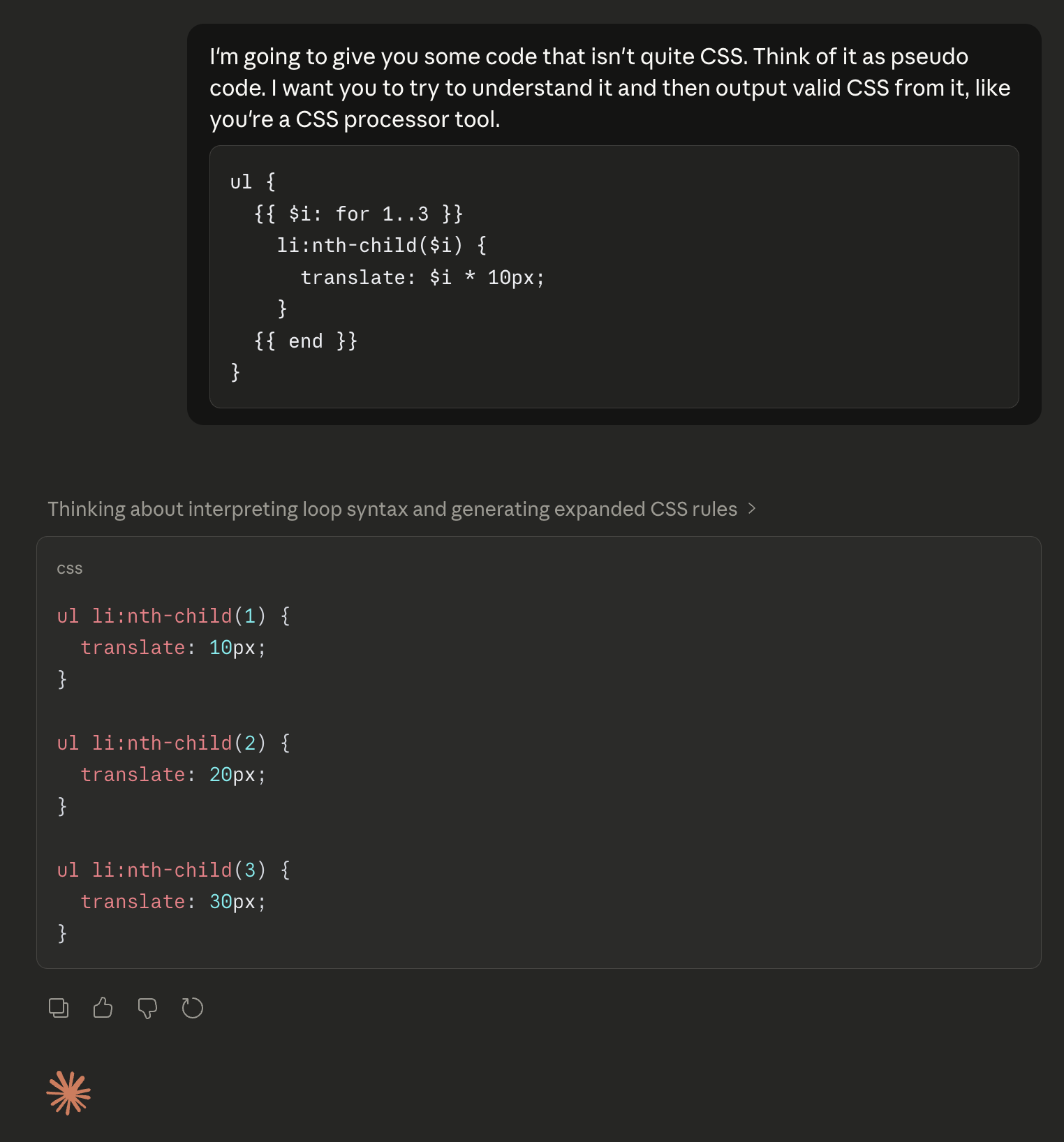
You can’t leave that pseudo code in your codebase, of course, as AI conversion like this is non-deterministic and it would be a ridiculous waste of resources to convert it on every build, but it’s kinda interesting for one-time conversion.

In that same vein… could AI be your CMS? That silly thought passed through my mind the other day and I learned it’s already had quite a debate that I missed. So I blogged that. The gist is that, yes, it actually can be quite useful to not have your content in a CMS and have it right in your codebase instead, and potentially for LLM-related reasons. I quibbled with saying “CMS” though, as I think if your content is Markdown-and-Frontmatter and something is processing that with templates into HTML output… that already is a CMS. It’s the database part that is most relevant to this conversation.

Whether you or I like it or not, giving LLM tools access and context is where things seem to be headed.