


This article is a continuation of WebGL 2D DrawImage. If you haven't read that I suggest you start there.
In that last article we implemented the WebGL equivalent of Canvas 2D's
drawImage function including its ability to specify both the source
rectangle and the destination rectangle.
What we haven't done yet is let us rotate and/or scale it from any
arbitrary point. We could do that by adding more arguments, at a minimum
we'd to specify a center point, a rotation and an x and y scale.
Fortunately there's a more generic and useful way. The way the Canvas 2D
API does that is with a matrix stack. The matrix stack functions of the
Canvas 2D API are save, restore, translate, rotate, and scale.
A matrix stack is pretty simple to implement. We make a stack of matrices. We make functions to multiply the top matrix of the stack using by either a translation, rotation, or scale matrix using the functions we created earlier.
Here's the implementation
First the constructor and the save and restore functions
function MatrixStack() {
  this.stack = [];

  // since the stack is empty this will put an initial matrix in it
  this.restore();
}

// Pops the top of the stack restoring the previously saved matrix
MatrixStack.prototype.restore = function() {
  this.stack.pop();
  // Never let the stack be totally empty
  if (this.stack.length < 1) {
    this.stack[0] = m4.identity();
  }
};

// Pushes a copy of the current matrix on the stack
MatrixStack.prototype.save = function() {
  this.stack.push(this.getCurrentMatrix());
};
We also need functions for getting and setting the top matrix
// Gets a copy of the current matrix (top of the stack)
MatrixStack.prototype.getCurrentMatrix = function() {
  return this.stack[this.stack.length - 1].slice();
};

// Let's us set the current matrix
MatrixStack.prototype.setCurrentMatrix = function(m) {
  return this.stack[this.stack.length - 1] = m;
};
Finally we need to implement translate, rotate, and scale using our
previous matrix functions.
// Translates the current matrix
MatrixStack.prototype.translate = function(x, y, z) {
  var m = this.getCurrentMatrix();
  this.setCurrentMatrix(m4.translate(m, x, y, z));
};

// Rotates the current matrix around Z
MatrixStack.prototype.rotateZ = function(angleInRadians) {
  var m = this.getCurrentMatrix();
  this.setCurrentMatrix(m4.zRotate(m, angleInRadians));
};

// Scales the current matrix
MatrixStack.prototype.scale = function(x, y, z) {
  var m = this.getCurrentMatrix();
  this.setCurrentMatrix(m4.scale(m, x, y, z));
};
Note we're using the 3d matrix math functions. We could just use 0 for
z on translation and 1 for z on scale but I find that I'm so used to
using the 2d functions from Canvas 2d that I often forget to specify z
and then the code breaks so let's make z optional
// Translates the current matrix
MatrixStack.prototype.translate = function(x, y, z) {
+  if (z === undefined) {
+    z = 0;
+  }
  var m = this.getCurrentMatrix();
  this.setCurrentMatrix(m4.translate(m, x, y, z));
};

...

// Scales the current matrix
MatrixStack.prototype.scale = function(x, y, z) {
+  if (z === undefined) {
+    z = 1;
+  }
  var m = this.getCurrentMatrix();
  this.setCurrentMatrix(m4.scale(m, x, y, z));
};
Using our drawImage from the previous lesson
we had these lines
// this matrix will convert from pixels to clip space
var matrix = m4.orthographic(0, gl.canvas.width, gl.canvas.height, 0, -1, 1);

// this matrix will translate our quad to dstX, dstY
matrix = m4.translate(matrix, dstX, dstY, 0);

// this matrix will scale our 1 unit quad
// from 1 unit to texWidth, texHeight units
matrix = m4.scale(matrix, dstWidth, dstHeight, 1);
We just need to create a matrix stack
var matrixStack = new MatrixStack();
And multiply in the top matrix from our stack in
// this matrix will convert from pixels to clip space
var matrix = m4.orthographic(0, gl.canvas.width, gl.canvas.height, 0, -1, 1);

+// this matrix moves the origin to the one represented by
+// the current matrix stack.
+matrix = m4.multiply(matrix, matrixStack.getCurrentMatrix());

// this matrix will translate our quad to dstX, dstY
matrix = m4.translate(matrix, dstX, dstY, 0);

// this matrix will scale our 1 unit quad
// from 1 unit to texWidth, texHeight units
matrix = m4.scale(matrix, dstWidth, dstHeight, 1);
And now we can use it the same way we'd use it with the Canvas 2D API.
If you're not aware of how to use the matrix stack you can think of it as moving and orientating the origin. So for example by default in a 2D canvas the origin (0,0) is at the top left corner.
For example if we move the origin to the center of the canvas then drawing an image at 0,0 will draw it starting at the center of the canvas
Let's take our previous example and just draw a single image
var textureInfo = loadImageAndCreateTextureInfo('resources/star.jpg');

function draw(time) {
  gl.clear(gl.COLOR_BUFFER_BIT);

  matrixStack.save();
  matrixStack.translate(gl.canvas.width / 2, gl.canvas.height / 2);
  matrixStack.rotateZ(time);

  drawImage(
    textureInfo.texture,
    textureInfo.width,
    textureInfo.height,
    0, 0);

  matrixStack.restore();
}
And here it is.
you can see even though we're passing 0, 0 to drawImage since we use
matrixStack.translate to move the origin to the center of the canvas
the image is drawn and rotates around that center.
Let's move the center of rotation to center of the image
matrixStack.translate(gl.canvas.width / 2, gl.canvas.height / 2);
matrixStack.rotateZ(time);
+matrixStack.translate(textureInfo.width / -2, textureInfo.height / -2);
And now it rotates around the center of the image in the center of the canvas
Let's draw the same image at each corner rotating on different corners
matrixStack.translate(gl.canvas.width / 2, gl.canvas.height / 2);
matrixStack.rotateZ(time);

+matrixStack.save();
+{
+  matrixStack.translate(textureInfo.width / -2, textureInfo.height / -2);
+
+  drawImage(
+    textureInfo.texture,
+    textureInfo.width,
+    textureInfo.height,
+    0, 0);
+
+}
+matrixStack.restore();
+
+matrixStack.save();
+{
+  // We're at the center of the center image so go to the top/left corner
+  matrixStack.translate(textureInfo.width / -2, textureInfo.height / -2);
+  matrixStack.rotateZ(Math.sin(time * 2.2));
+  matrixStack.scale(0.2, 0.2);
+  // Now we want the bottom/right corner of the image we're about to draw
+  matrixStack.translate(-textureInfo.width, -textureInfo.height);
+
+  drawImage(
+    textureInfo.texture,
+    textureInfo.width,
+    textureInfo.height,
+    0, 0);
+
+}
+matrixStack.restore();
+
+matrixStack.save();
+{
+  // We're at the center of the center image so go to the top/right corner
+  matrixStack.translate(textureInfo.width / 2, textureInfo.height / -2);
+  matrixStack.rotateZ(Math.sin(time * 2.3));
+  matrixStack.scale(0.2, 0.2);
+  // Now we want the bottom/left corner of the image we're about to draw
+  matrixStack.translate(0, -textureInfo.height);
+
+  drawImage(
+    textureInfo.texture,
+    textureInfo.width,
+    textureInfo.height,
+    0, 0);
+
+}
+matrixStack.restore();
+
+matrixStack.save();
+{
+  // We're at the center of the center image so go to the bottom/left corner
+  matrixStack.translate(textureInfo.width / -2, textureInfo.height / 2);
+  matrixStack.rotateZ(Math.sin(time * 2.4));
+  matrixStack.scale(0.2, 0.2);
+  // Now we want the top/right corner of the image we're about to draw
+  matrixStack.translate(-textureInfo.width, 0);
+
+  drawImage(
+    textureInfo.texture,
+    textureInfo.width,
+    textureInfo.height,
+    0, 0);
+
+}
+matrixStack.restore();
+
+matrixStack.save();
+{
+  // We're at the center of the center image so go to the bottom/right corner
+  matrixStack.translate(textureInfo.width / 2, textureInfo.height / 2);
+  matrixStack.rotateZ(Math.sin(time * 2.5));
+  matrixStack.scale(0.2, 0.2);
+  // Now we want the top/left corner of the image we're about to draw
+  matrixStack.translate(0, 0);  // 0,0 means this line is not really doing anything
+
+  drawImage(
+    textureInfo.texture,
+    textureInfo.width,
+    textureInfo.height,
+    0, 0);
+
+}
+matrixStack.restore();
And here's that
If you think of the various matrix stack functions, translate,
rotateZ, and scale as moving the origin then the way I think of
setting the center of rotation is where would I have to move the origin
so that when I call drawImage a certain part of the image is at the
previous origin?
In other words let's say on a 400x300 canvas I call
matrixStack.translate(220, 150). At that point the origin is at 220,
150 and all drawing will be relative that point. If we call drawImage
with 0, 0 this is where the image will be drawn.
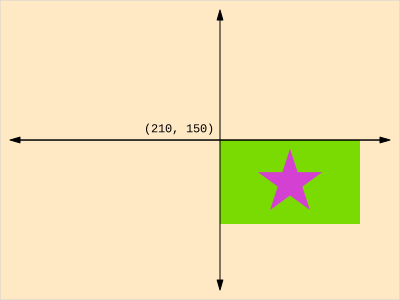
Let's say we want the center of rotation to be the bottom right. In that
case where would be have to move the origin so that when we call
drawImage the point we want to be the center of rotation is at the
current origin? For the bottom right of the texture that would be
-textureWidth, -textureHeight so now when we call drawImage with 0,
0 the texture would be drawn here and it's bottom right corner as at the
previous origin.
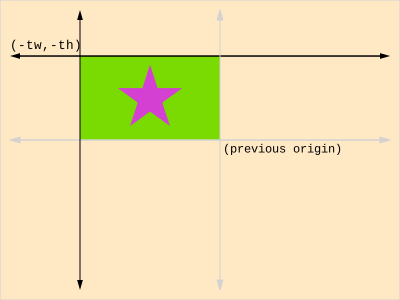
At any point whatever we did before that on the matrix stack it doesn't
matter. We did a bunch of stuff to move or scale or rotate the origin but
just before we call drawImage wherever the origin happens to be at the
moment is irrelevant. It's the new origin so we just have to decide where
to move that origin relative where the texture would be drawn if we had
nothing before it on the stack.
You might notice a matrix stack is very similar to a scene graph that we covered before. A scene graph had a tree of nodes and as we walked the tree we multiplied each node by its parent's node. A matrix stack is effectively another version that same process.
此内容由惯性聚合(RSS阅读器)自动聚合整理,仅供阅读参考。 原文来自 — 版权归原作者所有。