


Pinterest, Google Images and lots of image-heavy sites lazy-load their content. They also calculate the dominant color of each image to use as a placeholder. This post presents a few methods to do the same and helps you understand the GIF file format to make the most of data URIs.
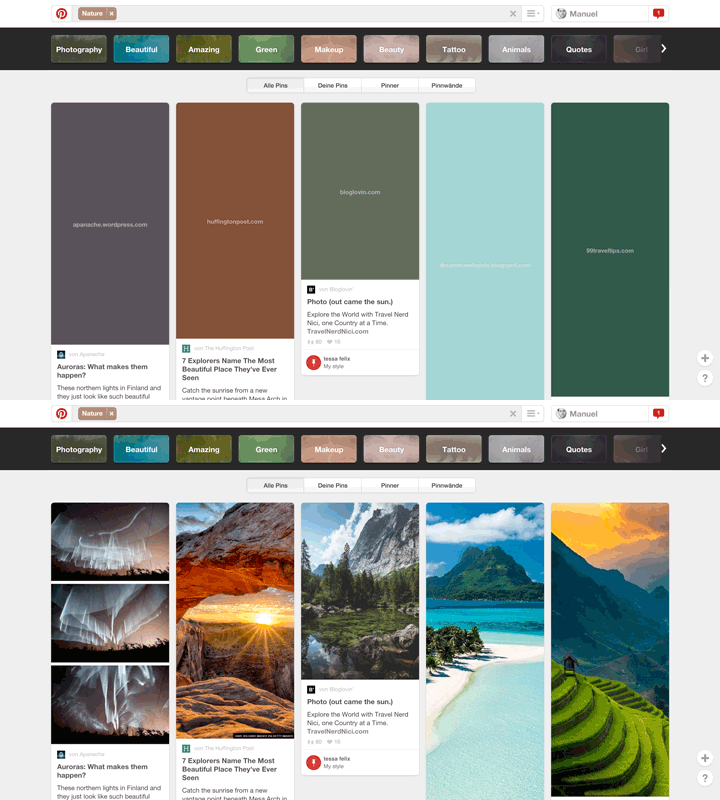
The basic concept is to use a tiny blank.gif as src attribute and replace it with the correct image after the page has fully loaded. The blank.gif can also be set as a Base64-encoded Data URI to save a request.
<img src="data:image/gif;base64,R0lGODlhAQABAAD/ACwAAAAAAQABAAACADs="
     data-src="https://s-media-cache-ak0.pinimg.com/474x/50/1b/74/501b74902935b063816ea8e14f460ca0.jpg"
     alt="Ghost In The Shell">
Pinterest then sets the style of the wrapper to background: #1e1f20; and shows the image with opacity: 1; when it has loaded. They could therefore easily animate the transition, but right now they don’t.
Finding the dominant colors of an image requires clustering of points in three-dimensional space. I initially planned to indulge in clustering algorithms and write my own k-means clustering in JavaScript, but after installing GraphicsMagick for decoding image files of various formats on the server I decided to put this plan off to another day and simply use the color quantization of GraphicsMagick.
You are of course free to compare the results of even more sophisticated algorithms and choose the one that is to your liking, but If you want a simpler solution the color quantization of GraphicsMagick or ImageMagick is usually sufficient.
The following snippet shows you how to use the gm npm package for finding the dominant color. It is a good idea to resize the image first to soften compression artifacts. This will also speed up the quantization as there is less data to process – quantization of a 12 megapixel image (iPhone 6s) takes 13-17 seconds in my benchmarks, whereas first resizing it reduces the time to 3-5 seconds.
var gm = require('gm');gm('test.jpg')
    .resize(250, 250)
    .colors(1)
    .toBuffer('RGB', function (error, buffer) {
        console.log(buffer.slice(0, 3));
    });
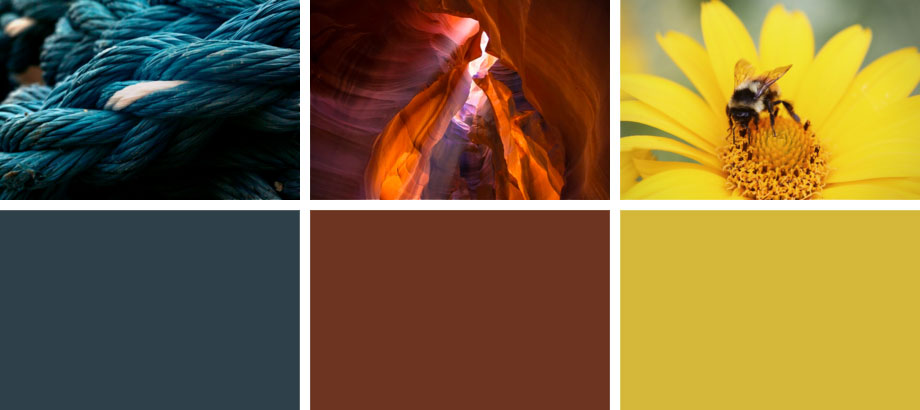
The same can of course be accomplished with the imagick extension in PHP. I do know that a gmagick extension exists but the former was already installed on my server.
<?php$image = new Imagick('test.jpg'));
$image->resizeImage(250, 250, Imagick::FILTER_GAUSSIAN, 1);
$image->quantizeImage(1, Imagick::COLORSPACE_RGB, 0, false, false);
$image->setFormat('RGB');
echo substr(bin2hex($image), 0, 6);
Let’s say you have calculated the dominant colors for all your images and your lazy-loading is working smoothly. You can now go a step further and use a different Base64-encoded placeholder for each image, so that you don’t need wrappers and the img element itself can be its placeholder. To do this you have to either create lots of GIFs and store them somewhere or create them on the fly, which is what I’d like to explain in this section.
If you fire up Photoshop, create a file with 1 × 1 pixels in a single color and hit Save For Web you get a GIF which is exactly 43 bytes. I have labeled the binary data in the following snippet for you.
47 49 46 38 39 61             // Header
01 00 01 00 80 00 00          // Logical Screen Descriptor
FF FF FF 00 00 00             // Global Color Table
21 F9 04 00 00 00 00 00       // Graphics Control Extension
2C 00 00 00 00 01 00 01 00 00 // Image Descriptor
02 02 44 01 00                // Image Data
3B                            // Trailer
data:image/gif;base64,R0lGODlhAQABAIAAAP///wAAACH5BAAAAAAALAAAAAABAAEAAAICRAEAOw==If you go back to the first snippet in this article you’ll notice that the Base64-encoded data URI is a lot longer than Pinterests’s. The graphics control extension and the trailer are actually optional. So if you remove them you get a tiny GIF, which is only 34 bytes.
47 49 46 38 39 61             // Header
01 00 01 00 80 01 00          // Logical Screen Descriptor
FF FF FF 00 00 00             // Global Color Table
2C 00 00 00 00 01 00 01 00 00 // Image Descriptor
02 02 44 01 00                // Image Data
data:image/gif;base64,R0lGODlhAQABAIABAP///wAAACwAAAAAAQABAAACAkQBAA==How did Pinterest get a GIF with only 26 bytes? Turns out that you can remove the global color table and the LZW-encoded image data as well. Browsers then just assume a color, which is usually black.
data:image/gif;base64,R0lGODlhAQABAAD/ACwAAAAAAQABAAACADs=The last thing I want to mention is that Pinterest does not remove the trailer. On the one hand Photoshop, GIMP and possible some browsers report an Unexpected End of File error if there is no trailer present. On the other hand adding it back in does not increase the size of the Base64 string. Why? A Base64 string’s length is always a multiple of 4 bytes. The equals symbol is used as a padding at the end of the string. So if you remove the trailer the Base64 string will end in AA== but still have 26 bytes.
data:image/gif;base64,R0lGODlhAQABAAD/ACwAAAAAAQABAAACAA==The following snippet takes the above knowledge and creates data URIs in the dominant color of a given image. You can achieve the same in PHP by using the pack and base64_encode functions.
var gm = require('gm');var header = new Buffer('474946383961', 'hex');
var logicalScreenDescriptor = new Buffer('01000100800100', 'hex');
var imageDescriptor = new Buffer('2c000000000100010000', 'hex');
var imageData = new Buffer('0202440100', 'hex');
gm('test.jpg')
.resize(250, 250)
.colors(1)
.toBuffer('RGB', function (error, buffer) {
var gif = [
header,
logicalScreenDescriptor,
buffer.slice(0, 3),
new Buffer([0, 0, 0]),
imageDescriptor,
imageData
];
console.log('data:image/gif;base64,' + Buffer.concat(gif).toString('base64'));
});
data:image/gif;base64,R0lGODlhAQABAIABAEdJRgAAACwAAAAAAQABAAACAkQBAA==You can now lazy-load your images and show a tiny GIF in the dominant color as a placeholder, which is embedded in your HTML as a Base64-encoded data URI. The last thing I want to show you is how easily you can now implement the placeholders Medium is using.
If you resize your image to 3 × 3 pixels and remove the color quantization you get a data URI that is only a bit longer than the single-colored blank.gif but gives you more of a thumbnail for your image. If you then resize your thumbnail to the image dimensions you may have to use filter: blur(…); to soften artifacts but you can see in the image below that Chrome does an excellent job in upscaling tiny thumbnails.
var gm = require('gm');gm('test.jpg')
    .resize(3, 3)
    .toBuffer('GIF', function (error, buffer) {
        console.log('data:image/gif;base64,' + buffer.toString('base64'));
    });
data:image/gif;base64,R0lGODlhAwACAPIFAD1KI0JSIWp2WXOIj4WVlYicngAAAAAAACH5BAAAAAAALAAAAAADAAIAAAMESDUSkAA7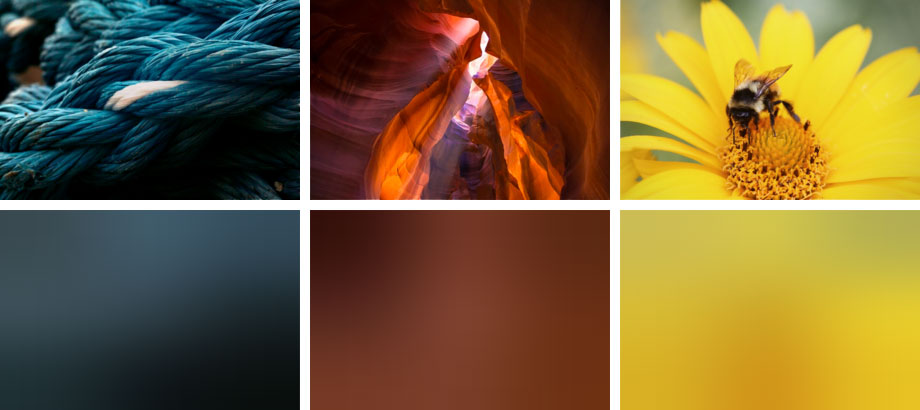
That’s all for now. If you like this article please share or retweet. I’d also love to hear your feedback and will answer any questions.
I’ve started working on a WordPress plugin called Dominant Colors Lazy Loading which uses the above concepts. The code is on GitHub and I'd very much appreciate your feedback and pull requests.
此内容由惯性聚合(RSS阅读器)自动聚合整理,仅供阅读参考。 原文来自 — 版权归原作者所有。