


This small post is the continuation of my second article about sub-components. To fully understand this article please read that first
In Part 2 of my React sub-components series, we saw how using Context could greatly improve the original pattern I’ve described in my first post. However, one regression came along with this improvement and in this article we’ll bring a solution to it thanks to static typing.
The sub-component pattern described in the previous post addressed a few issues of the original implementation, but introduced one regression: children that are not properly defined as sub-components are still being rendered.
Originally, the findByType util was being used to render our sub-components and would skip any unknown sub-components. The code snippet below shows this regression. You can give it a try by pulling the example project here and following the instruction in the README to run it. You can try switching the imports of <App/> in index.js to see how both implementation defer.
Incorrect usage of a subcomponent
This regression breaks one of the main advantages of using sub-components: narrowing the scope of what can be rendered within a given component to make sure it is used properly and avoiding a messy codebase.
To fix this, as I mentioned at the end of the previous article, I decided to use static typing. The main idea here is to provide a specific type for the Article component, so that only a given list of components (i.e. our sub-components) will be rendered within it.
Let’s see how static typing can fix the main caveat of the sub-component pattern that is implemented with contexts. I’m going to use Flow here to handle my types.
The gif below shows the actual implementation of using static typing to whitelist the sub-components of Article . You can see that before adding <div>Hello</div> as a child of Article, running Flow against my codebase returns no errors. However, once I add this extra piece of code, Flow will output the following error:
1
Cannot create Article element because in property type of array element of
3
• Either div [1] is incompatible with typeof Title [2].
4
• Or div [1] is incompatible with typeof Metadata [3].
5
• Or div [1] is incompatible with typeof Content [4].
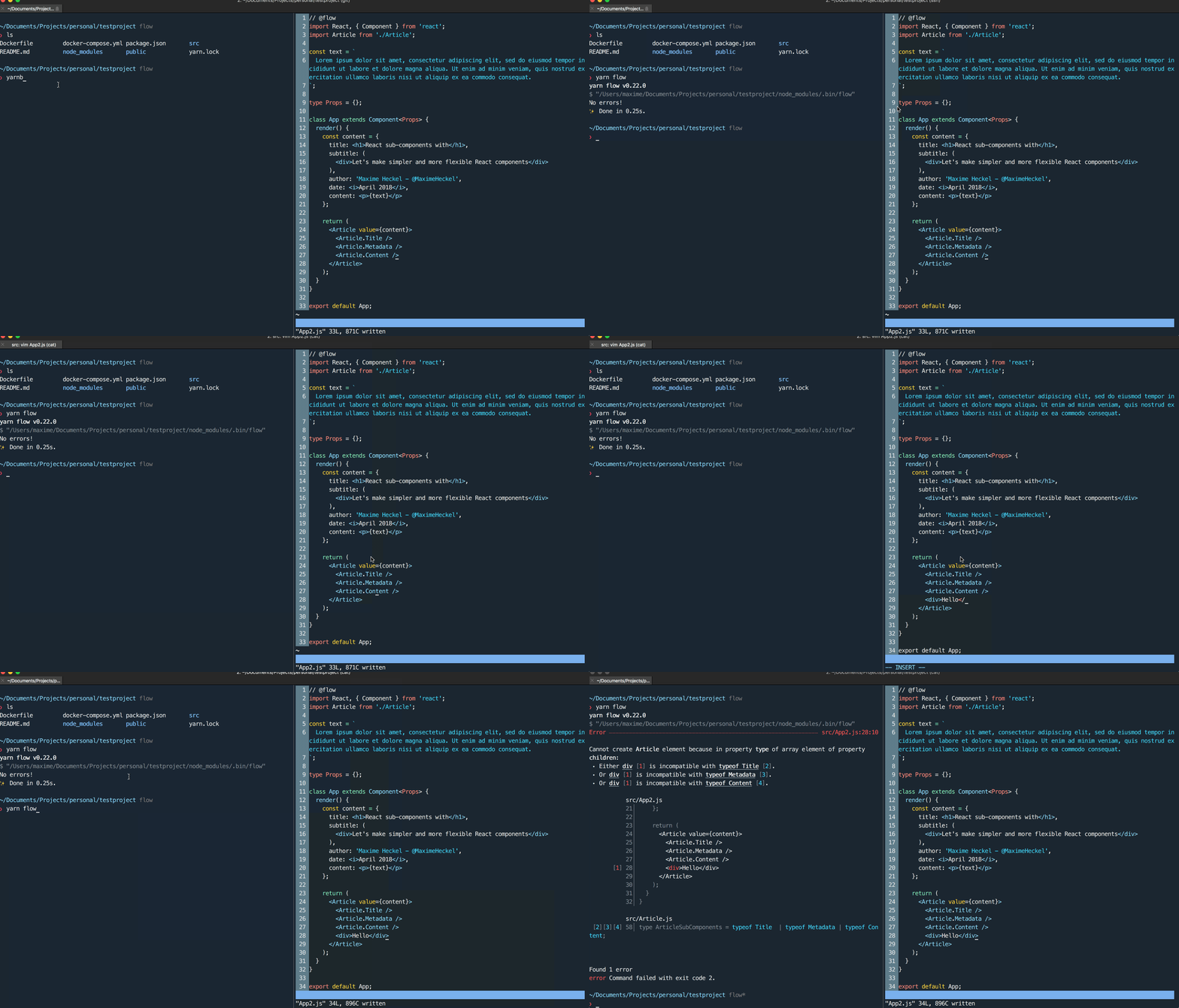
As you can see, Flow is aware of the type of our sub-components (and of any children of Article ), and reports that div is not compatible with one of these types.
To make sure to catch whether someone misuses Article in our codebase, we can simply add Flow as a step in our CI pipeline. Additionally, there are many editor extensions available to highlight whenever a component is not use correctly given its Flow type.
First, we need to add Flow to our project. For that, I recommend following this guide. Once done, running flow at the root of the project should output no errors since we haven’t typed anything in our codebase yet.
Then we’ll need to do some modifications to our Article.js file. First, we’ll have to change any sub-components declared as a functional component to a full class. This is due to the fact that classes have their own type but functional components do not. If we want to whitelist children, this is going to be the only limitation here.
Then, we’ll have to declare the types¹ of our sub-components, i.e. the children of Article . For that we’ll declare a type ArticleSubComponent which will be of type Title or of type Metadata or of type Content .
Finally, we need to associate that type to the children prop of Article. Our component can have either 1 or more children, thus the type should either be an array of React elements of type ArticleSubComponent if Article has 2 or more children or a single React element of type ArticleSubComponent if it has 1.
The code snippet bellow shows the resulting component:
2
import * as React from 'react';
6
const ArticleContext = React.createContext();
12
class Title extends React.Component<{}> {
15
<ArticleContext.Consumer>
16
{({ title, subtitle }) => (
17
<div style={{ textAlign: 'center' }}>
19
<div style={{ color: '#ccc' }}>
24
</ArticleContext.Consumer>
29
class Metadata extends React.Component<{}> {
32
<ArticleContext.Consumer>
33
{({ author, date }) => (
37
justifyContent: 'space-between',
44
</ArticleContext.Consumer>
49
class Content extends React.Component<{}> {
52
<ArticleContext.Consumer>
54
<div style={{ width: '500px', margin: '0 auto' }}>{content}</div>
56
</ArticleContext.Consumer>
64
type ArticleSubComponents = typeof Title | typeof Metadata | typeof Content;
66
type Property = string | Node;
84
| Array<React.Element<ArticleSubComponents>>
85
| React.Element<ArticleSubComponents>,
89
const Article = (props: Props) => {
91
<ArticleContext.Provider {...props}>
93
</ArticleContext.Provider>
98
Article.Metadata = Metadata;
99
Article.Content = Content;
101
export default Article;
There are surely other solutions to address this issue, but this is the one I’m exploring as it uses dependencies and patterns that I’m already using in most of my projects.
Feeling like playing with Flow types and sub-components? I’ve made available this specific example on a branch named flow on the same repository that I’ve used as an example for the previous post. Check it out here!
[1] The type reference doc from the Flow website was very useful when looking to type my classes https://flow.org/en/docs/react/types/#toc-react-element
此内容由惯性聚合(RSS阅读器)自动聚合整理,仅供阅读参考。 原文来自 — 版权归原作者所有。