
惯性聚合 高效追踪和阅读你感兴趣的博客、新闻、科技资讯
阅读原文 在惯性聚合中打开

推荐订阅源

Cisco Talos Blog
Cisco Talos Blog
freeCodeCamp Programming Tutorials: Python, JavaScript, Git & More
爱范儿
爱范儿
奇客Solidot–传递最新科技情报
奇客Solidot–传递最新科技情报
Jina AI
Jina AI
雷峰网
雷峰网
The Register - Security
The Cloudflare Blog
博客园 - 【当耐特】
M
MIT News - Artificial intelligence
I
InfoQ
博客园 - 三生石上(FineUI控件)
H
Help Net Security
博客园 - 司徒正美
Vercel News
Vercel News
WordPress大学
WordPress大学
S
SegmentFault 最新的问题
云风的 BLOG
云风的 BLOG
B
Blog
Google DeepMind News
B
Blog RSS Feed
L
LangChain Blog
人人都是产品经理
人人都是产品经理
GbyAI
GbyAI
T
The Blog of Author Tim Ferriss
T
Tailwind CSS Blog
aimingoo的专栏
aimingoo的专栏
让小产品的独立变现更简单 - ezindie.com
Recorded Future
Recorded Future
小众软件
小众软件
Martin Fowler
Martin Fowler
罗磊的独立博客
Stack Overflow Blog
Stack Overflow Blog
钛媒体:引领未来商业与生活新知
钛媒体:引领未来商业与生活新知
酷 壳 – CoolShell
酷 壳 – CoolShell
腾讯CDC
CTFtime.org: upcoming CTF events
Apple Machine Learning Research
Cyber Security Advisories - MS-ISAC
博客园 - Franky
Hugging Face - Blog
Hugging Face - Blog
Y
Y Combinator Blog
V
Visual Studio Blog
F
Fortinet All Blogs
Microsoft Azure Blog
大猫的无限游戏
大猫的无限游戏
Engineering at Meta
Engineering at Meta
N
Netflix TechBlog - Medium
V
V2EX
Blog — PlanetScale
Blog — PlanetScale

Maxime Heckel's Blog

On Rendering the Sky, Sunsets, and Planets - The Blog of Maxime Heckel Shades of Halftone - The Blog of Maxime Heckel Field Guide to TSL and WebGPU - The Blog of Maxime Heckel On Shaping Light: Real-Time Volumetric Lighting with Post-Processing and Raymarching for the Web - The Blog of Maxime Heckel Speaking at Figma Config 2025 - The Blog of Maxime Heckel Post-Processing Shaders as a Creative Medium - The Blog of Maxime Heckel On Crafting Painterly Shaders - The Blog of Maxime Heckel The Art of Dithering and Retro Shading for the Web - The Blog of Maxime Heckel Moebius-style post-processing and other stylized shaders - The Blog of Maxime Heckel Shining a light on Caustics with Shaders and React Three Fiber - The Blog of Maxime Heckel Real-time dreamy Cloudscapes with Volumetric Raymarching - The Blog of Maxime Heckel Painting with Math: A Gentle Study of Raymarching - The Blog of Maxime Heckel Building a magical AI-powered semantic search from scratch - The Blog of Maxime Heckel Beautiful and mind-bending effects with WebGL Render Targets - The Blog of Maxime Heckel Refraction, dispersion, and other shader light effects - The Blog of Maxime Heckel The magical world of Particles with React Three Fiber and Shaders - The Blog of Maxime Heckel The Study of Shaders with React Three Fiber - The Blog of Maxime Heckel Building a Design System from scratch - The Blog of Maxime Heckel Everything about Framer Motion layout animations - The Blog of Maxime Heckel Building a Vaporwave scene with Three.js - The Blog of Maxime Heckel Cubic Bézier: from math to motion - The Blog of Maxime Heckel First steps with GPT-3 for frontend developers - The Blog of Maxime Heckel Building the perfect GitHub CI workflow for your frontend team - The Blog of Maxime Heckel Migrating to Next.js - The Blog of Maxime Heckel Static Tweets with MDX and Next.js - The Blog of Maxime Heckel Advanced animation patterns with Framer Motion - The Blog of Maxime Heckel Scrollspy demystified - The Blog of Maxime Heckel The Power of Composition with CSS Variables - The Blog of Maxime Heckel My first failed SwiftUI project - The Blog of Maxime Heckel Guide to creating animations that spark joy with Framer Motion - The Blog of Maxime Heckel Using Shortcuts and serverless to build a personal Apple Health API - The Blog of Maxime Heckel SEO mistakes I've made and how I fixed them - The Blog of Maxime Heckel Going native: SwiftUI from the perspective of a React developer - The Blog of Maxime Heckel Build your own preview deployment service - The Blog of Maxime Heckel The little guide to CI/CD for frontend developers - The Blog of Maxime Heckel Immigrating to the US - The Blog of Maxime Heckel The physics behind spring animations - The Blog of Maxime Heckel Generate screenshots of your code with a serverless function - The Blog of Maxime Heckel How to use Framer Motion with Emotion styled-components - The Blog of Maxime Heckel Data Fetching with NextJS: What I learned - The Blog of Maxime Heckel Learning in public - The Blog of Maxime Heckel Fixing the dark mode flash issue on server rendered websites - The Blog of Maxime Heckel How to fix NPM link duplicate dependencies issues - The Blog of Maxime Heckel Running scheduled cross-browser end-to-end tests on Github CI - The Blog of Maxime Heckel How I built my first custom ESLint rule - The Blog of Maxime Heckel Automated UI accessibility testing with Cypress - The Blog of Maxime Heckel Building a GraphQL wrapper for the Docker API - The Blog of Maxime Heckel Switching off the lights - Adding dark mode to your React app - The Blog of Maxime Heckel Getting started with Typescript on Gatsby - The Blog of Maxime Heckel Rebuilding Redux with Hooks and Context - The Blog of Maxime Heckel Asynchronous rendering with React - The Blog of Maxime Heckel Using Flow generics to type generic React components - The Blog of Maxime Heckel How to efficiently type your styled-components with Flow - The Blog of Maxime Heckel How I got started with Kubernetes on GKE - The Blog of Maxime Heckel React sub-components Part 3: Whitelisting sub-components with flow - The Blog of Maxime Heckel React sub-components Part 2: Using the new Context API - The Blog of Maxime Heckel React sub-components - The Blog of Maxime Heckel Running Golang tests with Jest - The Blog of Maxime Heckel No title No title
React Lazy: a take on preloading views - The Blog of Maxime Heckel
Maxime Heckel · 2019-09-24 · via Maxime Heckel's Blog

Ever since I first got to use React Loadable and React Lazy and Suspense, I've been a big advocate of route base code splitting for big applications. They allow the client to only load the chunks of the apps they are actually accessing instead of having to download the whole app before rendering something on the screen. It works so well that this pattern is even featured on the official documentation of the React Library. However, I'm always looking for tips and tricks on how I could make the end-user experience even better and that's why recently I've been trying to address the problem of how to preload chunks in a route base code split React app to make navigation between chunks more seamless. I've seen this behavior on some Gatsby sites and I really liked how discrete and efficient it is. That's why I decided to write my own take on implementing preloading and to share it with you all!

Our app

Let's consider a React app with multiple routes: a landing page route, another one to get a list of todos, another one to inspect todos. Each route renders a specific view / components. We carefully read the React documentation about code splitting and used React.Lazy and React.Suspense which results in us having a codebase similar to the following:

Sample route based code split app root

1

import React from 'React';

2

import { Route, Router, Switch } from 'react-router-dom';

4

const App = React.lazy(() => import('./App'));

5

const Todos = React.lazy(() => import('./Todos'));

6

const Todo = React.lazy(() => import('./Todo'));

9

{ path: '/', exact: true, component: App },

10

{ path: '/todos', exact: true, component: Todos },

11

{ path: '/todos/:id', exact: true, component: Todo },

16

<React.Suspense fallback={'Loading'}>

18

{routes.map((route) => (

23

component={route.component}

If we run our app, we can see in the developer tools of our browser that navigating from one view to another is loading the different "pieces" or "chunks" of our app. Now let's focus on how we could start loading these chunks when the user hovers one of the navigation links instead of loading them after navigating to the new route.

Preload components with React Lazy

To preload the view we'll have to be able to call a preload method on our chunk. This preload method would be able to be called to run the import statement that is passed to React Lazy. While such functionality is available out of the box in React Loadable, React Lazy doesn't seem to provide it and this is why we'll have to implement it from scratch with the following code:

Implementation of ReactLazyPreload

1

const ReactLazyPreload = (importStatement) => {

2

const Component = React.lazy(importStatement);

3

Component.preload = importStatement;

We can now redeclare our code split chunks as follows:

Examples of usage of ReactLazyPreload

1

const App = ReactLazyPreload(() => import('./App'));

3

const Todos = ReactLazyPreload(() => import('./Todos'));

5

const Todo = ReactLazyPreload(() => import('./Todo'));

With the code above we can now call the preload method at will on any of our components which will result in each of them loading their respective chunks:

Calling "preload" on our components

Calling preload on the right component for a given route

While we could specify which component we'd wish to preload when the user hovers a given link, wouldn't it be great if we could "find" which component to preload based on the route? If we take a look at the first code snippet of this post, we can see that we declared a routes object that contains all the properties required by the React Router Route component. This is intentional and will be useful for us to find which component is associated to which route.

Let's declare our findComponentForRoute function:

Implementation of findComponentForRoute

1

import { matchPath } from 'react-router-dom';

3

const findComponentForRoute = (path, routes) => {

4

const matchingRoute = routes.find((route) =>

11

return matchingRoute ? matchingRoute.component : null;

React Router comes with a pretty handy method called matchPath which for a given path will return true if the path passed in the second argument matches. The function in the code snippet above uses this method and when a match is found, returns the associated component or null if no route has been found.

Now that we have a way to find the component associalted to a given route, we can create a function to preload it:

Implementation of preloadRouteComponent

1

const preloadRouteComponent = (path) => {

2

const component = findComponentForRoute(path, routes);

4

if (component && component.preload) {

Finally, we could just add this function to a onMouseEnter event handler to all our Link components and call it a day but let's make the things we just implemented easier to use. Let's create a LinkWithPreload component that will have the same props as Link but will also use the preloadRouteComponent function:

LinkWithPreload component

1

import { Link } from 'react-router-dom'

5

const LinkWithPreload = ({ to, onPreload, ...rest }) => {

9

onMouseEnter={() => preloadRouteComponent(to)}

15

export default LinkWithPreload;

Now, by using this component instead of Link, as you can see below, hovering any navigational links in our App should load the chunk associated with the route of that link:
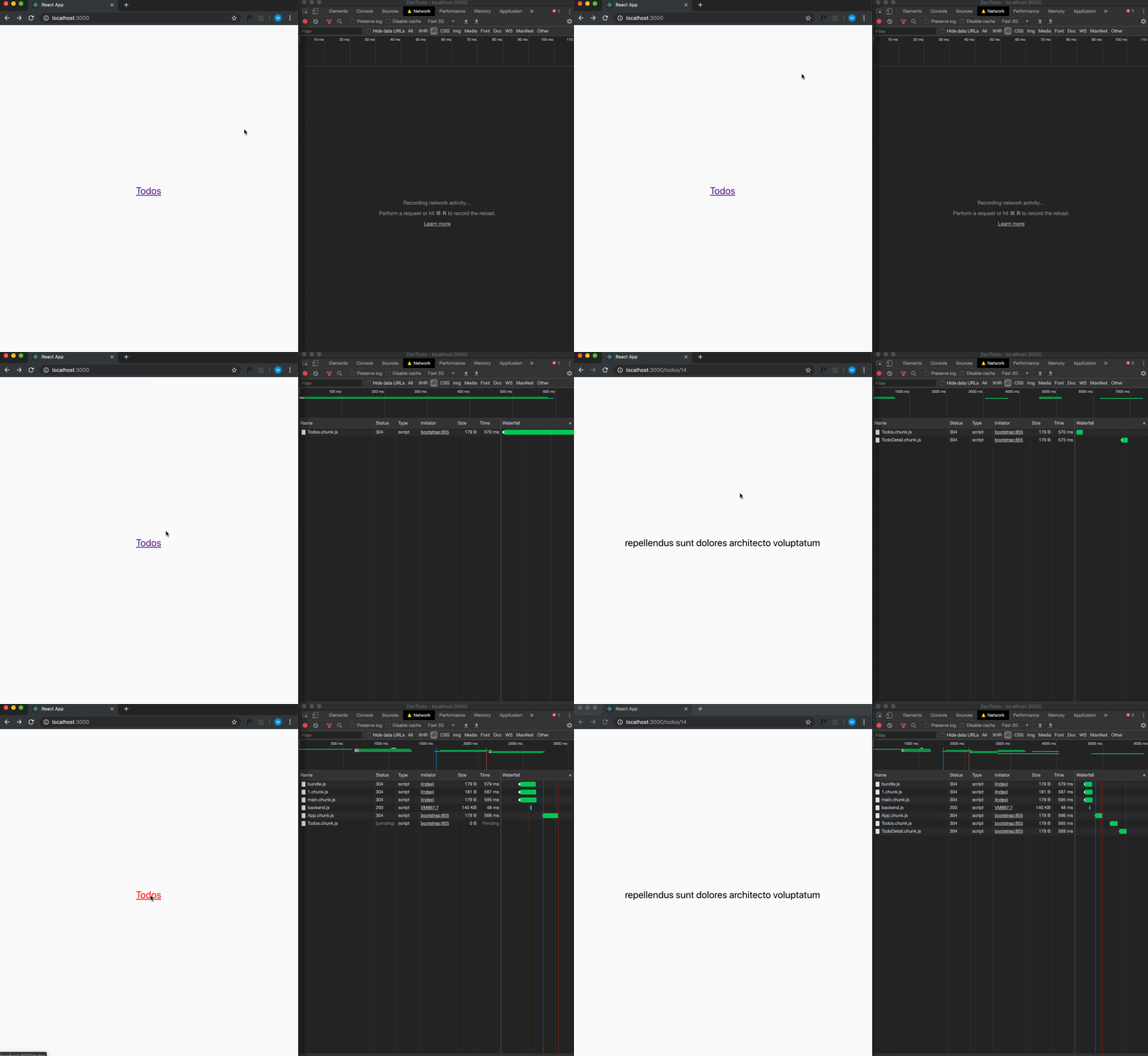
Gif showcasing the preloading behavior we implemented using React Lazy and Suspense. When hovering, the chunk will load and the transition to the new route is seemless. However, if we don't hover long enough and click on the link, we will see the fallback component from Suspense until the chunk is fully loaded.

Do you want to see the whole code? I made the app showcased in this article available here!