







While migrating my blog to Next.js, I took the opportunity to address the big performance pitfalls that were degrading the reader's experience in the previous version. With Core Web Vitals becoming one of the biggest factors in search ranking in 2021, I needed to get my act together and finally find workarounds to these issues before they impact my overall traffic.
One of those issues was embed tweets. I often find myself in need to quote or reference a tweet in my MDX blog posts. However, using the classic Twitter embed iframe is not the best solution for that: they are slow to load and triggers a lot of Content Layout Shift (CLS) which hurts the performance of my blog.
Thankfully, by leveraging some of Next.js' key features, a bit of hacking, and also the awesome work from Vercel's Head of DevRel Lee Robinson, we can get around this problem and have tweets in MDX based pages that do not require an iframe and load instantly 🚀 like this one:
📨 just sent the latest issue of my newsletter! Topics for this one include - looking back at one year of learning in public⭐️ - my writing process ✍️ - what's coming up next on my blog! Curious but not yet subscribed? You can read it right here 👇 https://t.co/xQRm1wrNQw
Curious how it works? Let's take a look at the solution I managed to put together to solve this problem and some MDX/Next.js magic ✨.
The original inspiration for this solution comes from @leerob himself: a few months ago he came up with a video titled Rebuilding the Twitter Embed Widget! which covers the following:
what are the issues with the classic embed tweets?
how to leverage the Twitter API to fetch the content of tweets
how to build a <Tweet /> component to display the content of a tweet with the output of the Twitter API
how to put these pieces together to display a predefined list of tweets in a Next.js page.
However, after watching this video, one could indeed follow this method to get a predefined list of tweets to render on a dedicated route/page in a Next.js project, but this still doesn't quite solve the problem for tweets in MDX-based pages 🤔. Thus I came up with the following plan to address this gap:
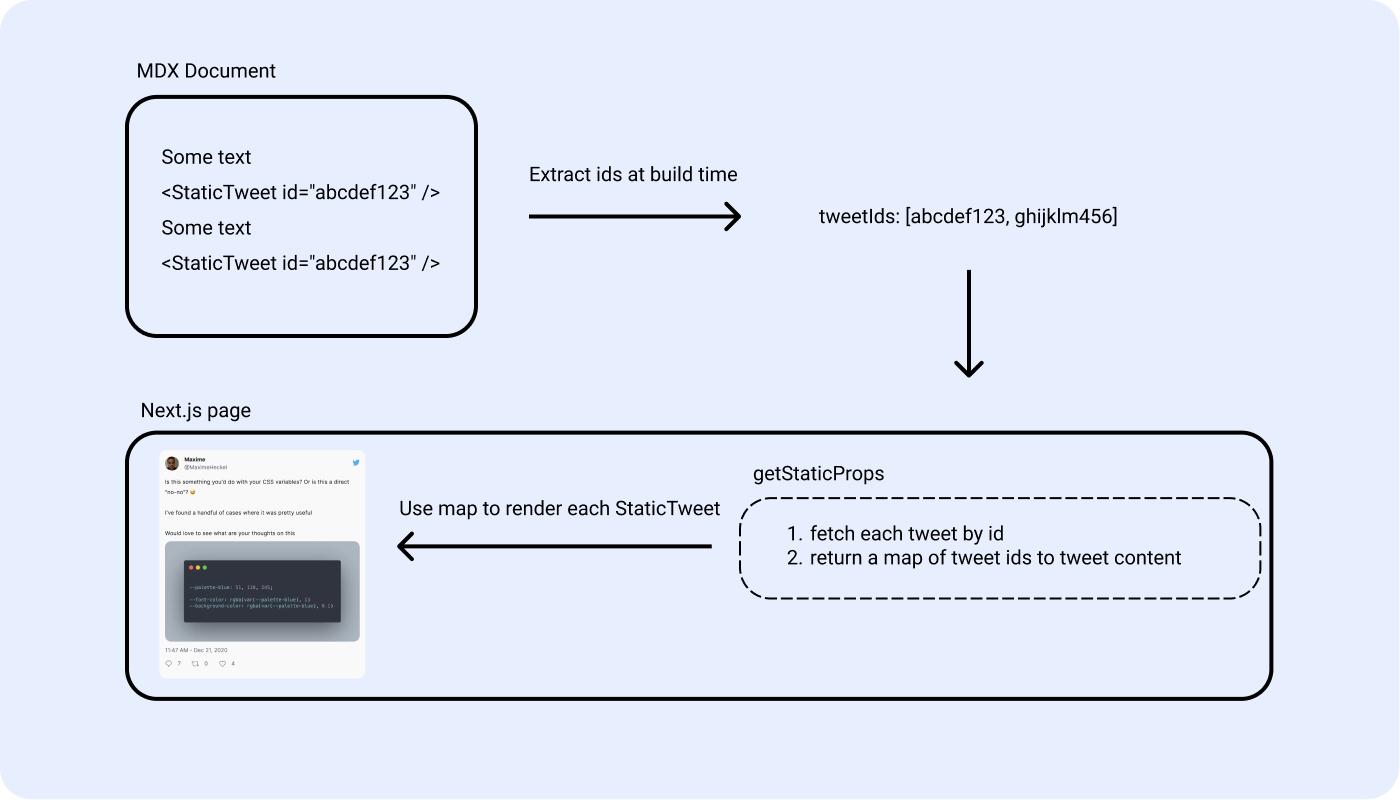
The core of this plan happens at build time when every page/article of the blog gets generated:
When processing a given path, we get its corresponding MDX document content by reading a static .mdx file.
Each MDX file can use/import React components. When it comes to handling tweets, I planned on using the following interface/component: <StaticTweet id="abcdef123"/> where the id prop contains the id of the tweet I want to render.
Then, by using some regex magic (I'll detail the code later in this article) we can extract each StaticTweet component from the content of the MDX document, and finally get a list of tweet ids where each id represents a tweet we want to eventually render.
This list of tweet ids is then returned in getStaticProps and used to fetch each tweet from the Twitter API and eventually get a map of tweet ids to tweet content (see first code snippet below). This map will help us find the content associated with each static tweet.
Finally, the most "hacky" part of this implementation: rendering each tweet declared in the MDX document with the proper content (you'll see why it's "hacky" in the next part 😄).
Sample map of tweet ids to tweet content
2
'1392141438528458758': {
3
created_at: '2021-05-11T15:35:58.000Z',
5
"📨 just sent the latest issue of my newsletter!\n\nTopics for this one include\n- looking back at one year of learning in public⭐️\n- my writing process ✍️\n- what's coming up next on my blog!\n\nCurious but not yet subscribed? You can read it right here 👇\nhttps://t.co/xQRm1wrNQw",
6
id: '1392141438528458758',
13
author_id: '116762918',
15
referenced_tweets: [],
18
'https://pbs.twimg.com/profile_images/813646702553010176/rOM8J8DC_normal.jpg',
21
url: 'https://t.co/CePDMvig2q',
24
username: 'MaximeHeckel',
27
'1386013361809281024': {
29
media_keys: ['3_1386013216527077377'],
31
created_at: '2021-04-24T17:45:10.000Z',
33
"24h dans le volume d'une Fiat 500 avec trois amis et pourtant on se sent comme chez soi... à 400 km d'altitude ! Superbe performance technique et opérationelle de toutes les équipes qui nous ont entrainés et encadrés pour ce voyage 👏 https://t.co/kreeGnnLUM",
34
id: '1386013361809281024',
41
author_id: '437520768',
45
url: 'https://pbs.twimg.com/media/EzwbrVEX0AEdSDO.jpg',
47
media_key: '3_1386013216527077377',
51
referenced_tweets: [],
54
'https://pbs.twimg.com/profile_images/1377261846827270149/iUn8fDU6_normal.jpg',
57
url: 'https://t.co/6gdcdKt160',
58
name: 'Thomas Pesquet',
60
username: 'Thom_astro',
Now that we went through the plan, it's time to take a look at the implementation. There are 3 major pieces to implement:
Using regex to find all the occurrences of StaticTweet and eventually get a list of tweet ids from the MDX document.
In getStaticProps, i.e. during static site generation, use that list of tweet ids to fetch their corresponding tweets with the Twitter API and return the map of tweets to id so the Next.js page can use it as a prop.
Define the StaticTweet component.
Our first step consists of getting the list of ids of tweets we want to later fetch during the "static site generation" step.
For that, I took the easy path: **using regex to find each occurrence of ** StaticTweet when reading the content of my MDX file.
Most MDX + Next.js setups, including this blog, have a function dedicated to reading and parsing the content of MDX files/documents. One example of such function can be found in Vercel's own tutorial to build an MDX-based blog with Next.JS: getDocBySlug. It's in this function that we'll extract each StaticTweet and build the list of ids:
Extraction of each occurrence of StaticTweet
1
import matter from 'gray-matter';
2
import { serialize } from 'next-mdx-remote/serialize';
5
const TWEET_RE = /<StaticTweet\sid="[0-9]+"\s\/>/g;
7
const docsDirectory = join(process.cwd(), 'docs')
9
export function getDocBySlug(slug) {
10
const realSlug = slug.replace(/\.md$/, '')
11
const fullPath = join(docsDirectory, `${realSlug}.md`)
12
const fileContents = fs.readFileSync(fullPath, 'utf8')
13
const { data, content } = matter(fileContents)
19
const tweetMatch = content.match(TWEET_RE);
30
const tweetIDs = tweetMatch?.map((mdxTweet) => {
31
const id = mdxTweet.match(/[0-9]+/g)![0];
35
const mdxSource = await serialize(source)
41
tweetIDs: tweetIDs || []
Here, we execute the following tasks:
extract each occurrence of StaticTweet
extract the value of the id prop
return the array of ids along with the content of the article
This step will be a bit easier since it mostly relies on @leerob's code to fetch tweets that he detailed in his video. You can find his implementation on his blog's repository. My implementation is the same as his but with Typescript type definitions.
At this stage, however, we still need to do some little edits in our getStaticProps function and Next.js page:
Get the tweet ids out of the getDocBySlug
Fetch the content associated with each tweet id
Return the map of tweet ids to tweet content
Read the map of ids tweet ids to tweet content in the Next.js page code.
Fetch the list of tweets and inject the content in the page
1
import Image from 'next/image';
2
import { MDXRemote } from 'next-mdx-remote';
3
import { Heading, Text, Pre, Code } from '../components';
14
export default function Post({ mdxSource, tweets }) {
17
return <MDXRemote {...mdxSource} components={components} />;
20
export async function getStaticProps({ params }) {
21
const { mdxSource, frontMatter, slug, tweetIDs } = getDocBySlug(params.slug);
24
const tweets = tweetIDs.length > 0 ? await getTweets(tweetIDs) : {};
This is where the core of this implementation resides, and also where things get a bit hacky 😬.
We can now, at build time, for a given path, get the content of all the tweets present in a corresponding MDX document. But now the main problem is: how can we render that content?
It's at this stage that I kind of hit a wall, and had to resolve to use, what I'd call, "unconventional patterns" and here are the reasons why:
we can't override the interface of my MDX component. MDX makes us use the same interface between the definition of the component and how it's used in the MDX documents, i.e. in our case it takes one id prop, so it can only be defined with an id prop. Thus we can't simply define an MDX component for StaticTweet and call it a day.
our map of tweet ids to tweet content is only available at the "page" level, and thus can't be extracted out of that scope.
One way to fix this is to define the StaticTweet component inline, i.e. inside the Next.js page, and use the map returned by getStaticProps in the definition of the component:
Definition of the StaticTweet component used in MDX documents
1
import Image from 'next/image';
2
import { MDXRemote } from 'next-mdx-remote';
3
import { Heading, Text, Pre, Code, Tweet } from '../components';
14
export default function Post({ mdxSource, tweets }) {
15
const StaticTweet = ({ id }) => {
17
return <Tweet tweet={tweets[id]} />;
Usually, I'd not define a React component this way and even less with external dependencies that are not passed as props, however in this case:
it's only to render static data, thus that map will never change after the static site generation
it's still a valid Javascript pattern: our StaticTweet component definition is inherently a Javascript function and thus has access to variables outside of its inner scope.
So, it may sound a bit weird but it's not a red flag I promise 😄.
We now have everything in place to render Static Tweets in our Next.js + MDX setup so let's take a look at a couple of examples to show what this implementation is capable of.
In the MDX document powering this same blog post, I added the following StaticTweets:
1
<StaticTweet id="1397739827706183686" />
3
<StaticTweet id="1386013361809281024" />
5
<StaticTweet id="1384267021991309314" />
The first one renders a standard tweet:
The following one renders a tweet with images:
24h dans le volume d'une Fiat 500 avec trois amis et pourtant on se sent comme chez soi... à 400 km d'altitude ! Superbe performance technique et opérationelle de toutes les équipes qui nous ont entrainés et encadrés pour ce voyage 👏 https://t.co/kreeGnnLUM

Finally, the last one renders a "quote tweet":
Just updated some of my projects to fix the missing headers, thank you @leeerob for sharing https://t.co/njBo8GLohm 🔒 and some of your tips! Just a note for Netlify users: you will have to add the headers either in your netlify.toml or a header file https://t.co/RN65w73I4r
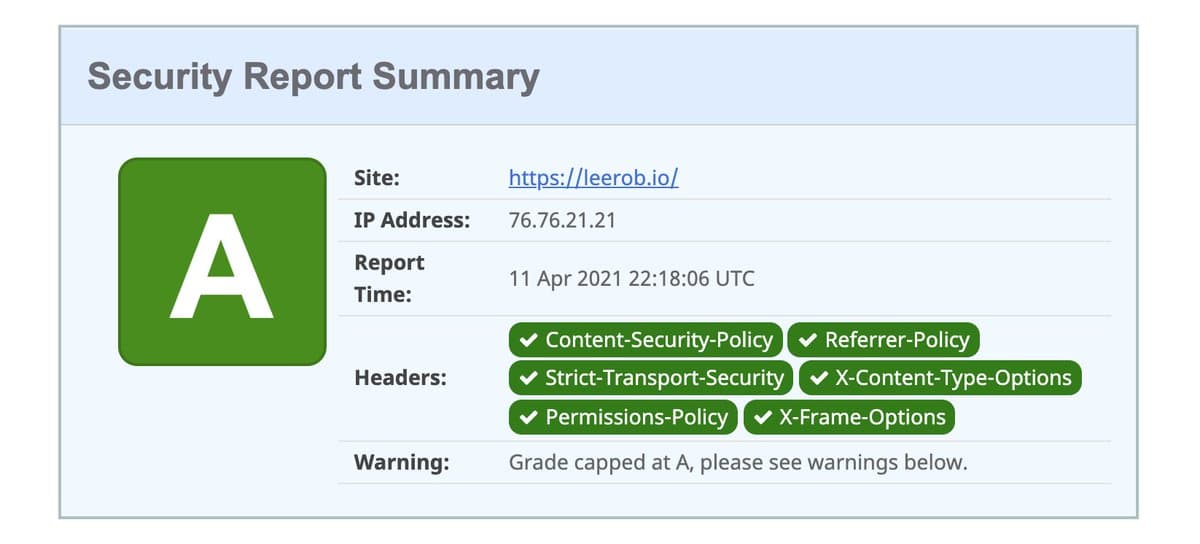
Learned about https://t.co/RAxyJCKWjZ today 🔒 Here's how to take your Next.js site to an A. https://t.co/APq7nxngVw
And the best thing about this implementation: the resulting will remain as fast no matter how many tweets you add in your MDX document!
Pretty sweet right? ✨
First of all, thank you @leerob for the original inspiration for this implementation 🙌! This was yet another moment where I saw how Next.js and static site generation can shine.
I hope you all liked this little extension of Lee's static tweets tutorial. Adding support for MDX-based pages while keeping the interface clean was no easy feat as you can see but the result is definitely worth the effort and hours of tinkering put into this.
I'm still looking to improve the <Tweet /> component as I'm writing these words. There are yet a few elements that remain to be tackled in my current implementation, such as:
figuring out a clean/secure way to parse links, right now they just render as text
providing a better way to render a grid of images, as of now some images might see their aspect ratio altered
parsing numbers, i.e. displaying 118k instead of 118000 when it comes to likes, retweets, or replies
It's not perfect but for now, it will do! I revisited previous blog posts that referenced tweets and replaced them with this new component to guarantee the best reading experience. If you have any suggestions or ideas on how I could further improve how tweets are rendered on my blog, as always, don't hesitate to reach out! I love hearing your feedback!
此内容由惯性聚合(RSS阅读器)自动聚合整理,仅供阅读参考。 原文来自 — 版权归原作者所有。
