


When I work with React or more generally with Javascript, I always use ESLint for linting. Although I've been very familiar with how to use and configure this tool, I've never actually written a custom ESLint rule from scratch until recently. At first, it sounded like a daunting task, but it ended up teaching me quite a few things. This is what this article is about: how I built this specific rule and how I learned about "Abstract Syntax Tree". Let's dive in together!
The rule I had to implement stated the following: when using the validate method from the yup package, we want yup.validateSync() to be preceeded by CHECK &&; hence the following snippets will show an error
1
yup.validateSync() && CHECK;
and the next code snippets are valid:
1
CHECK && yup.validateSync();
1
CHECK && yup.validateSync() && SOMETHINGELSE;
To create our custom ESLint rule, we'll need to build a ESLint plugin. Creating a ESLint plugin is similar to creating any other NPM project, except that the name of the package needs to start with eslint-plugin-.
Let's create our new project from scratch and install ESLint as a dev dependency:
Commands to initialize our ESLint plugin
1
mkdir eslint-plugin-custom
When it comes to organizing the different files and folder of the project, ESLint has a standard way of doing so. For this post, we can follow what is adivised in the official documentation about working with rules, so we'll create a file called check-before-type-validation.js where we will implement our rule.
A ESLint rule contains 2 main parts:
meta: an object where we will specify the usage of our rule.
create: a function that will return an object with all the methods that ESLint will use to parse our statement. Each method returned is an AST node.
You might have seen or heard about ASTs in the past but here's a definition just in case:
an AST is simplified and condensed tree representation of the structure of source code written in a given programming language. It is "abstract" as it does not represent every detail appearing in the real syntax but just the content or structural details.
To build the ESLint rule, we need to get the represention of the expression CHECK && yup.validateSync(); in a AST and let the create function return an error everytime the tree for the given expression does not match the valid tree. To find the AST representation of our expression you can use AST Explorer, which was very helpful for me.
However, before doing all that, let's start by addressing the meta section of our rule.
Let's start by adding the basic structure of our rule and the meta to check-before-type-validation.js
Basic structure of our ESLint rule
2
'type-check-before-yup': {
5
description: '"yup.validateSync()" needs to be preceded by “CHECK &&”',
10
'"yup.validateSync()" is found but is not preceded "CHECK &&"',
13
create: function (context) {
We can see above that we've added 2 important fields: messages and docs. The string under messages.unexpected is the message that will be displayed when the rule will fail. The one under docs.description provides a short description of the rule which can be display by some text editors like VSCode.
For this part, let's first go to AST explorer and write our statement to see how it translates into AST. By entering CHECK && yup.validateSync() we should get the following output:
AST representation of our expression
7
"type": "ExpressionStatement",
11
"type": "LogicalExpression",
22
"type": "CallExpression",
26
"type": "MemberExpression",
39
"name": "validateSync"
48
"sourceType": "module"
To write our rule, we can start by highlighting yup.validateSync(). We see from the AST tree that this expression is a CallExpression:
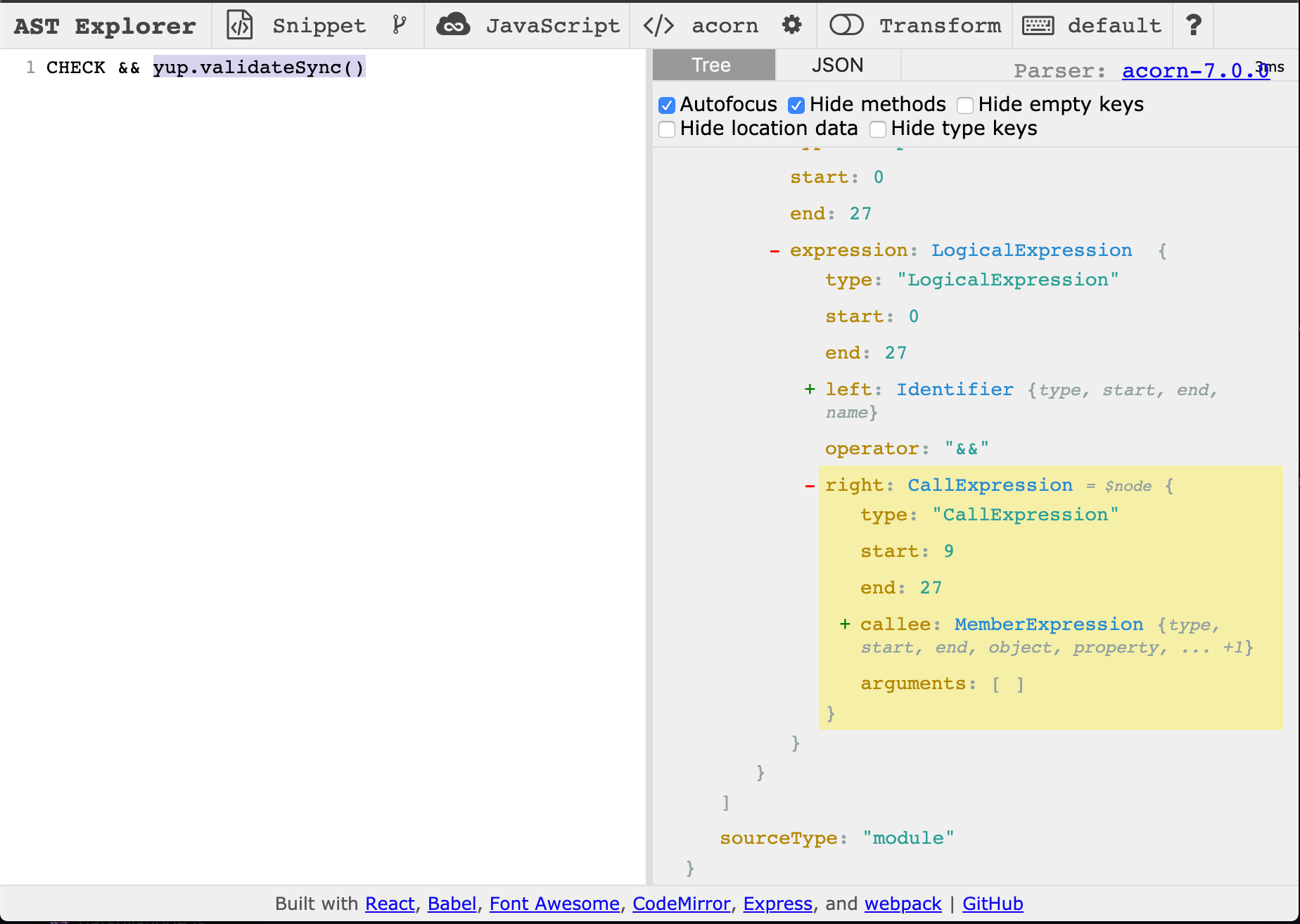
We'll first need ESLint to find that specific node with the object name yup and a property name validateSync in a CallExpression. If found, we can check one of the parents of that node to see if CHECK && is present. Hence, we can start by writing the following code:
Writing the rule (step 1)
1
create: function(context) {
4
CallExpression: function(node) {
5
const callee = node.callee;
9
callee.object.name === 'yup' &&
11
callee.property.name === 'validateSync'
The next part of the AST tree that we're looking for is a LogicalExpression. We can see from the screenshot above that it's present 2 levels up the tree. We can deduct from this that if this parent were not to be a LogicalExpression, our ESLint rule should report an error. We can then continue writing our code snippet above by adding the following:
Writing the rule (step 2)
3
callee.object.name === 'yup' &&
5
callee.property.name === 'validateSync'
9
const calleeLogicalExpression = callee.parent.parent;
11
if (calleeLogicalExpression.type !== 'LogicalExpression') {
15
context.report({ node, messageId: 'unexpected' });
As you can see above, in order to have ESLint reporting the error, we need to call the context.report function. We pass the messageId that we specified in the meta of our rule instead of typing the full message as it is advised in the ESLint documentation.
Next, we have to check that if it is a LogicalExpression the operator of that expression is actually a "AND" and not a "OR":
Writing the rule (step 3)
3
callee.object.name === 'yup' &&
5
callee.property.name === 'validateSync'
9
const calleeLogicalExpression = callee.parent.parent;
11
if (calleeLogicalExpression.type !== 'LogicalExpression') {
15
context.report({ node, messageId: 'unexpected' });
19
if (calleeLogicalExpression.operator !== '&&') {
20
context.report({ node, messageId: 'unexpected' });
With this code our ESLint rule will report an error for the following:
2
CHECK || yup.validateSync();
However if we have something like the following:
1
TEST && yup.validateSync();
our rule will not catch any error. So let's go back to our AST tree to see what we can do here.
We can see that a LogicalExpression has 3 main parts:
the left part: CHECK
the operator: && or ||
the right right: yup.validateSync()
so for the last part of our rule we want to check whether the name of the left part of our LogicalExpression is CHECK:
Writing the rule (step 4)
3
callee.object.name === 'yup' &&
5
callee.property.name === 'validateSync'
9
const calleeLogicalExpression = callee.parent.parent;
11
if (calleeLogicalExpression.type !== 'LogicalExpression') {
15
context.report({ node, messageId: 'unexpected' });
16
} else if (calleeLogicalExpression.left.name !== 'TYPE_CHECK') {
17
context.report({ node, messageId: 'unexpected' });
21
if (calleeLogicalExpression.operator !== '&&') {
22
context.report({ node, messageId: 'unexpected' });
Now that we wrote all the cases we want our rule to handle, it's time to test it. We're lucky, because ESLint comes with its own tool for testing rules called RuleTester. With this tool, we can specify all the cases we want to run the rule against and whether these cases are expected to pass or be reported as errors. Our test will live in tests/lib and will import the rule we just wrote in the previous part:
2
const rules = require('../../lib/check-before-type-validation');
3
const RuleTester = require('eslint').RuleTester;
5
const ruleTester = new RuleTester();
8
const errors = [{ messageId: 'unexpected' }];
10
const typeCheckRule = rules['type-check-before-yup'];
13
ruleTester.run('type-check', typeCheckRule, {
16
code: 'CHECK && yup.validateSync()',
20
code: 'yup.someOtherCommand()',
26
code: 'yup.validateSync()',
30
code: 'OTHER && yup.validateSync()',
34
code: 'CHECK || yup.validateSync()',
In the previous code snippet we can see that we're going to test our rule in 5 different cases:
an error is not reported if we have the statements CHECK && yup.validate or yup.someOtherCommand()
an error is reported if we have the following statements: yup.validateSync() (missing LogicalExpression) or OTHER && yup.validateSync (wrong left part of the LogicalExpression) or CHECK || yup.validateSync() (wrong operator).
We can then run this test with Jest or any other test runner and we should get an output similar as this:
5
✓ OTHER && CHECK && yup.validateSync() (45ms)
7
✓ CHECK && yup.validateSync() (3ms)
9
✓ yup.someOtherCommand() (1ms)
13
✓ yup.validateSync() (3ms)
15
✓ OTHER && yup.validateSync() (1ms)
17
✓ CHECK || yup.validateSync() (2ms)
Now that we've ensured that the rule is working as expected, we can publish it as an NPM package and add it as a plugin to any ESLint configuration we want.
This whole process might seem like a lot at first, especially since it involves dealing with AST which isn't the most accessible thing to learn. But, now that we know what the anatomy of an ESLint rule is, we can appreciate even more the insane amount of work done by the community to provide us with all this linting rules that we're using on a day to day basis to make our codebase cleaner and more consistent.
此内容由惯性聚合(RSS阅读器)自动聚合整理,仅供阅读参考。 原文来自 — 版权归原作者所有。