


April 14, 2015
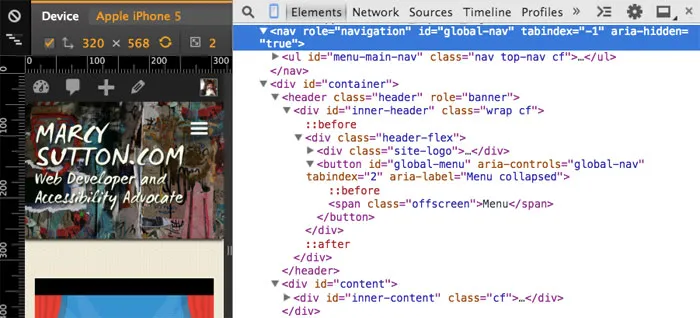
When I redesigned this website in November 2014, I had a design aesthetic in mind for the main navigation: a “hamburger” menu icon in the top right corner exposing a list of links on the right side on click or tap, effectively sliding the page out of the way. I looked up a few demos for inspiration, and found these:
I could see it wouldn’t be too difficult to code a basic slide menu using HTML, CSS and JavaScript (I wasn’t a fan of the CSS-only solution). The trick was making it accessible using keyboards and screen readers. I thought I had a workable solution, and then I discovered a big problem: pages weren’t scrollable in mobile Voiceover with 3-finger swipe! It made reading articles impossible, since they always read “page 1 of 1”, even though there were clearly more pages. So I set out to fix it. Read on for the solution and check out my Codepen demo below to see the finished result!
Logical source order
The slide effect required a nav outside of the main #content wrapper so each element could be positioned independently and animated. My first challenge was creating a logical page structure while keeping my design aesthetic…I wondered, should my nav come first in the document or last? I settled on first, since the links were visually at the top. My desired tab order was the site logo link, then the menu button, the menu links (when open) and the rest of the main content. To accomplish this, I added tabindex="1" to the site logo link and tabindex="2" to the hamburger button so they always came first in the tab order. Then the rest of the content followed. This is breaking the general rule that you should avoid positive integer tabindex values, but I did it for a specific keyboard order. Read more about tabindex.
Managing visibility & focus
While the nav was visually hidden, I set aria-hidden="true" on it and tabindex="-1" on the child links. I wrote some JavaScript to update those attributes, hiding and unhiding them as the menu was toggled. To work with the document source order required by the sliding pattern, I also managed focus when the menu was toggled: hit SPACE on the menu button when closed and see focus sent into the first menu link. Hit ESC anywhere in the menu to see focus sent back to the menu button. (An alternative to managing tabindex and aria-hidden would be to use display:none after animating.)
For screen readers, I established an ARIA relationship between the nav and button using <button aria-controls="navId" aria-haspopup="true"> and <nav id="navId">. I also toggled the text “Menu collapsed” and “Menu expanded” on the button using aria-label and JavaScript since it was more reliable than aria-expanded. I’m hard-coding the text in JavaScript, but I might do it differently if I had to support internationalization.
The Mobile Voiceover Bug
Many of the demos I found used position:fixed; or absolute on the main content area with CSS overflow to scroll the content and some basic animations to slide in the menu. When I checked my first iteration in mobile VoiceOver, the screen reader on iOS devices, I found a major bug where pages wouldn’t scroll. D’oh!
When browsing mobile optimized webpages, Voiceover normally calculates and announces the number of screens on a given page (“page 1 of 3”, “page 2 of 5”, etc.). Pages on my site that clearly spanned more than one screen length were always announced as “page 1 of 1” and they wouldn’t scroll. It worked fine in Chrome for Android though–I had stumbled upon a bug in Voiceover related to fixed/absolute positioning in CSS.
The fix
The trick to making pages scrollable in mobile Voiceover is to keep main content areas in the normal document flow using position:relative, not absolute. (I think overflow:hidden and max-height:100% on the body element causes problems too, but I need to do more research.) The nav can use fixed positioning and slide in next to the rest of the content. One limitation is that a menu that also overflows the page height probably won’t scroll in Voiceover, as it will suffer from the original positioning bug.
The fix was simple enough, but I suspect this issue is present all over the Web. I’ve seen a ton of websites and web-apps using fixed or absolute CSS positioning on the main content area, and barely anyone tests in mobile screen readers. Let’s change that! Here are some testing tips from Henny Swan. They’re from 2011, but still relevant. TalkBack on Android has gotten a lot better, too.
This is one instance where mobile web accessibility can be easily wrong, and even I had trouble with it at first. It would be awesome to get a bug report filed with Apple. For now, to make it easier to create an accessible slide menu, I’ve abstracted mine into a demo on Codepen. I encourage you to test it in Voiceover to see for yourself! Here is a setup tip.
Update: Here’s the Webkit bug report! https://bugs.webkit.org/show_bug.cgi?id=141893
This example shows how to create an accessible slide menu independent from my site. It uses CSS to animate translateX to perform better on mobile devices, thanks to hardware acceleration.
<nav id=“global-nav” aria-label=“Main navigation”>
<ul>
<li><a href=”#“>Posts</a></li>
<li><a href=”#“>Talks</a></li>
<li><a href=”#“>About</a></li>
<li><a href=”#“>Contact</a></li>
</ul>
</nav>
<div id=“container”>
<header role=“banner”>
<div class=“inner-header”>
<div class=“header-flex”>
<h1 class=“site-title”>
<!— tabindex=“1” so this link is always first in the tab order —>
<a href=”#” tabindex=“1”>
Accessible Slide Menu
</a>
</h1>
<button aria-controls=“global-nav” tabindex=“2”> id=“menu-button”>
<span class=“menu-icon” aria-hidden=“true”>
<svg version=‘1.1’ x=‘0px’ y=‘0px’ width=‘30px’ height=‘30px’ viewBox=‘0 0 30 30’ enable-background=‘new 0 0 30 30’><rect width=‘30’ height=‘5’/><rect y=‘24’ width=‘30’ height=‘5’ /><rect y=‘12’ width=‘30’ height=‘5’/></svg>
</span>
<span class=“menu-text”>Menu</span>
</button>
</div>
</div>
</header>
<main>
<section>
<article>
<h2>By <a href=“http://marcysutton.com/“>Marcy Sutton</a></h2>
<h3>Some Bowie Ipsum for scrolling</h3>
<p>Dignity is valuable, but our lives are valuable too. I would not challenge a giant. Hey, that’s far out so you heard him too! Beware the savage jaw of 1984. Do you remember, the bills you have to pay?</p>
<p>Throwing darts in lovers’ eyes. Freak out!</p>
<p>I’ve never done good things. As they pulled you out of the oxygen tent, you asked for the latest party. What you like is in the limo.</p>
</article>
</section>
</main>
</div>See the Pen MarcySutton.com Menu by Marcy Sutton (@marcysutton) on CodePen.
Let me know if you run into any issues with the menu, or if you’ve seen something similar!