


25 September 2019
Single page apps (SPAs) present something of a mixed bag when it comes to performance.
On the one hand, the ability to respond to user input without reloading the page can make them feel very fast once they've loaded.
However, there's always that barrier on initial load: the browser can't do a thing with all that JavaScript until it's actually received it.
And that introduces an inevitable delay over and above what you would see with a static web page.
But that's not all.
Handing off all the work to the client assumes that the client is up to it.
And it probably is, most of the time. However, the range of devices people use to access the web is wider than ever, as is the gulf between the haves and the have nots. If your SPA performs well on the latest iPhone, how does it do on a five year old low-end Android device?
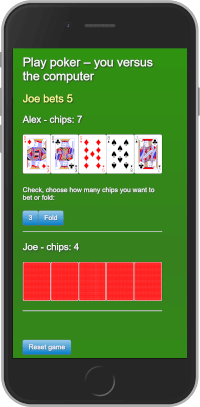
I've been experimenting with SPA frameworks in general and React in particular, and I've uploaded one of the apps I built on to this website.
It's a fairly unsophisticated poker game where you get to pit your wits against the computer. And while it's not exactly a world beater, one thing I was determined to do was make it fast.
I did a few simple, easy things to achieve it, and I thought I'd share my experience here.
Just because you can package everything up into a JavaScript file, it doesn't mean you should. It's not unusual to come across SPAs that put the rendering of absolutely everything in the hands of a client-side script, when it can make more sense to put certain types of content directly in the HTML.
Good candidates for server-side rendering include:
It's worth mentioning that this sort of thing doesn't tend to get covered in introductory React tutorials. Instead, you'll be told that all you need in your initial HTML file is the document structure and a main or root div into which you'll inject your app, which may include <Header />, <Main /> and <Footer /> components.
This is completely understandable. The aim of such tutorials is to introduce the main concepts. Delving into performance optimisation before those concepts have been fully absorbed would probably serve only to muddy the waters.
But it might go some way towards explaining why it's not uncommon to see SPAs that rely too heavily on JavaScript to render content.
My app has some introductory text and a footer, and I decided to deliver both as static HTML.
That HTML file also includes all the styles for the app, minified and inlined, so that everything you need to get started is included in a single 6KB file. At this point, still no JavaScript. That makes the first rendering of the page very fast indeed.
The only part of the landing page that isn't delivered as static content is the form that's required to start the game, since we need the app to have loaded for the form to work. In its place, there is a CSS-powered loading spinner, so if the script is taking a while to load, people will at least know there is more to come.
To illustrate the difference this makes, I compared two versions of the page using Webpagetest (Moto G4 running Chrome on a slow 3G connection). The version that takes advantage of server-side rendering (top in the filmstrip below) is able to render meaningful content two seconds faster than the version that relies entirely on JavaScript.

Progressive web apps (PWAs) allow you to deliver an app-like experience with a web page. So making your SPA a PWA is usually a no-brainer.
The detail of creating a PWA is probably too big a topic for this post, so instead I'll run just through a few of the steps I took to make my SPA behave more like an app.
The web app manifest is a JSON file that you will need if you want to be able to prompt users to add the app to their home screen, and it defines how it should look if saved and launched as an app. For example, it sets out how much of the browser UI should be shown and whether it should be displayed landscape or portrait. It also contains references to the images that will be used as launch icons.
The service worker is the key component of a PWA and essentially allows network traffic to be managed in the background, off the main browser thread. You have to register the service worker when someone first visits your page, so it's no use on an initial visit.
However, once registered, it enables you to do some very useful things. For a start, you can use the Cache API to store static assets persistently (this is different from the HTTP cache, which is managed through the Cache-control field in the response header).
In my case, I needed to store the HTML file, the script and a total of 53 small images. Once this was done, I added some simple logic to enable the service worker to determine how to handle future requests.
For the HTML file, if the user is online, the request goes over the network first and only if that fails does it look to the cache. This helps to ensure that visitors always get the most up-to-date version.
For all other resources (and for the HTML if offline), the request goes to the cache first and falls back to the network.
If you're interested in the mechanics, this guide is particularly helpful.
While my own PWA is pretty basic and unrefined, it seems to do the job, with service workers and caching allowing it to work just as well offline as online.
The fact that all the images are cached on initial page load also means that there is no delay when a card is 'dealt' during the game.
All in all, it makes for a much slicker experience.
There were also a few easy web performance wins to be had.
I already mentioned that I don't have too much CSS, and it's inlined, so there's no delay to rendering the page while the browser goes off to fetch a style sheet.
But one thing the app does have is a large number of images, all of which are SVGs. I knew that each one probably came with a lot of data (e.g. metadata) that wasn't strictly necessary. I didn't particularly feel like going through them one by one, but fortunately, I stumbled across this excellent online interface for SVGO, which allowed for some quick, easy SVG optimisation, courtesy of Jake Archibald.
That was enough to take the combined file size down from 577KB to 429KB.
However, when I looked at the file sizes when transmitted over the network, I realised something was wrong.
Since SVGs are text files, they should benefit from compression using Gzip (or Brotli, if available). But that wasn't happening.
A quick look at the .htaccess file revealed that I'd omitted SVGs from the list of file types to compress – something that was easily remedied:
AddOutputFilterByType DEFLATE image/svg+xml
It made a huge difference, as you can see from these extracts from one of the response headers.
Before Gzip enabled:
Content-Length: 1751
Content-Type: image/svg+xml
After Gzip enabled:
Content-Encoding: gzip
Content-Length: 548
Content-Type: image/svg+xml
Vary: Accept-Encoding
Apply this across the board, and the 429KB total comes down to just 134KB. Considering that the app's other assets only come to 154KB, that's a huge saving. To put it another way, images went from making up 74 per cent of the app's total weight to just 47 per cent.
So if you're using SVGs on your site, remember that they're text files and that it pays to Gzip/Brotli them!
This was just a practice app. It's not the most polished, and it doesn't adhere to every React best practice. But for me at least, there is a small measure of redemption: it's quick.
此内容由惯性聚合(RSS阅读器)自动聚合整理,仅供阅读参考。 原文来自 — 版权归原作者所有。