
惯性聚合 高效追踪和阅读你感兴趣的博客、新闻、科技资讯
阅读原文 在惯性聚合中打开

推荐订阅源

cs.CL updates on arXiv.org
雷峰网
雷峰网
Recent Announcements
月光博客
月光博客
G
Google Developers Blog
腾讯CDC
S
Secure Thoughts
大猫的无限游戏
大猫的无限游戏
T
Tenable Blog
云风的 BLOG
云风的 BLOG
W
WeLiveSecurity
博客园 - 【当耐特】
cs.CV updates on arXiv.org
博客园 - 聂微东
The Cloudflare Blog
阮一峰的网络日志
阮一峰的网络日志
人人都是产品经理
人人都是产品经理
P
Privacy International News Feed
MyScale Blog
MyScale Blog
K
Kaspersky official blog
T
The Blog of Author Tim Ferriss
Attack and Defense Labs
Spread Privacy
Spread Privacy
Threat Intelligence Blog | Flashpoint
aimingoo的专栏
aimingoo的专栏
I
Intezer
Vercel News
Vercel News
小众软件
小众软件
Simon Willison's Weblog
cs.AI updates on arXiv.org
N
Netflix TechBlog - Medium
P
Proofpoint News Feed
Latest news
Latest news
freeCodeCamp Programming Tutorials: Python, JavaScript, Git & More
T
Tor Project blog
S
Security Affairs
P
Proofpoint News Feed
博客园 - 三生石上(FineUI控件)
博客园 - Franky
C
Cyber Attacks, Cyber Crime and Cyber Security
Exploit-DB.com RSS Feed
美团技术团队
Recent Commits to openclaw:main
S
Security @ Cisco Blogs
L
LINUX DO - 热门话题
Know Your Adversary
Know Your Adversary
Project Zero
Project Zero
D
Docker
L
Lohrmann on Cybersecurity
F
Full Disclosure

oida.dev | TypeScript, Rust

TypeScript's `erasableSyntaxOnly` Flag Unsafe for work Tokio: Macros Tokio: Channels Tokio: Getting Started Network Applications on the Tokio Stack Remake, Remodel, Reduce. The `never` type and error handling in TypeScript 5 Inconvenient Truths about TypeScript Refactoring in Rust: Introducing Traits Refactoring in Rust: Abstraction with the Newtype Pattern Announcing the TypeScript Cookbook TypeScript: Iterating over objects The road to universal JavaScript 10 years of oida.dev Rust: Tiny little traits The TypeScript converging point How not to learn TypeScript Getting started with Rust Introducing Slides and Coverage TypeScript: The humble function overload TypeScript + React: Children types are broken TypeScript: In defense of any Rust: Enums to wrap multiple errors Dissecting Deno Error handling in Rust TypeScript: Unexpected intersections Upgrading Node.js dependencies after a yarn audit TypeScript: Array.includes on narrow types TypeScript + React: Typing Generic forwardRefs shared, util, core: Schroedinger's module names Learning Rust and Go TypeScript: Narrow types in catch clauses TypeScript: Low maintenance types Tidy TypeScript: Name your generics Tidy TypeScript: Avoid traditional OOP patterns Tidy TypeScript: Prefer type aliases over interfaces Tidy TypeScript: Prefer union types over enums My new book: TypeScript in 50 Lessons Go Preact! ❤️ this in JavaScript and TypeScript TypeScript and ECMAScript Modules TypeScript + React: Why I don't use React.FC TypeScript + React: Component patterns TypeScript: Augmenting global and lib.dom.d.ts Vite with Preact and TypeScript TypeScript: Union to intersection type 11ty: Generate Twitter cards automatically Are large node module dependencies an issue? TypeScript: Variadic Tuple Types Preview TypeScript: Improving Object.keys Remake, Remodel. Part 4. TypeScript + React: Typing custom hooks with tuple types TypeScript: Assertion signatures and Object.defineProperty TypeScript: Check for object properties and narrow down type Boolean in JavaScript and TypeScript void in JavaScript and TypeScript Symbols in JavaScript and TypeScript Why I use TypeScript TypeScript + React: Extending JSX Elements TypeScript: Validate mapped types and const context TypeScript: Match the exact object shape TypeScript: The constructor interface pattern Streaming your Meetup - Part 4: Directing and Streaming with OBS Streaming your Meetup - Part 3: Speaker audio Streaming your Meetup - Part 2: Speaker video TypeScript and React Guide: Added a new styles chapter TypeScript and React Guide: Added a new render props chapter TypeScript and React: Styles and CSS TypeScript and React TypeScript and React Guide: Added a new prop types chapter TypeScript without TypeScript -- JSDoc superpowers TypeScript: Mapped types for type maps JAMStack vs serverless web apps The Unsung Benefits of JAMStack Sites TypeScript: Ambient modules for Webpack loaders My most favourite talks in 2018 TypeScript and React Guide: Added a new context chapter TypeScript: Built-in generic types TypeScript: Type predicates JSX is syntactic sugar TypeScript and React Guide: Added a new hooks chapter Getting your CfP application right FAQ on our Angular Connect Talk: Automating UI development TypeScript and Substitutability Debugging Node.js apps in TypeScript with Visual Studio Code From Medium: Deconfusing Pre- and Post-processing From Medium: PostCSS misconceptions Saving and scraping a website with Puppeteer Cutting the mustard - 2018 edition Wordpress as CMS for your JAMStack sites My most favourite podcast episodes in 2017 My most favourite talks in 2017 My most favourite books in 2017 The Best Request Is No Request, Revisited Not so hidden figures - Organizing ScriptConf My podcast journey to ScriptCast Grid layout, grid layout everywhere! #scriptconf and #devone Object streams in Node.js
Streaming your Meetup - Part 1: Basics and Projector
2019-07-24 · via oida.dev | TypeScript, Rust

When we did Script’18 in January 2018, we borrowed an A/V equipment worth of 35.000 EUR to make sure we get kick-ass videos. A+ camera, an A/V mixer and a hard disc recording system that does editing on the fly. We wanted to go live with our recordings directly after the conference.

It turned out that some mysterious error never stored any video data, just audio. We were devastated.

Last summer I decided to take matter in our own hands. Understand which pieces we need to be able to edit, record and stream videos from all our conferences, meetups and all other events we might do. And I wanted to go from pro equipment to consumer class equipment. See how much quality we can get out of off the shelf pieces.

I want to share my findings with you. Maybe you get some ideas for your own meetup or conference. I go from super cheap to quite expensive in some cases. But I always refrain from pro equipment.

I split the whole series into four pieces:

  1. Basics and Projector – 📍you are here
  2. Recording the speaker
  3. Recording audio
  4. Directing and streaming with OBS

Enjoy!

Basics #

Before you start any stream with the possible combinations of hardware equipment, you need some basics.

A powerful laptop, a powerful graphics card #

I underestimated the need for a powerful laptop to be able to record with at least 30 frames per second. Slides usually go for 30 frames per talk, but if you want to have a video recording of your speaker that’s smooth and without any significant frame drops, make sure that you have a laptop with its own graphics card.

If you’re using a Mac, the 15" Macbook Pros have a proper graphics card. 13" Macbooks have onboard graphics. If your specs say something from NVIDIA to ATI you can be pretty sure.

Alternatives: Get an external graphics card (they exist) like the Razor Core X (Amazon) - around 300-500 EUR.

HDMI cables, a couple of them #

You need a couple of HDMI cables to record your stuff. Make sure you have a couple of them in different lengths to be prepared for your surroundings. It’s easier with a meetup as the room is usually much smaller and the layout is more casual. This means you can be directly in the first row and don’t need long HDMI cables.

For a conference, you sometimes need to layout 20m worth of HDMI cables. This is where HDMI has its limits. Starting from 7m, you get one-directional cables. Which means you need to make sure you have to take care where the ends are.

I usually have 2-3 HDMI cables around 1.5m, one cable around 3m, and a longer one that spans 10m.

You’ll spend around 50 EUR.

A network cable #

If you want to stream, I recommend using good old ethernet connections rather than WiFi. WiFi, even strong ones that have good upstream, have interferences, cause stalls, and don’t produce the same quality as going over the wire.

Ask your meetup host if they have a LAN connection. They also should open all ports to make sure the streaming servers are reachable.

I have a recent Macbook Pro, so I only have USB-C jacks. I bought a cheap adapter (that’s what Macbook users do) to have ethernet available:

Recording the projector #

Our goal is to have a split screen view, like we know from conference videos, with this layout:
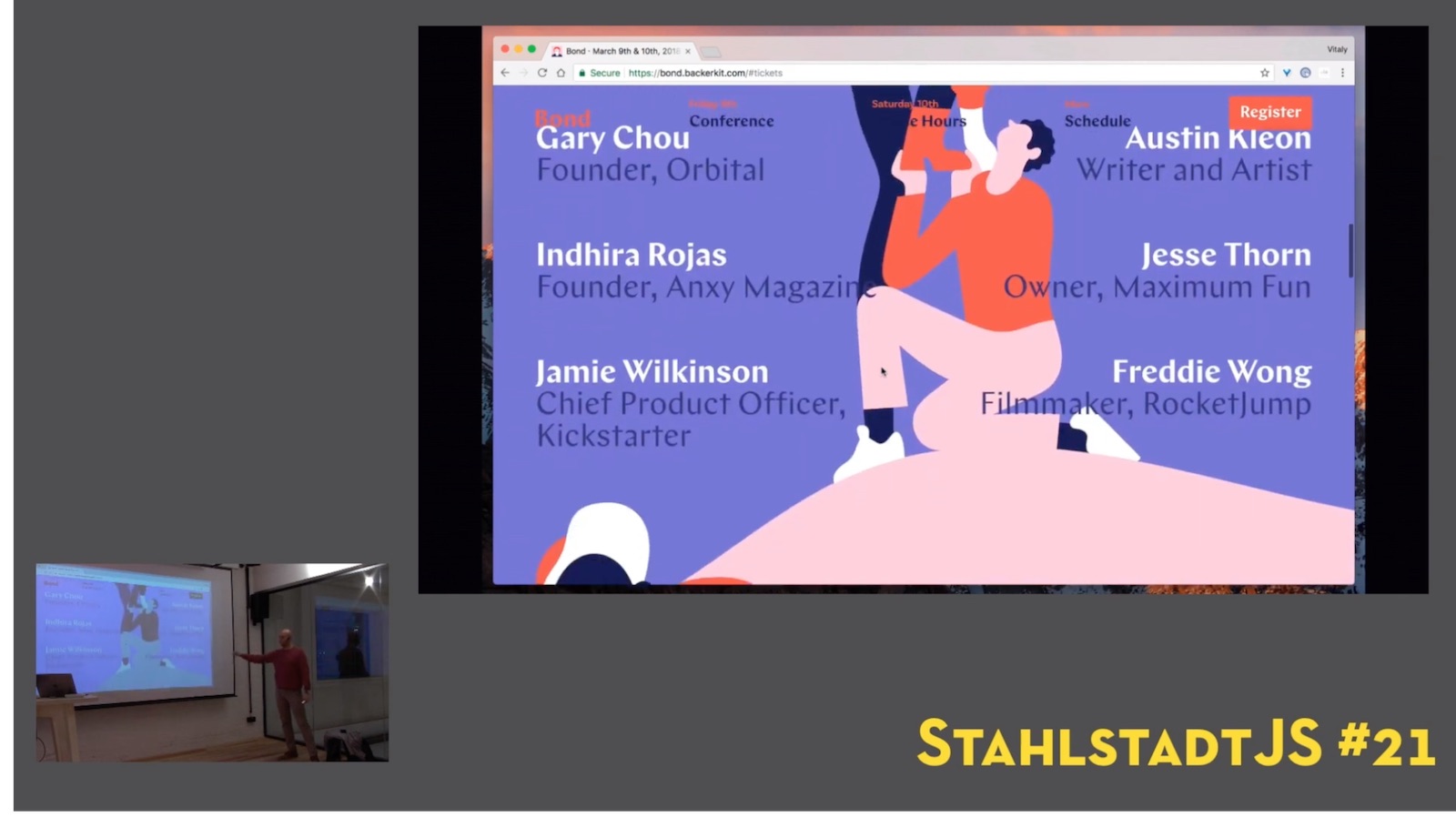
A screen showing the projector and the speaker

It contains

  • Speaker audio
  • Speaker video
  • Projector video
  • Projector audio

Let’s focus on the projector. We want to record the video output of our speaker’s laptop. We need this signal as an input for our laptop. Sounds hard! We can achieve this in two steps:

1. Splitting the signal #

We somehow need to make sure the speaker laptop video out not only goes to the projector, but also to us. For that we need to split the signal and lead it to both video input sinks.

Diagram showing what we want to do

For that, I can highly recommend the CSL HDMI Splitter. Works like a charm, has external power supply to make sure that it can handle the signal. One input, two outputs, 20 EUR:
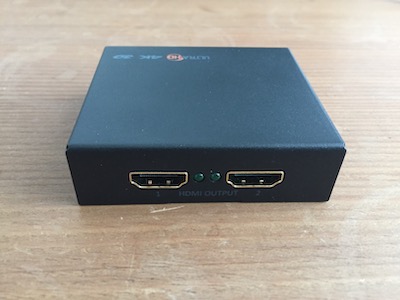
HDMI Splitter

I usually take one of my 1.8m cables to connect the speaker laptop to the splitter in, take the projector cable to output 1, and use one of my 7.5m or 3m cables to connect it from output 2 to my laptop.

But wait! We can’t simply plug this one into our HDMI jack. Laptop’s HDMI plugs only produce a video out signal, no video in. For that we need another tool: A video grabbing device.

2. Grabbing the video signal #

We need a special plug that transforms the video in signal into something our laptops can understand. We need to convert the signal into a … webcam! There’s a tool for that. Coming from the game streaming community called CamLink. It takes HDMI for input and has an USB connector so you can plug it into your laptop.
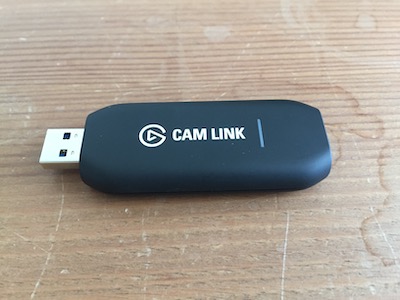
CamLink 4K

It’s pretty much plug and play. You can immediately use it as a webcam.

I recommend installing their Game Capture software. It’s not what we need to stream our meetup, but you are able to do some settings for the CamLink. Like recuding framerate, or resolution. It might help with some notebooks to get a signal without interferences.

Plug it in and try it out with your favourite Webcam software.

Money spent so far #

We want to keep it as affordable as it can be. Right now we spent:

A total of 190 EUR to get started.

Cheap alternative if you don’t want to stream, just record #

This setup is convenient if you want to record and stream without any hassle. And without being constraint on the input signal: if it can produce HDMI, you can record it.

If you don’t want to stream, just record, and maybe have some time to assemble videos in post production, you can always ask one thing: Speakers shall record their own screen. On Mac this is possible via QuickTime. And I just found out Windows 10 has a built-in screen recorder as well.

Costs: 0. You have to do serious post production, though.

Coming up next: Recording the speaker!

Related Articles