
惯性聚合 高效追踪和阅读你感兴趣的博客、新闻、科技资讯
阅读原文 在惯性聚合中打开

推荐订阅源

Cisco Talos Blog
Cisco Talos Blog
freeCodeCamp Programming Tutorials: Python, JavaScript, Git & More
爱范儿
爱范儿
奇客Solidot–传递最新科技情报
奇客Solidot–传递最新科技情报
Jina AI
Jina AI
雷峰网
雷峰网
The Register - Security
The Cloudflare Blog
博客园 - 【当耐特】
M
MIT News - Artificial intelligence
I
InfoQ
博客园 - 三生石上(FineUI控件)
H
Help Net Security
博客园 - 司徒正美
Vercel News
Vercel News
WordPress大学
WordPress大学
S
SegmentFault 最新的问题
云风的 BLOG
云风的 BLOG
B
Blog
Google DeepMind News
B
Blog RSS Feed
L
LangChain Blog
人人都是产品经理
人人都是产品经理
GbyAI
GbyAI
T
The Blog of Author Tim Ferriss
T
Tailwind CSS Blog
aimingoo的专栏
aimingoo的专栏
让小产品的独立变现更简单 - ezindie.com
Recorded Future
Recorded Future
小众软件
小众软件
Martin Fowler
Martin Fowler
罗磊的独立博客
Stack Overflow Blog
Stack Overflow Blog
钛媒体:引领未来商业与生活新知
钛媒体:引领未来商业与生活新知
酷 壳 – CoolShell
酷 壳 – CoolShell
腾讯CDC
CTFtime.org: upcoming CTF events
Apple Machine Learning Research
Cyber Security Advisories - MS-ISAC
博客园 - Franky
Hugging Face - Blog
Hugging Face - Blog
Y
Y Combinator Blog
V
Visual Studio Blog
F
Fortinet All Blogs
Microsoft Azure Blog
大猫的无限游戏
大猫的无限游戏
Engineering at Meta
Engineering at Meta
N
Netflix TechBlog - Medium
V
V2EX
Blog — PlanetScale
Blog — PlanetScale

oida.dev | TypeScript, Rust

TypeScript's `erasableSyntaxOnly` Flag Unsafe for work Tokio: Macros Tokio: Channels Tokio: Getting Started Network Applications on the Tokio Stack Remake, Remodel, Reduce. The `never` type and error handling in TypeScript 5 Inconvenient Truths about TypeScript Refactoring in Rust: Introducing Traits Refactoring in Rust: Abstraction with the Newtype Pattern Announcing the TypeScript Cookbook TypeScript: Iterating over objects The road to universal JavaScript 10 years of oida.dev Rust: Tiny little traits The TypeScript converging point How not to learn TypeScript Getting started with Rust Introducing Slides and Coverage TypeScript: The humble function overload TypeScript + React: Children types are broken TypeScript: In defense of any Rust: Enums to wrap multiple errors Dissecting Deno Error handling in Rust TypeScript: Unexpected intersections Upgrading Node.js dependencies after a yarn audit TypeScript: Array.includes on narrow types TypeScript + React: Typing Generic forwardRefs shared, util, core: Schroedinger's module names Learning Rust and Go TypeScript: Narrow types in catch clauses TypeScript: Low maintenance types Tidy TypeScript: Name your generics Tidy TypeScript: Avoid traditional OOP patterns Tidy TypeScript: Prefer type aliases over interfaces Tidy TypeScript: Prefer union types over enums My new book: TypeScript in 50 Lessons Go Preact! ❤️ this in JavaScript and TypeScript TypeScript and ECMAScript Modules TypeScript + React: Why I don't use React.FC TypeScript + React: Component patterns TypeScript: Augmenting global and lib.dom.d.ts Vite with Preact and TypeScript TypeScript: Union to intersection type 11ty: Generate Twitter cards automatically Are large node module dependencies an issue? TypeScript: Variadic Tuple Types Preview TypeScript: Improving Object.keys Remake, Remodel. Part 4. TypeScript + React: Typing custom hooks with tuple types TypeScript: Assertion signatures and Object.defineProperty TypeScript: Check for object properties and narrow down type Boolean in JavaScript and TypeScript void in JavaScript and TypeScript Symbols in JavaScript and TypeScript Why I use TypeScript TypeScript + React: Extending JSX Elements TypeScript: Validate mapped types and const context TypeScript: Match the exact object shape TypeScript: The constructor interface pattern Streaming your Meetup - Part 4: Directing and Streaming with OBS Streaming your Meetup - Part 3: Speaker audio Streaming your Meetup - Part 1: Basics and Projector TypeScript and React Guide: Added a new styles chapter TypeScript and React Guide: Added a new render props chapter TypeScript and React: Styles and CSS TypeScript and React TypeScript and React Guide: Added a new prop types chapter TypeScript without TypeScript -- JSDoc superpowers TypeScript: Mapped types for type maps JAMStack vs serverless web apps The Unsung Benefits of JAMStack Sites TypeScript: Ambient modules for Webpack loaders My most favourite talks in 2018 TypeScript and React Guide: Added a new context chapter TypeScript: Built-in generic types TypeScript: Type predicates JSX is syntactic sugar TypeScript and React Guide: Added a new hooks chapter Getting your CfP application right FAQ on our Angular Connect Talk: Automating UI development TypeScript and Substitutability Debugging Node.js apps in TypeScript with Visual Studio Code From Medium: Deconfusing Pre- and Post-processing From Medium: PostCSS misconceptions Saving and scraping a website with Puppeteer Cutting the mustard - 2018 edition Wordpress as CMS for your JAMStack sites My most favourite podcast episodes in 2017 My most favourite talks in 2017 My most favourite books in 2017 The Best Request Is No Request, Revisited Not so hidden figures - Organizing ScriptConf My podcast journey to ScriptCast Grid layout, grid layout everywhere! #scriptconf and #devone Object streams in Node.js
Streaming your Meetup - Part 2: Speaker video
2019-07-25 · via oida.dev | TypeScript, Rust

We successfully set up the projector in our last chapter. Now it’s time to record the speaker himself. I’ll show you a couple of options how you can record the speaker video. It’s up to your budget and up to the quality you want to achieve.
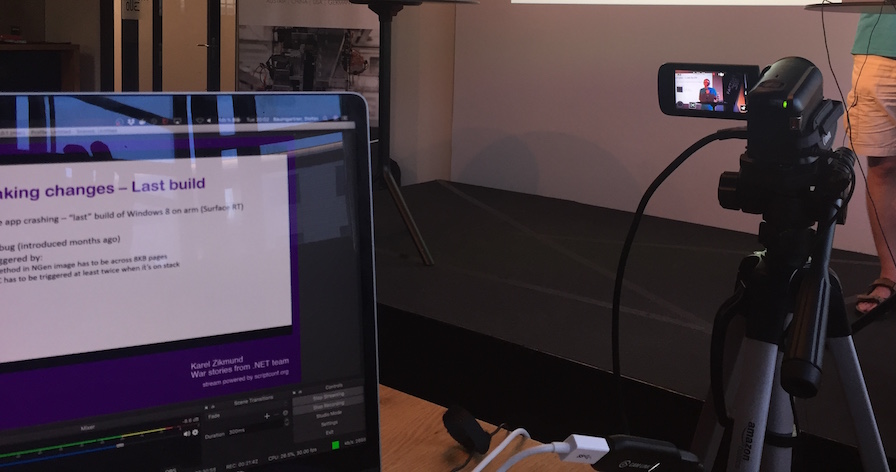
Recording with a camera

Maybe you are already into photography and have nice DSLR at home. This might totally do for recording the speaker video. Even better: This might acutally be the best option.

So check out how to record and stream your speaker, and be sure to check out the other parts as well:

  1. Basics and Projector
  2. Recording the speaker – 📍you are here
  3. Recording audio
  4. Directing and streaming with OBS

Let’s go!

A few words before we start #

The different options I show you are category based. I don’t have a favourite model or a favourite vendor. I just select based on certain criteria. Since we want to use consumer hardware, be happy with what you have lying around or your relatives can offer. Other than that, I always go for something affordable.

There’s two things to keep in mind:

  1. Camera audio always sucks. We don’t want to record camera audio, that’s why we check on audio in the next chapter. If you have to choose between two cameras that are similar in pricing, quality and features, always go for the camera that has an external microphone input. They exist, but are rare. It’s always better to connect your audio input directly with the cam, rather than mixing it on your laptop.
  2. Not every camera has the possibility to be connected to your laptop. Most of them have HDMI out to be connected to a monitor or to your TV screen. There’s a solution for that, and you know it already from the last chapter: CamLink. I bought a second one just for our cams. Also: never connect two CamLinks to the same USB port. Use two different ones, because they use all the power they need. Definitely check if your camera is compatible with CamLink.

With every option you get, you’ll also see info for those two criterias:

  1. Is an external microphone possible
  2. Do you need CamLink

Also, you most likely need a Tripod. This one costs roughly 30 EUR.

Ready? Let’s check our first option.

The webcam #

Who would have thought, a simple Webcam does the trick. Those things are not as popular anymore since every notebook has one built-in, but they still exist and are of great quality.

One that is very popular with streamers is the Logitech C920. Great video quality, plug and play, extra software to fine-tune it. My friend Tom uses it to stream meetups, check out one of the recordings on YouTube. Keep in mind that you have to be very close to the speaker to get a proper video.

The camera costs around 100 EUR, but sometimes it’s sold for around 70 EUR.

The best thing: IT FITS ON A TRIPOD! Yes! Probably the only webcam I know that can be mounted on a regular Tripod.

  • No external microphone possible 👎
  • Does not need CamLink 👍

The camcorder #

For my meetups we use a camcorder. We bought the Legria HF R806, but I’m not entirely convinced. It’s nice as it works with CamLink, but it doesn’t have any external microphone input. Also, the quality lacks when lights are dim. You can do a lot with the onboard settings, but overall, I expected a bit more. THe price is ok. Around 250 EUR.

The cool thing is, though, that you can record hours of material next to streaming it to your laptop. Which means I always have a video backup should anything crash on the laptop.

My friend Rainer uses a Sony FDR-AX33. This one has an audio jack for an external microphone, and the quality is supreme. It also costs a lot more, this one is sold for 500 EUR.

But hey, check out the quality in one of Rainer’s videos.

  • External microphone possible 👍
  • Does need CamLink 👎

The DSLR #

DSLRs are not camcorders or video recorders. They are not there to record lengthy videos, and most of them stop after 15 minutes due to some taxation issues. But: They are available. Either you or one of your relatives could have one and they create great shots.

I would not recommend buying one extra for streaming, because they are expensive. Around 500-800 EUR just for the camera, and then you have to invest in lenses. The Canon EOS series allows for external microphones, but is hard to use with CamLink.

The Sony cameras (A5100, A6000) don’t have an external microphone check, but work great with CamLink. Your choice.

  • External microphone possible 👍
  • Does need CamLink 👎

The action camera #

Another possibility, somewhere inbetween Camcorder and DSLR, is a GoPro action camera. They are affordable (180EUR to 350 EUR), and have great accessories. There’s an adapter for 10 EUR for an external microphone.

The video is not typically conference like, but you might like that.

  • External microphone possible 👍
  • Does need CamLink 👎

The iPhone #

There’s another possibility that has popped up: The iPhone. Elgato (the people behind CamLink), released Stream Link for 11 EUR. This, together with the Game Capture Studio allows you to stream your iPhone camera (or screen!) to your PC. It requires great WiFi, thought. Don’t be fooled, it’s nowhere as stable as good old plugs. But it might be an option if your laptop hardware and the WiFi you have is strong enough to support this. And: an external microphone is possible. Great!

Other than that: There’s a possibility to connect your phone with CamLink and use it as a camera. Sweet.

  • External microphone possible 👍
  • Does not need CamLink 👍

Summary #

Lots of options, all of them good, all of them different. They might suit your situation or your budget, or you might not produce the results you wish to achieve. Make sure the hardware selected is suitable for your everyday need.

If you don’t use an external webcam, almost all solutions are able to have an external microphone (if you select the right model), and need CamLink. They differ in quality, budget, and availability.

This is the setup so far:
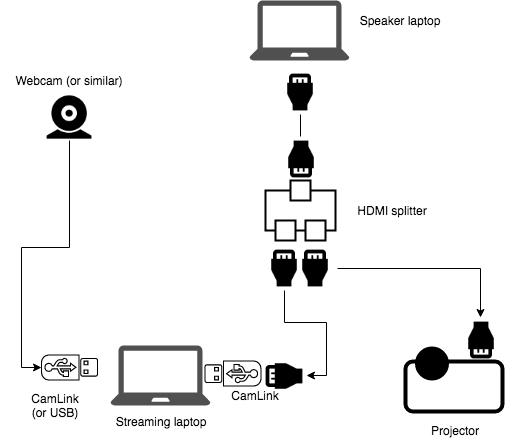
The streaming setup

  • 2 extra HDMI cables (we assume that there is one available from the projector)
  • An HDMI splitter
  • 1-2 CamLinks
  • A webcam (or similar)
  • Your streaming notebook

Money spent so far #

You have a ton of options that are all cheaper than a pro camera. But they produce different results. If you do a lot of streaming, I’d recommend investing in a Sony camcorder with an external microphone jack, and CamLink. Another CamLink costs another 130 EUR. Don’t forget to add that amount to your calculations. If you are for the most affordable one, let’s buy a Logitech Webcam on sale and a tripod:

100 EUR. Together with 190 EUR from the first chapter, we spent 290 EUR to stream.

Related Articles