


For the redesign of this blog, I created Twitter title cards that are generated automatically. So whenever people share my stuff on social media, they get a nice card telling them the article’s title and post date.
And folks should share these articles on social media, shouldn’t they?
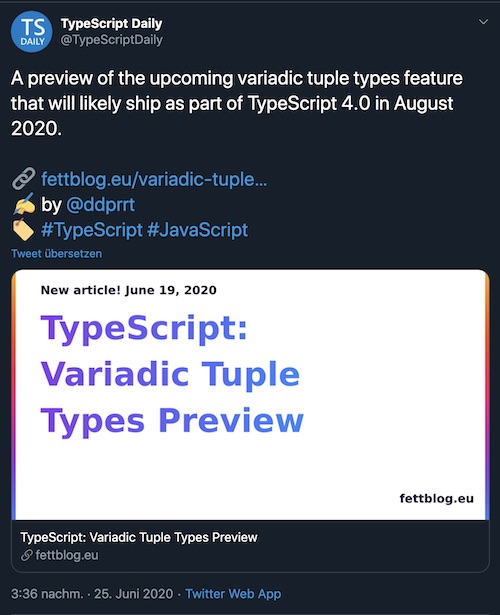
I’m using Eleventy as a static site generator for this webpage, and thanks to their pagination feature, creating Twitter cards for each post took just little investment.
One important feature of Eleventy is collections. Eleventy tries to collect all parsable files from your source into a big all collection, and you have the possibility to cluster this big heap of data into different groups. One would be posts, which goes for all my blog articles.
In a lot of cases, you want to browse your collections either as a whole or on several pages. The pagination feature of Eleventy allows you exactly that. It takes a set of data, and slices it based on page size. This can be defined in the front-matter:
---
pagination:
  data: collections.posts
  size: 10
  alias: pagedPosts
---
In the example above, I create pages with 10 items each from the posts collection, storing the information in an array called pagedPosts. We loop over this array and show the contents in the template. Effectively creating a paged overview.
So how can we use the pagination for our teasers? The trick lies in the pagination size. What happens if we set the pagination size to 1? We get a page for each entry in the posts collection. With this, we remap the entire contents of our blog to a new output.
This can be another HTML or XML page, or JSON, or in our case: An SVG.
---
pagination:
  data: collections.posts
  size: 1
  alias: post
permalink: /teasers/{{ pagination.items[0].permalink | slug  }}.svg
eleventyExcludeFromCollections: true
---
The above code
post so we can access it within the templateeleventyExcludeFromCollections: true I make sure that the newly created pages to get added to the overall list of collections.This is the basic set-up. Now to the contents of the template
What I did for this site was creating an SVG with Sketch. A simple one with just a bit of text. I tried system fonts, because once I’m rendering this in an SVG or PNG, I’m not sure with fonts I have available. I used some dummy text based on a real blog post, and then copied the SVG code in the template:
---
pagination:
  data: collections.posts
  size: 1
  alias: post
permalink: /teasers/{{ pagination.items[0].permalink | slug  }}.svg
eleventyExcludeFromCollections: true
---
<?xml version="1.0" encoding="UTF-8"?>
<svg width="1452px"
  height="843px" viewBox="0 0 1452 843"
  version="1.1" xmlns="http://www.w3.org/2000/svg"
  xmlns:xlink="http://www.w3.org/1999/xlink">
  <!-- here come the contents -->
</svg>
I searched for the part why I set the text and removed all existing lines. I changed it to a loop where I split the title of the post so each line has the right number of characters in it.
<text id="text"
  fill="url(#linearGradient-3)"
  font-family="Arial, Helvetica, sans-serif"
  font-size="100" font-weight="bold" line-spacing="101">
  {% for line in post.data.title | splitlines %}
  <tspan x="81" y="{{247 + loop.index0 * 141}}">{{line}}</tspan>
  {% endfor %}
</text>
Depending on the font size that I set, I set the y coordinate to an offset (in this case 247), plus the current line index and a font-size with line-height (141).
splitlines is a filter I create in my .eleventy.js configuration file:
config.addFilter('splitlines', function(input) {
  const parts = input.split(' ') /* 1 */
  /* 2 */
  const lines = parts.reduce(function(prev, current) {
    /* 3 */
    if(!prev.length) {
      return [current]
    }    /* 4 */
    let lastOne = prev[prev.length - 1]
    if(lastOne.length + current.length > 18) {
      return [...prev, current]
    }
    prev[prev.length - 1] = lastOne + ' ' + current
    return prev
  }, [])
  return lines
})
Here’s what I do:
I also do something similar with the post date.
This already gives me an SVG for each blog post that I’m writing.
The last thing that was necessary was creating a PNG of each SVG. I haven’t been able to do this via Eleventy, yet. So I resorted to Gulp. This is actually intentional, as I want to save time through maximum parallelism.
This is my Gulpfile.js. I just need one plug-in.
const gulp = require('gulp');
const svg2png = require('gulp-svg2png');gulp.task('default', function() {
  return gulp
    .src('./dist/teasers/*.svg')
    .pipe(svg2png())
    .pipe(gulp.dest('./dist/teasers/'));
})
Note that this is resource-heavy. Depending on how big your site is you might want to do this incrementally or store the results somewhere instead of creating this per build run.
As for this site. Eleventy builds HTML + SVGs in less than 2 seconds. Converting the PNGs takes another 20 seconds on Vercel. This is still faster than a “Hello world” style Gatsby site. So I think it’s reasonable to do this every time 😉
Last, but not least, I add the results in the meta information of each blog post:
{% set imgPath = permalink | slug %}<meta property="og:image"
  content="https://oida.dev/teasers/{{ imgPath }}.png">
<meta property="og:image:secure_url"
  content="https://oida.dev/teasers/{{ imgPath }}.png">
<meta name="twitter:image"
  content="https://oida.dev/teasers/{{ imgPath }}.png">
And that’s it!
Some gotchas that I found:
But other than that, I think it’s quite ok!
此内容由惯性聚合(RSS阅读器)自动聚合整理,仅供阅读参考。 原文来自 — 版权归原作者所有。