


You might have heard of Preact, the tiny 3KB alternative to React. It has been around for a while, and since its inception, it claims to be API and feature compatible compared to the more widely used Facebook library.
After using Preact for quite a while I come to the conclusion that Preact is much more. It offers a totally different development and design philosophy and has the potential to solve a ton of problems the current JavaScript ecosystem has to face. In this article, I try to compile a list of things that I find outstanding.
Vue popularized the idea of a progressive JavaScript framework. The idea is that you can start small with just a few bits and pieces, but you can get very far with it. The more you progress with the framework, the more you are able to opt-in to more features. Evan You’s presentation on that topic shows an image that illustrates the idea very well (see slide 11):
vuex)vue-cli and single file components)With each step, you are able to create richer applications, but easing in is simple as you always build upon the previous steps, you never discard them.
Preact and its eco-system work also progressively. I tried to create a similar chart for Preact:
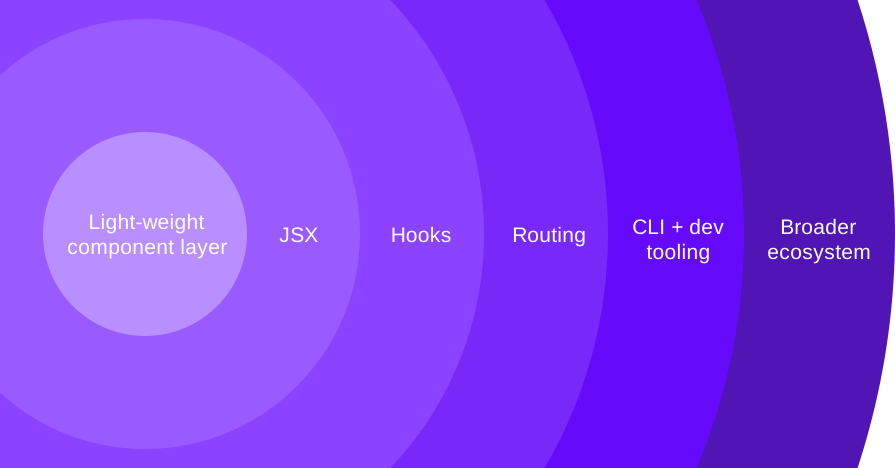
Each step in detail:
import { h, Component } from 'preact';class Counter extends Component {
  state = {
    count: 0,
  };  render() {
    const { count } = this.state;
    return h("div", null, [
      count,
      h(
        "button",
        {
          onClick: () => this.setState({ count: count + 1 }),
        },
        "Increment"
      ),
    ]);
  }
}
import { h, Component } from 'preact';class Counter extends Component {
  state = {
    count: 0,
  };  render() {
    const { count } = this.state;
    return <div>
      {count}
      <button
        onClick={() => this.setState({ count: count + 1 })}>
        Increment
      </button>
    </div>
  }
}
import { h } from 'preact'
import { useState } from 'preact/hooks'function Counter() {
  const [count, setCount] = useState(0)
  return <div>
    {count}
    <button
      onClick={() => setCount(prev => prev + 1)}>
      Increment
    </button>
  </div>
}
Note that from step 1 on, you can choose to use htm, a small library that allows you to write JSX style Preact (and React) but in tagged template literals. The example from above, without a build step, without JSX, would look like this:
import {
html,
render,
useState
} from "https://unpkg.com/htm/preact/standalone.mjs?module";function Counter() {
const [count, setCount] = useState(0);
return html`<div>
${count}
<button
onClick=${() => setCount((prev) => prev + 1)}>
Increment
</button>
</div>`;
}
render(
html`<${Counter} />`,
document.querySelector("#app"))
Preact ships its own client-side routing implementation with preact-router. This is also again an opt-in solution, and Preact is aware of alternatives, like wouter, which work as well.
To tick off the tooling part, the Preact team ships its own CLI, which comes with a lot of templates for different use-cases, and wires up things like CSS processing, bundling, transpilation, code splitting, etc.
If you need more, you can consume from the broader Preact ecosystem, where some of the best libraries are provided by core team members.
htm JSX style components in template literalspreact-custom-element is a very tiny wrapper to make Preact work with web components. More on that later.unistore, a small state container for Redux like state managementSo it’s easy to start with small widgets on your website, especially when you have htm wired up. No builds, just a single library. And you can opt-in to use more and more features until you write full-fledged applications.
Everything about Preact is opt-in. In fact, Preact decides against having default exports where you can suck in the whole framework at once. It requires you to be intentional about everything you load (unless you use the compatibility layer, see below). That way, you only end up with what you actually need.
This is incredibly useful if your bundler works with tree shaking. Do you only need the useState and useEffect hooks? Then you won’t get any others in your production bundle.
I spun up a quick Vite project and compared a couple of simple components, pulling in progressively more features.
A simple Greeting component:
function Greeting({name = 'Stefan'}) {
  return <p>{name}</p>
}
As well as the counter example from above. Here are the results.
Greeting function component: Minified 8.60kb, brotli: 3.20kbGreeting class component: 8.64kb, brotli: 3.22kb (most likely due my part being more verbose in a class)Counter class components, no hooks: Minified 8.73kb, brotli: 3.27kbCounter function component using useState: Minified 10.02kb, brotli: 3.73kbCounter function component using useState, logging useEffect: Minified 10.17kb, brotli: 3.79kbIt’s still incredibly small, but when you look at the minified site you see the size slowly increasing. Also, Preact stays small in the long run. Marvin from the Preact core team pointed me to a tweet by @halfnelson_au, where they compared the initial size of a Svelte app to a Preact app, bundle size evolves by increased source size. See the graph (nicked from the tweet) yourself:
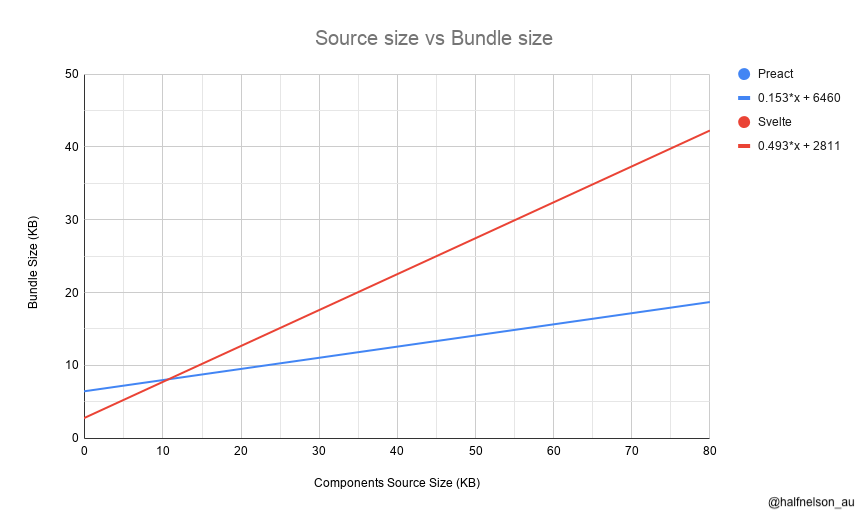
Being optimized for tree-shaking is just another way to express the progressive nature of the framework. The good thing is that you don’t end up with any surprises once you ship. This makes tracking down things a lot easier in the long run.
If you have been following my blog you might think that TypeScript is a very relevant topic to me. Actually, my TypeScript + React is my most popular resource on this blog.
The @types/react package is excellently written and maintained, but it is a third-party add-on. There might be some differences, and also occasions where the framework and its types are out of sync. Not to mention that types need to be versioned differently as their bugfixes progress differently.
Preact ships types with each release. It is also written in TypeScript, but makes use of adding types via JSDoc comments and maintaining additional types in .d.ts files. Preact is actually an excellent case-study for this approach. If you’re interested, I really invite you to browse through the source. Start here, with the createElement function. You much likely see TypeScript usage as you’ve never seen it before.
To stay as small as possible, Preact gets rid of lots of internal React functionality that you would rarely use in your day to day work. Things include support for React.children, PureComponent, forwardRef, etc. Legacy functionality that’s deprecated, but still supported. Framework internals. That kind of thing. This also means that things like hooks are not part of the main package, as everything in Preact is opt-in.
But Preact is designed to be a drop-in replacement for React, so this functionality is required by legacy applications, by frameworks like Next.js, or maybe by the component library that you include in your application. Preact patches this functionality via their preact/compat library.
This library includes all hooks, as well as patches for everything that was intentionally dropped to reach the 3KB goal. There are some guides on the Preact website on how to alias React to work with Preact, but my most favorite way is NPM aliasing.
NPM aliases install NPM or GitHub packages under a different name. That way you can point react to preact-compat, and the module resolution of Node figures out things on its own. I switched to Preact for all my Next.js projects, and all it took me was adding those lines:
{
  //...
  "dependencies": {
    "preact": "^10.4.6",
    "preact-render-to-string": "^5.1.10",
    "react": "github:preact-compat/react#1.0.0",
    "react-dom": "github:preact-compat/react-dom#1.0.0",
    "react-ssr-prepass": "npm:preact-ssr-prepass@^1.0.1",
    //...
  }
}
And, of course, removing the old installations of react and react-dom. Switching to Preact shaved off 110 KB of minified production JavaScript, which resulted in 34 KB of minified + gzipped JavaScript.
Aliasing for other frameworks can work differently. Check out how to alias for popular bundlers and dev environments here.
Web components are always a good way to start a hot discussion on Twitter. And there seems to be this existential divide between people who prefer their shiny tech framework, and others who love “using the platform”. I love that Preact doesn’t give a damn about this discussion. It just loves and supports both sides.
There’s a little library called preact-custom-element that allows you to register you Preact components as web components.
import register from 'preact-custom-element';
import { h } from 'preact';
import { useState } from 'preact/hooks';function Counter() {
const [count, setCount] = useState(0)
return <div>
{count}
<button
onClick={() => setState(prev => prev + 1)}>
Increment
</button>
</div>
}
register(Counter, 'my-counter')
Preact also allows you to think of web components not as an authoring layer for your apps, rather than a compile target or distribution possibility. You still write your apps and components with JSX in the virtual DOM, just as you are used to from React. But it’s easy to compile to a web component for distribution. Since Preact is so small, it also makes sense to use it as a web component run-time. Pick the level where you want to draw the line to enter web components land: Down at the presentational components, up at a widget level, or an entire application? All of it? It almost comes for free.
I love React for its technical ingenuity and have the utmost respect for its core members and the innovation they bring along. Plus, members like Dan Abramov also put the human at the center and help foster a welcoming community.
Still, React is a framework by Facebook and for Facebook. It solves Facebook’s needs first, and it’s just coincidence that they have a lot in common with the needs of everybody else. Personally, I got weary of buying into a framework that is developed by a big tech corporation.
And you know… there’s an ethical dilemma.
Preact is independent. It is backed by Google projects, sure, but it’s not a Google framework. This also means that the team can work on things that would not end up on React’s roadmap if it’s not part of React’s overall goals. Preact ships an official router. Preact has an official web components layer. The Preact team ships a way to write without a build step.
I’m aware that those things exist for React as well. But it’s an explicit non-goal of the React team to provide everything.
Independence gives Preact the ability to innovate in certain areas, like performance and compatibility with the broader web ecosystem.
There are a few gotchas that need to be pointed out.
Other than that, I haven’t found any caveats. It’s fun to use. As fun to use as React. Maybe even a little more…
It has Context. Apparently the lack of Context is a myth that won’t fade!
If you can spare an hour, I recommend watching those two talks.
And if using Facebook’s libraries keeps you up at night, take a look at this project by Andy Bell.
此内容由惯性聚合(RSS阅读器)自动聚合整理,仅供阅读参考。 原文来自 — 版权归原作者所有。