
惯性聚合 高效追踪和阅读你感兴趣的博客、新闻、科技资讯
阅读原文 在惯性聚合中打开

推荐订阅源

Recent Commits to openclaw:main
L
LangChain Blog
月光博客
月光博客
OSCHINA 社区最新新闻
OSCHINA 社区最新新闻
博客园 - 【当耐特】
宝玉的分享
宝玉的分享
让小产品的独立变现更简单 - ezindie.com
Last Week in AI
Last Week in AI
人人都是产品经理
人人都是产品经理
博客园_首页
T
Tailwind CSS Blog
P
Proofpoint News Feed
雷峰网
雷峰网
D
Darknet – Hacking Tools, Hacker News & Cyber Security
IT之家
IT之家
V
Vulnerabilities – Threatpost
阮一峰的网络日志
阮一峰的网络日志
C
CERT Recently Published Vulnerability Notes
Attack and Defense Labs
S
Schneier on Security
Security Archives - TechRepublic
L
Lohrmann on Cybersecurity
V
Visual Studio Blog
云风的 BLOG
云风的 BLOG
WordPress大学
WordPress大学
The Register - Security
N
Netflix TechBlog - Medium
Hugging Face - Blog
Hugging Face - Blog
Project Zero
Project Zero
博客园 - 叶小钗
F
Full Disclosure
大猫的无限游戏
大猫的无限游戏
Latest news
Latest news
S
SegmentFault 最新的问题
C
Cyber Attacks, Cyber Crime and Cyber Security
Google Online Security Blog
Recorded Future
Recorded Future
Cyber Security Advisories - MS-ISAC
Hacker News - Newest:
Hacker News - Newest: "LLM"
腾讯CDC
L
LINUX DO - 最新话题
Google DeepMind News
P
Privacy International News Feed
I
InfoQ
F
Fortinet All Blogs
Vercel News
Vercel News
H
Hackread – Cybersecurity News, Data Breaches, AI and More
T
Threatpost
T
Tenable Blog
B
Blog RSS Feed

oida.dev | TypeScript, Rust

TypeScript's `erasableSyntaxOnly` Flag Unsafe for work Tokio: Macros Tokio: Channels Tokio: Getting Started Network Applications on the Tokio Stack Remake, Remodel, Reduce. The `never` type and error handling in TypeScript 5 Inconvenient Truths about TypeScript Refactoring in Rust: Introducing Traits Refactoring in Rust: Abstraction with the Newtype Pattern Announcing the TypeScript Cookbook TypeScript: Iterating over objects The road to universal JavaScript 10 years of oida.dev Rust: Tiny little traits The TypeScript converging point How not to learn TypeScript Getting started with Rust Introducing Slides and Coverage TypeScript: The humble function overload TypeScript + React: Children types are broken TypeScript: In defense of any Rust: Enums to wrap multiple errors Dissecting Deno Error handling in Rust TypeScript: Unexpected intersections Upgrading Node.js dependencies after a yarn audit TypeScript: Array.includes on narrow types TypeScript + React: Typing Generic forwardRefs shared, util, core: Schroedinger's module names Learning Rust and Go TypeScript: Narrow types in catch clauses TypeScript: Low maintenance types Tidy TypeScript: Name your generics Tidy TypeScript: Avoid traditional OOP patterns Tidy TypeScript: Prefer type aliases over interfaces Tidy TypeScript: Prefer union types over enums My new book: TypeScript in 50 Lessons Go Preact! ❤️ this in JavaScript and TypeScript TypeScript and ECMAScript Modules TypeScript + React: Why I don't use React.FC TypeScript + React: Component patterns TypeScript: Augmenting global and lib.dom.d.ts Vite with Preact and TypeScript TypeScript: Union to intersection type 11ty: Generate Twitter cards automatically Are large node module dependencies an issue? TypeScript: Variadic Tuple Types Preview TypeScript: Improving Object.keys Remake, Remodel. Part 4. TypeScript + React: Typing custom hooks with tuple types TypeScript: Assertion signatures and Object.defineProperty TypeScript: Check for object properties and narrow down type Boolean in JavaScript and TypeScript void in JavaScript and TypeScript Symbols in JavaScript and TypeScript Why I use TypeScript TypeScript + React: Extending JSX Elements TypeScript: Validate mapped types and const context TypeScript: Match the exact object shape TypeScript: The constructor interface pattern Streaming your Meetup - Part 4: Directing and Streaming with OBS Streaming your Meetup - Part 3: Speaker audio Streaming your Meetup - Part 2: Speaker video Streaming your Meetup - Part 1: Basics and Projector TypeScript and React Guide: Added a new styles chapter TypeScript and React Guide: Added a new render props chapter TypeScript and React: Styles and CSS TypeScript and React TypeScript and React Guide: Added a new prop types chapter TypeScript without TypeScript -- JSDoc superpowers TypeScript: Mapped types for type maps JAMStack vs serverless web apps The Unsung Benefits of JAMStack Sites TypeScript: Ambient modules for Webpack loaders My most favourite talks in 2018 TypeScript and React Guide: Added a new context chapter TypeScript: Built-in generic types TypeScript: Type predicates JSX is syntactic sugar TypeScript and React Guide: Added a new hooks chapter Getting your CfP application right FAQ on our Angular Connect Talk: Automating UI development TypeScript and Substitutability From Medium: Deconfusing Pre- and Post-processing From Medium: PostCSS misconceptions Saving and scraping a website with Puppeteer Cutting the mustard - 2018 edition Wordpress as CMS for your JAMStack sites My most favourite podcast episodes in 2017 My most favourite talks in 2017 My most favourite books in 2017 The Best Request Is No Request, Revisited Not so hidden figures - Organizing ScriptConf My podcast journey to ScriptCast Grid layout, grid layout everywhere! #scriptconf and #devone Object streams in Node.js
Debugging Node.js apps in TypeScript with Visual Studio Code
2018-03-14 · via oida.dev | TypeScript, Rust

When developing, there’s three things that I absolutely enjoy:

  • Creating Node.js apps
  • Working with TypeScript
  • Debugging said apps in Visual Studio Code

I never combined all three of them. I developed Node apps and used the great debugging possibilities with VS Code. Or I wrote my Node.js apps in TypeScript using tsc or ts-node. But together, nope!

That’s where the magic is supposed to be, isn’t it? So I decided to get started with the complete setup. Since it took me a while and it requires some steps, I thought I better share that with you.

I’m using Node 9.8, VS Code 1.21 and TypeScript 2.7. Things might be different if you are using other versions.

Let’s go!

Setting up TypeScript #

I tried to make ts-node work for this setup, and made good progress. But at some point I was stuck and didn’t manage to debug my whole application. So I switched to a mode where I compile TypeScript first, then run debugging on the generated JavaScript files with source maps.

My TypeScript configuration tsconfig.json is pretty standard. I use a pretty late ES target (having Node an all), and I use commonjs as module format to work nicely with Node.js. The folder structure is easy: I have my TypeScript files in src, my output in bin.

{
"compilerOptions": {
"target": "es2017",
"module": "commonjs",
"allowJs": true,
"checkJs": true,
"outDir": "./bin",
"sourceMap": true,
"strict": true,
"noImplicitAny": true,
"strictNullChecks": true
},
"include": [
"src/**/*.ts"
],
"exclude": [
"node_modules"
]
}

There are two important settings that need to be made. First we activate source maps, otherwise VSCode wouldn’t know how to map the generated output to your sources.

Second, I set "esModuleInterop" to true. TypeScript will transform import statements to require statements. We don’t need to work with native import statements on Node anyway.

TypeScript is set up! Once you run tsc in the terminal, you can see the output: generated JavaScript files and source maps along with it.

VSCode task config #

Now that TypeScript is set up, let’s do the same with VSCode. To make debugging work and pleasant, we want to set up an automated build task that runs before debugging. So every time we hit the debug button, we compile our updated TypeScript sources into JavaScript.

VSCode is pretty clever, as based on your file structure it automatically finds possible commands to run. Hit ⌘ + ⇧ + B on Mac or Ctrl + Shift + B on Windows to see possible build tasks.
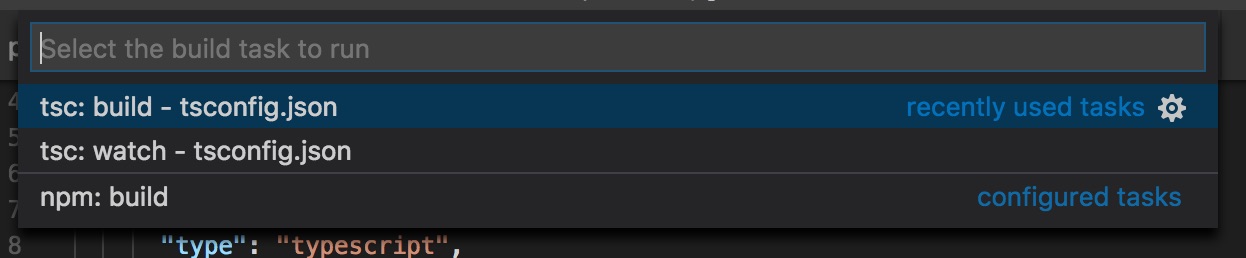
Build tasks

You can run them by selecting them. If you hit the wheel icon next to it, VSCode creates a tasks.json in the .vscode project folder, with all the setup you need. See below:

{
"version": "2.0.0",
"tasks": [
{
"type": "typescript",
"tsconfig": "tsconfig.json",
"problemMatcher": [
"$tsc"
]
}
]
}

Alright! Build task is set up! Let’s debug.

VSCode debug config #

The last thing we have to set up is the debug configuration in the launch.json file. You can generate this JSON file by clicking on the debug tab, and selecting “Add configuration” from the dropdown.
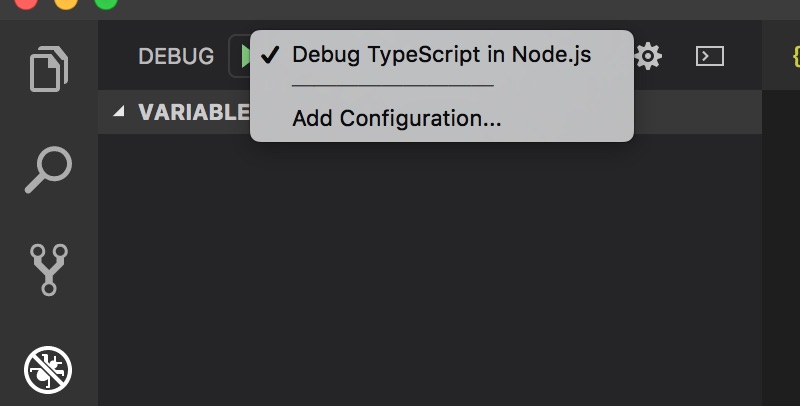
Add configuration in VSCode

Select “Node.js: Launch Program” and you get a couple of fields pre-filled. The others, the more important ones, we have to set ourselves:

  • "preLaunchTask": "typescript". This is the task we defined one step earlier. Use the identifier you specified there.
  • "program": "${workspaceFolder}/src/index.ts". The program to launch. This is your application’s entry point. In that case the index TypeScript file.
  • "cwd": "${workspaceFolder}". Where to execute this program. I usually select the workspace folder.
  • "protocol": "inspector". The protocol to communicate between app and debugger. For Node versions greater than 6, use inspector.
  • "outFiles": [ "${workspaceFolder}/bin/**/*.js"]. An array to the generated output files and source maps. This is what the debugger is actually executing.

The whole file looks like this:

{
"version": "0.2.0",
"configurations": [
{
"type": "node",
"request": "launch",
"name": "Debug TypeScript in Node.js",
"preLaunchTask": "typescript",
"program": "${workspaceFolder}/src/index.ts",
"cwd": "${workspaceFolder}",
"protocol": "inspector",
"outFiles": [
"${workspaceFolder}/bin/**/*.js"
]
}
]
}

And with that, you are all set up. Press the ▶️ button the debug view. You see your compile task executing, and once it’s finished you are right in the debug session.
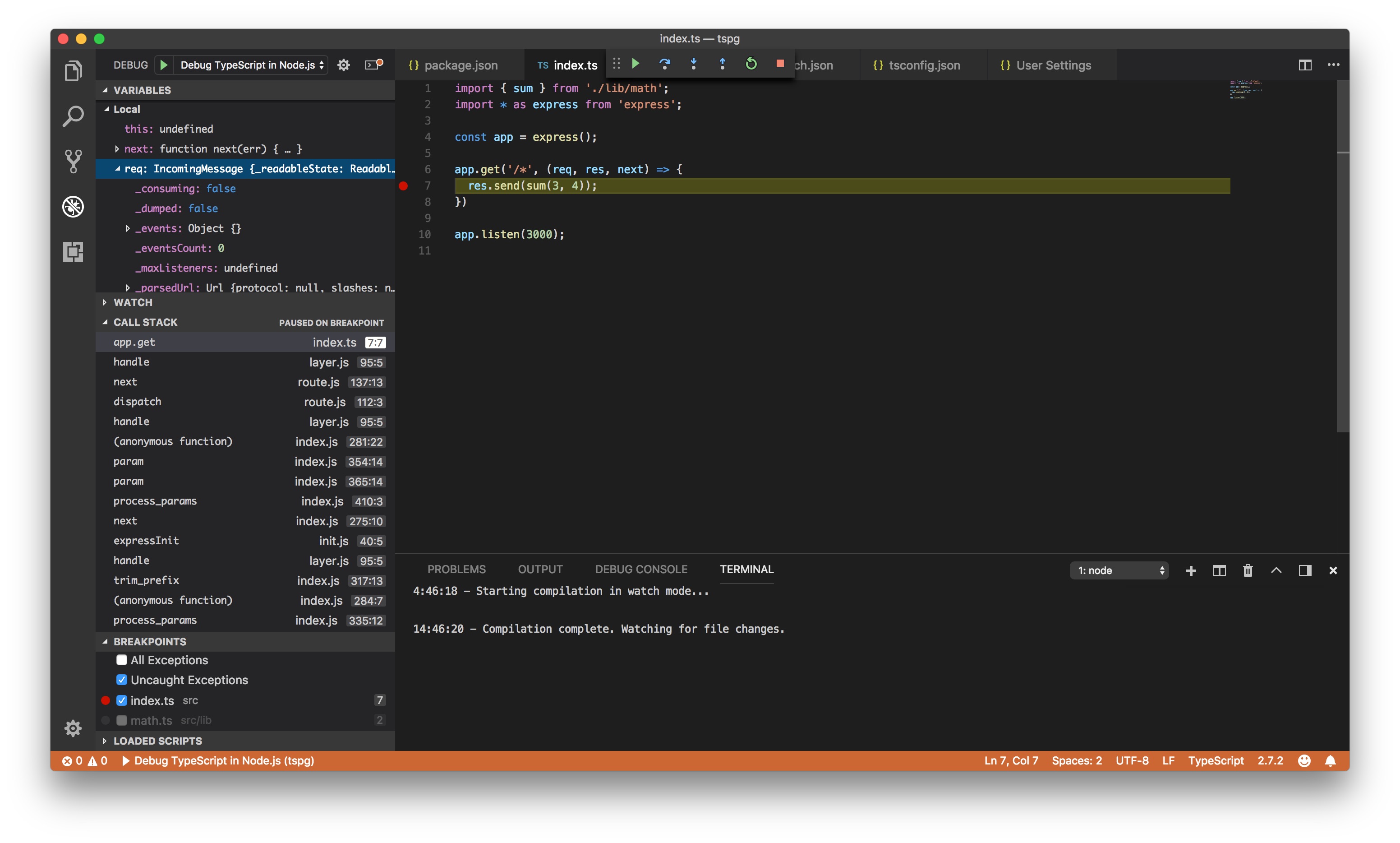
VSCode in action

Try setting a breakpoint somewhere and have fun with all the details!

Related Articles