


Before ECMAScript 2015 object literals (also named object initializers) in JavaScript were quite elementary. It was possible to define 2 types of properties:
{ name1: value1 }{ get name(){..} } and setters { set name(val){..} } for computed property valuesSadly, the object literal possibilities match into a single example:
var myObject = {
myString: 'value 1',
get myNumber() {
return this._myNumber;
},
set myNumber(value) {
this._myNumber = Number(value);
},
};
myObject.myString; // => 'value 1'
myObject.myNumber = '15';
myObject.myNumber; // => 15
JavaScript is a prototype based language, so everything is an object. It is a must that language to provide easy constructs when it comes to objects creation, configuration and accessing prototypes.
It's a common task to define an object and setup it's prototype. I always felt that setting up the prototype should be allowed directly in the object literal, using a single statement.
Unfortunately the limitations of the literal didn't allow to achieve that with a straightforward solution. You had to use Object.create() in combination with the object literal to setup the prototype:
var myProto = {
propertyExists: function(name) {
return name in this;
},
};
var myNumbers = Object.create(myProto);
myNumbers['array'] = [1, 6, 7];
myNumbers.propertyExists('array'); // => true
myNumbers.propertyExists('collection'); // => false
In my opinion, it's an uncomfortable solution. JavaScript is prototype based, why so much pain to create objects from a prototype?
Fortunately the language is changing. Many things that were relatively frustrating in JavaScript are solved step by step.
This article demonstrates how ES2015 solves the problems described above and improves the object literal with additional goodies:
super callsAlso let's look in the future and meet the new proposals (at stage 2): rest and spread properties of an object.

As you know already, one option to access the prototype of an existing object is applying the getter property __proto__:
var myObject = {
name: 'Hello World!',
};
myObject.__proto__; // => {}
myObject.__proto__.isPrototypeOf(myObject); // => true
myObject.__proto__ returns the prototype object of myObject.
Notice that the usage of object.__proto__ as a getter/setter is not recommended. Alternatives Object.getPrototypeOf() and Object.setPrototypeOf() should be considered instead.
The good part is that ES2015 allows to use the literal __proto__ as the property name to setup the prototype right in the object literal { __proto__: protoObject }.
Let's use __proto__ property for an object initialization, and improve the bitter situation that was described in the introduction:
var myProto = {
propertyExists: function(name) {
return name in this;
},
};
var myNumbers = {
__proto__: myProto,
array: [1, 6, 7],
};
myNumbers.propertyExists('array'); // => true
myNumbers.propertyExists('collection'); // => false
myNumbers object is created with the prototype myProto using a special property name __proto__.
The object is created in a single statement, without additional functions like Object.create().
As seen, coding with __proto__ is simple. I always prefer simple and obvious solutions.
A bit out of theme. I consider an oddity that simple and flexible solutions require a big amount of work and design. If a solution is simple, you may consider that it was easy to design it. However it's vice versa:
If something looks too complex or not comfortable to use, probably it wasn't considered enough.
What is your opinion about simplicity? (feel free to write a comment below)
Even if __proto__ seems simple, there are some particular scenarios that you should be aware of.
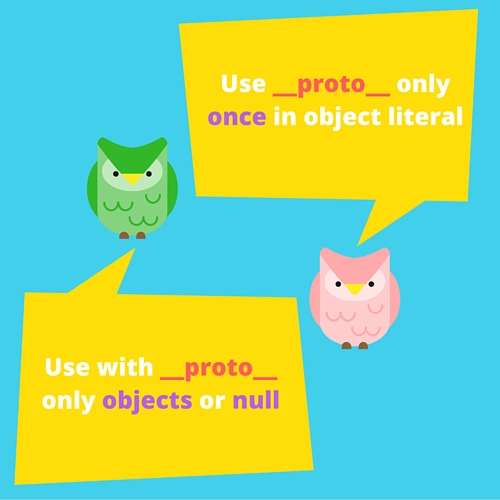
It is allowed to use __proto__ only once in the object literal. On duplication JavaScript throws an error:
var object = {
__proto__: {
toString: function() {
return '[object Numbers]'
}
},
numbers: [1, 5, 89],
__proto__: {
toString: function() {
return '[object ArrayOfNumbers]'
}
}
};
The object literal in the example is using two times __proto__ property, which is not allowed. An error SyntaxError: Duplicate __proto__ fields are not allowed in object literals is thrown in this situation.
JavaScript constraints to use only an object or null as a value for __proto__ property. Any attempt to use primitive types (strings, numbers, booleans) or undefined is simply ignored and does not change object's prototype.
Let's see this limitation in an example:
var objUndefined = {
__proto__: undefined,
};
Object.getPrototypeOf(objUndefined); // => {}
var objNumber = {
__proto__: 15,
};
Object.getPrototypeOf(objNumber); // => {}
The object literals are using undefined and number 15 to setup __proto__ value. Because only an object or null are allowed to be prototypes, objUndefined and objNumber still have their default prototypes: plain JavaScript objects {}. The __proto__ value is ignored.
Of course, it would be weird to attempt to use primitive types to setup object's prototype. The constraint applied here is expected.
Also be careful when the object literal has a computed property name that evaluates to '__proto__' string: { ['__proto__']: protoObj }. The property created such way does not change object's prototype, but simply creates an owned property with the key '__proto__'.
It is possible to use a shorter syntax to declare methods in object literals, in a way that function keyword and : colon to be omitted. This is named shorthand method definition.
Let's define some methods using the new short form:
var collection = {
items: [],
add(item) {
this.items.push(item);
},
get(index) {
return this.items[index];
},
};
collection.add(15);
collection.add(3);
collection.get(0); // => 15
add() and get() are methods defined in collection using a short form.
A nice benefit is that methods declared this way are named functions, which is useful for debugging purposes. Executing collection.add.name from previous example returns the function name 'add'.
An interesting improvement is the ability to use super keyword as way to access inherited properties from the prototype chain. Take a look at the following example:
var calc = {
numbers: null,
sumElements() {
return this.numbers.reduce(function(a, b) {
return a + b;
});
},
};
var numbers = {
__proto__: calc,
numbers: [4, 6, 7],
sumElements() {
// Verify if numbers is not null or empty
if (this.numbers == null || this.numbers.length === 0) {
return 0;
}
return super.sumElements();
},
};
numbers.sumElements(); // => 17
calc is the prototype of numbers object. In the method sumElements of the numbers it is possible to access the methods from the prototype using super keyword: super.sumElements().
This is a method override.
Eventually super is a shortcut to access the inherited properties from the prototype chain of the object.
In the previous example you may try to call the prototype directly executing calc.sumElements(). However super.sumElements() is a correct option because it accesses the prototype chain of the object. And makes sure that sumElements() method from the prototype accesses correctly the array using this.numbers.
super presence clearly suggests that inherited properties are about to be used.
super can be used only inside the shorthand method definition in an object literal.
If trying to access it from a normal method declaration { name: function() {} }, JavaScript throws an error:
var calc = {
numbers: null,
sumElements() {
return this.numbers.reduce(function(a, b) {
return a + b;
});
},
};
var numbers = {
__proto__: calc,
numbers: [4, 6, 7],
sumElements: function() {
// Verify if numbers is not null or empty
if (this.numbers == null || this.numbers.length === 0) {
return 0;
}
return super.sumElements();
},
};
// Throws SyntaxError: 'super' keyword unexpected here
numbers.sumElements();
The method sumElements is defined as a property: sumElements: function() {...}. Because super requires to be used only inside shorthand methods, calling it in such situation throws SyntaxError: 'super' keyword unexpected here.
This restriction does not affect much the way object literals are declared. Mostly is preferable to use shorthand method definitions because of a shorter syntax.
Before ES2015, the property names in object initializers were literals, mostly static strings. To create a property with calculated name, you had to use property accessors:
function prefix(prefStr, name) {
return prefStr + '_' + name;
}
var object = {};
object[prefix('number', 'pi')] = 3.14;
object[prefix('bool', 'false')] = false;
object; // => { number_pi: 3.14, bool_false: false }
Certainly, this way to define properties is by far pleasant.
Computed property names solves the problem elegantly.
When evaluating the property name from an expression, place the code into square brackets {[expression]: value}. The expression evaluation result becomes the property name.
I really like the syntax: short and simple.
Let's improve the above example:
function prefix(prefStr, name) {
return prefStr + '_' + name;
}
var object = {
[prefix('number', 'pi')]: 3.14,
[prefix('bool', 'false')]: false,
};
object; // => { number_pi: 3.14, bool_false: false }
[prefix('number', 'pi')] sets the property name by evaluating prefix('number', 'pi') expression, which is 'number_pi'.
Correspondingly [prefix('bool', 'false')] sets the second property name to 'bool_false'.
Symbols also can be used as computed property names. Just make sure to include them in brackets: { [Symbol('name')]: 'Prop value' }.
For example, let's use the special property Symbol.iterator and iterate over the own property names of an object. Check the following example:
var object = {
number1: 14,
number2: 15,
string1: 'hello',
string2: 'world',
[Symbol.iterator]: function *() {
var own = Object.getOwnPropertyNames(this),
prop;
while(prop = own.pop()) {
yield prop;
}
}
}
[...object]; // => ['number1', 'number2', 'string1', 'string2']
[Symbol.iterator]: function *() { } defines a property that is used to iterate over owned properties of the object. The spread operator [...object] uses the iterator and returns the list of owned properties.
Rest and spread properties of the object literal are a proposal in draft (stage 2), which makes them a candidate for a new JavaScript version.
They are an equivalent of the spread and rest operator already available for arrays in ECMAScript 2015.
Rest properties allows to collect the properties from an object that are left after a destructuring assignment.
The following example collects the remaining properties after destructuring object:
var object = {
propA: 1,
propB: 2,
propC: 3,
};
let { propA, ...restObject } = object;
propA; // => 1
restObject; // => { propB: 2, propC: 3 }
Spread properties allows to copy into an object literal the owned properties from a source object.
In this example the object literal collects into object additional properties from source object:
var source = {
propB: 2,
propC: 3,
};
var object = {
propA: 1,
...source,
};
object; // => { propA: 1, propB: 2, propC: 3 }
JavaScript is making big steps.
Even a relatively small construct as object literal was considerable improved in ECMAScript 2015. And a bunch of new features are in draft proposal.
You can setup the object's prototype directly from the initiliazer using __proto__ property name. Which is easier than dealing with Object.create().
Notice that __proto__ is a part of the annex B of the ES2015 standard, which usage is discouraged. This annex implementation is required for browsers, but optional for other environments.
NodeJS 4, 5 and 6 however support this feature.
The method declaration has now a shorter form, so you don't have to type function keyword. And inside shorthand method it's possible to use super keyword, which allows easy access to inherited properties from the prototype chain of the object.
If a property name is calculated on runtime, now you can use computed property names [expression] to initialize objects.
Indeed, object literals are now cool!
此内容由惯性聚合(RSS阅读器)自动聚合整理,仅供阅读参考。 原文来自 — 版权归原作者所有。