


Object destructuring is a useful JavaScript feature to extract properties from objects and bind them to variables.
Even better, object destructuring can extract multiple properties in a single statement, can access properties from nested objects, and can set a default value if the property doesn't exist.
This post will help you understand how to use object destructuring in JavaScript.
Imagine you'd like to extract some properties of an object. In a pre-ES2015 environment, you'd need to write the following code:
var hero = {
name: 'Batman',
realName: 'Bruce Wayne'
};
var name = hero.name;
var realName = hero.realName;
console.log(name); // => 'Batman',
console.log(realName); // => 'Bruce Wayne'
The property hero.name value is assigned to the variable name. Same way hero.realName value is assigned to realName.
By writing var name = hero.name, you have to mention the name binding 2 times, and the same for realName. This way of accessing properties and assigning them to variables requires boilerplate code.
That's where the object destructuring syntax is useful: you can read a property and assign its value to a variable without duplicating the property name. What is more, you can read multiple properties from the same object in just one statement!
Let's refactor the above script and apply the object destructuring to access the properties name and realName:
const hero = {
name: 'Batman',
realName: 'Bruce Wayne'
};
const { name, realName } = hero;
console.log(name); // => 'Batman',
console.log(realName); // => 'Bruce Wayne'
const { name, realName } = hero is an object destructuring assignment. This statement defines the variables name and realName, then assigns to them the values of properties hero.name and hero.realName correspondingly.
Compare two approaches to accessing the object properties:
const name = hero.name;
const realName = hero.realName;
// is equivalent to:
const { name, realName } = hero;
it's visible that object destructuring is handier because neither the property names nor the object variable is duplicated.
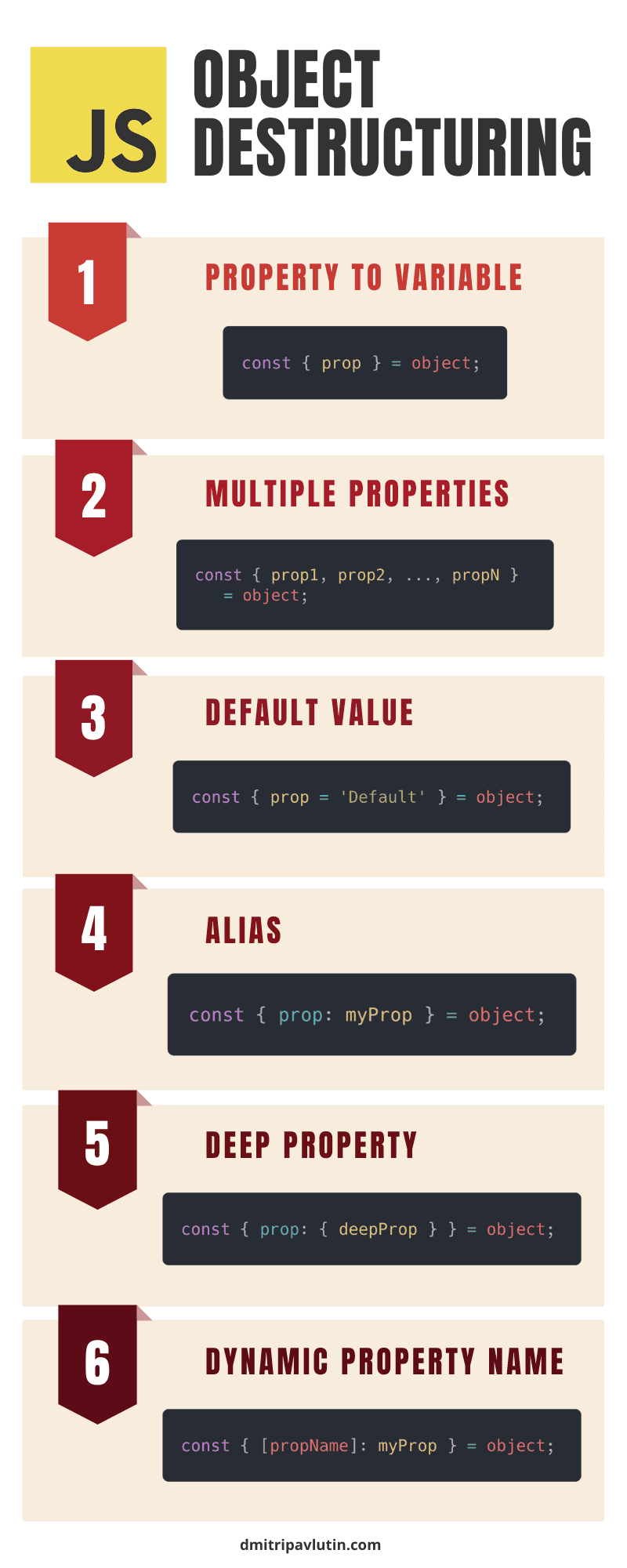
The syntax of object destructuring is pretty simple:
const { identifier } = expression;
Where identifier is the name of the property to access and expression should evaluate to an object. After the destructuring, the variable identifier contains the property value.
Here's the equivalent code using a property accessor:
const identifier = expression.identifier;
Let's try object destructuring in practice:
const hero = {
name: 'Batman',
realName: 'Bruce Wayne'
};
const { name } = hero;
console.log(name); // => 'Batman'
The statement const { name } = hero defines the variable name and initializes it with the value of hero.name property.
To destructure the object into multiple properties, enumerate as many properties as you like adding commas , in-between:
const { identifier1, identifier2, ..., identifierN } = expression;
Where identifier1, ..., identifierN are names of properties to access, and expression should evaluate to an object. After the destructuring, the variables identifier1, ..., identifierN contain corresponding properties values.
Here's the equivalent code:
const identifier1 = expression.identifier1;
const identifier2 = expression.identifier2;
// ...
const identifierN = expression.identifierN;
Let's take a look again at the example from the first section, where 2 properties are extracted:
const hero = {
name: 'Batman',
realName: 'Bruce Wayne'
};
const { name, realName } = hero;
console.log(name); // => 'Batman',
console.log(realName); // => 'Bruce Wayne'
const { name, realName } = hero creates 2 variables name and realName assigned with values of corresponding properties hero.name and hero.realName.
If the destructured object doesn't have the property specified in the destructuring assignment, then the variable is assigned with undefined. Let's see how it happens:
const hero = {
name: 'Batman',
realName: 'Bruce Wayne'
};
const { enemies } = hero;
console.log(enemies); // => undefined
After destructuring the variable enemies is undefined because the property enemies doesn't exist in the object hero.
Fortunately, you can set a default value if the property doesn't exist in the destructured object:
const { identifier = defaultValue } = expression;
Where identifier is the name of the property to access and expression should evaluate to an object. After destructuring, the variable identifier contains the property value or is assigned with defaultValue if the property identifier doesn't exist.
Here's the equivalent code:
const identifier = expression.identifier === undefined ?
defaultValue : expression.identifier;
Let's change the previous code sample, and use the default value feature:
const hero = {
name: 'Batman',
realName: 'Bruce Wayne'
};
const { enemies = ['Joker'] } = hero;
console.log(enemies); // => ['Joker']
Now, instead of being undefined, the variable enemies defaults to ['Joker'].
To create variables of different names than the properties you can use the aliasing feature of object destructuring.
const { identifier: aliasIdentifier } = expression;
identifier is the name of the property to access, aliasIdentifier is the variable name, and expression should evaluate to an object. After destructuring, the variable aliasIdentifier contains the property value.
The equivalent code:
const aliasIdentifier = expression.identifier;
Here's an example of an object destructuring alias feature:
const hero = {
name: 'Batman',
realName: 'Bruce Wayne'
};
const { realName: secretName } = hero;
console.log(secretName); // => 'Bruce Wayne'
Looking at const { realName: secretName } = hero, the destructuring defines a new variable secretName (alias variable) and assigns to it the value of hero.realName.
In the previous examples, the objects were plain: the properties have primitive data types (e.g. strings).
But objects can be nested in other objects. In other words, some properties can contain objects.
In such a case, you still can use the object destructuring and access properties from deep. Here's the basic syntax:
const { nestedObjectProp: { identifier } } = expression;
nestedObjectProp is the name of the property that holds a nested object. identifier is the property name to access from the nested object. expression should evaluate to the destructured object.
After destructuring, the variable identifier contains the property value of the nested object.
The above syntax is equivalent to:
const identifier = expression.nestedObjectProp.identifier;
The level of nesting to extract properties from is unlimited. If you want to extract properties from deep, just add more nested curly braces:
const { propA: { propB: { propC: { .... } } } } = object;
For example, the object hero contains a nested object { city: 'Gotham'}.
const hero = {
name: 'Batman',
realName: 'Bruce Wayne',
address: {
city: 'Gotham'
}
};
// Object destructuring:
const { address: { city } } = hero;
console.log(city); // => 'Gotham'
The object destructuring const { address: { city } } = hero accesses the property city from the nested object and creates a variable city having the property value.
You can extract into variables properties with a dynamic name (the property name is known at runtime):
const { [propName]: identifier } = expression;
propName expression should evaluate to a property name (usually a string), and the identifier should indicate the variable name created after destructuring. expression should evaluate to the object you'd like to destructure.
An equivalent code without object destructuring:
const identifier = expression[propName];
Let's look at an example where prop holds the property name:
const hero = {
name: 'Batman',
realName: 'Bruce Wayne'
};
const prop = 'name';
const { [prop]: name } = hero;
console.log(name); // => 'Batman'
const { [prop]: name } = hero is an object destructuring that assigns to variable name the value hero[prop], where prop is a variable holding the property name.
The rest syntax is useful to collect the remaining properties after destructuring:
const { identifier, ...rest } = expression;
Where identifier is the name of the property to access and expression should evaluate to an object. After destructuring, the variable identifier contains the property value. rest variable is a plain object with the remaining properties.
For example, let's extract the property name, but collect the rest of the properties into a variable rest:
const hero = {
name: 'Batman',
realName: 'Bruce Wayne',
company: 'WayneCorp'
};
const { name, ...rest } = hero;
console.log(rest); // => { realName: 'Bruce Wayne', company: 'WayneCorp' }
The destructuring const { name, ...realHero } = hero extracts the property name. Also, the remaining properties (realName and company) are collected into rest.
As seen in many examples before, the object destructuring binds property values to variables.
The object destructuring can assign values to variables declared using const, let, and var. Or even assign to an already existing variable.
For example, here's how to destructure using let statement:
// let
const hero = {
name: 'Batman',
};
let { name } = hero;
console.log(name); // => 'Batman'
How to destructure using var statement:
// var
const hero = {
name: 'Batman',
};
var { name } = hero;
console.log(name); // => 'Batman'
And how to destructure to an already declared variable:
// existing variable
let name;
const hero = {
name: 'Batman',
};
({ name } = hero);
console.log(name); // => 'Batman'
I find it satisfying to combine for..of cycle with object destructuring to extract the property right away:
const heroes = [
{ name: 'Batman' },
{ name: 'Joker' }
];
for (const { name } of heroes) {
console.log(name); // logs 'Batman', 'Joker'
}
Object destructuring can be placed anywhere where an assignment happens.
For example, you could destruct an object right inside the parameter of a function:
const heroes = [
{ name: 'Batman' },
{ name: 'Joker' }
];
const names = heroes.map(
function({ name }) {
return name;
}
);
console.log(names); // => ['Batman', 'Joker']
function({ name }) destructures the function parameter and creates a variable name holding the value of name property.
Object destructuring is a powerful feature to extract properties from an object and bind these values to variables.
I like object destructuring due to the concise syntax and the ability to extract multiple variables in one statement.
Have questions regarding object destructuring? Ask in a comment below!
此内容由惯性聚合(RSS阅读器)自动聚合整理,仅供阅读参考。 原文来自 — 版权归原作者所有。