


Hooks ease the management of state and side effects inside functional React components. Moreover, repeated logic can be extracted into a custom hook to reuse across the application.
Hooks heavily rely on JavaScript closures. That's why hooks are so expressive and simple. But closures are sometimes tricky.
One issue you can encounter when using hooks is stale closure. And it might be difficult to identify a stale closure!
Let's start with distilling what stale closure is. Then you'll see how a stale closure affects React hooks, and how to solve that.
A factory function createIncrement(incBy) returns a tuple of increment and log functions. When called, increment() function increases the internal value by incBy, while log() simply logs a message with the information about the current value:
function createIncrement(incBy) {
let value = 0;
function increment() {
value += incBy;
console.log(value);
}
const message = `Current value is ${value}`;
function log() {
console.log(message);
}
return [increment, log];
}
const [increment, log] = createIncrement(1);
increment(); // logs 1
increment(); // logs 2
increment(); // logs 3
// Does not work!
log(); // logs "Current value is 0"
Try the demo.
[increment, log] = createIncrement(1) returns a tuple of functions: one function that increments the internal value, and another that logs the current value.
Then the 3 invocations of increment() increment value up to 3.
Finally, the call of log() logs the message "Current value is 0". Hmm... this is unexpected because value equals 3.
log() is a stale closure. The closure log() has captured message variable having "Current value is 0".
Even if value variable gets incremented multiple times when calling increment(), the message variable doesn't update and always keeps an outdated value "Current value is 0".
The stale closure captures variables that have outdated values.
Let's see some approaches on how to fix the stale closure.
Fixing the stale log() requires closing the closure over the changed variable: value.
Let's move the statement const message = ...; into log() function body:
function createIncrement(incBy) {
let value = 0;
function increment() {
value += incBy;
console.log(value);
}
function log() {
const message = `Current value is ${value}`; // correct!
console.log(message);
}
return [increment, log];
}
const [increment, log] = createIncrement(1);
increment(); // logs 1
increment(); // logs 2
increment(); // logs 3
// Works!
log(); // logs "Current value is 3"
Try the fixed demo.
Now, after calling 3 times the increment() function, calling log() logs the actual value: "Current value is 3".
log() is no longer a stale closure. message accesses the actual value variable every time log() is called.
Let's study a common case of stale closure when using useEffect() hook.
Inside the component <WatchCount> the hook useEffect() logs every 2 seconds the value of count:
function WatchCount() {
const [count, setCount] = useState(0);
useEffect(function() {
setInterval(function log() {
console.log(`Count is: ${count}`);
}, 2000);
}, []);
return (
<div>
{count}
<button onClick={() => setCount(count + 1) }>
Increase
</button>
</div>
);
}
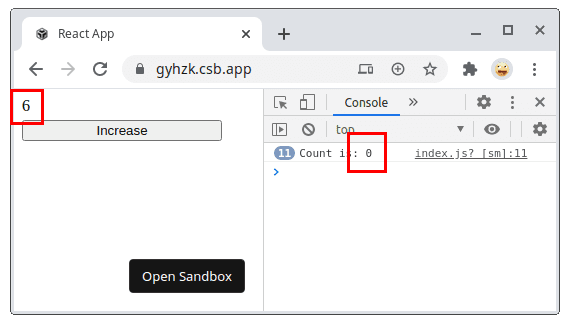
Open the demo and click a few times increase button. Then look at the console: every 2 seconds appears Count is: 0, although count state variable has been increased a few times.
Why does it happen?
At first render, the state variable count is initialized with 0.
After the component has mounted, useEffect() calls setInterval(log, 2000) timer function which schedules calling log() function every 2 seconds. Here, the closure log() captures count variable as 0.
Later, even if count increases when the Increase button is clicked, the log() closure called by the timer function every 2 seconds still uses count as 0 from the initial render. log() becomes a stale closure.
The solution is to let know useEffect() that the closure log() depends on count and properly handle the reset of the interval when count changes:
function WatchCount() {
const [count, setCount] = useState(0);
useEffect(function() {
const id = setInterval(function log() {
console.log(`Count is: ${count}`);
}, 2000);
return function() {
clearInterval(id);
}
}, [count]);
return (
<div>
{count}
<button onClick={() => setCount(count + 1) }>
Increase
</button>
</div>
);
}
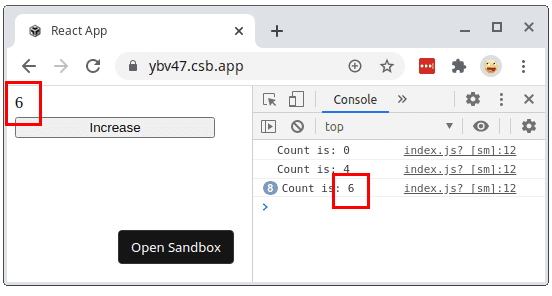
With the dependencies properly set, useEffect() updates the closure as soon as count changes.
Open the fixed demo and click a few times increase. The console will log the actual value of count.
Proper management of hooks dependencies is an efficient way to solve the stale closure problem.
I recommend enabling eslint-plugin-react-hooks, which detects forgotten dependencies.
On a side note, sometimes you can use a ref instead of a state in a React component. A ref is a mutable object whose value you access using ref.current, thus it's a benefit because you cannot get a stale closure on a ref. ref.current always evaluates to the actual value of the ref.
The component <DelayedCount> has 1 button Increase async that increments the counter asynchronously with 1 second delay.
function DelayedCount() {
const [count, setCount] = useState(0);
function handleClickAsync() {
setTimeout(function delay() {
setCount(count + 1);
}, 1000);
}
return (
<div>
{count}
<button onClick={handleClickAsync}>Increase async</button>
</div>
);
}
Now open the demo. Click quickly 2 times Increase async button. The counter gets updated only by 1, instead of the expected 2.
On each click setTimeout(delay, 1000) schedules the execution of delay() after 1 second. delay() captures the variable count as being 0.
Both delay() closures (because 2 clicks have been made) update the state to the same value: setCount(count + 1) = setCount(0 + 1) = setCount(1).
All because the delay() closure of the second click has captured the outdated count variable as being 0.
To fix the problem, let's use a functional way setCount(count => count + 1) to update count state:
function DelayedCount() {
const [count, setCount] = useState(0);
function handleClickAsync() {
setTimeout(function delay() {
setCount(count => count + 1);
}, 1000);
}
function handleClickSync() {
setCount(count + 1);
}
return (
<div>
{count}
<button onClick={handleClickAsync}>Increase async</button>
<button onClick={handleClickSync}>Increase sync</button>
</div>
);
}
Now setCount(count => count + 1) updates the count state inside delay().
Open the demo. Click Increase async quickly 2 times. The counter displays the correct value 2.
When a callback that returns the new state based on the previous one is supplied to the state update function, React makes sure that the latest state value is supplied as an argument to that callback:
setCount(alwaysActualStateValue => newStateValue);
That's why the stale closure problem that appears during state update is usually solved by using a functional way to update the state.
The stale closure problem occurs when a closure captures outdated variables.
An efficient way to solve stale closures is to correctly set the dependencies of React hooks. Or, in the case of a stale state, use a functional way to update the state.
The key takeaway is to try to supply hooks with closures that capture the freshest variables.
The next step to mastering React hooks is to be aware of 5 Mistakes to Avoid When Using React Hooks.
此内容由惯性聚合(RSS阅读器)自动聚合整理,仅供阅读参考。 原文来自 — 版权归原作者所有。