


this keyword has been a mystery for me for a long time.
From a background like Java, PHP or other standard language, this is the instance of the current object in the class method. this cannot be used outside the method and such a simple approach does not create confusion.
In JavaScript the situation is different: this is the context of a function invocation (a.k.a. execution). The language has 4 function invocation types:
alert('Hello World!')console.log('Hello World!')new RegExp('\\d')alert.call(undefined, 'Hello World!')Each invocation type defines the context in its way, so this behaves differently than the developer expects.

Moreover strict mode also affects the execution context.
The key to understanding
thiskeyword is having a clear view of function invocation and how it impacts the context.
This article focuses on the invocation explanation, how the function invocation influences this and demonstrates the common pitfalls of identifying the value of this.
Before starting, let's familiarize with a couple of terms:
parseInt function invocation is parseInt('15').this within function body.Function invocation is performed when an expression that evaluates to a function object is followed by an open parenthesis (, a comma separated list of arguments expressions and a close parenthesis ). For example parseInt('18').
A simple example of function invocation:
function hello(name) {
return 'Hello ' + name + '!';
}
// Function invocation
const message = hello('World');
hello('World') is a function invocation: hello expression evaluates to a function object, followed by a pair of parenthesis with the 'World' argument.
Function invocation expression cannot be a property accessor obj.myFunc(), which creates a method invocation. For example [1,5].join(',') is not a function invocation, but a method call. Please remember the distinction between them.
A more advanced example is the IIFE (immediately-invoked function expression):
// IIFE
const message = (function(name) {
return 'Hello ' + name + '!';
})('World');
IIFE is a function invocation too: the first pair of parenthesis (function(name) {...}) is an expression that evaluates to a function object, followed by the pair of parenthesis with 'World' argument: ('World').
thisis the global object in a function invocation.
The global object is determined by the execution environment. In a browser, the global object is window object.
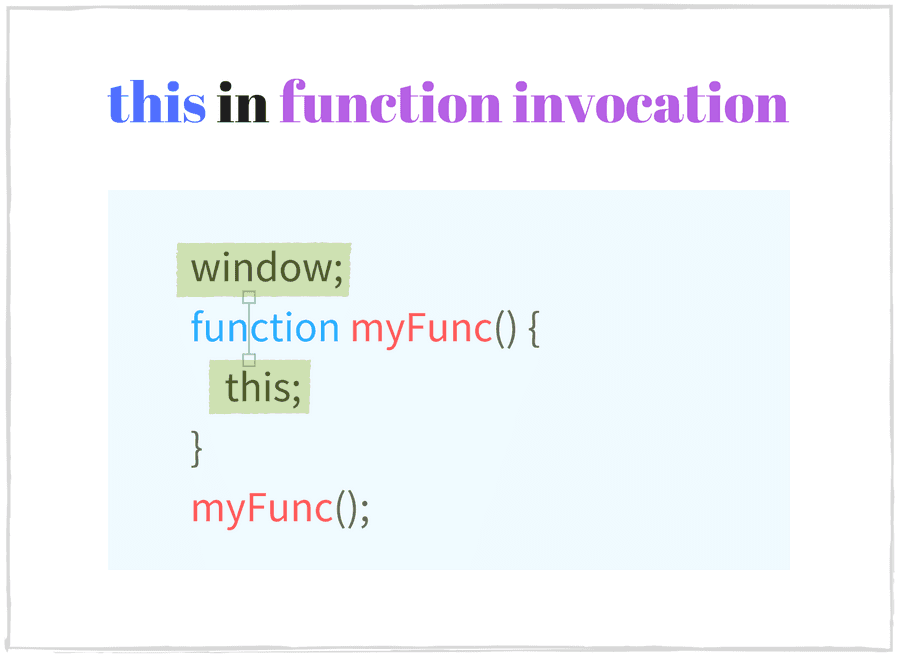
In a function invocation, the execution context is the global object.
Let's check the context in the following function:
function sum(a, b) {
console.log(this === window); // => true
this.myNumber = 20; // add 'myNumber' property to global object
return a + b;
}
// sum() is invoked as a function
// this in sum() is a global object (window)
sum(15, 16); // => 31
window.myNumber; // => 20
At the time sum(15, 16) is called, JavaScript automatically sets this as the global object (window in a browser).
When this is used outside of any function scope (the topmost scope: global execution context), it also equals to the global object:
console.log(this === window); // => true
this.myString = 'Hello World!';
console.log(window.myString); // => 'Hello World!'
<!-- In an html file -->
<script type="text/javascript">
console.log(this === window); // => true
</script>
thisisundefinedin a function invocation in strict mode
The strict mode is available starting ECMAScript 5.1, which is a restricted variant of JavaScript. It provides better security and stronger error checking.
To enable the strict mode place the directive 'use strict' at the top of a function body.
Once enabled, the strict mode affects the execution context, making this to be undefined in a regular function invocation. The execution context is not the global object anymore, contrary to above case 2.1.
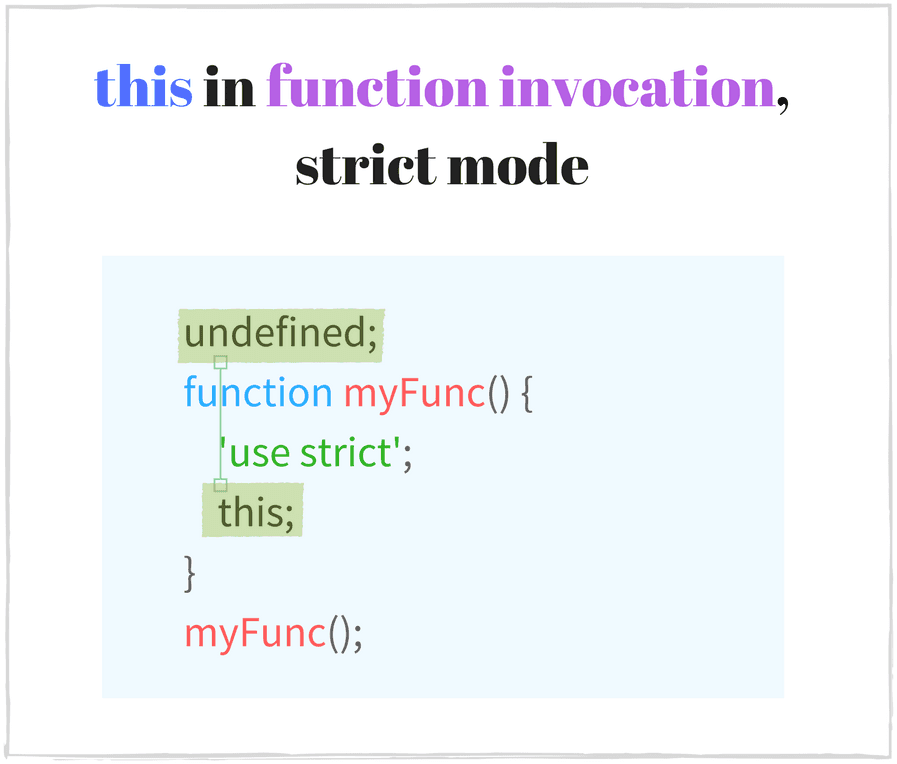
An example of a function called in strict mode:
function multiply(a, b) {
'use strict'; // enable the strict mode
console.log(this === undefined); // => true
return a * b;
}
// multiply() function invocation with strict mode enabled
// this in multiply() is undefined
multiply(2, 5); // => 10
When multiply(2, 5) is invoked as a function in strict mode, this is undefined.
The strict mode is active not only in the current scope but also in the inner scopes (for all functions declared inside):
function execute() {
'use strict';
function concat(str1, str2) {
// the strict mode is enabled too
console.log(this === undefined); // => true
return str1 + str2;
}
// concat() is invoked as a function in strict mode
// this in concat() is undefined
concat('Hello', ' World!'); // => "Hello World!"
}
execute();
'use strict' sits at the top of execute body, enabling the strict mode within its scope. Because concat is declared within the execute scope, it inherits the strict mode. And the invocation concat('Hello', ' World!') makes this to be undefined.
A single JavaScript file may contain both strict and non-strict modes. So it is possible to have different context behavior in a single script for the same invocation type:
function nonStrictSum(a, b) {
// non-strict mode
console.log(this === window); // => true
return a + b;
}
function strictSum(a, b) {
'use strict';
// strict mode is enabled
console.log(this === undefined); // => true
return a + b;
}
// nonStrictSum() is invoked as a function in non-strict mode
// this in nonStrictSum() is the window object
nonStrictSum(5, 6); // => 11
// strictSum() is invoked as a function in strict mode
// this in strictSum() is undefined
strictSum(8, 12); // => 20
⚠️ A common trap with the function invocation is thinking that this is the same in an inner function as in the outer function.
👍 The context of the inner function (except arrow function) depends only on its own invocation type, but not on the outer function's context.
To make this have a desired value, modify the inner function's context with indirect invocation (using .call() or .apply(), see 5.) or create a bound function (using .bind(), see 6.).
The following example is calculating a sum of two numbers:
const numbers = {
numberA: 5,
numberB: 10,
sum: function() {
console.log(this === numbers); // => true
function calculate() {
// this is window or undefined in strict mode
console.log(this === numbers); // => false
return this.numberA + this.numberB;
}
return calculate();
}
};
numbers.sum(); // => NaN or throws TypeError in strict mode
⚠️ numbers.sum() is a method invocation on an object (see 3.) thus this equals numbers. calculate() function is defined inside sum(), so you might expect to have this as numbers object when invoking calculate() too.
calculate() is a function invocation (but not method invocation), thus here this is the global object window (case 2.1.) or undefined in strict mode (case 2.2.). Even if the outer function numbers.sum() has the context as numbers object, it doesn't have influence here.
The invocation result of numbers.sum() is NaN (or an error is thrown TypeError: Cannot read property 'numberA' of undefined in strict mode). Definitely not the expected result 5 + 10 = 15. All because calculate() is not invoked correctly.
👍To solve the problem, calculate() function must execute with the same context as the numbers.sum() method, to access this.numberA and this.numberB properties.
One solution is to change manually the context of calculate() to the desired one by calling calculate.call(this) (an indirect invocation of a function, see section 5.):
const numbers = {
numberA: 5,
numberB: 10,
sum: function() {
console.log(this === numbers); // => true
function calculate() {
console.log(this === numbers); // => true
return this.numberA + this.numberB;
}
// use .call() method to modify the context
return calculate.call(this);
}
};
numbers.sum(); // => 15
calculate.call(this) executes calculate() function as usual, but additionally modifies the context to a value specified as the first parameter.
Now this.numberA + this.numberB is same as numbers.numberA + numbers.numberB. The function returns the expected result 5 + 10 = 15.
Another solution, slightly better, is to use an arrow function:
const numbers = {
numberA: 5,
numberB: 10,
sum: function() {
console.log(this === numbers); // => true
const calculate = () => {
console.log(this === numbers); // => true
return this.numberA + this.numberB;
}
return calculate();
}
};
numbers.sum(); // => 15
The arrow function resolves this lexically, or, in other words, uses this value of numbers.sum() method.
A method is a function stored in a property of an object. For example:
const myObject = {
// helloMethod is a method
helloMethod: function() {
return 'Hello World!';
}
};
const message = myObject.helloMethod();
helloMethod is a method of myObject. Use a property accessor myObject.helloMethod to access the method.
Method invocation is performed when an expression in a form of property accessor that evaluates to a function object is followed by an open parenthesis (, a comma separated list of arguments expressions and a close parenthesis ).
Recalling the previous example, myObject.helloMethod() is a method invocation of helloMethod on the object myObject.
More examples of method calls are: [1, 2].join(',') or /\s/.test('beautiful world').
Understanding the difference between function invocation (see section 2.) and method invocation is important!
The method invocation requires a property accessor form to call the function (obj.myFunc() or obj['myFunc']()), while function invocation does not (myFunc()).
const words = ['Hello', 'World'];
words.join(', '); // method invocation
const obj = {
myMethod() {
return new Date().toString();
}
};
obj.myMethod(); // method invocation
const func = obj.myMethod;
func(); // function invocation
parseFloat('16.6'); // function invocation
isNaN(0); // function invocation
thisis the object that owns the method in a method invocation
When invoking a method on an object, this is the object that owns the method.

Let's create an object with a method that increments a number:
const calc = {
num: 0,
increment() {
console.log(this === calc); // => true
this.num += 1;
return this.num;
}
};
// method invocation. this is calc
calc.increment(); // => 1
calc.increment(); // => 2
Calling calc.increment() makes the context of increment function to be calc object. So using this.num to increment the number property works well.
Let's follow another case. A JavaScript object inherits a method from its prototype. When the inherited method is invoked on the object, the context of the invocation is still the object itself:
const myDog = Object.create({
sayName() {
console.log(this === myDog); // => true
return this.name;
}
});
myDog.name = 'Milo';
// method invocation. this is myDog
myDog.sayName(); // => 'Milo'
Object.create() creates a new object myDog and sets its prototype from the first argument. myDog object inherits sayName method.
When myDog.sayName() is executed, myDog is the context of invocation.
In ECMAScript 2015 class syntax, the method invocation context is also the instance itself:
class Planet {
constructor(name) {
this.name = name;
}
getName() {
console.log(this === earth); // => true
return this.name;
}
}
const earth = new Planet('Earth');
// method invocation. the context is earth
earth.getName(); // => 'Earth'
⚠️ A method can be extracted from an object into a separated variable const alone = myObj.myMethod. When the method is called alone alone(), detached from the original object, you might think that this is the object myObject on which the method was defined.
👍 Correctly if the method is called without an object, then a function invocation happens, where this is the global object window or undefined in strict mode (see 2.1 and 2.2).
A bound function const alone = myObj.myMethod.bind(myObj) (using .bind(), see 6.) fixes the context by binding this the object that owns the method.
The following example defines Pet constructor and makes an instance of it: myCat. Then setTimeout() after 1 second logs myCat object information:
function Pet(type, legs) {
this.type = type;
this.legs = legs;
this.logInfo = function() {
console.log(this === myCat); // => false
console.log(`The ${this.type} has ${this.legs} legs`);
}
}
const myCat = new Pet('Cat', 4);
// logs "The undefined has undefined legs"
// or throws a TypeError in strict mode
setTimeout(myCat.logInfo, 1000);
⚠️ You might think that setTimeout(myCat.logInfo, 1000) will call the myCat.logInfo(), which should log the information about myCat object.
Unfortunately the method is separated from its object when passed as a parameter: setTimeout(myCat.logInfo). The following cases are equivalent:
setTimeout(myCat.logInfo);
// is equivalent to:
const extractedLogInfo = myCat.logInfo;
setTimeout(extractedLogInfo);
When the separated logInfo is invoked as a function, this is global object or undefined in strict mode (but not myCat object). So the object information does not log correctly.
👍 A function bounds with an object using .bind() method (see 6.). If the separated method is bound with myCat object, the context problem is solved:
function Pet(type, legs) {
this.type = type;
this.legs = legs;
this.logInfo = function() {
console.log(this === myCat); // => true
console.log(`The ${this.type} has ${this.legs} legs`);
};
}
const myCat = new Pet('Cat', 4);
// Create a bound function
const boundLogInfo = myCat.logInfo.bind(myCat);
// logs "The Cat has 4 legs"
setTimeout(boundLogInfo, 1000);
myCat.logInfo.bind(myCat) returns a new function that executes exactly like logInfo, but has this as myCat, even in a function invocation.
An alternative solution is to define logInfo() method as an arrow function, which binds this lexically:
function Pet(type, legs) {
this.type = type;
this.legs = legs;
this.logInfo = () => {
console.log(this === myCat); // => true
console.log(`The ${this.type} has ${this.legs} legs`);
};
}
const myCat = new Pet('Cat', 4);
// logs "The Cat has 4 legs"
setTimeout(myCat.logInfo, 1000);
If you'd like to use classes and bind this to the class instance in your method, use the arrow function as a class property:
class Pet {
constructor(type, legs) {
this.type = type;
this.legs = legs;
}
logInfo = () => {
console.log(this === myCat); // => true
console.log(`The ${this.type} has ${this.legs} legs`);
}
}
const myCat = new Pet('Cat', 4);
// logs "The Cat has 4 legs"
setTimeout(myCat.logInfo, 1000);
Constructor invocation is performed when new keyword is followed by an expression that evaluates to a function object, an open parenthesis (, a comma separated list of arguments expressions and a close parenthesis ).
Examples of construction invocation: new Pet('cat', 4), new RegExp('\\d').
This example declares a function Country, then invokes it as a constructor:
function Country(name, traveled) {
this.name = name ? name : 'United Kingdom';
this.traveled = Boolean(traveled); // transform to a boolean
}
Country.prototype.travel = function() {
this.traveled = true;
};
// Constructor invocation
const france = new Country('France', false);
// Constructor invocation
const unitedKingdom = new Country;
france.travel(); // Travel to France
new Country('France', false) is a constructor invocation of the Country function. This call creates a new object, which name property is 'France'.
If the constructor is called without arguments, then the parenthesis pair can be omitted: new Country.
Starting ECMAScript 2015, JavaScript allows to define constructors using class syntax:
class City {
constructor(name, traveled) {
this.name = name;
this.traveled = false;
}
travel() {
this.traveled = true;
}
}
// Constructor invocation
const paris = new City('Paris', false);
paris.travel();
new City('Paris') is a constructor invocation. The object's initialization is handled by a special method in the class: constructor, which has this as the newly created object.
The role of the constructor function is to initialize the instance. A constructor call creates a new empty object, which inherits properties from the constructor's prototype.
When a property accessor myObject.myFunction is preceded by new keyword, JavaScript performs a constructor invocation, but not a method invocation.
For example new myObject.myFunction(): the function is first extracted using a property accessor extractedFunction = myObject.myFunction, then invoked as a constructor to create a new object: new extractedFunction().
thisis the newly created object in a constructor invocation
The context of a constructor invocation is the newly created object. The constructor initializes the object with data that comes from constructor arguments, sets up initial values for properties, attaches event handlers, etc.
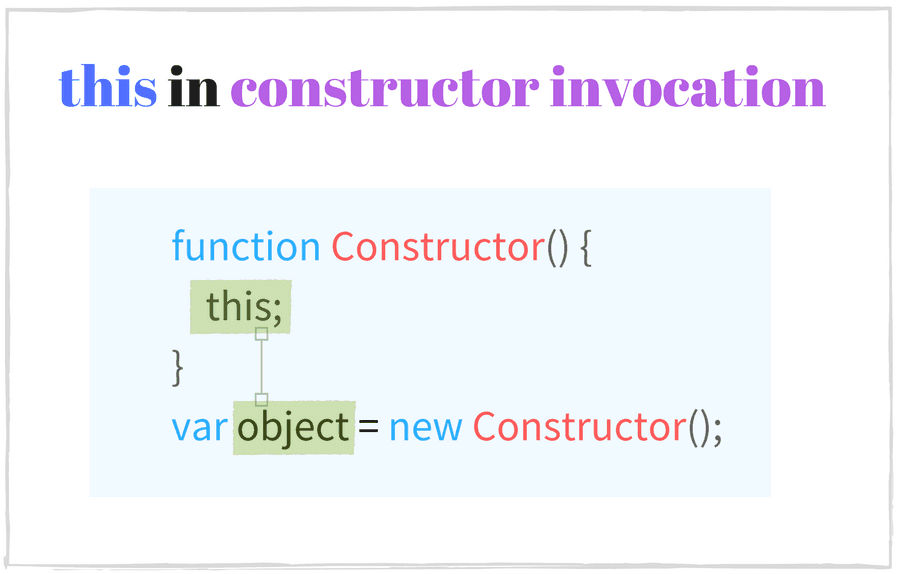
Let's check the context in the following example:
function Foo () {
// this is fooInstance
this.property = 'Default Value';
}
// Constructor invocation
const fooInstance = new Foo();
fooInstance.property; // => 'Default Value'
new Foo() is making a constructor call where the context is fooInstance. Inside Foo the object is initialized: this.property is assigned with a default value.
The same scenario happens when using class syntax (available in ES2015), only the initialization happens in the constructor method:
class Bar {
constructor() {
// this is barInstance
this.property = 'Default Value';
}
}
// Constructor invocation
const barInstance = new Bar();
barInstance.property; // => 'Default Value'
At the time when new Bar() is executed, JavaScript creates an empty object and makes it the context of the constructor() method. Now you can add properties to object using this keyword: this.property = 'Default Value'.
Some JavaScript functions create instances not only when invoked as constructors, but also when invoked as functions. For example RegExp:
const reg1 = new RegExp('\\w+');
const reg2 = RegExp('\\w+');
reg1 instanceof RegExp; // => true
reg2 instanceof RegExp; // => true
reg1.source === reg2.source; // => true
When executing new RegExp('\\w+') and RegExp('\\w+'), JavaScript creates equivalent regular expression objects.
⚠️ Using a function invocation to create objects is a potential problem (excluding factory pattern), because some constructors may omit the logic to initialize the object when new keyword is missing.
The following example illustrates the problem:
function Vehicle(type, wheelsCount) {
this.type = type;
this.wheelsCount = wheelsCount;
return this;
}
// Function invocation
const car = Vehicle('Car', 4);
car.type; // => 'Car'
car.wheelsCount // => 4
car === window // => true
Vehicle is a function that sets type and wheelsCount properties on the context object.
When executing Vehicle('Car', 4) an object car is returned, which has the correct properties: car.type is 'Car' and car.wheelsCount is 4.
You might think it works well for creating and initializing new objects.
However, this is window object in a function invocation (see 2.1.), thus Vehicle('Car', 4) sets properties on the window object. This is a mistake. A new object is not created.
👍 Make sure to use new operator in cases when a constructor call is expected:
function Vehicle(type, wheelsCount) {
if (!(this instanceof Vehicle)) {
throw Error('Error: Incorrect invocation');
}
this.type = type;
this.wheelsCount = wheelsCount;
return this;
}
// Constructor invocation
const car = new Vehicle('Car', 4);
car.type // => 'Car'
car.wheelsCount // => 4
car instanceof Vehicle // => true
// Function invocation. Throws an error.
const brokenCar = Vehicle('Broken Car', 3);
new Vehicle('Car', 4) works well: a new object is created and initialized because new keyword is present in the constructor invocation.
A verification is added in the constructor function: this instanceof Vehicle, to make sure that execution context is a correct object type — whenever Vehicle('Broken Car', 3) is executed without new an exception is thrown: Error: Incorrect invocation.
Indirect invocation is performed when a function is called using myFun.call() or myFun.apply() methods.
Functions in JavaScript are first-class objects, which means that a function is an object. The type of function object is Function.
From the list of methods that a function object has, .call() and .apply() are used to invoke the function with a configurable context.
myFunction.call(thisArg, arg1, arg2, ...) accepts the first argument thisArg as the context of the invocation and a list of arguments arg1, args2, ... that are passed as arguments to the called function.
myFunction.apply(thisArg, [arg1, arg2, ...]) accepts the first argument thisArg as the context of the invocation and an array of arguments [arg1, args, ...] that are passed as arguments to the called function.
The following example demonstrates the indirect invocation:
function sum(number1, number2) {
return number1 + number2;
}
sum.call(undefined, 10, 2); // => 12
sum.apply(undefined, [10, 2]); // => 12
sum.call() and sum.apply() both invoke the function with 10 and 2 arguments.
thisis the first argument of.call()or.apply()in an indirect invocation
this in indirect invocation is the value passed as first argument to .call() or .apply().

The following example shows the indirect invocation context:
const rabbit = { name: 'White Rabbit' };
function concatName(string) {
console.log(this === rabbit); // => true
return string + this.name;
}
// Indirect invocations
concatName.call(rabbit, 'Hello '); // => 'Hello White Rabbit'
concatName.apply(rabbit, ['Bye ']); // => 'Bye White Rabbit'
The indirect invocation is useful when a function should be executed with a specific context. For example, to solve the context problems with function invocation, where this is always window or undefined in strict mode (see 2.3.). It can be used to simulate a method call on an object (see the previous code sample).
Another practical example is creating hierarchies of classes in ES5 to call the parent constructor:
function Runner(name) {
console.log(this instanceof Rabbit); // => true
this.name = name;
}
function Rabbit(name, countLegs) {
console.log(this instanceof Rabbit); // => true
// Indirect invocation. Call parent constructor.
Runner.call(this, name);
this.countLegs = countLegs;
}
const myRabbit = new Rabbit('White Rabbit', 4);
myRabbit; // { name: 'White Rabbit', countLegs: 4 }
Runner.call(this, name) inside Rabbit makes an indirect call of the parent function to initialize the object.
A bound function is a function whose context and/or arguments are bound to specific values. You create a bound function using .bind() method. The original and bound functions share the same code and scope, but different contexts and arguments on execution.
myFunc.bind(thisArg[, arg1, arg2, ...) accepts the first argument thisArg as the context and an optional list of arguments arg1, arg2, ... to bound to. .bind() returns a new function which context is bound to thisArg and arguments to arg1, arg2, ....
The following code creates a bound function and later invokes it:
function multiply(number) {
'use strict';
return this * number;
}
// create a bound function with context
const double = multiply.bind(2);
// invoke the bound function
double(3); // => 6
double(10); // => 20
multiply.bind(2) returns a new function object double, which is bound with number 2. multiply and double have the same code and scope.
Contrary to .apply() and .call() methods (see 5.), which invoke the function right away, the .bind() method only returns a new function supposed to be invoked later with a pre-defined this value.
thisis the first argument ofmyFunc.bind(thisArg)when invoking a bound function
The role of .bind() is to create a new function, which invocation will have the context as the first argument passed to .bind(). It is a powerful technique that allows creating functions with a predefined this value.
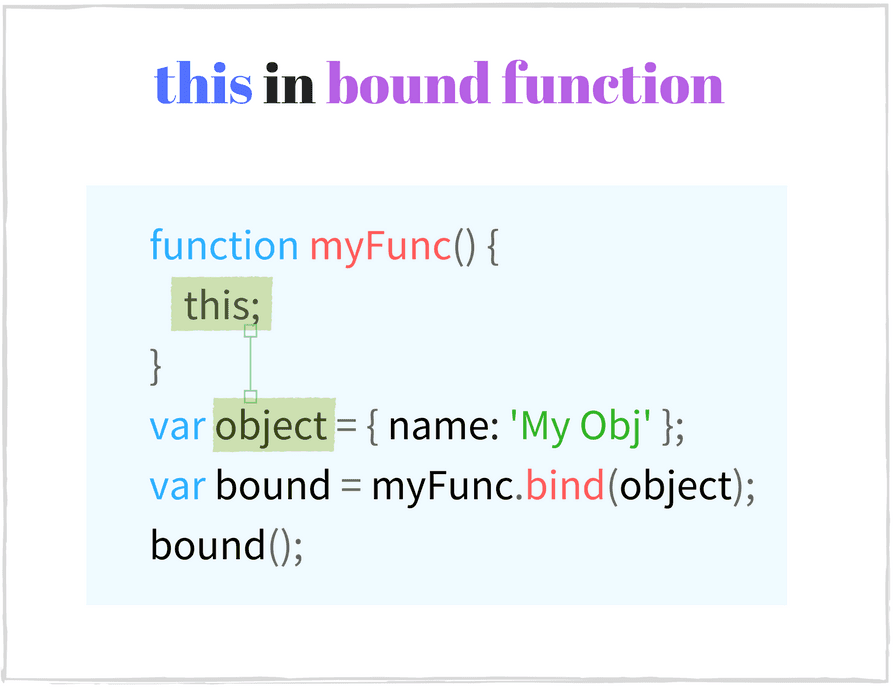
Let's see how to configure this of a bound function:
const numbers = {
array: [3, 5, 10],
getNumbers() {
return this.array;
}
};
// Create a bound function
const boundGetNumbers = numbers.getNumbers.bind(numbers);
boundGetNumbers(); // => [3, 5, 10]
// Extract method from object
const simpleGetNumbers = numbers.getNumbers;
simpleGetNumbers(); // => undefined or throws an error in strict mode
numbers.getNumbers.bind(numbers) returns a function boundGetNumbers which context is bound to numbers. Then boundGetNumbers() is invoked with this as numbers and returns the correct array object.
The function numbers.getNumbers is extracted into a variable simpleGetNumbers without binding. On later function invocation simpleGetNumbers() has this as window or undefined in strict mode, but not numbers object (see 3.2. Pitfall). In this case simpleGetNumbers() will not return correctly the array.
.bind() makes a permanent context link and will always keep it. A bound function cannot change its linked context when using .call() or .apply() with a different context or even a rebound doesn't have any effect.
Only the constructor invocation of a bound function can change an already bound context, but this is not something you would normally do (constructor invocation must use regular, non-bound functions).
The following example creates a bound function, then tries to change its already pre-defined context:
function getThis() {
'use strict';
return this;
}
const one = getThis.bind(1);
one(); // => 1
one.call(2); // => 1
one.apply(2); // => 1
one.bind(2)(); // => 1
new one(); // => Object
Only new one() changes the context of the bound function. Other types of invocation always have this equal to 1.
Arrow function is designed to declare the function in a shorter form and lexically bind the context.
It can used the following way:
const hello = (name) => {
return 'Hello ' + name;
};
hello('World'); // => 'Hello World'
// Keep only even numbers
[1, 2, 5, 6].filter(item => item % 2 === 0); // => [2, 6]
Arrow functions have a light syntax, don't have the verbose keyword function. When the arrow function has only 1 statement, you could even omit the return keyword.
An arrow function is anonymous, but its name can be inferred. It doesn't have a lexical function name (which would be useful for recursion, detaching event handlers).
Also it doesn't provide the arguments object, opposed to a regular function. The missing arguments is fixed using ES2015 rest parameters:
const sumArguments = (...args) => {
console.log(typeof arguments); // => 'undefined'
return args.reduce((result, item) => result + item);
};
sumArguments.name // => ''
sumArguments(5, 5, 6); // => 16
thisis the enclosing context where the arrow function is defined
The arrow function doesn't create its own execution context but takes this from the outer function where it is defined. In other words, the arrow function resolves this lexically.
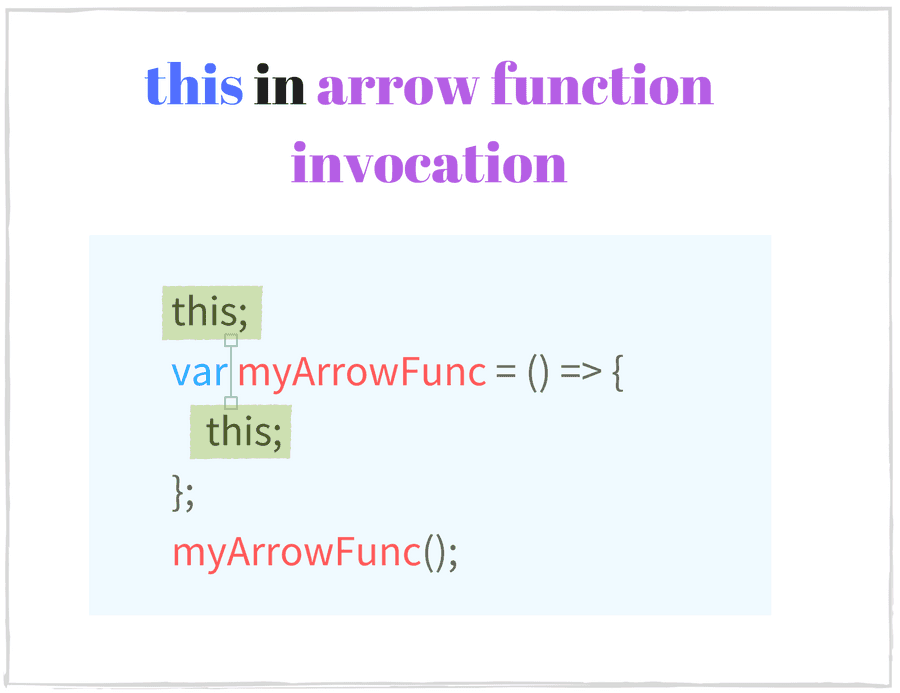
The following example shows the context transparency property:
class Point {
constructor(x, y) {
this.x = x;
this.y = y;
}
log() {
console.log(this === myPoint); // => true
setTimeout(() => {
console.log(this === myPoint); // => true
console.log(this.x + ':' + this.y); // => '95:165'
}, 1000);
}
}
const myPoint = new Point(95, 165);
myPoint.log();
setTimeout() calls the arrow function with the same context (myPoint object) as the log() method. As seen, the arrow function "inherits" the context from the function where it is defined.
A regular function in this example creates its own context (window or undefined in strict mode). So to make the same code work correctly with a function expression it's necessary to manually bind the context: setTimeout(function() {...}.bind(this)). This is verbose, and using an arrow function is a cleaner and shorter solution.
If the arrow function is defined in the topmost scope (outside any function), the context is always the global object (window in a browser):
const getContext = () => {
console.log(this === window); // => true
return this;
};
console.log(getContext() === window); // => true
An arrow function is bound with the lexical this once and forever. this cannot be modified even when using the context modification methods:
const numbers = [1, 2];
(function() {
const get = () => {
console.log(this === numbers); // => true
return this;
};
console.log(this === numbers); // => true
get(); // => [1, 2]
// Try to change arrow function context manually
get.call([0]); // => [1, 2]
get.apply([0]); // => [1, 2]
get.bind([0])(); // => [1, 2]
}).call(numbers);
No matter how the arrow function get() is called, it always keeps the lexical context numbers. Indirect call with other context get.call([0]) or . get.apply([0]), rebinding get.bind([0])() have no effect.
An arrow function cannot be used as a constructor. Invoking it as a constructor new get() throws an error: TypeError: get is not a constructor.
⚠️ You might want to use arrow functions to declare methods on an object. Fair enough: their declaration is quite short comparing to a function expression: (param) => {...} instead of function(param) {..}.
This example defines a method format() on a class Period using an arrow function:
function Period (hours, minutes) {
this.hours = hours;
this.minutes = minutes;
}
Period.prototype.format = () => {
console.log(this === window); // => true
return this.hours + ' hours and ' + this.minutes + ' minutes';
};
const walkPeriod = new Period(2, 30);
walkPeriod.format(); // => 'undefined hours and undefined minutes'
Since format is an arrow function and is defined in the global context (topmost scope), it has this as window object.
Even if format is executed as a method on an object walkPeriod.format(), window is kept as the context of invocation. It happens because the arrow function has a static context that doesn't change on different invocation types.
The method returns 'undefined hours and undefined minutes', which is not the expected result.
👍 The function expression solves the problem because a regular function does change its context depending on invocation:
function Period (hours, minutes) {
this.hours = hours;
this.minutes = minutes;
}
Period.prototype.format = function() {
console.log(this === walkPeriod); // => true
return this.hours + ' hours and ' + this.minutes + ' minutes';
};
const walkPeriod = new Period(2, 30);
walkPeriod.format(); // => '2 hours and 30 minutes'
walkPeriod.format() is a method invocation on an object (see 3.1.) with the context walkPeriod object. this.hours evaluates to 2 and this.minutes to 30, so the method returns the correct result: '2 hours and 30 minutes'.
Because the function invocation has the biggest impact on this, from now on do not ask yourself:
Where is
thistaken from?
but do ask yourself:
How is the*`function invoked*?
For an arrow function ask yourself:
What is
thisinside the outer function where the arrow function is defined?
This mindset is correct when dealing with this and will save you from the headache.
If you have an interesting example of context pitfall or just experience difficulties with a case, write a comment below, and let's discuss!
此内容由惯性聚合(RSS阅读器)自动聚合整理,仅供阅读参考。 原文来自 — 版权归原作者所有。