


useEffect() hook manages the side-effects like fetching over the network, manipulating DOM directly, and starting/ending timers.
Although the useEffect() is one of the most used hooks along with useState(), it requires time to familiarize and use correctly.
A pitfall you might experience when working with useEffect() is the infinite loop of component renderings. In this post, I'll describe the common scenarios that generate infinite loops and how to avoid them.
Let's say you want to create a component having an input field, and also display how many times the user changed that input.
Here's a possible implementation of <CountInputChanges> component:
import { useEffect, useState } from 'react';
function CountInputChanges() {
const [value, setValue] = useState('');
const [count, setCount] = useState(-1);
useEffect(() => setCount(count + 1));
const onChange = ({ target }) => setValue(target.value);
return (
<div>
<input type="text" value={value} onChange={onChange} />
<div>Number of changes: {count}</div>
</div>
)
}
<input type="text" value={value} onChange={onChange} /> is a controlled component.
value state variable holds the input value, and the onChange event handler updates the value state when the user types into the input.
I decided to update the count variable using useEffect() hook. Every time the component re-renders due to the user typing into the input, the useEffect(() => setCount(count + 1)) updates the counter.
Because useEffect(() => setCount(count + 1)) is used without the dependencies argument, () => setCount(count + 1) callback is executed after every rendering of the component.
Do you expect any problems with this component? Open the demo.
The demo shows that count state variable increases uncontrollably, even if you haven't typed anything into the input. That's an infinite loop.
The problem is in the way useEffect() is used:
useEffect(() => setCount(count + 1));
which generates an infinite loop of component re-renderings.
After initial rendering, useEffect() executes the side-effect callback and updates the state. The state update triggers re-rendering. After re-rendering useEffect() executes the side-effect callback and again updates the state, which triggers again a re-rendering. ...and so on indefinitely.
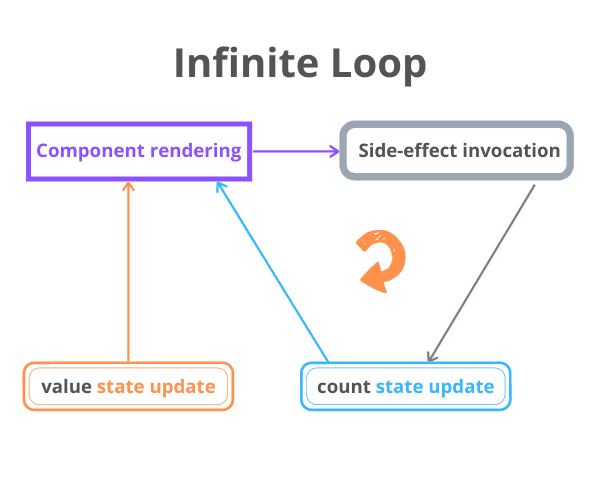
The infinite loop is fixed with correct management of the useEffect(callback, dependencies) dependencies argument.
Because you want count to increment when value changes, you can simply add value as a dependency of the side-effect:
import { useEffect, useState } from 'react';
function CountInputChanges() {
const [value, setValue] = useState('');
const [count, setCount] = useState(-1);
useEffect(() => setCount(count + 1), [value]);
const onChange = ({ target }) => setValue(target.value);
return (
<div>
<input type="text" value={value} onChange={onChange} />
<div>Number of changes: {count}</div>
</div>
);
}
By adding [value] as a dependency of useEffect(..., [value]), the count state variable will only be updated when [value] changes. This solves the infinite loop.
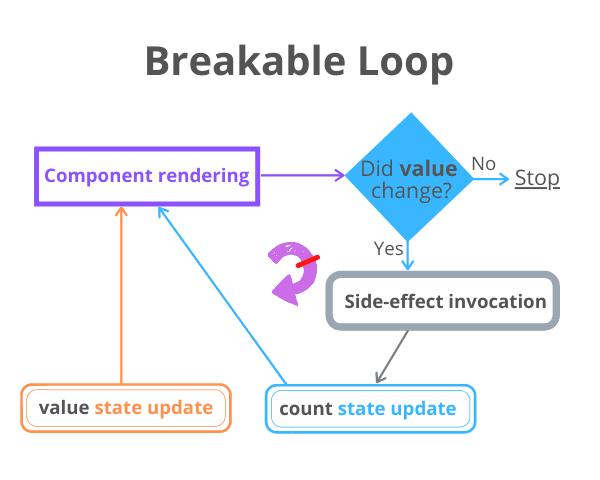
Open the fixed demo. Now, as soon as you type into the input field, the count state correctly displays the number of input value changes.
An alternative solution is to use a reference (created by useRef() hook) to store the number of changes of the input.
The idea is that updating a reference doesn't trigger re-rendering of the component.
Here's a possible implementation:
import { useState, useRef } from 'react';
function CountInputChanges() {
const [value, setValue] = useState('');
const countRef = useRef(0);
const onChange = ({ target }) => {
setValue(target.value);
countRef.current++;
};
return (
<div>
<input type="text" value={value} onChange={onChange} />
<div>Number of changes: {countRef.current}</div>
</div>
);
}
Inside the event handler onChange the countRef.current++ is executed each time the value state changes. The reference change doesn't trigger re-rendering.
Check out the demo. Now, as soon as you type into the input field, the countRef reference is updated without triggering a re-rendering — efficiently solving the infinite loop problem.
Even if you set up correctly the useEffect() dependencies, still, you have to be careful when using objects as dependencies.
For example, the following CountSecrets component monitors the words that the user types into the input, and as soon as the user types the special word 'secret', a counter of secrets is increased and displayed.
Here's a possible implementation of the component:
import { useEffect, useState } from "react";
function CountSecrets() {
const [secret, setSecret] = useState({ value: "", countSecrets: 0 });
useEffect(() => {
if (secret.value === 'secret') {
setSecret(s => ({...s, countSecrets: s.countSecrets + 1}));
}
}, [secret]);
const onChange = ({ target }) => {
setSecret(s => ({ ...s, value: target.value }));
};
return (
<div>
<input type="text" value={secret.value} onChange={onChange} />
<div>Number of secrets: {secret.countSecrets}</div>
</div>
);
}
Open the demo and type some words, one of which should be 'secret'. As soon as you type the word 'secret', the secret.countSecrets state variable starts to grow uncontrollably.
That's an infinite loop problem.
Why is this happening?
The secret object is used as a dependency of useEffect(..., [secret]). Inside the side-effect callback, as soon as the input value equals 'secret', the state updater function is called:
setSecret(s => ({...s, countSecrets: s.countSecrets + 1}));
which increments the secrets counter countSecrets, but also creates a new object.
secret now is a new object and the dependency has changed. So useEffect(..., [secret]) invokes again the side-effect that updates the state and a new secret object is created again, and so on.
2 objects in JavaScript are equal only if they reference exactly the same object.
Because of the objects creation and referential equality problem, it's wise to avoid objects as deps in useEffect(). Stick to primitives when possible:
let count = 0;
useEffect(() => {
// some logic
}, [count]); // Good!
let myObject = {
prop: 'Value'
};
useEffect(() => {
// some logic
}, [myObject]); // Not good!
useEffect(() => {
// some logic
}, [myObject.prop]); // Good!
Fixing the infinite loop of <CountSecrets> component requires changing the dependency from useEffect(..., [secret]) to useEffect(..., [secret.value]).
Calling the side-effect callback when only secret.value changes is sufficient. Here's the fixed version of the component:
import { useEffect, useState } from "react";
function CountSecrets() {
const [secret, setSecret] = useState({ value: "", countSecrets: 0 });
useEffect(() => {
if (secret.value === 'secret') {
setSecret(s => ({...s, countSecrets: s.countSecrets + 1}));
}
}, [secret.value]);
const onChange = ({ target }) => {
setSecret(s => ({ ...s, value: target.value }));
};
return (
<div>
<input type="text" value={secret.value} onChange={onChange} />
<div>Number of secrets: {secret.countSecrets}</div>
</div>
);
}
Open the fixed demo. Type some words into the input... and as soon as you enter the special word 'secret' the secrets counter increments. No infinite loop is created. That's a win!
useEffect(callback, deps) is the hook that executes callback (the side-effect) after deps changes. If you aren't careful with what the side-effect does, you might trigger an infinite loop of component renderings.
A common case that generates an infinite loop is updating the state in the side-effect without having any dependency argument at all:
useEffect(() => {
// Infinite loop!
setState(count + 1);
});
An efficient way to avoid the infinite loop is to properly manage the hook dependencies — control when exactly the side-effect should run.
useEffect(() => {
// No infinite loop
setState(count + 1);
}, [whenToUpdateValue]);
Alternatively, you can also use a reference. Updating a reference doesn't trigger a re-rendering:
Another common recipe for an infinite loop is to use an object as a dependency of useEffect(), and within the side-effect, update that object (effectively creating a new object):
useEffect(() => {
// Infinite loop!
setObject({
...object,
prop: 'newValue'
})
}, [object]);
Avoid using objects as dependencies, but use the object property values directly as dependencies:
useEffect(() => {
// No infinite loop
setObject({
...object,
prop: 'newValue'
})
}, [object.whenToUpdateProp]);
I recommend checking also my post 5 Mistakes to Avoid When Using React Hooks.
What other infinite loop pitfalls when using useEffect() do you know?
此内容由惯性聚合(RSS阅读器)自动聚合整理,仅供阅读参考。 原文来自 — 版权归原作者所有。