


This article was written based on our development collaboration with Evil Martians. You can check their technical blog.
In this article, I’ll tell you a little story: I added an automated caching mechanism to Octokit …and everything went wrong. Thanks to my fantastic misadventures, you’ll learn about HTTP caches, how Faraday middleware work, and how to use them to automagically start caching API calls.
I was beginning to get very tired, sitting by my computer on the bank, manually caching API responses. Once or twice I peeped into RFC 7234, but it had no pictures or conversations in it, “and what is the use of a document”, I thought, “without pictures or conversations?”
But seriously, everything started with StackBlitz, our browser-powered IDE that makes heavy use of the GitHub API (with some help from the Octokit gem).
Every once in a while, Octokit would error out as a result of GitHub API rate limits. This is a known problem, so much so that it’s even mentioned in the Octokit README: “If you want to boost performance, stretch your API rate limit, or avoid paying the hypermedia tax, you can use Faraday Http Cache.”
stack = Faraday::RackBuilder.new do |builder|
  builder.use Faraday::HttpCache, serializer: Marshal, shared_cache: false
  builder.use Octokit::Response::RaiseError
  builder.adapter Faraday.default_adapter
end
Octokit.middleware = stack
“What a clear way you have of putting things!” I thought.
At that moment, I added the Octokit gem to the project, and down the rabbit-hole I went, never once considering how in the world I was to get out again.
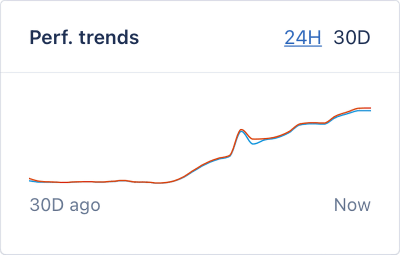
Some time went by. One morning, I decided to check on the caching. I opened our APM and what I saw wasn’t a performance increase, but the complete opposite—our requests had started performing dreadfully slower:
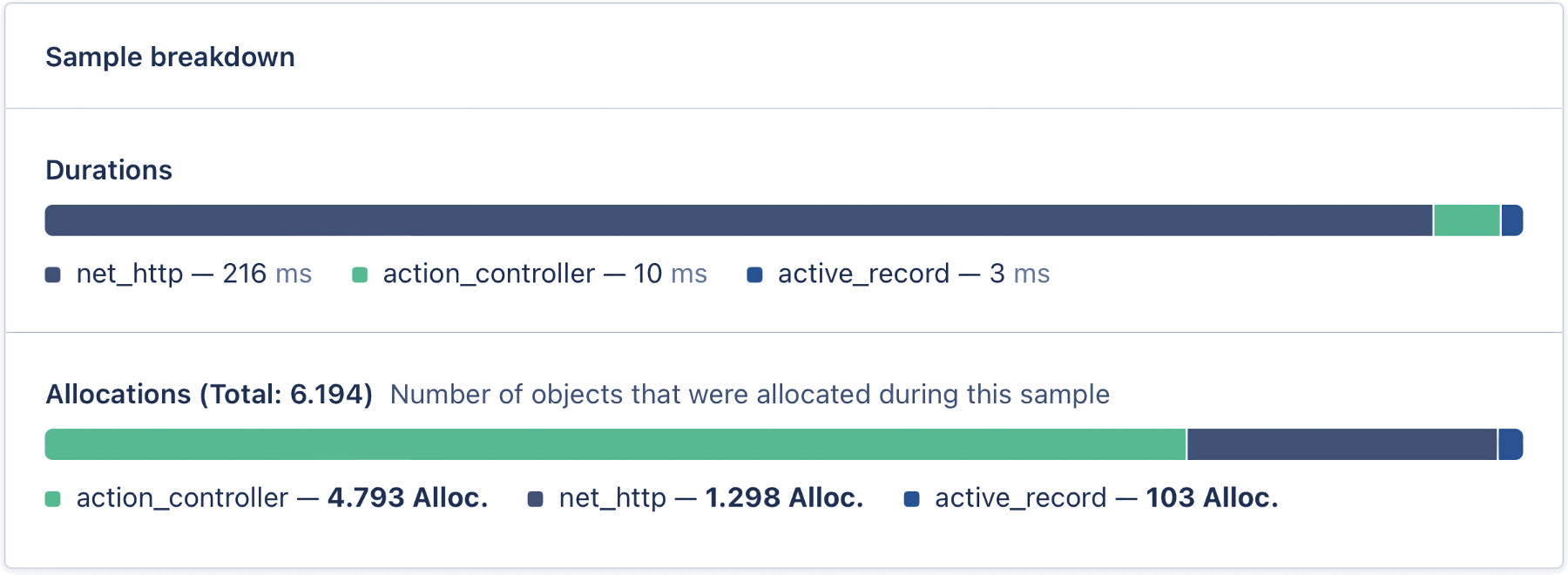
“I decided to take a closer look at how the request worked before the cache was turned on. And, I hoped the allocations shan’t’ve grown any more.
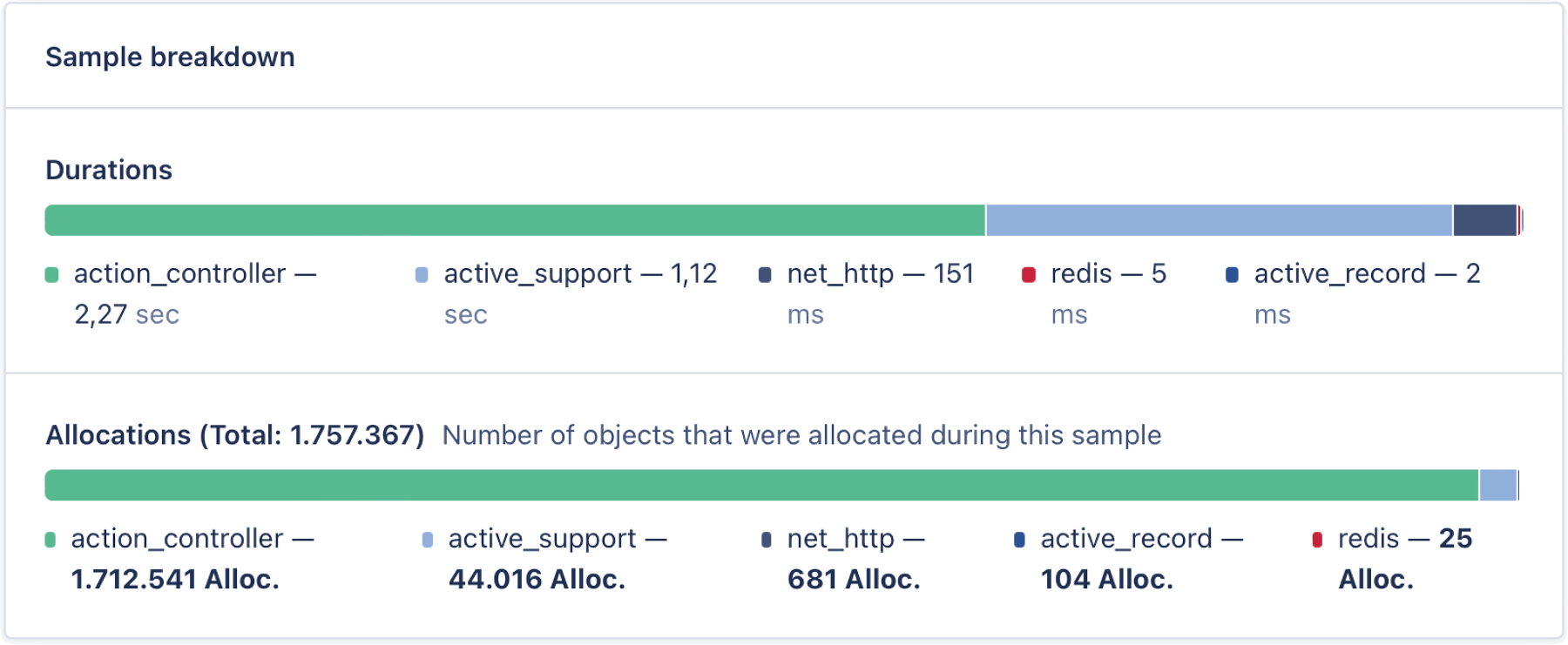
Alas! it was too late to wish that! The allocations went on growing, and growing, and growing further still, and very soon our server was lumbering sluggishly about.
Down, down, down. Would the fall never come to an end? Finally, I landed in a wet pool and grasped and read a note floating by, “MEMORY BLOATING IN RUBY”.
Well, no, this wasn’t exactly a tear-worthy turn of events, but we disabled the cache to normalize request time, that’s for sure!
So, what happened? We were trying to resolve the problem of API limits with an officially proposed solution, but instead ended up with pure, unadulterated memory bloating.
Curiouser and curiouser! To understand what was happening, let’s start with a small examination on how Octokit works and why we were able to add caching with just a couple of lines of code.
Octokit is built on top of an HTTP client library, Faraday, which essentially allows the end user to customize request processing. For example, you might decide to use an asynchronous client such as EM-HTTP-Request—and this would be totally possible thanks to Faraday’s adapters.
It’s also possible to customize request handling via middleware, and Faraday has this too: for authentication, cookies, retries, logging, and much more. If you’ve heard of Rack middleware, you know the drill. Faraday inserts a stack of middleware between the API client and API server.
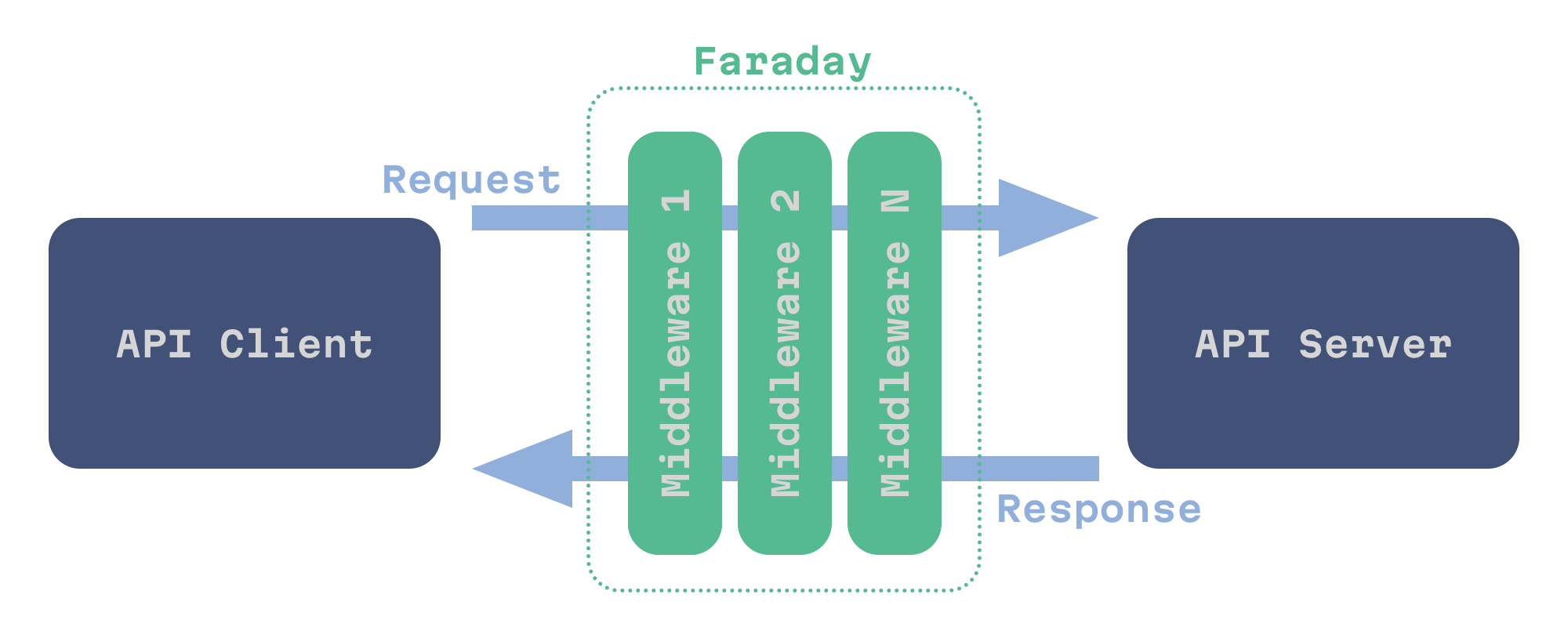
Faraday middleware are a class that can process a special Env object and then pass it to the next middleware. After all the middleware have run, Faraday makes a request, then all middleware are called again to process the response.
To add a middleware to Faraday, you need to call the #use method with the desired class and its options:
stack = Faraday::RackBuilder.new do |builder|
  builder.use Faraday::HttpCache, serializer: Marshal, shared_cache: false
  builder.use Octokit::Response::RaiseError
end
Writing your own middleware is quite an easy task—the only thing you need to do is implement the #on_request method to process a request and the #on_complete method to process a response:
module Faraday
  module Gardener
    class Middleware < Faraday::Middleware
      # This method will be called when the request is being prepared.
      # @param env [Faraday::Env] the environment of the request being processed
      def on_request(env)
        Gardener.plant_rose!(env)
      end

      # This method will be called when the response is being processed.
      # @param env [Faraday::Env] the environment of the response being processed.
      def on_complete(env)
        Gardener.paint_red!(env)
      end
    end
  end
end
And that’s it!
To learn more about custom middleware, refer to the official Faraday documentation, and faraday-middleware-template repository.
So, now we know how it’s possible to easily modify Octokit’s behavior with a custom caching middleware! But how is it possible that the middleware knows how and when to cache responses? What kind of black magic is that?
It’s easy to forget how much data is flowing around on the web at any given time. For example, just how much it takes in order to bring you a post from your favorite technical blog. 😜 But, to speed things up and to reduce throughput on the web, we can always make use of caching. However, this can be a bit tricky: one resource might quickly become irrelevant, while another might be practically static—how is it possible to distinguish what is what?
Well, guess what? Indeed, we already have such a mechanism to distinguish relevant resources: HTTP Caching.
HTTP Caching allows you to cache HTTP responses in order to optimize repeated requests and to use HTTP headers to control cache behavior. The standard (RFC 7234) describes two types of caches: public and private.
A public cache is a shared cache that stores non-personalized responses for multiple users, and is a service located between the client and the server, for example, this includes CDNs.
A private cache is a dedicated cache intended only for a particular user, and these are implemented in all modern browsers.
Have you ever been dealing with some problem and you’ve said to a user: “try to clear the browser cache”. Most probably, any issue was the result of HTTP Caching headers misuse, so let’s talk about them.
Cache-ControlLet’s start with the Cache-Control header. It’s used to list different cache directives, and we’ll cover the most important ones.
private / publicNot all responses are made equal. Some are only intended for a particular user (like profile settings), and these should specify the private directive:
Cache-Control: private
Other requests may be addressed to many users (a list of blog posts, for example), and therefore, these may be stored in the shared cache, for those we should use the public directive:
public directive can be omitted when max-age is given.
Cache-Control: public
max-ageThe max-age directive specifies the number of seconds after which the cache is considered stale.
There is also the Expires header, but it’s obsolete and fully replaced by max-age.
Cache-Control: max-age=3600
must-revalidateThe must-revalidate directive forces cache revalidation on every request.
Cache-Control: must-revalidate
no-cache / no-storeThis is a bit strange, but the no-cache directive does not prevent storage of responses. What it does is forces cache revalidation on every request.
Cache-Control: no-cache
To prevent storage of responses for real, use the no-store directive:
Cache-Control: no-store
And that’s basically it. But what happens when a saved response gets stale? Did someone mention validation?
The no-cache, no-store and max-age directives can also be used by a client. For example, if you want to force revalidation of cached values, you can add the Cache-Control: no-cache header to the request.
To check if a saved response is still valid, we can use conditional requests with the If-Modified-Since or If-None-Match request headers.
If-Modified-Since and Last-ModifiedTo use time-based validation, we should find the value of the Last-Modified header from the stale response:
HTTP/1.1 200 OK
Content-Type: text/html
Cache-Control: max-age=3600
Date: Sun, 19 Jun 2022 19:06:00 GMT
Last-Modified: Thu, 27 Feb 2022 18:06:05 GMT
<…>
And send it as value for the If-Modified-Since request header:
GET /chronicles HTTP/1.1
Host: evilmartians.com
Accept: text/html
If-Modified-Since: Thu, 27 Feb 2022 18:06:05 GMT
If the content has not changed since the specified time, we’ll get a 304 Not Modified response without a body.
HTTP/1.1 304 Not Modified
Content-Type: text/html
Cache-Control: max-age=3600
Date: Sun, 19 Jun 2022 20:06:01 GMT
Last-Modified: Thu, 27 Feb 2022 18:06:05 GMT
<…>
In this case, the cache can mark the response as fresh to reuse it for another 1 hour and return it to the client.
If-None-Match and EtagSince working with time strings is hard, there is a better option. Suppose the cached response contains the Etag header:
HTTP/1.1 200 OK
Content-Type: text/html
Cache-Control: max-age=3600
Date: Sun, 19 Jun 2022 19:06:00 GMT
ETag: "5dc9f959df262d184fb5968d80611e33"
<…>
If so, we can use its value for the If-None-Match request header:
GET /chronicles HTTP/1.1
Host: evilmartians.com
Accept: text/html
If-None-Match: "5dc9f959df262d184fb5968d80611e33"
The server will return 304 Not Modified if the value of the Etag header is the same.
Now we know when to store responses and how to validate them, but how to distinguish one response from another? Using just the URL, and that’s it?
VaryUnfortunately we can’t rely only on URLs here, the content of a response may depend on the values of request headers such as Accept, Accept-Language, and so on.
Say, for instance, we have a multilingual version of the page using the Accept-Language header, and we can also return HTML or JSON depending on the Accept header. To make the cache store such responses separately we can use the Vary header:
Vary: Accept, Accept-Language
With that, the cache server will use the URL + values of Accept and Accept-Language headers to distinguish one response from another.
For more info on HTTP Caching you can read this MDN article or even RFC 7234—which, actually, is really easy to read. No joke!
With that, let’s take a quick look into… the future!
Here’s a little tease for you: two new proposed RFCs on caching headers. Both are meant to make work with multilayered caching configurations easier.
This header will help developers understand more about what type of data was just received: if the response originated from a cache, if the response was cached on the way to us, the current TTL, etc. And all of this checking could be done for each caching layer: nginx, cdn, or even the browser itself.
Here is a simple example:
Cache-Status: OriginCache; hit; ttl=1100,
              "CDN Company Here"; hit; ttl=545
To learn more about the available options, I recommend checking out RFC 9211
This header has the same format as the Cache-Control header and it helps to indicate a target for the caching rules. For example, CDN-Cache-Control will target all CDNs, and Faraday-Gem-Cache-Control might only target the Faraday gem. There’s not much to it, but here is the RFC 9213 link anyway.
Usually when someone talks about HTTP caching and Rails, it’s all about setting HTTP headers on the server—and with Rails, it couldn’t be easier:
def show
  @tea_schedule = TeaSchedule.find(params[:id])

  if stale?(
    etag: @tea_schedule,
    last_modified: @tea_schedule.updated_at,
    public: true,
    cache_control: { no_cache: true }
  )
    # business logic…
    # respond…
  end
end
You can find info on available attributes in the Rails API documentation. And, to help you decide on which Cache Control headers you need, check out this beautiful flow-chart by Jeff Posnick and Ilya Grigorik.
That’s all and well, but now we’ve found ourselves in quite a different scenario from back when our Rails application was only a server instead of a client. But, finally, with all this information, we can talk about what’s really behind this strange memory bloat.
Faraday’s HTTP Cache uses URLs to generate cache-keys. Here’s the relevant code, straight from the gem:
# Internal: Computes the cache key for a specific request, taking in
# account the current serializer to avoid cross serialization issues.
#
# url - The request URL.
#
# Returns a String.
def cache_key_for(url)
  prefix = (@serializer.is_a?(Module) ? @serializer : @serializer.class).name
  Digest::SHA1.hexdigest("#{prefix}#{url}")
end
With every new request, the Faraday cache middleware fetches an array of response/request pairs from the cache using the URL-generated key. The middleware serializes that array using map and only then tries to find a cached response. To match a cached response with the current one, the Faraday middleware reads the Vary header from the cached response. Then, it matches the cached request and the current request using the header values listed in the Vary header.
# Internal: Retrieve a response Hash from the list of entries that match
# the given request.
#
# request  - A Faraday::HttpCache::::Request instance of the incoming HTTP
#            request.
# entries  - An Array of pairs of Hashes (request, response).
#
# Returns a Hash or nil.
def lookup_response(request, entries)
  if entries
    entries = entries.map { |entry| deserialize_entry(*entry) }
    _, response = entries.find { |req, res| response_matches?(request, req, res) }
    response
  end
end
In some cases there is very little URL variance and a lot of
Varyvariance. If so, the default URL-keyed implementation is far from optimal.
And this is just the case with our server which is working with private requests. For example, the https://api.github.com/user URL remains the same for every user.
What happened is that every API request from every StackBlitz user added a new value to the same cache-key and every following request, we then fetched all those responses and processed every one of them in memory to check the freshness of the cached value. 🤯
To solve this problem, I had to add a new concept, strategies, to the library, so now you can provide a :strategy option for the middleware to specify which one to use:
stack = Faraday::RackBuilder.new do |builder|
  builder.use :http_cache, store: Rails.cache, strategy: Faraday::HttpCache::Strategies::ByUrl
end
And as a second step, I implemented a new ByVary strategy. This strategy uses header values from the Vary header to generate cache keys:
# Computes the cache key for the response.
#
# @param [Faraday::HttpCache::Request] request - instance of the executed HTTP request.
# @param [String] vary - the Vary header value.
#
# @return [String]
def response_cache_key_for(request, vary)
  method = request.method.to_s
  headers = vary.split(/[\s,]+/).map { |header| request.headers[header] }
  Digest::SHA1.hexdigest("by_vary#{@cache_salt}#{method}#{request.url}#{headers.join}")
end
But everything comes with a price. At the moment, when we fetch cached values, we only have values from the current request. There is no Vary header there. The original strategy uses a URL to fetch the request and response, it reads the Vary header from the cached response and then uses these headers to compare the current request with the cached one.
With the new strategy we need to know the list of headers upfront since they are used in the cache-key. To do this, we introduced a new index to fetch Vary headers for each URL from the cache store.
As a result, we do not store old requests. However, we do store Vary headers and we increase cache reads (since we always need to call cache.read twice).
I told you a bit about how Faraday works, what HTTP Cache is, and how we can use it in our projects from both the server and client perspective. This is also a story about the ease of contributing back to the community, so be curious, and don’t be afraid to go down that rabbit-hole.
Special thanks to Gustavo Araujo for bringing the Faraday Http Cache gem back to life after some time without releases 🙏
此内容由惯性聚合(RSS阅读器)自动聚合整理,仅供阅读参考。 原文来自 — 版权归原作者所有。