


I don't write a lot of end to end (e2e) tests. However, for one project at work, we have a handful of them, and we write them using Cypress. Cypress is a great e2e test framework that is very intuitive for people coming from a JavaScript background.
In particular, I was writing an e2e test for an interaction that required an ajax call / response, and found the existing Cypress documentation … lacking. It is full of unspoken assumptions and one glaring omission.
I'm writing this post mostly as notes to myself in the future, but I hope this walk through helps someone else out there.
Fixtures are blobs of hard coded data, usually recorded from an actual network response. (You could write your own by hand, but I imagine it'd be quite painful.)
If you are trying to test functionality that relies on a network request, test frameworks can artificially insert this fixture data while running the test. The insertion of fake data like this is referred to as stubbing. This has many advantages for tests:
Fixtures will only be useful in something like Cypress if you are stubbing in front end network requests (read: xhr / ajax). Cypress runs a browser instance and then tests what happens in that browser.
You cannot stub server backend network requests. (You can do this in separate backend integration tests, but then you are not testing browser behavior.)
In other words — if you have a server side rendered site, this won't help you much.
So you've identified a piece of functionality that you want to test, and it depends on an AJAX / XHR call in order to work. Here is roughly the steps you will go through:
(This is what I found so frustrating about the Cypress docs on this. In that whole page, it basically covers step 3 above. At no point do they explain how to generate a fixture, they just explain how to use it.)
The easiest way to figure out exactly which XHR call to record is to use your browser's developer tools Network tab. The screenshot below will be from Chrome, but other browsers have very similar functionality. So, with that tab open:
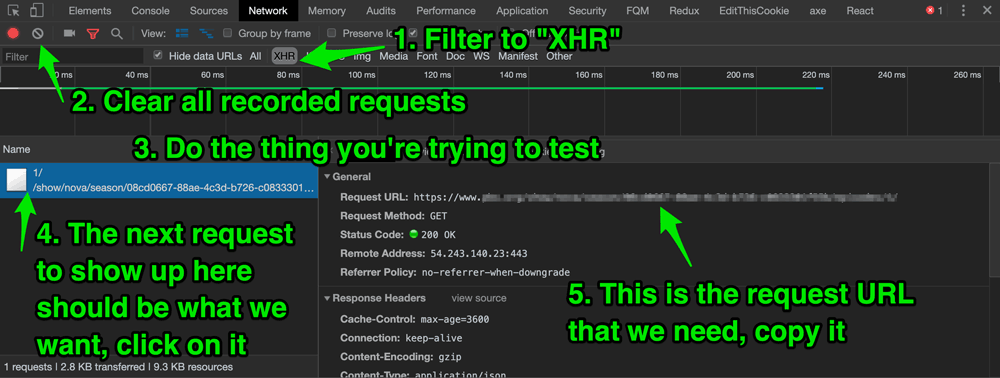
This is the glaring omission made in the Cypress docs. I literally found out how to do this from some Github issue comments. Apparently, this steps seems obvious to a lot of people — well, I can tell you, it is not obvious.
I'm going to assume that you already have Cypress installed in your project. Let's create a test for, say, a widget component (the actual kind of component isn't important).
We'll create a test file in the cypress/integration integration directory. Call it, say, widget_spec.js. You will need to start off with a basic test like this:
// cypress/integration/widget_spec.js

describe("Testing the widget", function() {
  it("Widget does something with AJAX / XHR", function() {
    // stuff will go here
  });
});
This is the magic part. At this point you can write a temporary function that will make the network call in question, and then write that response to a fixture file.
// cypress/integration/widget_spec.js

describe("Testing the widget", function() {
  it("Widget does something with AJAX / XHR", function() {
    // this function will be temporary
    // using cy.request, we will ping the
    // Request URL that we copied earlier
    cy.request("https://request-url-from-step-1-above/example/").then(
      response => {
        // then use the response.body to write a fixture.
        cy.writeFile("cypress/fixtures/widget.json", response.body);
      }
    );
  });
});
You can organize fixtures however you want, but they should live in the cypress/fixtures directory.
Now, actually run Cypress and run the current spec file's tests. Cypress will now create a fixture file (in this example, cypress/fixtures/widget.json). That is the fixture we will now use in our test.
You can look at it — it's just a JSON file. For this example, let's say it looks like this:
// cypress/fixtures/widget.js
{
  "title": "The title of the widget based on the XHR fixture data"
}Now that we have a fixture file in hand, we can write a test that stubs that response in when an XHR call is made.
First, delete the function that we wrote before.
Now, writing a test to use the fixture looks like this:
// cypress/integration/widget_spec.js

describe("Testing the widget", function() {
  it("Widget does something with AJAX / XHR", function() {
    // sets up cy.server, so cypress knows to
    // prepare network responses
    cy.server();
    // this is where we tell cypress to intercept
    // certain XHR calls,
    // and to stub in our fixture instead
    cy.route({
      // our example is a GET call, but you could also
      // have a POST, if you're pushing data up
      method: "GET",
      // more on the URL below
      url: `https://request-url-from-step-1-above/example/`,
      // the fixture: shortcut will know to
      // look in cypress/fixtures,
      // unless you configure cypress to
      // put it somewhere else
      response: "fixture:widget.json"
    });
    // all this does is load the path where our widget is,
    // but it has to come after cy.server and cy.route
    cy.visit("/path-to-page-where-widget-appears");
    // using a CSS selector, in this case a class name,
    // make sure there is at least one widget
    cy.get(".widget-selector").should("have.length", 1);
    // from here on out, you can write your test as needed
    // in this example clicking the widget button
    // kicks off the XHR request
    cy.get(".widget-button").click();
    // our fixture data will come back,
    // so we can write tests to make sure
    // data is getting displayed in some
    // manner that we expect
    cy.get(".widget-title").contains(
      "The title of the widget based on the XHR fixture data"
    );
  });
});In our example above, I had this configuration:
cy.route({
  method: "GET",
  url: `https://request-url-from-step-1-above/example/`,
  response: "fixture:widget.json"
});
First https://request-url-from-step-1-above/example/ is an absolute URL. You will need this if your XHR call is to outside site, but, if it's an internal AJAX call, you can start with /, like so:
url: `/example/`,This is okay, if the URL is only ever one path, and it never changes. Thankfully, we can use wildcards.
url: `/example/*`,This was one of the tricker things that I ran into. Depending on the depth of the path, you may need to experiment with which pieces of it you can or cannot wildcard in order to get stubbing to work.
Let's say it's more complicated, like
url: `/users/123/profile/emailprefs`,Using a blanket wildcard like this may not work:
// does not work
url: `/users/*`,
But with some trial and error you may find that something like this works:
url: `/users/*/profile/*`,I wasted a lot of time trying to get stubbing to work, only to find that my url wildcard needed to be more specific.
I hope this helps you write some fixture driven e2e tests in Cypress!
此内容由惯性聚合(RSS阅读器)自动聚合整理,仅供阅读参考。 原文来自 — 版权归原作者所有。