


Many developers know that you can use service workers to cache web pages (and their sub-resources) in order to serve those pages to users when they’re offline.
And while this is true, it’s far from the only thing that service workers can do to improve the performance and reliability of a website. A lesser known capability of service workers is that you can programmatically generate your responses—you aren’t limited to just fetching from the network or reading from the cache.
In a traditional client-server setup, the server always needs to send a full HTML page to the client for every request (otherwise the response would be invalid). But when you think about it, that’s pretty wasteful. Most sites on the internet have a lot of repetition in their HTML payloads because their pages share a lot of common elements (e.g. the <head>, navigation bars, banners, sidebars, footers etc.). But in an ideal world, you wouldn’t have to send so much of the same HTML, over and over again, with every single page request.
With service workers, there’s a solution to this problem. A service worker can request just the bare minimum of data it needs from the server (e.g. an HTML content partial, a Markdown file, JSON data, etc.), and then it can programmatically transform that data into a full HTML document.
On this site, after a user visits once and the service worker is installed, that user will never request a full HTML page again. Instead the service worker will intercept requests for pages and just request the contents of those pages—everything inside the <main> element—and then the service worker will combine that content with the rest of the HTML, which is already in the cache.
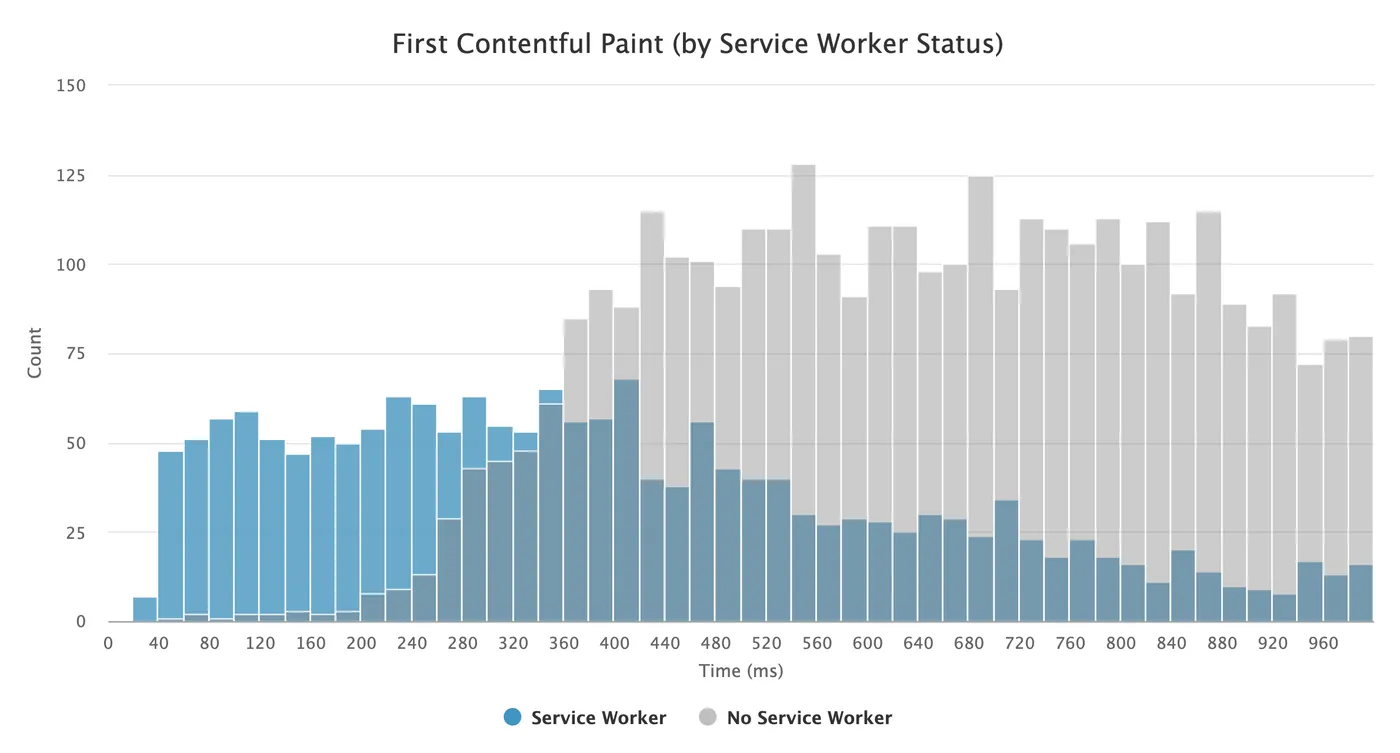
By only requesting the contents of a page, the networks payloads become substantially smaller, and the pages can load quite a bit faster. For example, on this site over the past 30 days, page loads from a service worker had a 47.6% smaller network payloads, and a median First Contentful Paint (FCP) that was 52.3% faster than page loads without a service worker (416ms vs. 851ms). In the graph below, you can clearly see the entire distribution shifted to the left:
Anyone who’s ever built a Single Page Application (SPA) is probably familiar with the basics of how this technique works. SPAs will typically only fetch the content portion of a new page and then swap that out with the content of the existing page—preventing the browser from having to make a full navigation.
Service workers can take this technique to the next level, though, since (once installed) they work for all page loads, not just in-page links. They can also leverage streaming APIs to deliver content even faster and let the browser start rendering even earlier—something SPAs can’t currently do (at least not without hacks).
When a user with a service worker installed visits any of my pages, the final HTML document the browser renders is actually a concatenation of three different page partials:
/shell-start.html/<page-slug>/index.content.html/shell-end.htmlAnd only one of those partials (the content) is sent over the network.
The following sections outline exactly how I’ve implemented this strategy on this site.
In order to serve either a full HTML version of a page (for first-time visitors) or just a content partial (for repeat visitors with a service worker installed), you’ll need to either:
Since this site is a static site, I do the latter. It might sound like a lot of extra work, but if you’re using a template system to build your pages, you’ve probably already extracted the common parts of your layout into partials. So the only thing left to do is create a content-only template and update your build process to render each page twice.
On this site I have a content partial template and then also a full page template that includes the content partial template in its <main> element.
Here’s an example of both rendered versions of my “About” page (note the view-source: URL prefix):
view-source:https://philipwalton.com/about/index.htmlview-source:https://philipwalton.com/about/index.content.htmlIn order for the service worker to insert the page partial sent from your server into a full HTML page response that can be rendered in your browser window, it has to know what the surrounding HTML is for the full page.
The easiest way to make that work is to build and deploy this HTML as two separate files:
<main> tag (including everything in the <head>).</main> tag.On my site, I call these files shell-start.html and shell-end.html, and you can see their contents for yourself here:
view-source:https://philipwalton.com/shell-start.htmlview-source:https://philipwalton.com/shell-end.htmlI never request these files from the main page, but I do precache them in the service worker at install time, which I’ll explain next.
When a user first visits my site and the service worker installs, as part of the install event I fetch the contents of shell-start.html and shell-end.html, and put them in the cache storage.
I use Workbox (specifically the workbox-precaching package) to do this, which makes it easy to handle asset versioning and cache invalidation whenever I update either of these partials.
import {precache} from 'workbox-precaching';

precache([
  {url: '/shell-start.html', revision: SHELL_START_REV},
  {url: '/shell-end.html', revision: SHELL_END_REV},
  // Additional resources to precache...
]);
In the above code, the revision property of each precached URL is generated at build time using the rev-hash package and inserted in the service worker script via Rollup (rollup-plugin-replace).
Alternatively, if you don’t want to generate the revisions yourself, you can use the workbox-webpack-plugin, workbox-build, or workbox-cli packages to generate them for you. When doing that, your code would just look like this (and in your configuration you’d tell Workbox what files you want to revision, and it’ll generate the precache manifest for you, replacing the self.__WB_MANIFEST variable in your output file):
import {precache} from 'workbox-precaching';

precache(self.__WB_MANIFEST);
Once you’ve put the shell partials in the cache, the next step is to configure navigation requests to construct their responses by combining the shell partials from the cache with the content partial from the network.
A naive way to do this would be to get the text of each response and concatenate them together to form a new response:
import {getCacheKeyForURL} from 'workbox-precaching';

function getText(responsePromise) {
  return responsePromise.then((response) => response.text());
}

addEventListener('fetch', (event) => {
  if (event.request.mode === 'navigate') {
    event.respondWith(async function() {
      const textPartials = await Promise.all([
        getText(caches.match(getCacheKeyForURL('/shell-start.html'))),
        getText(fetch(event.request.url + 'index.content.html')),
        getText(caches.match(getCacheKeyForURL('/shell-end.html'))),
      ]);

      return new Response(textPartials.join(''), {
        headers: {'content-type': 'text/html'},
      });
    }());
  }
});
I said above that this is the naive way to do it, not because it won’t work, but because it requires you to wait for all three responses to fully complete before you can even begin to deliver any of the response to the page.
All modern browsers and servers support sending and receiving HTML as a stream of content, and service workers are no different. So instead of waiting until you have the full text of each response and then creating a new response from that full string, you can create a ReadableStream and start responding as soon as you have the very first bit of content. And since the shell-start.html file will be coming from the cache, you can generally start responding right away—you don’t need to wait for the network request to finish!
If you’ve never heard of Readable Streams before, don’t worry. When using Workbox (which I recommend) you don’t have to deal with them directly. The workbox-streams package has a utility method for creating a streaming response by combining other runtime caching strategies.
import {cacheNames} from 'workbox-core';
import {getCacheKeyForURL} from 'workbox-precaching';
import {registerRoute} from 'workbox-routing';
import {CacheFirst, StaleWhileRevalidate} from 'workbox-strategies';
import {strategy as composeStrategies} from 'workbox-streams';

const shellStrategy = new CacheFirst({cacheName: cacheNames.precache});
const contentStrategy = new StaleWhileRevalidate({cacheName: 'content'});

const navigationHandler = composeStrategies([
  () => shellStrategy.handle({
    request: new Request(getCacheKeyForURL('/shell-start.html')),
  }),
  ({url}) => contentStrategy.handle({
    request: new Request(url.pathname + 'index.content.html'),
  }),
  () => shellStrategy.handle({
    request: new Request(getCacheKeyForURL('/shell-end.html')),
  }),
]);

registerRoute(({request}) => request.mode === 'navigate', navigationHandler);
In the above code I’m using a cache-first strategy for the shell partials, and then a stale-while-revalidate strategy for the content partials. This means users who revisit a page they already have cached might see stale content, but it also means that content will load instantly.
If you prefer to always get fresh content from the network, you can use a network-first strategy instead.
Note: A nice benefit of using workbox-streams is that it’ll automatically fallback to a full text response in browsers that don’t support Readable Streams (though at this point all modern browsers support streams).
Observant readers might have noticed that, if you serve the same cached shell content for all pages, you’ll end up having the same <title> tag for every page, as well as any <link> or <meta> tags that had previously been page-specific.
The best way to deal with this is for your page partials to include a script tag at the end that sets the title (and any other page-specific data) at runtime. For example, my page partial template uses something like this:
<script>document.title = '{{ page.title }}'</script>
Note that this is not a problem for search crawlers or other services that render page preview cards. These tools do not run your service worker, which means they’ll always get the full HTML page when making a request.
It’s also not a problem for users who have JavaScript disabled because, again, those users would not be running your service worker either.
The histogram I showed at the beginning of the article should give you a sense for how using this technique vastly improves FCP for all users. Here’s a closer look at the specific FCP values at some key percentiles:
| First Contentful Paint (in milliseconds) | ||
|---|---|---|
| Percentile | Service Worker | No Service Worker |
| 50th | 416 | 851 |
| 75th | 701 | 1264 |
| 90th | 1181 | 1965 |
| 95th | 1797 | 2632 |
As you can see, FCP is faster when using a service worker across all key percentiles.
However, since visitors with a service worker installed are always returning visitors, and visitors without service worker installed are likely first time visitors, you might be skeptical as to whether the performance improvements I’m seeing are actually from this technique, or whether they’re from things like resource caching in general.
While resource caching may improve FCP for some sites, it actually doesn’t for mine. I inline both my CSS and SVG content in the <head> of my pages, which means FCP is never blocked on anything other than the page response, and that means the FCP gains seen here are entirely due to how I’m generating the response in the service worker.
The primary reason service worker loads are faster on this site is because users with a service worker installed already have the shell-start.html partial in their cache. And since the service worker is responding with a stream, the browser can start rendering the shell almost immediately—and it can fetch the page’s content from the server in parallel.
But that brings up another interesting question: does this technique improve the speed of the entire response, or just the first part of it?
Again, to answer that question let me show you some timing data for the entire response.
And note that since I use a stale-while-revalidate caching strategy for my content partials, sometimes a user will already have a page’s content partial in the cache (e.g. if they’re returning to an article they’ve already read) and sometimes they won’t (e.g. they previously visited my site, and now they’ve come back to read a new article).
Here’s the response timing data segmented by both service worker status as well as content partial cache status:
| Response Complete Time (in milliseconds) | |||
|---|---|---|---|
| Percentile | Service Worker (content cached) | Service Worker (content not cached) | No Service Worker |
| 50th | 92 | 365 | 480 |
| 75th | 218 | 634 | 866 |
| 90th | 520 | 1017 | 1497 |
| 95th | 887 | 1284 | 2213 |
Comparing the performance results between the “No Service Worker” case and the “Service Worker (content not cached)” case is particularly interesting because in both cases the browser has to fetch something from the server over the network. But as you can see from these results, fetching just the content part of the HTML (rather than the entire page in the “no service worker” case) is around 20%-30% faster for most users—and that even includes the overhead of starting up the service worker thread if it’s not running!
And if you look at the performance results for visitors who already had the content partial in their cache, you can see the responses are near instant for the majority of users!
This article has shown how you can use service workers to significantly reduce the amount of data your users need to request from your server, and as a result you can dramatically improve both the render and load times for your pages.
To end, I want to emphasize a couple of key pieces of performance advice from this article that I hope will stick with you:
<head>, and for returning visits (once the service worker has installed) all resources required for first paint should be in the cache.此内容由惯性聚合(RSS阅读器)自动聚合整理,仅供阅读参考。 原文来自 — 版权归原作者所有。