


Note: The following article was originally published on CSS-Tricks as a guest post.
A few days ago, Chris tweeted:
If we could stack pseudo elements (e.g.
:after:after) we could build a whole website with no HTML other than<html>. Probably good we can’t.
(Technically, we can, although no browser has implemented this yet. This feature been removed from the draft version of the spec.)
In response to this, I created this quick demo (view in Firefox or Opera ≤ 12), illustrating that technically you don’t need any HTML at all to use CSS.
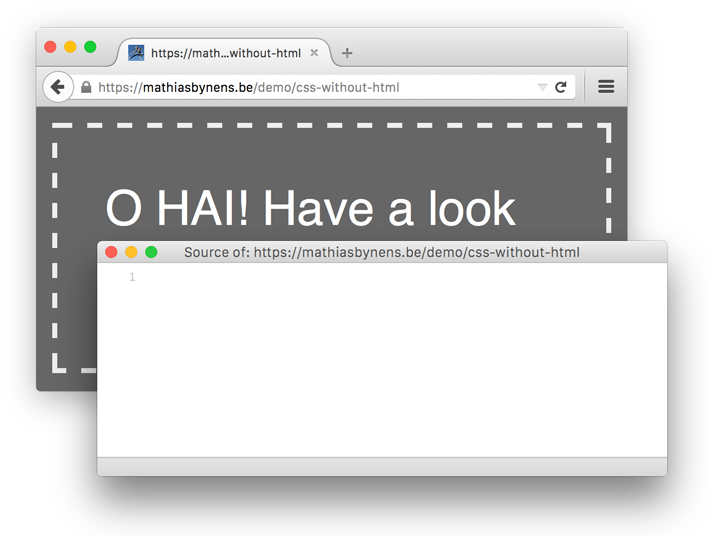
Since this demo apparently caused some confusion, I decided to write an article about it.
Basically, all this magical demo does is combine two nifty little tricks most people don’t seem to know about.
The opening and closing <html>, <head> and <body> tags aren’t required in HTML. The following document is perfectly valid and conforming:
<!DOCTYPE html>
<title>Example</title>
For brevity, this code sample uses the HTML5 DOCTYPE, but don’t let that confuse you — if you’d switch to the HTML 4.01 DOCTYPE and append just a starting <p> tag, for example, the document would still validate.
(Obviously, XHTML has a much stricter syntax, which doesn’t allow omitting optional start and/or end tags. But anno 2010, who’s still using XHTML anyway?)
When a browser renders our example document, it notices the <html>, <head> and <body> elements are missing from the source, and — wait for it — automatically generates them. You can confirm this by opening the demo page and inspecting the generated source using Firebug, the Web Inspector, or Opera Dragonfly.
Because these elements are implied, they can also be styled through CSS, regardless of whether they occur in the source code or not. Consider the following example:
<!DOCTYPE html>
<title>Example</title>
<style>
	html {
		background: red;
	}
	body {
		background: blue;
		margin: 0 auto;
		width: 30em;
	}
</style>
Even though there’s no mention of the <html> and <body> elements in the HTML source, we can still style them because browsers generate them automatically.
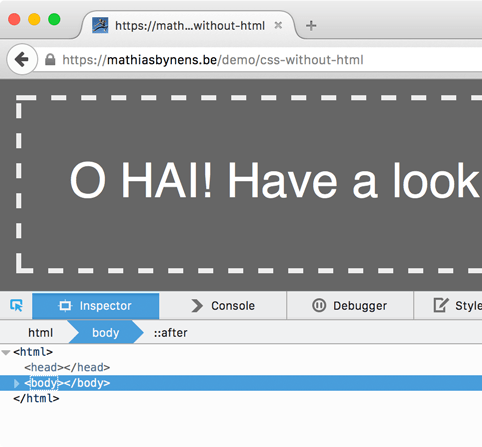
Basically, this is the first trick I used; I just took it one step further. I didn’t bother to specify a DOCTYPE, let alone a <title>, and simply used no HTML at all. Never, ever do this for a real website.
Because of the missing DOCTYPE, the document will be rendered in quirks mode instead of standards mode. It goes without saying that the document won’t validate either.
Even with a completely empty HTML document, browsers will still auto-generate the implied HTML elements.
(Interesting sidenote: it’s also possible to style hidden elements such as <head>, <title>, <meta>, <script>, etc.)
RFC 5988 defines the Link HTTP header, which allows you to send <link> elements through HTTP headers instead of including them in the HTML. To give you an example, you can serve a document with the following HTTP header:
Link: <some-document.html>;rel=prefetch…which would have the same effect as placing this in your HTML:
<link href="some-document.html" rel="prefetch">Similarly, RFC 5988 makes it possible to include stylesheets in an HTML document using nothing but an HTTP header:
Link: <magic.css>;rel=stylesheetWhich is equivalent to…
<link href="magic.css" rel="stylesheet">Well, that’s the theory. In practice, not a lot of browsers implement the Link header. At the time of writing, only Opera and Firefox support this little gem.
If you’re interested to see how browser support for this feature will improve over time, you can subscribe to the bug reports for WebKit (Chromium has separate bug tickets for the CSS and the general variant) and Internet Explorer.
Getting back to our fun little HTML-free demo (view in Firefox or Opera ≤ 12), basically what I did was combine the above two “tricks”. Here’s the CSS:
html { background: #666; padding: 1em; }
body { border: 5px dashed #eee; color: #fff; font: 3em/1.5 sans-serif; padding: 1em; width: 30em; margin: 0 auto; }
body::after { content: 'O HAI! Have a look at my source code :)'; /* This needs to be on the ::after (and not just on `body`) for it to work in Firefox 3.6.x. */ }
The empty HTML document is actually a PHP file that sets the Link header. (Of course, there are other ways to do this, too.)
<?php header('Link: <demo.css>;rel=stylesheet'); ?>As mentioned, these techniques are fun tricks, and it’s definitely good to know they exist. However, it wouldn’t be a good idea to use these in practice. The no-HTML ‘hack’ is all kinds of evil, and no web developer would seriously consider using this for a real site.
The Link HTTP header is a lot more interesting. The only reason this can’t really be used yet, is lack of browser support. Maybe one day…
Kudos to Anne van Kesteren for teaching me about the Link header back in 2005 :)
此内容由惯性聚合(RSS阅读器)自动聚合整理,仅供阅读参考。 原文来自 — 版权归原作者所有。